imgui-java
JNI based binding for Dear ImGui
- 828
- MIT
- 13 d ago
Repo SpaiR/imgui-java, read from GitHub 1 min ago. SpaiR has not joined Take My Repo.
In short
SpaiR/imgui-java is a public repo on GitHub by SpaiR. JNI based binding for Dear ImGui. It declares the MIT license on GitHub. It is written mainly in Java, has 828 stars and last changed on 2026-11-09. Nobody has reviewed it on Take My Repo yet, which says nothing about its quality. Read from GitHub on 2026-11-22.
Features
- Generated JNI code with no third-party runtime dependencies.
- Small footprint, direct native calls.
- Full coverage of the public Dear ImGui API, adapted for idiomatic Java usage.
- Multi-Viewports and Docking support (docking branch).
- Optional FreeType font renderer for higher-quality text.
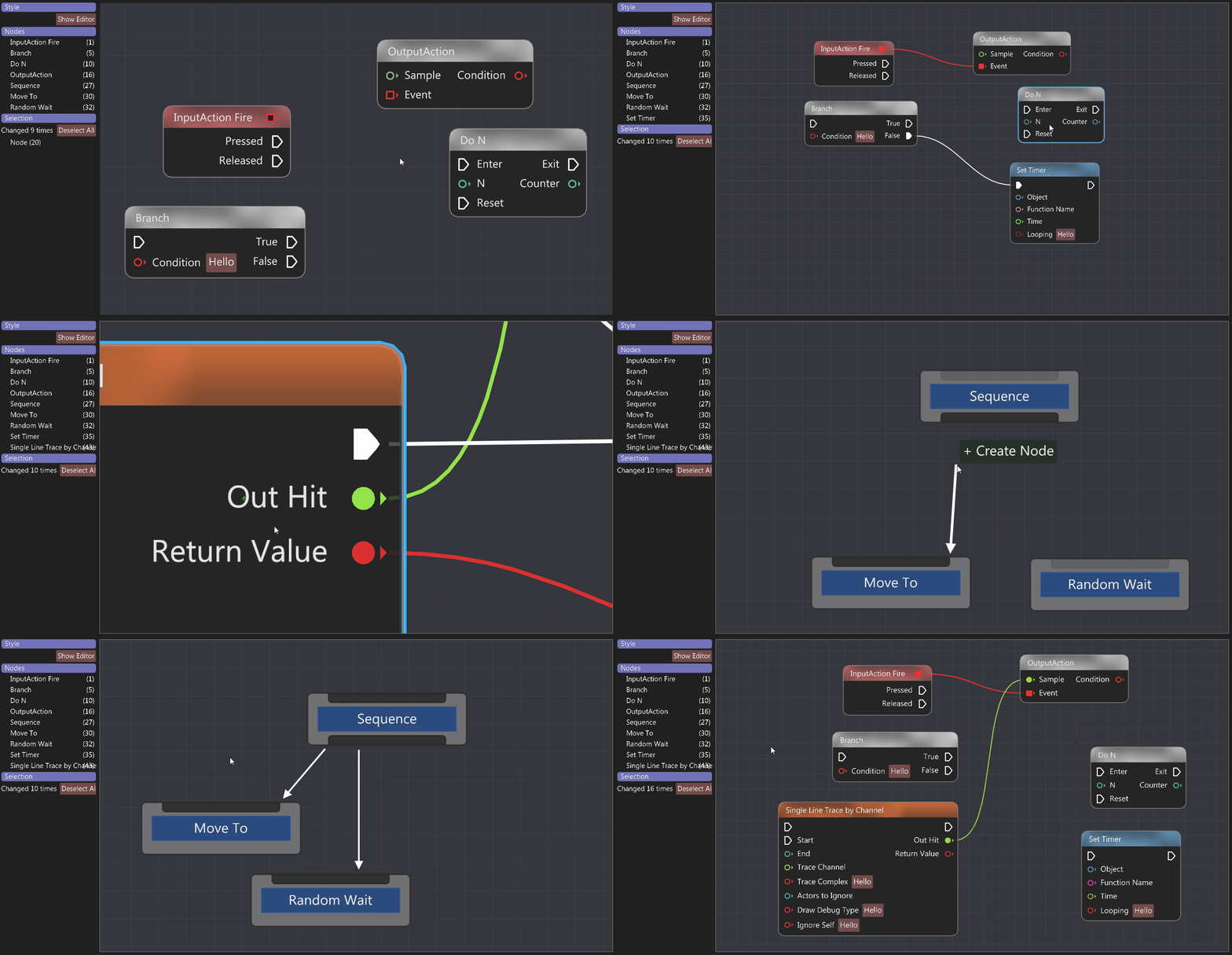
- Bundled extensions: ImPlot, ImNodes, imgui-node-editor, ImGuizmo, ImGuiColorTextEdit, ImGuiFileDialog, ImGui Club MemoryEditor, imgui-knobs.
The repo ships three Maven artifacts:
imgui-java-app— high-level wrapper with bundled GLFW + OpenGL + native libs. SubclassApplication, overrideprocess().imgui-java-binding— the binding itself, no backend included.imgui-java-lwjgl3— ready-made GLFW/OpenGL backend on top of LWJGL3 for use withimgui-java-binding.
Backends are optional — Dear ImGui is renderer-agnostic, so feel free to copy imgui-lwjgl3 as a starting point and
adapt it to your stack.
How to Try
JDK 17+ is required to run the build (Gradle's toolchain pins it). Published artifacts target Java 8 bytecode, so consuming them as a dependency only needs JDK 8+ at runtime.
git clone --recurse-submodules https://github.com/SpaiR/imgui-java.git
cd imgui-java
./gradlew :example:run
# SDL3 + SDL_GPU backend smoke test:
./gradlew :example:run -PmainClass=MainSdl
# SDL3 + SDL_Renderer backend smoke test:
./gradlew :example:run -PmainClass=MainSdlRenderer
example/src/main/java/ contains a runnable showcase for every widget and extension — start with Main.java, then
explore the per-extension Example*.java files.
How to Use
Pick a module based on how much control you need:
imgui-app— one-jar batteries-included setup (GLFW + OpenGL + Dear ImGui + native libs). ExtendApplication, overrideprocess(), you're done.imgui-binding+imgui-lwjgl3— bring your own backend wiring. Use this when you want to integrate ImGui into an existing render loop or a non-default GLFW/OpenGL setup.
On Apple Silicon nothing extra is needed: the published macOS native is a universal binary covering both x86_64 and
aarch64.
SDL3 backend (imgui-app)
imgui-app now supports three backends via Configuration#setBackend(...):
Backend.GLFW(default)Backend.SDL(SDL3 + SDL_GPU)Backend.SDL_RENDERER(SDL3 +SDL_Renderer)
Use SDL3 by switching backend in configure(...):
@Override
protected void configure(final Configuration config) {
    config.setBackend(Backend.SDL);
}
For a ready smoke-test entry point, run MainSdl:
./gradlew :example:run -PmainClass=MainSdl
The SDL_Renderer variant is available through Backend.SDL_RENDERER and the MainSdlRenderer smoke test:
./gradlew :example:run -PmainClass=MainSdlRenderer
At the moment, SDL backends in imgui-app are focused on single-window flow (multi-viewport is not supported).
Application
If you don't care about OpenGL and other low-level stuff, then you can use application layer from imgui-app module.
It is a one jar solution which includes: GLFW, OpenGL and Dear ImGui itself.
So you only need one dependency line or one jar in classpath to make everything to work.
You don't need to add separate dependencies to LWJGL or native libraries, since they are already included.
Application module is the best choice if everything you care is the GUI itself.
At the same time, Application gives options to override any life-cycle method it has. That means that if you are seeking for a bit more low-level control - you can gain it as well.
Example
A very simple application may look like this:
import imgui.ImGui;
import imgui.app.Application;
import imgui.app.Configuration;

public class Main extends Application {
    @Override
    protected void configure(Configuration config) {
        config.setTitle("Dear ImGui is Awesome!");
    }

    @Override
    public void process() {
        ImGui.text("Hello, World!");
    }

    public static void main(String[] args) {
        launch(new Main());
    }
}
Read imgui.app.Application javadoc to understand how it works under the hood.
Dependencies
Gradle
repositories {
    mavenCentral()
}

dependencies {
    implementation "io.github.spair:imgui-java-app:${version}"
}
Maven
<dependencies>
    <dependency>
        <groupId>io.github.spair</groupId>
        <artifactId>imgui-java-app</artifactId>
        <version>${version}</version>
    </dependency>
</dependencies>
Raw Jar
- Go to the release page;
- Download
java-libraries.zip; - Get
imgui-app-${version}-all.jar; - Add the jar to your classpath.
Jar with all classifier already contains binding and lwjgl3 modules.
If you're using jar without the all classifier, add appropriate jars as well.
Both jars, with or without all classifier, have all required native libraries already.
Java Module System
If using Java 9 modules, you will need to require the imgui.app module.
Binding
Using binding without imgui-app module requires to "attach" it to the application manually.
You can refer to imgui-app module to see how things are done there.
Dependencies
For simplicity, example of dependencies for Gradle / Maven only shows how to add natives for Windows. Feel free to add other platforms.
| Native Binaries | System |
|---|---|
| imgui-java-natives-windows | Windows |
| imgui-java-natives-linux | Linux |
| imgui-java-natives-macos | macOS |
Take a note, that you also need to add dependencies to LWJGL library. Examples below shows how to do it as well.
Gradle
repositories {
    mavenCentral()
}

ext {
    lwjglVersion = '3.4.1'
    imguiVersion = "${version}"
}

dependencies {
    implementation platform("org.lwjgl:lwjgl-bom:$lwjglVersion")

    ['', '-opengl', '-glfw'].each {
        implementation "org.lwjgl:lwjgl$it:$lwjglVersion"
        implementation "org.lwjgl:lwjgl$it::natives-windows"
    }

    implementation "io.github.spair:imgui-java-binding:$imguiVersion"
    implementation "io.github.spair:imgui-java-lwjgl3:$imguiVersion"

    implementation "io.github.spair:imgui-java-natives-windows:$imguiVersion"
}
Maven
<properties>
    <lwjgl.version>3.4.1</lwjgl.version>
    <imgui.java.version>${version}</imgui.java.version>
</properties>

<dependencyManagement>
    <dependencies>
        <dependency>
            <groupId>org.lwjgl</groupId>
            <artifactId>lwjgl-bom</artifactId>
            <version>${lwjgl.version}</version>
            <scope>import</scope>
            <type>pom</type>
        </dependency>
    </dependencies>
</dependencyManagement>

<dependencies>
    <dependency>
        <groupId>org.lwjgl</groupId>
        <artifactId>lwjgl</artifactId>
    </dependency>
    <dependency>
        <groupId>org.lwjgl</groupId>
        <artifactId>lwjgl-glfw</artifactId>
    </dependency>
    <dependency>
        <groupId>org.lwjgl</groupId>
        <artifactId>lwjgl-opengl</artifactId>
    </dependency>
    <dependency>
        <groupId>org.lwjgl</groupId>
        <artifactId>lwjgl</artifactId>
        <classifier>natives-windows</classifier>
    </dependency>
    <dependency>
        <groupId>org.lwjgl</groupId>
        <artifactId>lwjgl-glfw</artifactId>
        <classifier>natives-windows</classifier>
    </dependency>
    <dependency>
        <groupId>org.lwjgl</groupId>
        <artifactId>lwjgl-opengl</artifactId>
        <classifier>natives-windows</classifier>
    </dependency>

    <dependency>
        <groupId>io.github.spair</groupId>
        <artifactId>imgui-java-binding</artifactId>
        <version>${imgui.java.version}</version>
    </dependency>
    <dependency>
        <groupId>io.github.spair</groupId>
        <artifactId>imgui-java-lwjgl3</artifactId>
        <version>${imgui.java.version}</version>
    </dependency>
    <dependency>
        <groupId>io.github.spair</groupId>
        <artifactId>imgui-java-natives-windows</artifactId>
        <version>${imgui.java.version}</version>
    </dependency>
</dependencies>
Raw Jars
- Go to the release page;
- Download
java-libraries.zipandnative-libraries.zip; - Get
imgui-binding-${version}.jarandimgui-lwjgl3-${version}.jarfromjava-libraries, and binary libraries for required OS fromnative-librariesarchive; - Add jars to your classpath;
- Provide a VM option with location of files from the
native-librariesarchive.
VM option example:
- -Dimgui.library.path=${path}
- -Djava.library.path=${path}
Both imgui.library.path and java.library.path are equal with the difference, that java.library.path is standard JVM option to provide native libraries.
Java Module System
If using Java 9 modules, ImGui Java has Automatic Module Names:
| Package | Module |
|---|---|
| imgui-java-app | imgui.app |
| imgui-java-binding | imgui.binding |
| imgui-java-lwjgl3 | imgui.lwjgl3 |
| imgui-java-natives-windows | imgui.natives.windows |
| imgui-java-natives-linux | imgui.natives.linux |
| imgui-java-natives-macos | imgui.natives.macos |
Extensions
All extensions are already included in the binding and can be used as is. See example/src/main/java/ for runnable
demos of each.
- ImNodes | Example
A small, dependency-free node editor for Dear ImGui. (A good choice for simple start.) - imgui-node-editor | Example
Node Editor using ImGui. (A bit more complex than ImNodes, but has more features.) - ImGuizmo | Example
Immediate mode 3D gizmo for scene editing and other controls based on Dear ImGui. - implot | Example
Advanced 2D Plotting for Dear ImGui. - ImGuiColorTextEdit | Example
Syntax highlighting text editor for ImGui. - ImGuiFileDialog | Example
A file selection dialog built for ImGui. - ImGui Club MemoryEditor | Example
Memory editor and viewer for ImGui. - imgui-knobs | Example
A collection of knob widgets for Dear ImGui.
FreeType
By default, Dear ImGui uses stb-truetype to render fonts. There is an option to use the FreeType font renderer instead — see imgui_freetype for the differences.
This binding also supports the FreeType option.
FreeType is statically pre-compiled into the published native libraries, meaning it is included by default.
The compile-time default font loader stays stb_truetype; the renderer is switched at runtime via
ImFontAtlas#setFreeTypeRenderer(true), which must be called before fonts atlas generation. After that you can freely
use ImGuiFreeTypeBuilderFlags in your font configuration.
See example/src/main/java/Main.java for a working example.
If you prefer not to ship FreeType, you will need to build your own binaries (omit -Dfreetype=true when invoking
generateLibs).
API Conventions
The binding adapts the C++ API for Java; almost everything maps directly, but two patterns differ:
- Out-parameters: where C++ takes a reference, Java takes a primitive wrapper —
ImInt,ImFloat,ImBoolean, etc. - Native structs: every wrapper holds a public pointer to its native memory. You can usually ignore this, but reassigning the pointer lets one Java instance address different native structs — useful for iteration over native arrays.
For everything else, follow upstream Dear ImGui's documentation and wiki; the binding javadoc covers Java-specific details.
How to Build Native Libraries
Native binaries shipped on Maven Central are built by CI; you only need to build them yourself when bumping a vendored submodule, hacking on the JNI layer, or producing a binary without FreeType.
Ensure you've downloaded git submodules. That could be achieved:
- When cloning the repository:
git clone --recurse-submodules https://github.com/SpaiR/imgui-java.git - When the repository already cloned:
git submodule update --init --recursive
The Gradle toolchain pins JDK 17 for the build regardless of your system JDK. You only need a JVM that can launch
gradlew.
Recommended: buildSrc/scripts/build.sh
This is the path CI uses. It vendors FreeType, runs generateLibs, and lays the resulting binary under
/tmp/imgui/dst/:
buildSrc/scripts/build.sh <windows|linux|macos>
For macos it builds both x86_64 and arm64 slices and combines them into a single universal libimgui-java64.dylib
via lipo.
To use the freshly-built binary with the example:
cp /tmp/imgui/dst/libimgui-java64.<so|dylib|dll> bin/
./gradlew :example:run -PlibPath=$PWD/bin
Direct Gradle invocation
If you don't need FreeType or want a stock build under the project tree, call generateLibs directly:
Windows
- Required on PATH: Ant, Mingw-w64 (recommended via MSYS2 — install the mingw-w64-x86_64-toolchain group).
- Build:
./gradlew imgui-binding:generateLibs -Denvs=windows -Dlocal - Run example:
./gradlew example:run -PlibPath="../imgui-binding/build/libsNative/windows64"
Windows ARM64
- Required on PATH: Ant, LLVM-MinGW (the
aarch64-w64-mingw32-*wrappers). - Build:
./gradlew imgui-binding:generateLibs -Denvs=windowsarm64 -Dlocal - Output:
imgui-binding/build/libsNative/windowsarm64/imgui-java64.dll - Run example:
./gradlew example:run -PlibPath="../imgui-binding/build/libsNative/windowsarm64" - The direct Gradle path builds without FreeType by default, matching the other platforms.
Linux
- Install dependencies:
mingw-w64-gcc,ant. (Package names vary by distro.) - Build:
./gradlew imgui-binding:generateLibs -Denvs=linux -Dlocal - Run example:
./gradlew example:run -PlibPath=../imgui-binding/build/libsNative/linux64
macOS
- Same toolchain dependencies as Linux.
- Build (universal):
./gradlew imgui-binding:generateLibs -Denvs=macos,macosarm64 -Dlocal— producesmacosx64/andmacosxarm64/outputs that the Maven Central artifact bundles together vialipo(seebuildSrc/scripts/build.sh). - Single slice: pass only
-Denvs=macosor-Denvs=macosarm64. - Run example (Intel slice):
./gradlew example:run -PlibPath=../imgui-binding/build/libsNative/macosx64
Flags
| Flag | Effect |
|---|---|
-Denvs=<csv> |
Target platforms — any of windows, windowsarm64, linux, linuxarm64, macos, macosarm64 |
-Dlocal |
Output to imgui-binding/build/libsNative/ instead of /tmp/imgui/ |
-Dfreetype=true |
Compile FreeType statically into the binary (requires vendor_freetype.sh to have been run; build.sh handles this for you) |
Vendored patches
A few submodules need local fixups to compile against the current Dear ImGui (e.g. imgui-node-editor against imgui
1.92's new operator* overload). Patches live under patches/ and are applied idempotently by the applyVendorPatches
task, which generateLibs runs automatically — no manual step required.
For Contributors
The Java side of the binding is codegen-driven. Annotated stubs live under imgui-binding/src/main/java/; the
generator in buildSrc/ expands them into imgui-binding/src/generated/java/ (both trees are committed). Never
hand-edit src/generated/: it is regenerated and your changes will be lost. The workflow is always:
# edit imgui-binding/src/main/java/...
./gradlew :imgui-binding:generateApi
# commit both src/main/java and src/generated/java in one commit
CONTRIBUTING.md is the contributor guide: build prerequisites, the checks to run before pushing,
the commit-message format with its type/scope tables, PR and label conventions, and how releases are cut. Start there.
AGENTS.md is the deep operational guide, written for AI agents but equally useful to humans. It documents
the codegen workflow, the procedure for upgrading Dear ImGui or any extension submodule, javadoc/doclint pitfalls when
copying C++ comments, the dual font-loader design, and codegen internals (Spoon generic-type bounds, Gradle 9
configuration cache requirements). Read it before bumping a submodule or touching the generator.
Support
If you find the project useful, you can support it on Ko-fi to motivate further development.
License
See the LICENSE file for license rights and limitations (MIT).
Questions
What is imgui-java?
SpaiR/imgui-java is a public repo on GitHub by SpaiR. JNI based binding for Dear ImGui.
Is imgui-java open source?
It declares the MIT license on GitHub.
Does imgui-java run on macOS, Windows or Linux?
Its maker has not tagged a system, so it is unknown here. Its README says what it needs.
How do I install imgui-java?
Open "Take it" on its page: Take My Repo writes an install plan for your machine and hands it to your AI agent (Claude Code, Codex or Cursor), which asks you before each step. Take My Repo has not tested it on any machine.
Is imgui-java still maintained?
Its last change on GitHub was on 2026-11-09. Take My Repo does not judge from that whether it is maintained.
What do people who ran imgui-java say?
Nobody has reviewed it on Take My Repo yet, which says nothing about its quality.