
tablekit
TableKit: Excel & Parquet Viewer - JetBrains IDE plugin for Parquet, Avro, Excel, CSV, TSV and JSON Lines files, powered by an embedded DuckDB engine
- 0
- 3 mo ago
Repo SpdVpr/tablekit, read from GitHub 1 min ago. SpdVpr has not joined Take My Repo.
In short
SpdVpr/tablekit is a public repo on GitHub by SpdVpr. TableKit: Excel & Parquet Viewer - JetBrains IDE plugin for Parquet, Avro, Excel, CSV, TSV and JSON Lines files, powered by an embedded DuckDB engine. It declares no license on GitHub. Public does not mean open source: without a license, nobody is granted the right to reuse it. It is written mainly in Kotlin, has 0 stars and last changed on 2026-08-31. Nobody has reviewed it on Take My Repo yet, which says nothing about its quality. Read from GitHub on 2026-11-22.
TableKit: Excel & Parquet Viewer
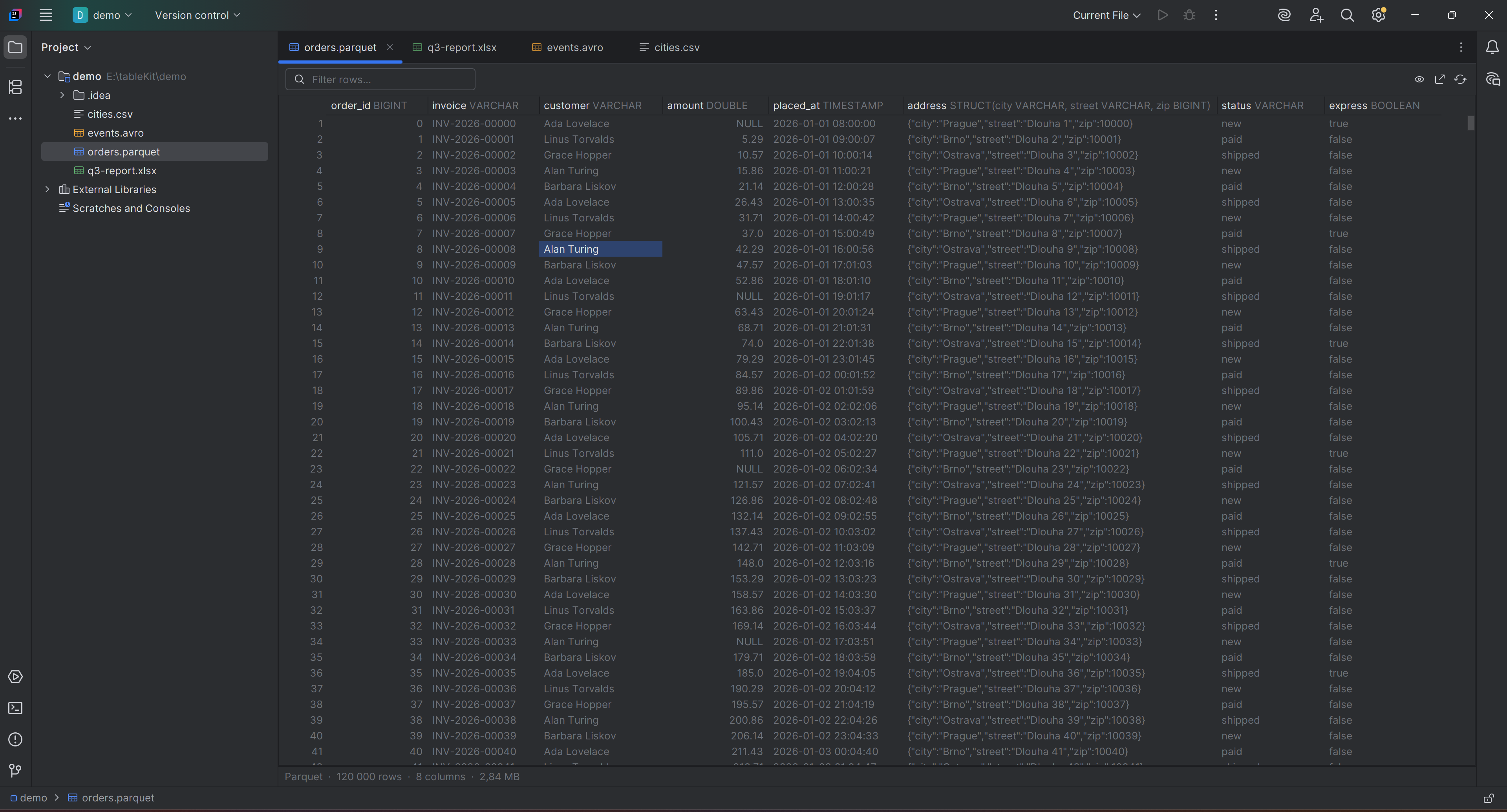
Open Parquet, Excel, Avro, CSV, TSV and JSON Lines files directly in a JetBrains IDE - no row limits, no freezes, no data leaving the machine.
Install from the JetBrains Marketplace, or find it in your IDE under Settings → Plugins and search for TableKit. It runs in every JetBrains IDE from 2025.1 on, Android Studio and DataGrip included.

An embedded DuckDB engine queries the file where it lies, so only the rows on screen are ever in memory. A 1.2 GB Parquet file with 25 million rows opens in 21 ms and stays under 40 MB of heap while it is sorted; a 786 MB CSV opens in under a second.
| Every row | No 10 000 row ceiling. Sorting and filtering become SQL against the file, never a sort in the IDE's heap. |
| Every type | Column types sit in the header; struct, list and map values are rendered as JSON instead of driver objects. |
| Statistics | Nulls, distinct values, range, average and the shape of the distribution, for the rows the filters leave. |
| Excel | .xlsx and .xlsm, sheet by sheet, with dates read as dates. |
| Avro | Schema-typed columns, logical types, nested records as JSON, deflate. |
| Export | The rows currently shown, filters and sorting included, to CSV, TSV, JSON Lines or Parquet - which also makes it a format converter. |
| Private | No network permissions at all. Nothing uploaded, no telemetry, nothing downloaded at runtime. |
 |
 |
 |
 |
ide-*.png are taken in IntelliJ IDEA with the plugin installed; the numbered ones are
rendered headlessly by ScreenshotsTest and are there to catch layout regressions.
Vendor: Kitworks · Plugin ID: com.kitworks.tablekit (immutable after first upload)
Status
Released. Version 0.1.0 was published on the JetBrains Marketplace on 14 August 2026. Version 0.1.1 raises the minimum IDE to 2025.1; 0.1.0 stays on the Marketplace for 2024.2 and 2024.3.
The viewer works for Parquet, Avro, Excel, CSV, TSV and JSON Lines, with sorting, filtering, column statistics, export and the interaction pass that makes it feel like part of the IDE. JetBrains' own verification found 0.1.0 compatible from IntelliJ IDEA 2024.2.6 through 2026.2.1, with no issues in an IDE run. See CHANGELOG.md for what landed and CLAUDE.md for the decisions behind it.
Requirements
| JDK | 21 (IntelliJ Platform 2025.1 targets Java 21) |
| Gradle | 9.3.0 via the committed wrapper |
| Kotlin | 2.3.21, compiled with apiVersion=2.1 (2025.1 bundles stdlib 2.1.10) |
| Target IDE | IntelliJ IDEA Community 2025.1.7.2, sinceBuild=251, no untilBuild |
The build never depends on IntelliJ Ultimate or on the Kotlin plugin.
Build
./gradlew buildPlugin     # distribution zip in build/distributions
./gradlew runIde          # sandbox IDE with the plugin installed
./gradlew test            # unit tests
./gradlew verifyPlugin    # IntelliJ Plugin Verifier, oldest supported IDE to newest
verifyPlugin last reported compatible against IntelliJ IDEA 2025.1, 2025.2 and
2026.2 - the whole range 0.1.1 declares - with no deprecated API usages left. That is
what moving sinceBuild to 251 bought: on 2024.2 and 2024.3 FileSaverDescriptor had
no constructor that 2025.1 had not deprecated.
Two suites are opt in because of what they produce:
./gradlew test -Ptablekit.perf=true --tests '*PerformanceTest'
./gradlew test -Ptablekit.screenshots=true --tests '*GridScreenshotTest'
The first generates a 1.2 GB Parquet file under testData/generated (kept between runs)
and asserts the performance targets. The second paints the editor into
build/screenshots without starting an IDE.
On Windows, JAVA_HOME must point at a JDK 21 installation
(C:\Program Files\Microsoft\jdk-21.0.12.8-hotspot on the dev machine).
Architecture
FileEditorProvider (custom editor, NOT the IDE Document model - it caps at ~20 MB)
 ├─ BinaryTabularFileEditorProvider   parquet/xlsx/avro/orc -> HIDE_DEFAULT_EDITOR
 └─ TextTabularFileEditorProvider     csv/tsv/jsonl         -> PLACE_AFTER_DEFAULT_EDITOR
        └─ TabularFileEditor -> TabularEditorPanel (toolbar, grid, status bar)
              └─ TabularTableModel   40 pages x 200 rows, LRU, async fetch
                    └─ TableSource   one DuckDB session per open file
                          ├─ parquet/csv/tsv/jsonl  read in place
                          └─ xlsx     own reader -> temp table -> typed view
Sorting, filtering and statistics are pushed down to DuckDB as SQL; the grid never holds more than a few thousand rows. One background thread per open file runs every query, and the EDT only paints what has already arrived.
Why the .xlsx and .avro readers are ours
Every Excel library worth using depends on commons-compress and a StAX implementation;
Apache Avro depends on Jackson, slf4j and commons-compress. The IntelliJ Platform already
bundles all of those, in versions we do not control, and shipping a second copy is how
plugins earn NoSuchMethodError reports on IDE versions their author never tested.
XlsxWorkbook therefore parses its format with java.util.zip and the javax.xml.stream
API, and AvroFile with java.util.zip and a 150-line JSON reader. Apache POI and Apache
Avro are used in tests to write the fixtures those readers are checked against, and are
never shipped.
Non-negotiable constraints
- No network permissions. No telemetry, no runtime downloads, nothing uploaded. It is both a selling point and a faster Marketplace review.
- Never block the EDT. Freezing IDEs is the category flaw we are here to fix.
- Performance targets are requirements: 1 GB Parquet open < 2 s, smooth scrolling, heap < 300 MB.
- Never claim
.csv/.tsv/.jsonlas the default editor - we only add a tab next to the existing one.
Layout
src/main/kotlin/com/kitworks/tablekit/
  format/     TabularFormat - supported formats and extension mapping
  filetype/   IDE file type registrations (drives plugin suggestions)
  data/       TableSource, queries, filters, DuckDB session
  data/xlsx/  the .xlsx reader
  data/avro/  the .avro reader
  editor/     FileEditor, providers, grid model, renderers, root panel
  icons/      icon holder
src/main/resources/
  META-INF/plugin.xml   plugin descriptor (id, name, vendor, extensions)
  messages/             i18n bundle
  icons/                file type icons
Release
Signing and publishing credentials are read from the environment only
(CERTIFICATE_CHAIN_FILE, PRIVATE_KEY_FILE, PRIVATE_KEY_PASSWORD, PUBLISH_TOKEN)
and must never be committed.
License
Proprietary, source available: read it, build it, use it - see LICENSE. The source is public so that the "no network permissions" claim above is something you can check rather than something you have to believe.
Questions
What is tablekit?
SpdVpr/tablekit is a public repo on GitHub by SpdVpr. TableKit: Excel & Parquet Viewer - JetBrains IDE plugin for Parquet, Avro, Excel, CSV, TSV and JSON Lines files, powered by an embedded DuckDB engine.
Is tablekit open source?
It declares no license on GitHub. Public does not mean open source: without a license, nobody is granted the right to reuse it.
Does tablekit run on macOS, Windows or Linux?
Its maker tagged it for Windows. That is declared by the maker; Take My Repo has not tested it.
How do I install tablekit?
Open "Take it" on its page: Take My Repo writes an install plan for your machine and hands it to your AI agent (Claude Code, Codex or Cursor), which asks you before each step. Take My Repo has not tested it on any machine.
Is tablekit still maintained?
Its last change on GitHub was on 2026-08-31. GitHub counts 0 open issues and pull requests. Take My Repo does not judge from that whether it is maintained.