
Slicer4RTN
Conic slicer utilizing planar slicers for 4-axis Rotating Tilted Nozzle (RTN) 3D printers
- 78
- Perl
- LGPL-3.0
- 5 y ago
GCodeToolbox (gctoolbox) to manipulate .gcode files (for 3D printers / RepRaps)
Repo Spiritdude/GCodeToolbox, read from GitHub 11 min ago. Spiritdude has not joined Take My Repo.
Spiritdude/GCodeToolbox is a public repo on GitHub by Spiritdude. GCodeToolbox (gctoolbox) to manipulate .gcode files (for 3D printers / RepRaps). It declares no license on GitHub. Public does not mean open source: without a license, nobody is granted the right to reuse it. It is written mainly in G-code, has 7 stars and last changed on 2021-04-02. Nobody has reviewed it on Take My Repo yet, which says nothing about its quality. Read from GitHub on 2026-11-23.
Version: 0.014 (ALPHA)
GCodeToolbox (gctoolbox) is a command-line perl-script to manipulate .gcode files (for 3D printers & RepRaps) as created by slicers (like Slic3r) from .stl files.
The main aim of this package is to be able to
Install 2 perl-modules first:
% sudo apt-get install libgd-gd2-perl     # this way
% sudo cpan GD                            # or so ...
% sudo cpan Device::SerialPort            # not yet used, but required for future support of direct printing
and then
% make install
GCodeToolbox 0.013: gctoolbox [switches] [cmd] [file1]..[fileN]info [file1]... provide info on .gcode files slice [file1]... slice .stl files to .gcode cat [file1]... concat multiple .gcode files to stdout render [file1]... render multiple .gcode files to .png -h or --help this help -v or --verbose=v increase verbosity --output=file output result (default: stdout) --slicer=cmd define slicer (default: slic3r) --slicer.[arg]=x define slicer arguments passed on slicer (e.g. --slicer.skirts=0) --sequence=type define sequence type: { concurrent (default), complete } --printer=file reference printer profile --printerX=x define build width (default: 200) [mm] --printerY=y define build depth (default: 200) [mm] --printerZ=z define build height (default: 200) [mm] --printerMargin=m define margin to perimeter of platform (default: 3) [mm] --printerHeadX=x define head width (default: 16) [mm] --printerHeadY=y define head depth (default: 16) [mm] --printerHeadZ=z define head height (default: 50) [mm] --cols=c define columns when concat(enating) (default none, auto-overflow) [mm] --objectSpacing=x define distance between items when concat (default: 3) [mm] --fanSpeed=s define fan-speed (s=0-255) (default none, defined in gcode) --temperature=t define extruder temperature (default none, defined in gcode) --conf=file configuration file, all command-line arguments (without '--'), one per line --fileList=file file with list of files (one file per line) --renderView=v define render view (default: top) { top, front }
% gctoolbox info cube10mm.gcode
prints out some information about the actual gcode
% gctoolbox slice cube10mm.stl
% gctoolbox --slicer=slic3r --slicer.skirt-distance=2 slice cube10mm.stl
creates cube10mm.gcode, default slicer is Slic3r, and arguments for the slicer can be given by --slicer.[arg]=[value].
% gctoolbox --slicer=anotherSlicer slice cube10mm.stl
use another slicer backend, it has to create .gcode
Concatenating (short 'cat', like the UNIX command 'cat') is the main feature of GCodeToolbox.
% gctoolbox cat cube10mm.gcode inchAxis.gcode > mixed.gcode
concatenate several gcode files into one gcode.

You can also define a multiplication:
% gctoolbox cat 10x cube10mm.gcode 3x inchAxis.gcode > mixed2.gcode
which concatenates 10 times cube10mm's and 3 times inchAxis's.
By default pieces are arranged left-to-right and when it overflows they are a placed further on the platform, but you can force wrapping:
% gctoolbox --cols=5 cat 25x cube10mm.gcode > 25cubes5x5.gcode
which is ideal when a grid of test objects with different settings are made (e.g. per row one temperature, per column certain settings like infill density).
% gctoolbox --fileList=myfiles.list cat > mixed3.gcode
whereas myfiles.list is
# my objects
cube10mm.gcode
cube10mm.gcode
inchAxis.gcode
inchAxis.gcode
steps5mm.gcode
steps5mm.gcode
You can define a profile of your printer (default X=200, Y=200, Z=200 and margin=3), with e.g. "myprinter.conf":
# MyPrinter (all measurements in mm)
X = 150
Y = 180
Z = 120
margin = 3
headX = 20     # -- important to set to avoid collision when objects are concat(enat)ed
headY = 25     #    dito
headZ = 50     # -- important, defines maxZ of an object to be printed in "complete object"-sequence (default)
defines the build-volume, margin of the built-platform toward the pieces, all variables of .conf file are also available via command-line --printer[key]=[value] as well ([key] starts with uppercase letter), for example:
% gctoolbox --printer=myprinter.conf cat 10x cube10mm.gcode > 10cubes.gcode
% gctoolbox --printerX=200 --printerY=180 --printerMargin=5 --printerHeadX=20 --printerHeadY=25 --objectSpacing=5 3x cube10mm.gcode > 3cubes.gcode
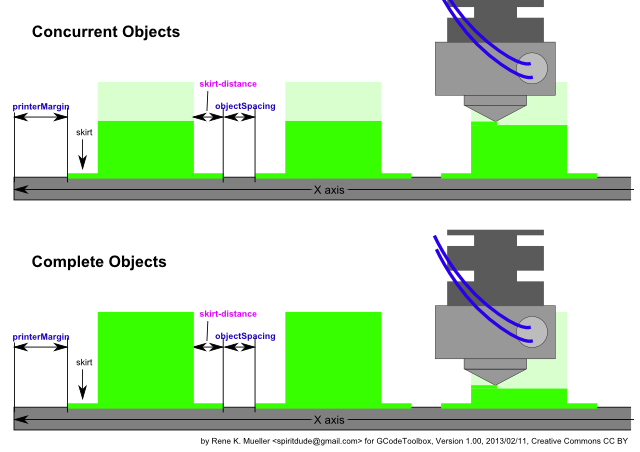
There are two modes available (via --sequence=s) when concatenating:
Since version 0.010 --sequence=concurrent is default, and --sequence=complete is available optionally (prior 0.010 --sequence=complete was default).
When using --sequence=complete the objects are printed individually complete first, which poses some danger that the extruder nozzle crashes into existing already printed items:
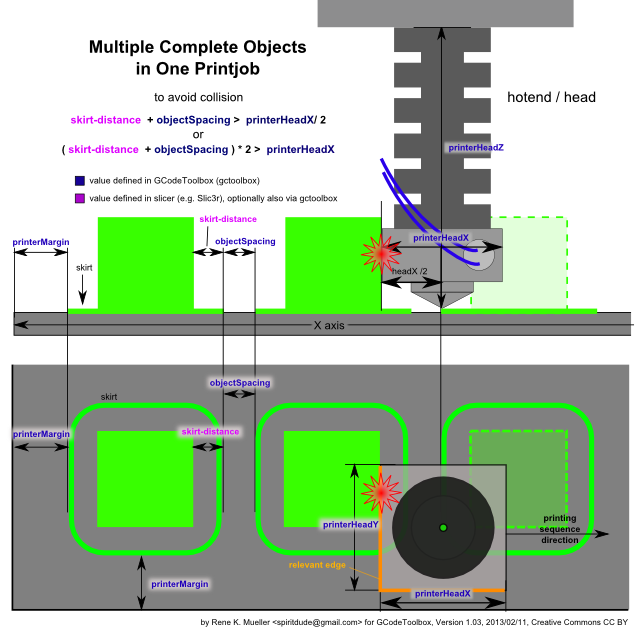
gctoolbox prints out a warning if these conditions are not met, and increases objectSpacing so there is no collision; important is to set the headX & headY properly. By default headY = headX unless you define headY explicit as well. headZ defines the maximum objectZ to printed in this manner.
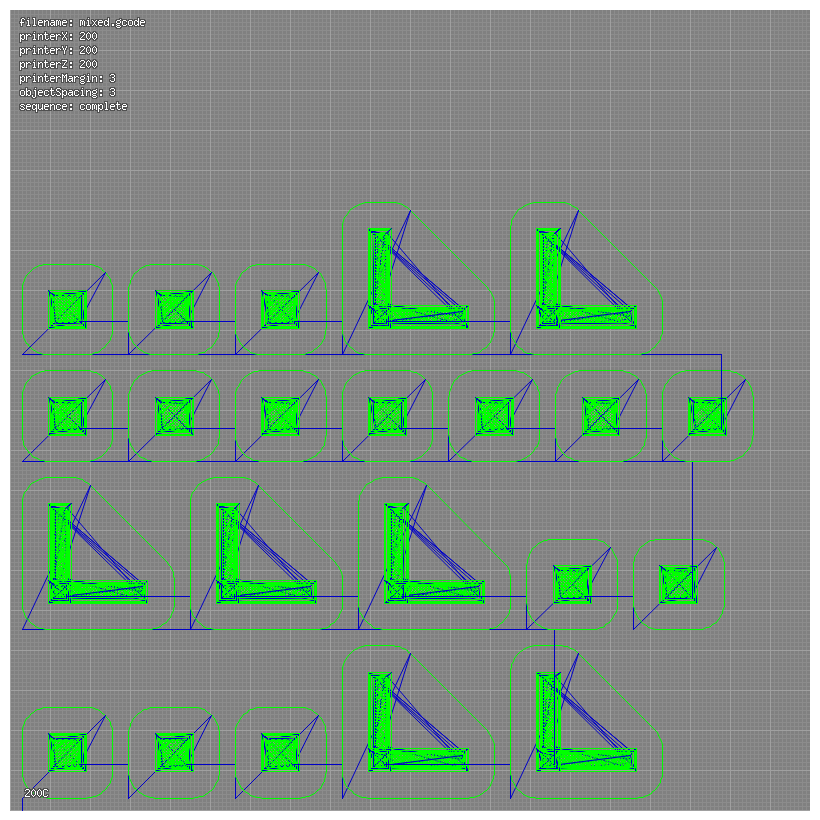
You can render any .gcode to .png like this:
% gctoolbox render mixed.gcode
% make tests
and it will do some tests in tests/ and tests/array/; best explore the files.
Best visit
That's all for now,
Rene K. Mueller
initial 2013/02/08, update 2013/02/09
Spiritdude/GCodeToolbox is a public repo on GitHub by Spiritdude. GCodeToolbox (gctoolbox) to manipulate .gcode files (for 3D printers / RepRaps).
It declares no license on GitHub. Public does not mean open source: without a license, nobody is granted the right to reuse it.
Its maker has not tagged a system, so it is unknown here. Its README says what it needs.
Open "Take it" on its page: Take My Repo writes an install plan for your machine and hands it to your AI agent (Claude Code, Codex or Cursor), which asks you before each step. Take My Repo has not tested it on any machine.
Its last change on GitHub was on 2021-04-02. Take My Repo does not judge from that whether it is maintained.
Nobody has reviewed it on Take My Repo yet, which says nothing about its quality.
Conic slicer utilizing planar slicers for 4-axis Rotating Tilted Nozzle (RTN) 3D printers
Small wrapper for converting OpenSCAD .scad files to OpenJsCad .jscad files, openjscad (CLI) .jscad to .stl on command-line.
Converting svg files from Inkscape to .scad files to edit with OpenSCAD and later convert to .stl to print on a RepRap or 3D printer.
UNIX-like ultra-lightweight Shell for NodeMCU supported devices (ESP8266, ESP32, Raspberry Pi, NanoPi, Orange Pi) written in Lua