
autoclicker
Free Windows auto clicker: record click routines, click wherever an image appears, sequences and hold/key actions, with safety stops on by default. Single .exe.
- 0
- 8 d ago
Repo TMHSDigital/autoclicker, read from GitHub 1 min ago. TMHSDigital has not joined Take My Repo.
- v1.7.0Release
v1.7.0
Install: download
WindowsAutoclicker.exebelow and run it (no installer), or with Scoop:scoop bucket add tmhs https://github.com/TMHSDigital/autoclicker, thenscoop install tmhs/windows-autoclicker.A new dark control-panel window. Click a button wherever it appears on screen, saved in profiles and runnable from the command line, and start or stop at a time of day. Safer edges: no run can start with its stop keys released, a paused run still ends on time, and image clicks never land where the image used to be. Settings lock while clicking, and the screen is searched about three times faster.
Added
-
Image target mode: press Capture and drag a rectangle around a button; each click then goes wherever that image is found nearby (searched within a margin around the capture), and the run waits while it isn't on screen. Matching is exact and needs no extra dependencies (#87).
-
Image profiles: a profile saved in Image mode keeps its own captured image, and exporting profiles embeds the picture in the file so it works on another PC.
--imageruns the captured image from the command line, also with--headlessand--profile(#98). -
Image mode: a Tolerance setting (0 to 64, 0 = exact as before) finds a button whose colors shift slightly, such as under HDR or Night light; a thumbnail shows the captured image, and Clear forgets it (#123).
-
Start at a time of day (Timing, or
--start-at 09:30): Start counts down to that time on the wall clock, cancellable like any countdown, claiming the global stop keys only for the last minute. The README explains running on a schedule with Task Scheduler (#121). -
Spread: each click can land at a random spot up to N pixels (0 to 50) from its target, like variation does for timing. Works for fixed points, sequence steps and image targets (staying on the image), also as
--spreadand in profiles (#120). -
Portable mode: with a
portable.txtfile next toWindowsAutoclicker.exe, settings, logs and captured images stay in adatafolder beside it instead of%APPDATA%. Releases include a ready-madeWindowsAutoclicker-portable.zip, smoke-tested in CI (#122). -
Sequences: Edit... (or double-click or right-click a step) re-picks a step's point, changes its button or single/double click, sets its wait or duplicates it, without removing and re-adding it. Delete, Alt+Up and Alt+Down work on the step list, and Undo (Ctrl+Z) brings back the steps from before the last Remove or Record (#175).
-
With Windows High Contrast on, the window takes the system's colors instead of its own dark palette, custom-drawn controls included (#181).
-
The tray menu has a Profiles submenu that loads a saved profile into the window, greyed out while a run, countdown or recording is on (#178).
-
While a run with limits is going, the Clicks readout shows progress such as
57 / 200, the Runtime caption counts down to the earliest time limit (auto-stop minutes or Stop at), and the tray tooltip says the same (#173). -
Image mode: Stop if not seen for N seconds (or
--image-timeout N) ends the run once the image has been missing that long in a row, instead of waiting forever; 0, the default, keeps waiting. Saved in profiles (#174). -
Stop at a time of day (Timing, or
--stop-at 17:30), the counterpart to Start at: the run ends the next time the clock shows that time, across midnight too, or earlier if a click or minute limit comes first (#177). -
--list-profilesprints the saved profiles with a one-line summary each, and a--profilename that doesn't exist now lists the saved ones.--headless --jsonprints the result as one JSON object (reason,message,clicks,seconds,exit_code) for scripts (#176). -
Open data folder in the menu opens the folder with your settings, logs and captured images, in portable mode too (#180).
Changed
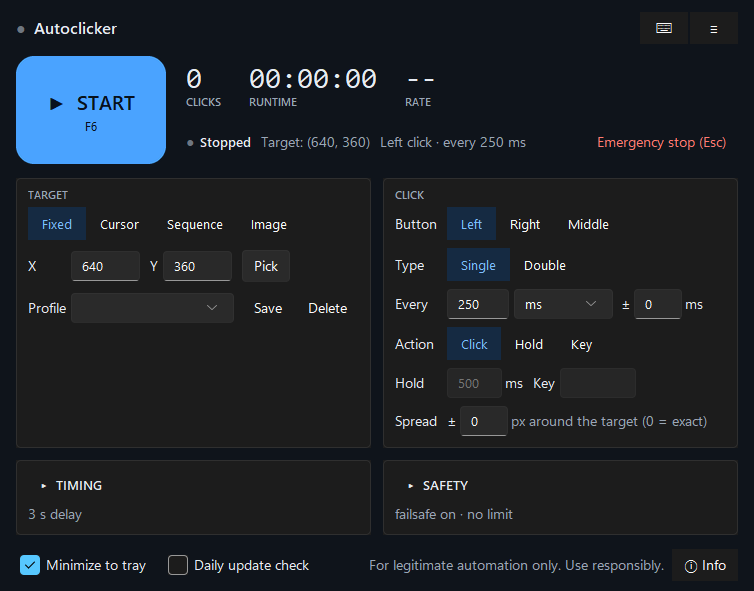
- New dark control-panel window. A large Start/Stop button carries the hotkey and turns amber while counting down and red while running; Clicks, Runtime and Rate readouts and a status line that describes the click settings sit beside it. Target and Click are side-by-side panels with segmented controls; Timing and Safety collapse to a one-line summary of their non-default values; the tray and update toggles live in the footer. The light theme and the sun/moon toggle are gone, and a saved
themesetting is ignored. Import/Export profiles and Check for updates now moved to the menu in the top-right corner. The success-rate figure no longer shows in the window (it is still in Copy diagnostics). - The unused
themesetting is no longer written to new settings files, andautoclicker.utils.coordinate_picker(the old name ofautoclicker.utils.profiles) is scheduled for removal in 2.0 (#172). - Installing from source or the Python package now asks for the dependency versions CI tests: Pillow 12 or newer (older ones have known image-decoder vulnerabilities), pywin32 306+, pyautogui 0.9.54+, pystray 0.19.5+ and sv-ttk 2.6.1+. The release exe is unaffected (#155).
- Running from source needs Python 3.11 or newer. Python 3.10 reached end of life in October 2026 and Pillow 13 no longer supports it; the release exe already ships with 3.11 and is unaffected.
- First launch shows a short hint with the ways to stop a run, using your own keys (stop key, emergency key, and the screen corners if the failsafe is on) until you press Got it. The update-check question moved into that hint as an unticked checkbox instead of a separate dialog (#124).
- The settings are locked while a countdown or run is in progress, since changes would not reach the running clicks; section headers still open. Action choices a target mode can't run are greyed out (Hold and Key in Sequence, Key in Image), switching to such a mode falls back to Click, and X/Y are off when Key is chosen. The status bar's target line follows what you type in X, Y and Key (#102).
Fixed
- Typing
infornaninto a number field, or passing it on the command line (--minutes inf), no longer crashes the panel summaries or startup; the value counts as unset (#147). - The numbers above the Start button show in their large type again, and the labels in the header and status line no longer sit on gray boxes: the theme's own colors and fonts were being overridden at startup.
- High Contrast: buttons, fields and the Timing and Safety headers take the system colors too, instead of light gray (the headers were white on gray and hard to read) (#181).
- Hold and Key are shown dimmed where a mode does not allow them (as in Sequence mode), instead of looking like raised buttons.
- The sequence step list is wider and its lines shorter ("wait 500 ms"), so a step's button, click type and wait are no longer cut off.
- If a hotkey could not be registered at startup (say F6 is taken by another program), every hotkey stopped working for the session, Stop and Emergency stop included, and the "Hotkey unavailable" message was lost. Now only the taken key is missing and the message shows once the window is up (#144).
- A settings file that is not UTF-8 (say, saved as ANSI from Notepad) is now moved aside as a
.corrupt-copy with a warning, like invalid JSON, instead of being replaced by defaults at the next save or stopping the app from starting. A settings file that can't be opened (locked by another program) loads defaults with a warning and is not saved over during that session. A hand-editedmax_cps_ceilingthat isn't a number no longer stops the app from starting (#146). - A settings change that can't be written (full disk, read-only folder, antivirus lock) now shows "Settings not saved" in the status line instead of only in the log, and the Hotkeys dialog says the new keys apply to this session only (#151).
- The Runtime and Rate readouts keep the last run's figures instead of counting on after it ended (they changed when a countdown was cancelled or Stop was pressed while idle), and the Timing summary no longer lists the start delay when Start at is set, since Start counts down to that time instead (#148).
- A speed limit below 8 clicks per second now stops the run at the first press over the limit; before, the guard waited for 8 presses in a second whatever the limit (#149).
--headlessclaims the Stop and Emergency keys before the first click instead of just after clicking started (#150).- Captured and imported images are only ever read as PNG, the format the app writes, so other image decoders never run on a shared profile (#157).
- Image mode: Start no longer freezes the window for a second or two with a large capture (preparing a full-screen image went from about 1 to 2 s to about 0.1 s, and later Starts reuse it), searches with a Tolerance are about a third faster, and a slow wide-margin search no longer keeps a processor core busy for the whole run (#161, #162).
- Image mode only opens images from its own images folder, where captures and imported profile images are kept; a settings or profile entry that points anywhere else asks you to capture the image again.
- The window appears sooner: PyAutoGUI and the update checker's web client are no longer imported at startup (PyAutoGUI loads in the background once the window is up), which saves 0.3 to 1 s per launch when running from source and a little in the exe (#163).
- The exe no longer bundles mouseinfo and pymsgbox (GPLv3+, optional pyautogui imports the app never used) or pyperclip. Releases now ship
THIRD_PARTY_NOTICES.txtwith the license of every bundled package, inside the exe, in the portable zip and as a release download (#153). - Stopping a run (button, hotkey, tray, Quit) no longer freezes the window for about a second, and Stop while recording no longer blocks it for up to two seconds. Background threads now hand their updates to the window through a queue instead of calling it directly (#145).
- Hint, summary and error text now meet WCAG AA contrast (the gray was 2.9:1, the error red 3.2:1) (#104).
- The Hotkeys dialog can no longer be opened during the Start countdown, while recording or while picking, and nothing starts while it is open. Before, a countdown could finish behind the dialog and start a run with every global stop key released (#93).
- Emergency stop while the picker is open now stops a running engine too, instead of only closing the picker. Start (button, hotkey, tray) is refused while picking or recording, so a countdown can no longer end on the picker overlay or release the recorder's stop keys (#95).
- A run paused by Pause when unfocused now stops when its auto-stop time is up, instead of staying paused until the window came back. A
--headlessrun started from a terminal no longer takes the terminal as its target window, which left it paused for good (and, with the first fix missing, never exiting) (#94). - Image target mode no longer clicks the old position again after a click makes the image disappear: each click needs a search that started after the previous click (#96).
- Copy diagnostics no longer includes the captured image's path or search area, and replaces your Windows user folder (which contains the account name) everywhere in the report, including the log lines (#99).
- Quitting with one invalid field no longer throws away every other unsaved change: the invalid field keeps its last saved value and the rest is saved (#101).
- Image mode: changing the search margin now takes effect at the next Start instead of needing a recapture (
image_regionnow stores where the image was captured; older saved areas just search a little wider). Replacing a capture deletes the old file unless a profile uses it. A screen that can't be read ends the run with an error after about two seconds instead of waiting silently, an oversized or malformed image file reports an error instead of crashing Start, and the capture overlay keeps its own hint, shows the rectangle's size while dragging and explains a too-small drag (#100). - The one-time migration of settings from older versions now only looks next to the app (the exe's folder, or the source checkout), never in whatever folder the app was started from, and a failed migration no longer makes the app save to the old file, which lost the session's changes (#105).
- Smaller fixes (#103): Record's replace prompt has a Cancel that discards the recording, and a recording longer than a sequence holds says how many steps were kept. The mouse wheel no longer scrolls the settings behind a dialog, the step list or a text box, and precision touchpads scroll. Emergency stop with nothing running no longer shows a red error. The first-run update question waits until no run or countdown is in progress, an update check that fails (say, offline) is retried at the next launch instead of a day later, and the Update button only opens this project's release pages.
- Image mode grabs only the searched area of the screen instead of the whole desktop and prepares the captured image once per run, cutting each search from about 50 ms to about 17 ms on a two-monitor desktop and keeping the click thread's timing steady (#97).
- Building the Python package from a source checkout no longer sweeps a local
autoclicker_envvirtualenv into the wheel and sdist (the package patternautoclicker*matched it); CI now builds and checks
-