supabase
The Postgres development platform. Supabase gives you a dedicated Postgres database to build your web, mobile, and AI applications.
- 115k
- TypeScript
- Apache-2.0
- 19 h ago
Full-featured PostgreSQL driver for Tabularis: browse schemas, tables, views, routines, and triggers; run queries with EXPLAIN plans; edit rows with type-aware binding for enums, JSON, arrays, UUIDs; generate DDL for tables, columns, indexes, and foreign keys.
Repo TabularisDB/tabularis-postgresql-plugin, read from GitHub 1 min ago. TabularisDB has not joined Take My Repo.
TabularisDB/tabularis-postgresql-plugin is a public repo on GitHub by TabularisDB. Full-featured PostgreSQL driver for Tabularis: browse schemas, tables, views, routines, and triggers; run queries with EXPLAIN plans; edit rows with type-aware binding for enums, JSON, arrays, UUIDs; generate DDL for tables, columns, indexes, and foreign keys. It declares the Apache-2.0 license on GitHub. It is written mainly in Rust, has 7 stars and last changed on 2026-11-19. Nobody has reviewed it on Take My Repo yet, which says nothing about its quality. Read from GitHub on 2026-11-20.

A PostgreSQL plugin for Tabularis, the open-source database client.
This plugin connects Tabularis to PostgreSQL via a standalone Rust binary speaking JSON-RPC 2.0 over stdio, replacing what was originally a built-in driver compiled directly into the Tabularis application. It is byte-for-byte behaviorally identical to that built-in driver, proven by an 82-test parity suite that runs both drivers against the same live database and compares every response.
Requires Tabularis v0.20.0 or later. This plugin relies on the plugin runtime introduced in that release; it will not load on earlier versions of Tabularis.
disable,
allow, prefer, require, verify-ca, verify-full) via rustls.udt_name fallback), indexes (including composite/unique),
foreign keys (including cross-schema).EXPLAIN/EXPLAIN ANALYZE,
and multi-statement batches that share a single connection (so BEGIN/COMMIT,
temp tables, and SET survive across statements).CAST, UUID, JSON/JSONB, arrays,
temporal types, BLOB wire format).CREATE TABLE, ADD COLUMN, ALTER COLUMN (including
implicit-cast-compatible TYPE changes), CREATE INDEX, ADD CONSTRAINT FOREIGN KEY, plus the corresponding drops.column_comments capability enables descriptions in
Add/Modify Column. Comment edits generate COMMENT ON COLUMN; clearing a
description removes it with IS NULL, without restating the column definition.bytea column to a file or preview it as a
MIME-sniffed data URL.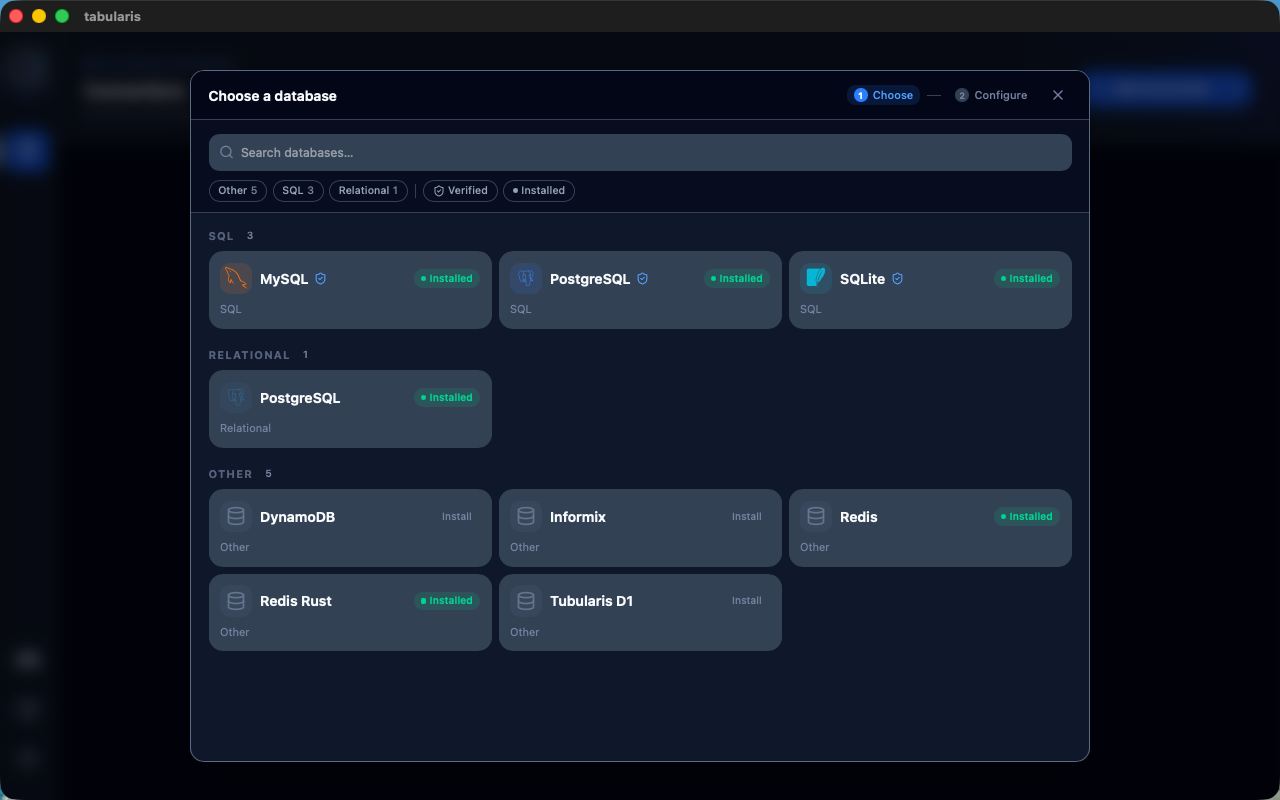 PostgreSQL in the database picker |
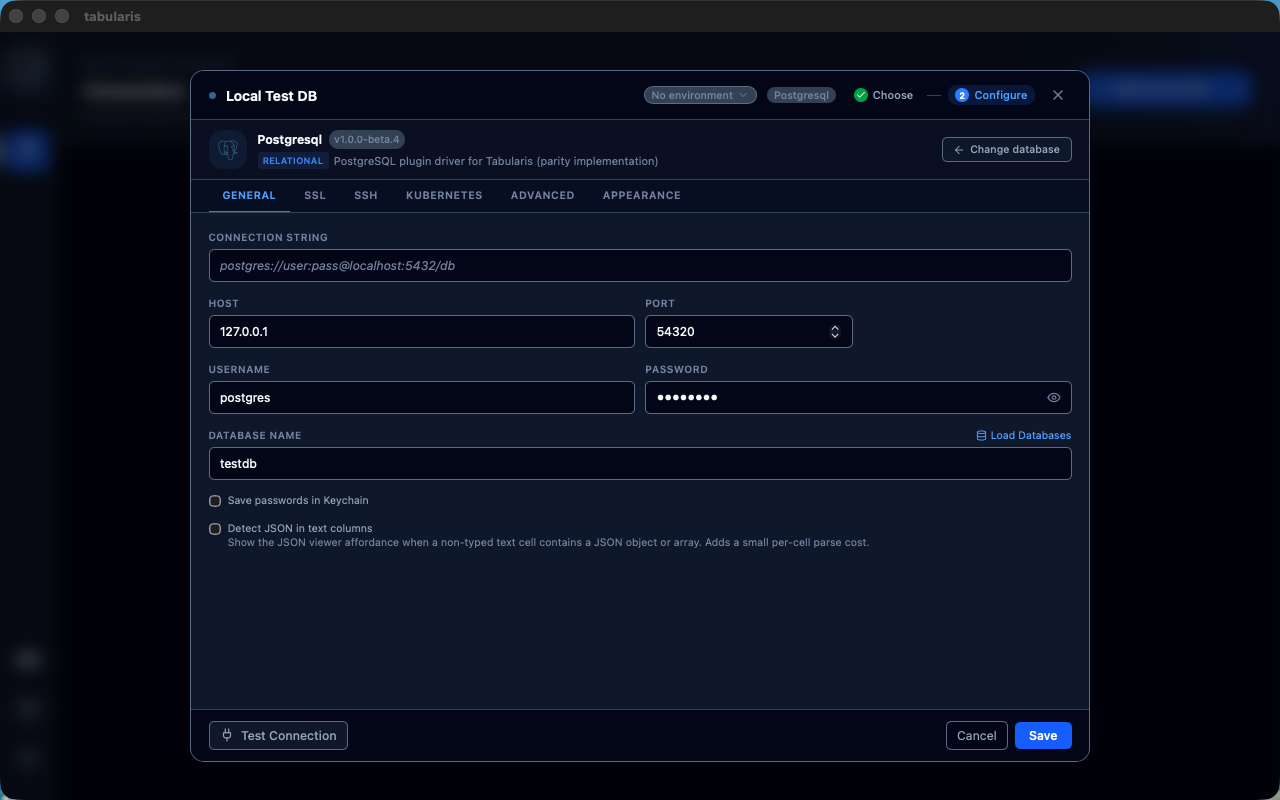 Connection configuration |
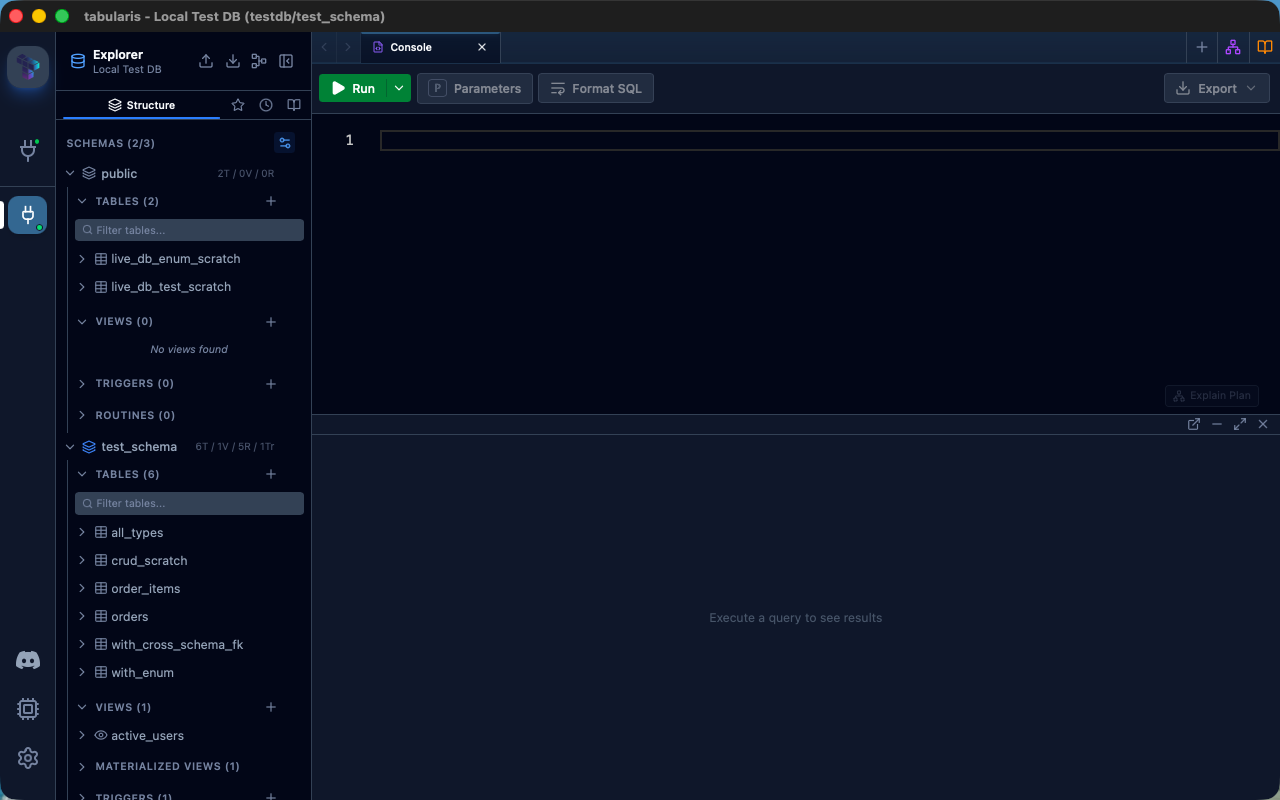 Multi-schema browsing |
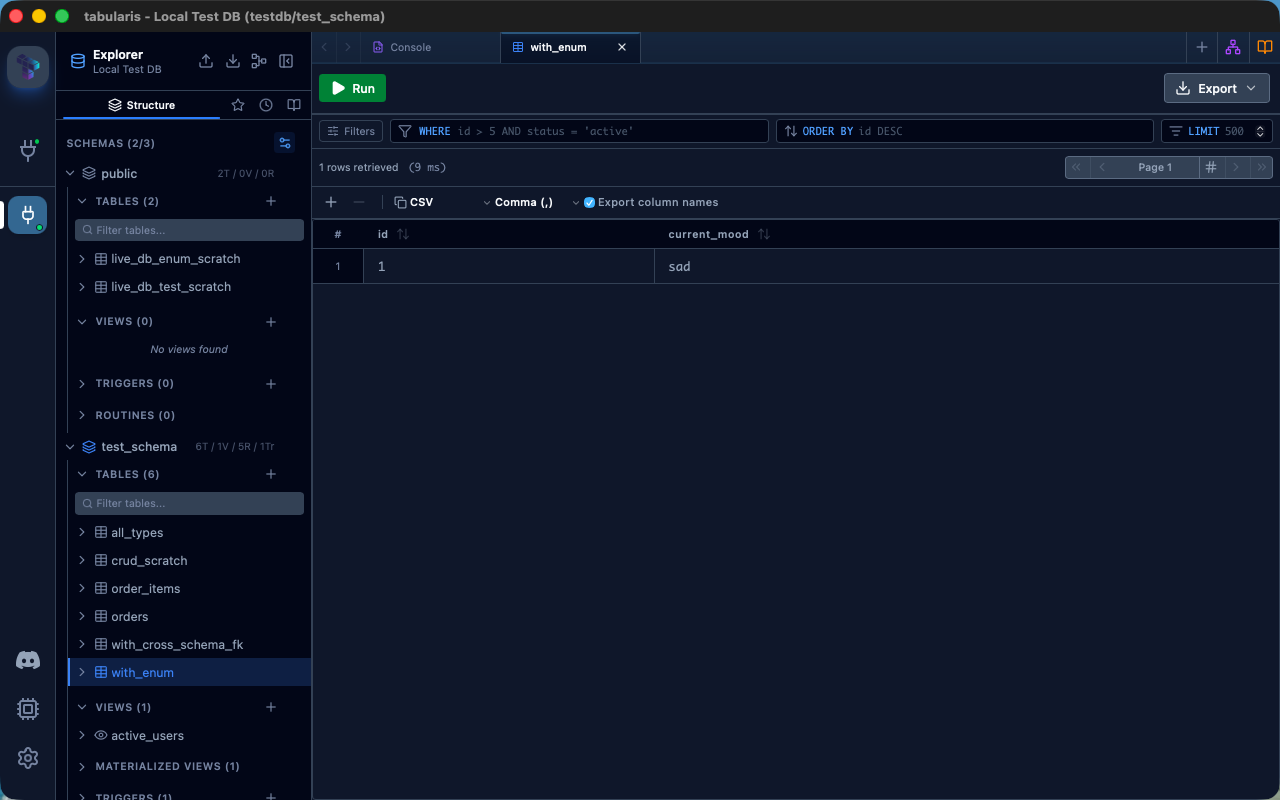 Data grid with enum support |
| Parameter | Description | Required |
|---|---|---|
host |
PostgreSQL server hostname | Yes (unless using connection_string) |
port |
PostgreSQL server port (default 5432) |
No |
database |
Database name to connect to | Yes (unless using connection_string) |
username |
Database user | Yes (unless using connection_string) |
password |
Database password | If required by the server |
ssl_mode |
disable, allow, prefer, require, verify-ca, or verify-full |
No |
ssl_ca |
Path to a custom CA bundle PEM file. Required for verify-ca (platform roots aren't used for this mode); optional for verify-full, where it overrides the system trust store |
No |
ssl_cert |
Path to a client certificate PEM file, for servers requiring mutual TLS (e.g. Google Cloud SQL). Must be set together with ssl_key |
No |
ssl_key |
Path to the private key PEM file matching ssl_cert. Must be set together with ssl_cert |
No |
connection_string |
Full postgres://user:pass@host:port/db URL, as an alternative to the discrete fields above |
No |
startup_script |
SQL run on every new pooled connection (e.g. SET search_path = ...) before it's handed to a query |
No |
| Category | Types |
|---|---|
| Numeric | SMALLINT, INTEGER, BIGINT, SERIAL, BIGSERIAL, REAL, DOUBLE PRECISION, NUMERIC, DECIMAL, MONEY |
| String | CHAR, VARCHAR, TEXT |
| Date/Time | DATE, TIME, TIMESTAMP, TIMESTAMPTZ, INTERVAL |
| Other | BOOLEAN, UUID, INET, CIDR, MACADDR |
| JSON | JSON, JSONB |
| Binary | BYTEA |
| Ranges | INT4RANGE, INT8RANGE, NUMRANGE, TSRANGE, TSTZRANGE, DATERANGE |
| Arrays | SMALLINT[], INTEGER[], BIGINT[], REAL[], DOUBLE PRECISION[], TEXT[], VARCHAR[], BOOLEAN[] |
This plugin is published on the Tabularium registry — the same one the DuckDB and Elasticsearch plugins ship through. Install it from Tabularis's in-app plugin browser: Settings → Plugins, search for PostgreSQL, and install.
If you point Tabularis at a different Tabularium instance via
tabulariumRegistryUrl in config.json, make sure that registry has
ingested this plugin's releases first.
Download the latest release for your platform from the
Releases page —
look for the most recent 1.0.0-rc.N tag (releases through 1.0.0-beta.10
shipped on the beta channel; new releases from 1.0.0-rc.1 onward ship
on the rc channel — see Contributing: PR Titles & Versioning).
Extract the archive.
Copy postgresql-plugin (or postgresql-plugin.exe on Windows) and
.tabularium into the Tabularis plugins directory:
| OS | Plugins Directory |
|---|---|
| Linux | ~/.local/share/tabularis/plugins/postgresql/ |
| macOS | ~/Library/Application Support/tabularis/plugins/postgresql/ |
| Windows | %APPDATA%\tabularis\plugins\postgresql\ |
Restart Tabularis.
The plugin is a standalone Rust binary that communicates with Tabularis through JSON-RPC 2.0 over stdio:
stdin.tokio-postgres
/ deadpool-postgres and writes
responses to stdout.Connection pools are cached in-process, keyed by
host:port:database:user:startup_script plus every TLS param
(ssl_mode/ssl_ca/ssl_cert/ssl_key), so repeated calls against the
same target with identical connection settings reuse an existing pool
instead of reconnecting.
| Method | Description |
|---|---|
initialize / shutdown |
Plugin lifecycle hooks called on load and unload |
test_connection / ping |
Verify connectivity with a lightweight SELECT 1 |
get_databases |
List databases on the server |
get_schemas |
List schemas in the connected database |
get_tables |
List tables in a schema |
get_columns / get_view_columns / get_materialized_view_columns |
Column metadata for tables, views, and materialized views |
get_table_ddl |
Reconstructed CREATE TABLE statement for an existing table, used by schema dumps |
get_indexes |
Index metadata, including composite and unique indexes |
get_foreign_keys |
Foreign key metadata, including cross-schema references |
get_views / get_view_definition / create_view / alter_view / drop_view |
View lifecycle |
get_materialized_views / get_materialized_view_definition / refresh_materialized_view |
Materialized view lifecycle |
get_routines / get_routine_parameters / get_routine_definition |
Function/procedure metadata |
get_triggers / get_trigger_definition / create_trigger / drop_trigger |
Trigger lifecycle |
execute_query / execute_query_batch / explain_query |
Query execution, multi-statement batches, and query plans. Both query methods accept an optional session_id that keeps the connection while an explicit transaction is open |
release_session |
Rolls back and releases the connection a session pinned for an open transaction |
insert_record / update_record / delete_record |
Row-level CRUD with type-aware value binding |
get_create_table_sql / get_add_column_sql / get_alter_column_sql / get_create_index_sql / get_create_foreign_key_sql / drop_index / drop_foreign_key |
DDL generation and execution |
save_blob_to_file / fetch_blob_as_data_url |
BLOB (bytea) export and preview |
just (optional, wraps the common cargo invocations)just build # debug build just release # release build (what the GitHub Actions workflow ships)
Or directly with cargo:
cargo build --release
The binary will be located at target/release/postgresql-plugin.
just dev-install   # build + copy binary and manifest into the Tabularis plugins dir
just uninstall     # remove the installed plugin
just demo-db        # postgres:16-alpine in Docker (postgres / password / testdb)
just demo-db-stopjust test # cargo test — unit tests for SQL builders, parsing, RPC just lint # clippy -D warnings just fmt # cargo fmt --all
echo '{"jsonrpc":"2.0","method":"test_connection","params":{"params":{"host":"127.0.0.1","port":5432,"username":"postgres","password":"password","database":"testdb"}},"id":1}' \
  | ./target/release/postgresql-plugin
PR titles must follow Conventional Commits
(type: subject, type(scope): subject, or type!: subject for a breaking
change) — enforced by CI on every PR. Add a BREAKING CHANGE: footer to the
PR description for breaking changes that don't fit cleanly into the title.
Every PR also needs exactly one prerelease:alpha / prerelease:beta /
prerelease:rc / prerelease:stable label, so CI knows which release
channel to target when suggesting the next version. There's no default —
CI fails with a clear error if the label is missing, rather than guessing.
As of 1.0.0-rc.1, new PRs should use prerelease:rc, not
prerelease:beta. This repo tracks a builtin driver that keeps shipping
its own changes (see CLAUDE.md's "Parity gaps beyond SQL text"); waiting
for full parity before calling this release-ready meant an indefinite
beta line chasing a moving target. rc is the checkpoint instead: gaps
discovered after 1.0.0-rc.1 are tracked as issues/patches on the rc
line (rc.2, rc.3, ...) rather than reasons to hold the channel back.
| PR title type | Version impact |
|---|---|
feat |
minor |
fix, refactor, perf |
patch |
docs, style, chore, test, ci, build |
none — no release suggested |
any type with ! or a BREAKING CHANGE: footer |
major |
CI posts a comment on the PR suggesting the next tag/version based on the
title's type and the prerelease:* label — informational only, nothing is
tagged or released automatically (yet). The suggestion updates (and marks
the previous suggestion as outdated) only when the underlying
classification actually changes, not on every edit to the title text.
Apache-2.0.
TabularisDB/tabularis-postgresql-plugin is a public repo on GitHub by TabularisDB. Full-featured PostgreSQL driver for Tabularis: browse schemas, tables, views, routines, and triggers; run queries with EXPLAIN plans; edit rows with type-aware binding for enums, JSON, arrays, UUIDs; generate DDL for tables, columns, indexes, and foreign keys.
It declares the Apache-2.0 license on GitHub.
Its maker has not tagged a system, so it is unknown here. Its README says what it needs.
Open "Take it" on its page: Take My Repo writes an install plan for your machine and hands it to your AI agent (Claude Code, Codex or Cursor), which asks you before each step. Take My Repo has not tested it on any machine.
The Postgres development platform. Supabase gives you a dedicated Postgres database to build your web, mobile, and AI applications.
Its last change on GitHub was on 2026-11-19. Take My Repo does not judge from that whether it is maintained.
Nobody has reviewed it on Take My Repo yet, which says nothing about its quality.
A Claude Code plugin that shows what's happening - context usage, active tools, running agents, and todo progress
Stop renting your intelligence. Own it with AnythingLLM. Everything you need for a powerful local-first agent experience
Full-stack observability · Metrics · Logs · Traces · Flows · Topology · Infrastructure · APM · NPM · DBM · RUM · Synthetics · Cloud · AI SRE · OpenTelemetry · SNMP · NetFlow/IPFIX/sFlow · IPMI · Redfish · 2000+ integrations
Open-source desktop SQL workspace with 3 built-in database drivers and 29 shipped driver plugins, including SQL Server, DuckDB, ClickHouse and Redis. Built-in MCP server for Claude, Cursor and Devin, SQL notebooks and visual EXPLAIN.
Microsoft SQL Server plugin for Tabularis. Rust, cross-platform (Linux x64/arm64, macOS x64/arm64, Windows x64)
Oracle Database driver plugin for Tabularis (12c+, XE, Autonomous DB, RDS), built on ODPI-C. Work in progress.
Self-hosted plugin registry for the tabularis platform — index, submit, and discover plugins.
Query Hacker News as SQL: a style exercise showcasing Tabularis plugin settings, from feeds and comment depth to user profiles and poll options.