
techscript
TechScript is an open-source programming language built with Rust, featuring a native compiler, virtual machine, package manager, and modern tooling. Build CLI, web, GUI, automation, AI, and full-stack applications using clean, readable syntax.
- 7
- 2 d ago
Repo Tcode-Motion/techscript, read from GitHub 13 min ago. Tcode-Motion has not joined Take My Repo.
In short
Tcode-Motion/techscript is a public repo on GitHub by Tcode-Motion. TechScript is an open-source programming language built with Rust, featuring a native compiler, virtual machine, package manager, and modern tooling. Build CLI, web, GUI, automation, AI, and full-stack applications using clean, readable syntax. It declares no license on GitHub. Public does not mean open source: without a license, nobody is granted the right to reuse it. It is written mainly in Rust, has 7 stars and last changed on 2026-11-23. Nobody has reviewed it on Take My Repo yet, which says nothing about its quality. Read from GitHub on 2026-11-25.
Similar repos
go
The Go programming language



TechScript 2.0
Independent Programming Language · WebForge Full-Stack Framework · AppForge Native Engine
Table of Contents
The Problem
Modern development is fragmented, bloated, and brittle:
| # | Problem | Impact |
|---|---|---|
| 1 | Dependency Bloat | Gigabytes of node_modules/venvs that break across OS boundaries |
| 2 | Ecosystem Fragmentation | Separate languages for web (JS), API (Python), mobile (Kotlin/Swift), native (Rust/C++) |
| 3 | Ambiguous Mutations | let/var/const/:= chaos creates subtle bugs and cognitive overload |
| 4 | AI Hallucination | Decades of competing idioms cause agents to hallucinate invalid syntax |
The Solution: What is TechScript 2.0?
TechScript 2.0 is an independent, high-performance general-purpose language built from first principles in native Rust, unified with WebForge (full-stack web) and AppForge (native mobile/desktop).
| Pillar | Detail |
|---|---|
| English-Like Locked Syntax | is (declare), becomes (mutate), constant, to name(): — zero symbol noise |
| Zero-Dependency Binary | Ships as a single tsc binary — no Python, no Node.js, no external VM |
| WebForge | Reactive websites + SQLite + WebGL 3D in one .tech file to zero-dep static bundle |
| AppForge | Cross-platform Android/desktop in pure .txs with liquid-glass hardware-accelerated UI |
| Locked AI Skill | SKILL.md gives agents an immutable grammar spec — eliminates hallucinated syntax |
| Dual Execution | Ultra-fast register-based VM for dev + LLVM backend for native machine code |
Why TechScript? (Feature Comparison)
| Feature | TechScript 2.0 | Python 3 | TypeScript/Node | Go |
|---|---|---|---|---|
| External Runtime | None | Python Interpreter | Node / Bun | None |
| Dependency Bloat | Zero | venv/site-packages | Heavy node_modules | Minimal |
| Web Framework Built-in | WebForge | External (Django/Flask) | External (Next.js) | External |
| Mobile Engine Built-in | AppForge | External (Kivy) | External (RN) | Not suited |
| Locked AI Skill | SKILL.md | None | None | None |
| Syntax Invariants | is / becomes |
Mutable by default | let/const/var | := vs = |
| Verified Test Suite | 100/100 | Varies | Varies | Varies |
Instant One-Line Installation
Zero prerequisites. Choose your OS:
Windows (PowerShell)
irm https://raw.githubusercontent.com/Tcode-Motion/techscript/main/scripts/install.ps1 | iex
Linux / macOS / Android Termux
curl -fsSL https://raw.githubusercontent.com/Tcode-Motion/techscript/main/scripts/install.sh | bash
Standalone Packages
| Package | Download |
|---|---|
| Windows Setup Wizard | TechScript_Setup.exe — GitHub Releases |
| Portable Archive | TechScript_Portable.zip |
| SHA256 Checksums | SHA256SUMS.txt |
Docker
docker run --rm ghcr.io/tcode-motion/techscript:latest --version
docker run --rm -v "${PWD}:/workspace" ghcr.io/tcode-motion/techscript:latest run main.txs
Canonical Syntax Quick-Start
# Constants and variables
constant platform_name is "TechScript 2.0"
counter is 0

# Functions: 'to name(params):' with colon + 4-space indent
to calculate_bonus(score, base_payout):
    if score >= 90:
        return base_payout * 2.0
    else if score >= 75:
        return base_payout * 1.5
    else:
        return base_payout

to greet_developer(name):
    say "Hello, {name}! Welcome to {platform_name}."

# Invocation
greet_developer("Engineer")
bonus is calculate_bonus(95, 500.0)
say "Awarded Bonus: {bonus}"

# Counted repetition
repeat 3 times:
    say "Writing clean, native, high-performance code."

# While loop — 'becomes' for explicit mutation
while counter < 2:
    counter becomes counter + 1
    say "Processing job {counter}..."
tsc run main.txs # Run instantly
Syntax Rules at a Glance
| Construct | Syntax | Example |
|---|---|---|
| Declare variable | name is value |
count is 0 |
| Reassign variable | name becomes value |
count becomes count + 1 |
| Constant | constant name is value |
constant max is 5 |
| Function | to name(params): |
to greet(x): |
| Return | return value |
return result |
say "text {var}" |
say "Hi {name}" |
|
| If / Else | if cond: / else if: / else: |
With 4-space indent |
| Repeat N times | repeat N times: |
repeat 3 times: |
| For loop | for item in list: |
With 4-space indent |
| While loop | while cond: |
With 4-space indent |
Syntax Mental Model & Invariants
flowchart LR
    Q1{"First use\nof variable?"}
    Q1 -- Yes --> S1["use 'is'\nscore is 100"]
    Q1 -- No --> Q2{"Changing\nexisting value?"}
    Q2 -- Yes --> S2["use 'becomes'\nscore becomes score + 10"]
    Q2 -- No --> S3["use 'constant ... is'\nconstant max is 500"]
- No
{}delimiters — blocks open with:and 4-space indentation - No prefix needed —
"Count: {count}"interpolates natively, no$orf - No ambiguous assignment —
isvsbecomesis always visually clear
WebForge: Full-Stack Declarative Web Framework
| Main Website | https://techscript.is-a.dev/ |
| WebForge Live Example | https://techscript.is-a.dev/techscript/ |
Compiles declarative
.techfiles — reactive UI, routing, embedded SQLite, WebGL 3D — to zero-dependency static bundles.
WebForge Code Sample
make a website called TechScriptForge

database Notes:
    table notes:
        title is text
        content is text

page Home:
    show heading "TechScript WebForge"
    show text "A full-stack site built with English-like TechScript!"

    show 3D scene called World:
        add cube:
            color is "purple"
            rotation speed is 3
        enable mouse controls

    show input "Write a note" called NoteInput
    show button "Save Note" called SaveButton

when SaveButton is clicked:
    send NoteInput to /api/notes
    show message "Saved!"

start website
WebForge CLI
tsc web create my-portal   # Scaffold new project
tsc web dev                # Hot-reload dev server on http://localhost:3000
tsc web build              # Compile to dist/ (zero-dep static bundle)
WebForge Compilation Pipeline
flowchart LR
    A[".tech Source"] --> B["AST Parser"]
    B --> C["SQLite Schema"]
    B --> D["Reactive DOM"]
    B --> E["WebGL 3D Engine"]
    C & D & E --> F["Static Bundle dist/"]
    F --> G["GitHub Pages / CDN"]
WebForge Demo Video
Your browser does not support the video tag.
AppForge: Native Mobile & Desktop Engine
The companion app (
examples/appforge/techscript-appforge/) is authored 100% in pure.txson the native Android engine with hardware-accelerated liquid-glass UI.
| Download | Link |
|---|---|
| Release APK (v2.0.2) | TechScript-AppForge-v2.0.0-release.apk |
| GitHub Releases | Direct APK Download |
Real Device Screenshots (Android 14 / 16)
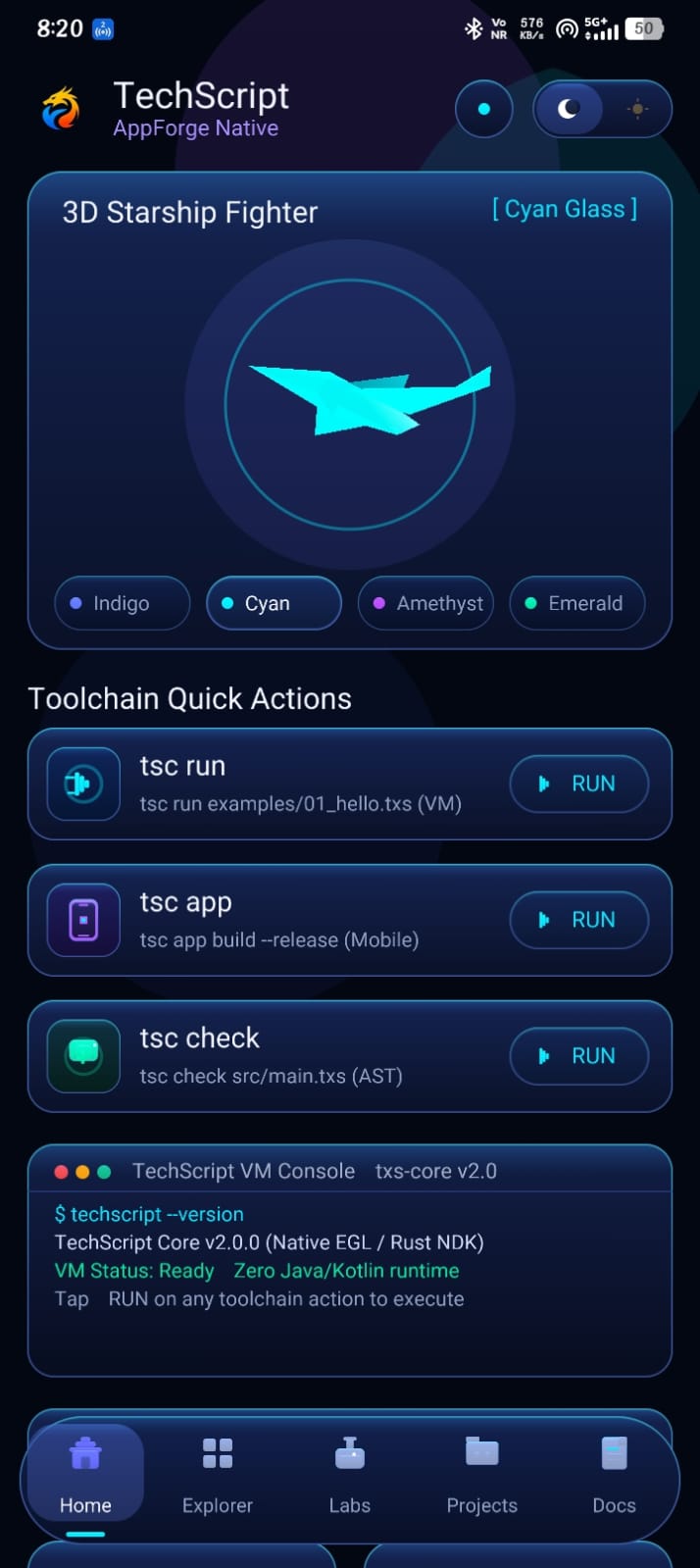 Home |
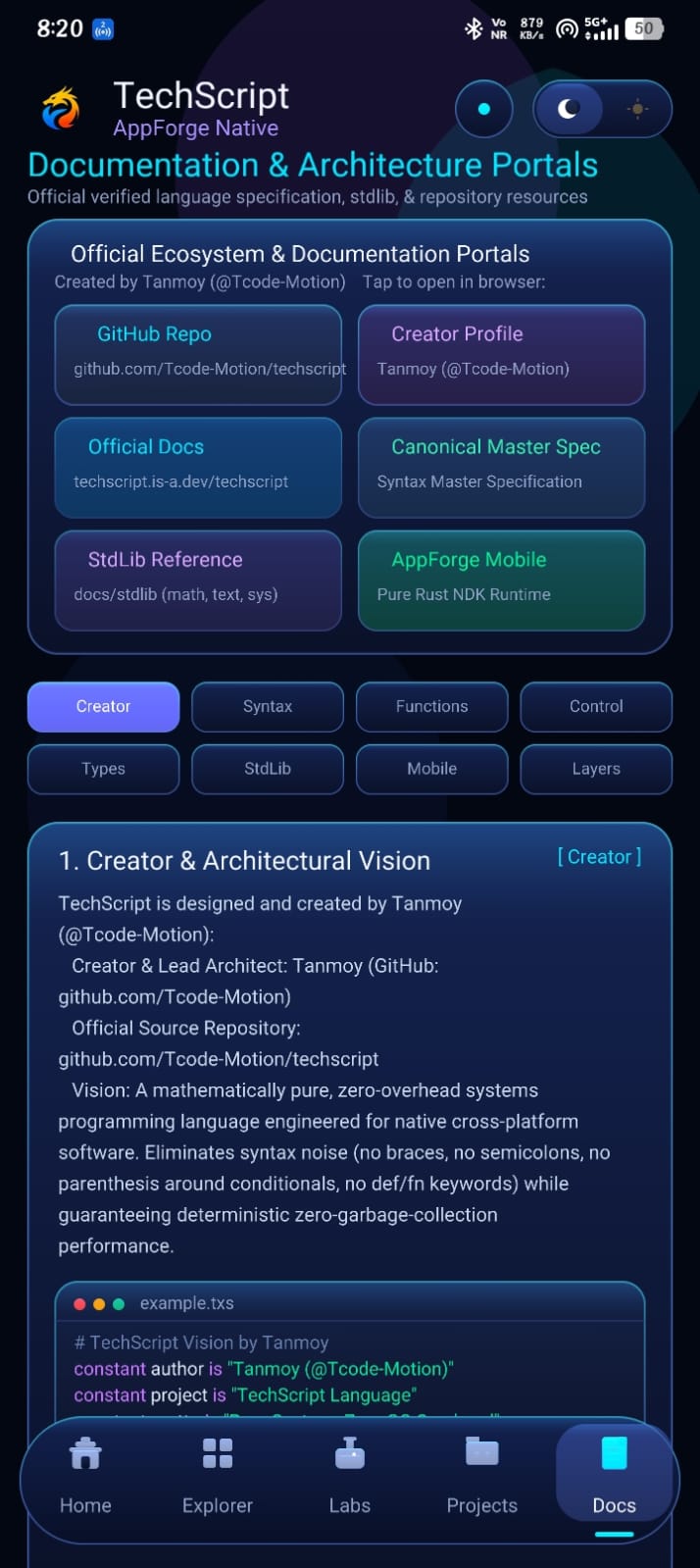 Docs |
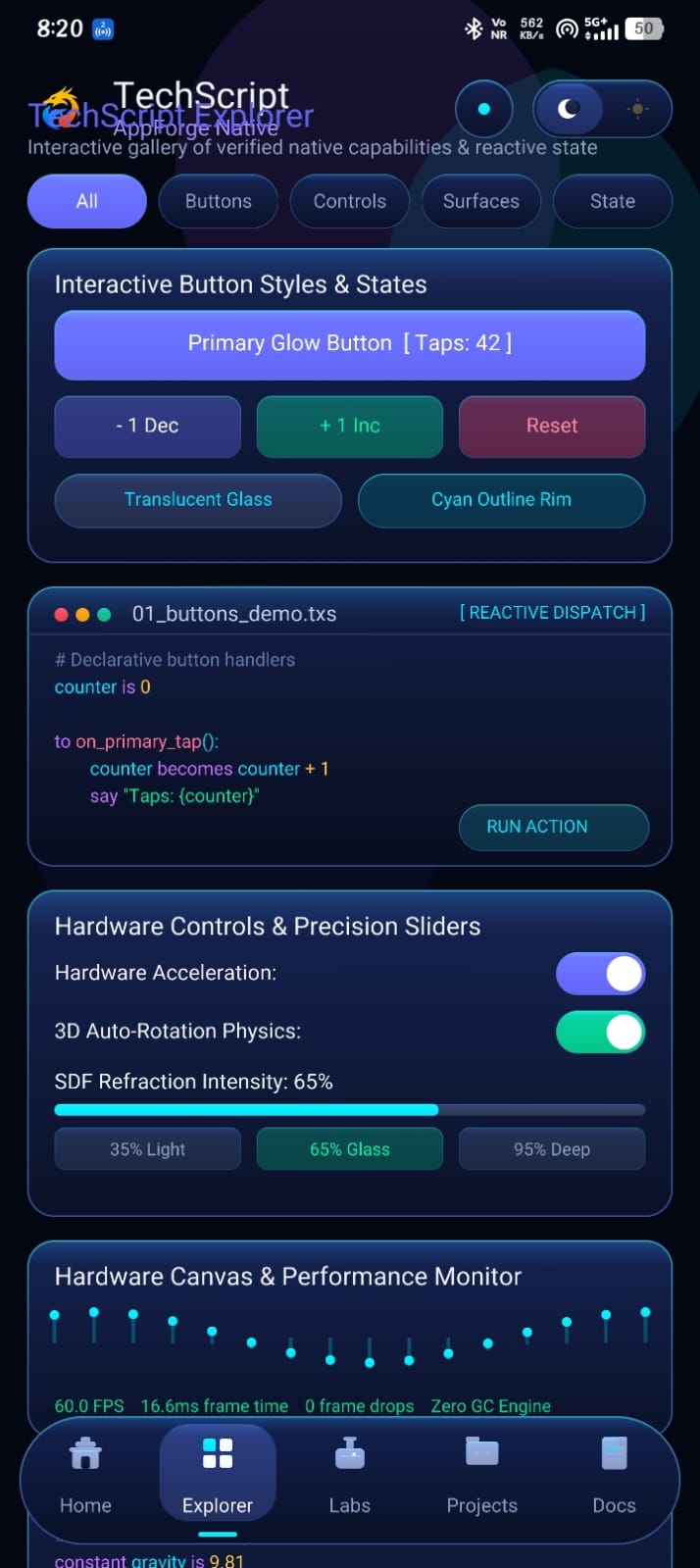 Explore |
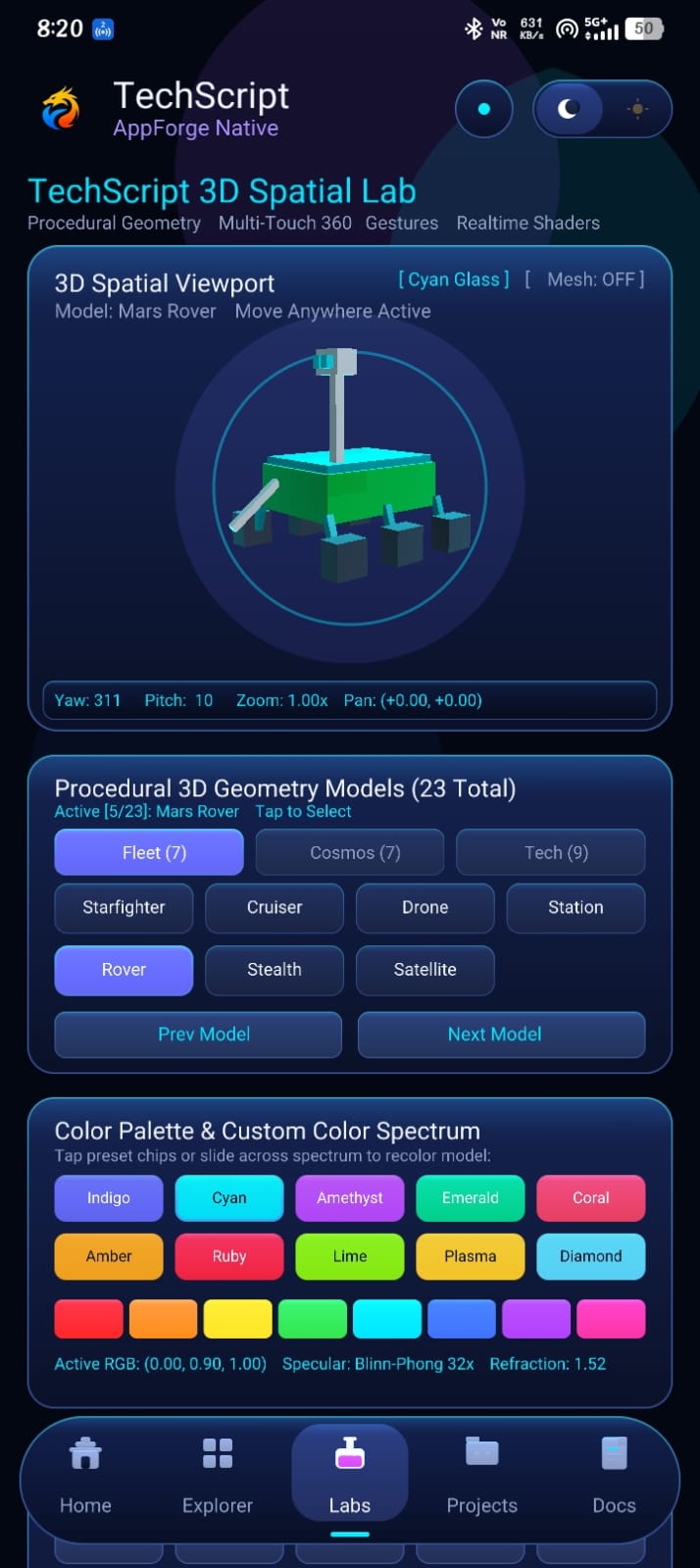 Lab |
AppForge Architecture
flowchart LR
    TXS[".txs Screens"] --> BRIDGE["JNI Native Bridge"]
    BRIDGE --> RENDER["Skia / Vulkan / GL"]
    RENDER --> GLASS["Liquid Glass UI"]
    GLASS --> TOUCH["Zero-Latency Touch"]
AppForge Screen Sample
screen Home:
    background is gradient("indigo", "violet")

    show card:
        show heading "TechScript AppForge"
        show text "Native Android, built in pure .txs"
        show button "Open Lab" called OpenLab

when OpenLab is tapped:
    navigate to Lab
Official Editor Extensions
| Registry | Publisher | Extension ID | VSIX Package | Listing |
|---|
Questions
What is techscript?
Tcode-Motion/techscript is a public repo on GitHub by Tcode-Motion. TechScript is an open-source programming language built with Rust, featuring a native compiler, virtual machine, package manager, and modern tooling. Build CLI, web, GUI, automation, AI, and full-stack applications using clean, readable syntax.
Is techscript open source?
It declares no license on GitHub. Public does not mean open source: without a license, nobody is granted the right to reuse it.





