
arr-userscripts
A personal collection of useful userscript (greasemonkey, tampermonkey, violentmonkey) that integrate with the Arr* stack
- 6
- 2 mo ago
Repo TechSquidTV/arr-userscripts, read from GitHub 1 min ago. TechSquidTV has not joined Take My Repo.
In short
TechSquidTV/arr-userscripts is a public repo on GitHub by TechSquidTV. A personal collection of useful userscript (greasemonkey, tampermonkey, violentmonkey) that integrate with the Arr* stack. It declares no license on GitHub. Public does not mean open source: without a license, nobody is granted the right to reuse it. It is written mainly in TypeScript, has 6 stars and last changed on 2026-09-13. Nobody has reviewed it on Take My Repo yet, which says nothing about its quality. Read from GitHub on 2026-11-24.
Arr* Userscripts
Small browser add-ons that let you send a title you are viewing to your own Sonarr or Radarr library. They run in a userscript manager such as Violentmonkey or Tampermonkey; you do not need to build anything or share your server credentials with this project.
Choose a script
Install the script that matches where and what you browse:
| Script | Use it when you are viewing | Install |
|---|---|---|
| IMDb → Sonarr | a TV series on IMDb | Install IMDb → Sonarr |
| IMDb → Radarr | a movie on IMDb | Install IMDb → Radarr |
| Plex → Sonarr | a TV show in Plex Web | Install Plex → Sonarr |
The IMDb scripts identify the title before showing a button: Sonarr appears for TV series and Radarr appears for movies. They stay out of the way on episodes and pages where IMDb does not give a reliable answer. The Plex script is similarly conservative: it appears for TV shows, not music or movies.
Install in three steps
- Install Violentmonkey or Tampermonkey in your browser.
- Choose an install link above and approve the userscript-manager installation screen.
- Visit a matching IMDb or Plex page, open your userscript manager’s menu, and choose Configure Arr* Userscripts.
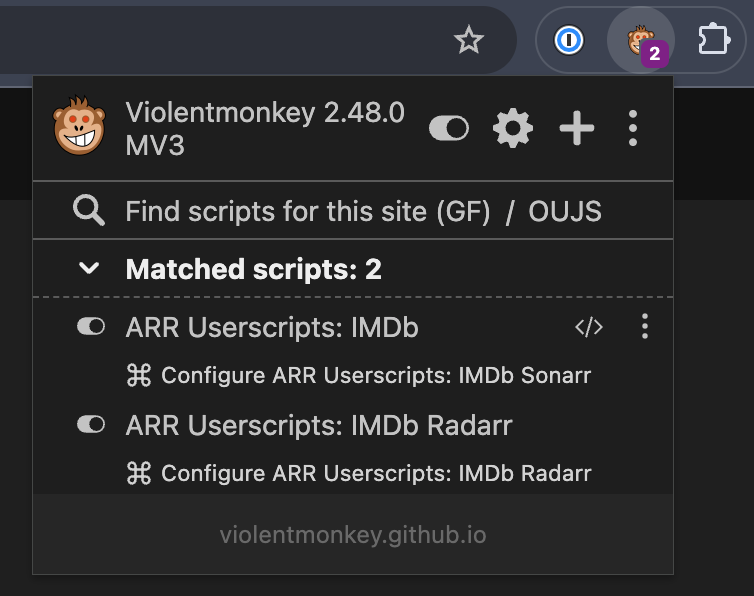
In Violentmonkey, the configuration command appears underneath each matched script. Choose the command for the service you want to set up:

The first field is your Sonarr or Radarr API key. Enter it along with the server address, then press Save settings. The script saves that connection in your userscript manager and immediately loads your root folders and quality profiles. Pick the options you want, set the monitoring/search choices, then press Save settings again to finish. You can still type a folder path and profile ID yourself; the Reload folders and profiles button refreshes the dropdowns whenever you need it.

The Plex script can also use your Plex server address to identify items more accurately. It does not need a root folder or quality profile because it only opens shows that already exist in Sonarr.
What happens next
The scripts do not ask for an API key simply because you installed them. Enter it once in that script’s configuration screen. A server URL alone is not enough: Sonarr and Radarr also need a root folder and quality profile; choose them from the loaded dropdowns or enter those values manually. Then open the right kind of detail page:
- IMDb → Sonarr adds a split button on a main TV-series page. It intentionally does not appear on movie, episode, list, search, or unclear pages.
- IMDb → Radarr adds a split button on a main movie page. It does not appear on TV-series or episode pages.
- Plex → Sonarr adds its Sonarr button on a TV-show detail page, not on movie or music pages.
Clicking an Add button—or Sonarr in Plex—uses the saved connection without another credentials prompt. The Plex screen also accepts an optional Plex server URL and token as a pair; saving them lets the script verify the media type and prefer exact external identifiers. If setup is incomplete, the visible Configure Arr* button opens this guide; it does not silently hide the control.
The IMDb buttons check your library when the page loads. Existing titles turn green and show whether they are monitored, without a checkmark. Otherwise, choose Add to Sonarr or Add to Radarr. The arrow opens Open in Sonarr/Radarr and Refresh library status. The link opens the existing title directly, or an IMDb-ID search if it has not been found in your library. Failed checks show Retry Sonarr/Radarr check and never proceed to add a title.
Behavior change: IMDb now makes an authenticated, read-only library request
automatically on each title page. Adding titles and manually refreshing status
require a real user click; .click() and dispatchEvent() cannot
trigger those requests.
Your API keys stay with you
Your Sonarr/Radarr API key—and the optional Plex token—are saved in the userscript manager’s own value storage, not in the website’s local storage, cookies, downloads, or this repository. This is per script and browser profile, so configure IMDb → Sonarr and Plex → Sonarr separately.
That storage isolates values from the target website under normal browser extension permissions, but it is not a dedicated password vault and its encryption behavior is managed by Violentmonkey or Tampermonkey. Use a scoped Arr API key, protect your browser profile, and do not store a high-value master password here. Reset saved settings removes the saved connection, including its API key/token, for that one script.
Updates
The install links always point to the latest published release. Userscript managers can check them for updates automatically. Saved settings survive an update.
Every script also has a small, readable defaults block directly below its metadata header. You may edit that block before installing, but use the configuration menu for settings you want to keep: an update replaces edited defaults while preserving saved settings.
The public Plex script is the exception when you add a self-hosted Plex Web address:
an edited @match rule is source code, so an official update would replace that
customization. Use one of the options below.
Using a self-hosted Plex Web address
The public Plex download runs on https://app.plex.tv/*. A userscript manager decides
where a script can run before its settings page opens, so adding a Plex server URL in
the dialog cannot enable another web address.
Quick one-time setup
You do not need to build the project or edit minified application code. Install the
public Plex → Sonarr script,
then open that script’s code editor in Violentmonkey or Tampermonkey. At the very top
of the file, inside the readable UserScript header, add one exact line:
// @match https://plex.example.com/*Save the script, then turn off automatic updates for that customized Plex copy. This is the simplest option for one host. A separate unminified release would not improve this workflow: the header is already readable, and an update would still replace a hand-edited rule.
Personal Plex release with automatic updates
For a self-hosted Plex Web address that should continue receiving updates, create a fork of this repository and use its included Publish personal Plex userscript workflow:
-
Open the Actions tab in your fork and enable workflows if GitHub asks.
-
Select Publish personal Plex userscript, choose Run workflow, and enter one or more comma-separated Plex Web origins, such as
https://plex.example.com. -
When it completes, install this script from your fork, replacing the placeholders:
https://github.com/<fork-owner>/<fork-repository>/releases/download/personal-plex/plex.user.js
The workflow creates a secret-free script with your exact @match rules. It updates
the same personal-plex release asset on each run, so your userscript manager can
update it automatically without losing those rules. To take upstream improvements,
sync your fork with this repository and run the workflow again. Plex hostnames are
not credentials; do not put API keys or Plex tokens in the workflow input.
Troubleshooting
- No button appears on IMDb: Open a main movie or TV-series page, rather than an episode, list, or search page. The script deliberately waits until it can identify the title type.
- No button appears in Plex: Open a TV-show detail page. The script does not run for music or movies.
- The request fails: Check the server URL, API key, root folder, and quality profile in Configure Arr* Userscripts. The server must be reachable from your browser.
- No requests appear in IMDb's Network tab: Requests use the userscript
manager's
GM_xmlhttpRequest, so they may appear in the extension's developer tools instead. Filter the page console for Arr* Userscripts to see library checks, results, and failures. Hover over a failed button for the error details, or use the dropdown to open the title in Sonarr/Radarr and refresh its status. - I need to start again: Choose Reset saved settings in the configuration dialog. This clears that script’s local settings, including its saved API key or Plex token.
For contributors
This repository is a pnpm workspace built with Vite+. The scripts share their user-interface, settings, ARR API, and metadata tooling so fixes can benefit every script. Releases are created by GitHub Actions from version tags; release downloads always contain blank defaults and no credentials.
vp install
vp check
vp test
vp run build
The bundled Sonarr, Radarr, and Plex icons are sourced from selfhst/icons.
Questions
What is arr-userscripts?
TechSquidTV/arr-userscripts is a public repo on GitHub by TechSquidTV. A personal collection of useful userscript (greasemonkey, tampermonkey, violentmonkey) that integrate with the Arr* stack.
Is arr-userscripts open source?
It declares no license on GitHub. Public does not mean open source: without a license, nobody is granted the right to reuse it.
Does arr-userscripts run on macOS, Windows or Linux?
Its maker has not tagged a system, so it is unknown here. Its README says what it needs.