
ros2-depth-anything-v3-trt
ROS2 TensorRT Node for Monocular Metric Depth estimation and Point Cloud generation from camera images with Depth Anything V3
- 663
- C++
- Apache-2.0
- 3 mo ago
[arxiv'26] GAE: Learning a Geometry-Native Latent Space for 3D-Consistent World Generation
Repo TencentARC/GAE-GeometricAutoEncoder, read from GitHub 6 min ago. TencentARC has not joined Take My Repo.
TencentARC/GAE-GeometricAutoEncoder is a public repo on GitHub by TencentARC. [arxiv'26] GAE: Learning a Geometry-Native Latent Space for 3D-Consistent World Generation. It declares no license on GitHub. Public does not mean open source: without a license, nobody is granted the right to reuse it. It is written mainly in Python, has 551 stars and last changed on 2026-10-13. Nobody has reviewed it on Take My Repo yet, which says nothing about its quality. Read from GitHub on 2026-11-22.
A link is a mention. It does not prove the project needs that model to run.
In the maintainer's words. Shown from GitHub; Take My Repo does not keep a copy.
🤗 If you find GAE useful, please consider giving this repo a ⭐. Your support helps us share and improve the project. Thank you!
Jiahao Lu1*
Minghao Yin2,3*
Wenbo Hu2†
Hengyu Liu4
Wang Zhao2
Sai-Kit Yeung1
Ying Shan2
Yuan Liu1†
1The Hong Kong University of Science and Technology
·
2ARC Lab, Tencent IEG
3The University of Hong Kong
·
4The University of Texas at Austin
*Equal contribution †Corresponding authors
Camera-controlled video and 3D geometry, decoded from one shared latent.
GAE puts the 3D inductive bias into the generated state itself. Instead of encoding a frame as an image and adding geometry from outside the latent, it compresses frozen geometry-foundation features into a compact per-view latent whose generated states decode jointly into RGB and geometry.
This is the public code release for the paper. Use gae/ for inference,
scripts/demo/ / scripts/train/ / scripts/eval/ / scripts/data/ for the
CLIs, and configs/ for the recipes.
Internal research filenames are documented in docs/CODEBASE.md
and docs/METHOD.md; you do not need them to run GAE.
Two stages, matching Sections 3.1 and 3.2–3.3 of the paper.
Stage 1 — the codec. Depth Anything 3 (DA3) is frozen at both ends: its encoder produces a four-level feature hierarchy, and its DPT head reads depth, rays and point maps back out. GAE learns the state in between:
images ──frozen DA3 encoder──> 4-level features ──level-wise normalize + concat──> X
   X ──GAECodec.encode──> z  (64 or 128 channels, DA3 patch grid)
   z ──GAECodec.decode──> rebuilt 4 levels ──frozen DPT head──> depth / rays / pointmap
   z ──learned RGB head──> RGB
Because the geometry head never trains, geometry reconstruction has to stay readable by the model the features came from. That is a real constraint, not a soft one.
Reconstruction alone does not organize the bottleneck for generation, so the loss also shapes it (Eqs. 8–10):
| term | what it does |
|---|---|
L_tok |
aligns each projected posterior token with C-RADIOv2.5-B; improves transport smoothness and semantic organization |
L_struct |
matches DINOv2-L patch–patch similarity directly in the raw posterior mean; restores the spatial and cross-view structure that token-only alignment collapses |
Both act on the codec bottleneck before the flow model is trained, unlike REPA which aligns intermediate denoiser states during generative training.
Stage 2 — the flow model. The codec is frozen, its posterior mean is standardized per channel, and one conditional flow model is trained over that state with RAEv2-style x-prediction (Eq. 11). Three controls specify the state without evolving with it:
t=0; their outputs are
discarded before the prediction head, and only generated views are integrated.The same backbone therefore covers text-to-image, camera-controlled video, and reference-conditioned novel-view synthesis.
python -m venv .venv && source .venv/bin/activate
pip install -e .            # installs the `gae` API and the src/ modules
# or, for a pinned CUDA env:  pip install -r requirements.txt
If python -m venv .venv fails with Operation not permitted on lib64, the
checkout is on a filesystem that rejects the venv symlink — create the env on
local disk instead (python -m venv /tmp/gae-venv && source /tmp/gae-venv/bin/activate).
run_demo.sh does that automatically (GAE_VENV overrides the location).
Python 3.10–3.12, torch 2.5.1. The DA3-GIANT backbone is pulled from the Hub
on first use. python3.13 is not supported (pip install -e . will refuse it).
pip install -e . puts both gae and the research packages (stage1,
stage2, utils, ...) on the import path, so no PYTHONPATH setup is
needed. The scripts still add src/ themselves, so they also run from a plain
pip install -r requirements.txt checkout.
The released weights turn one image + a prompt into a multi-view video with a consistent 3D point cloud, or a prompt into a single image — the same validated Euler + CFG sampler in both cases. This is the fastest way to see GAE work; the training and evaluation workflows follow in the next section.
Weights live at TencentARC/GAE-D64-1B.
bash scripts/demo/run_demo.sh creates a venv if needed (on the local disk
when the checkout cannot host the lib64 symlink), installs the package,
downloads those weights when ckpts/ is empty, then runs the bundled examples
(examples/scenes/ plus examples/t2i_prompts.txt):
bash scripts/demo/run_demo.sh
bash scripts/demo/run_demo.sh --smoke          # 17 views, 25 steps
bash scripts/demo/run_demo.sh --task i2v
Results go to results/demo/i2v/<scene>/ and results/demo/t2i/.
bash scripts/demo/run_demo.sh --help lists flags. Extra arguments after -- are
forwarded to scripts/demo/generate.py.
python scripts/demo/generate.py \
  --image examples/scenes/forest_lake_trail.jpg \
  --prompt-file examples/scenes/forest_lake_trail.txt \
  --hf-repo TencentARC/GAE-D64-1B \
  --output results/forest --total-views 81
Weights are fetched from Hugging Face on first run (cached under ckpts/).
This writes the generated MP4, trajectory visualization and .ply point cloud.
When running the repository demo, run_demo.sh --task i2v also writes a
cumulative progressive point-cloud video after each scene finishes. The
intermediate geometry sidecars are kept under the scene output directory:
bash scripts/demo/run_demo.sh --task i2v --smoke
# results/demo/i2v/<scene>/<scene>_progressive.mp4
To render an existing prediction manually, pass its generated
*_pred_pointcloud.ply; the adapter resolves the matching *_poses.npz and
*_geom.npz files automatically. The prediction PLY is read at its original
ray-map resolution (--point-stride 1); filtering and voxel merging below
only affect the visualization video, not the source PLY:
python scripts/demo/render_progressive_ply.py \
  results/demo/i2v/forest_lake_trail/scannetpp/000_pred_pointcloud.ply
Use --no-progressive-ply on run_demo.sh to skip this post-processing step.
For dataset-scale generation metrics (FVD / FID / 3D-consistency / MEt3R) see
Training & evaluation below.
Camera Studio adds interactive camera-path authoring: move and rotate cameras with the mouse or WASD, capture keyframes, choose a final view, and preview a smooth trajectory before generation. RGB and progressive 3D play in one synchronized video. The source preview estimates depth from one image; unseen regions are empty and the generated scene may differ from the preview.
Camera Studio uses the resident multi-GPU launcher
and one-time provisioning script, with
eight CUDA GPUs by default. Its models stay loaded between requests. The existing
app.py Space and preset-trajectory demo remain available.
bash scripts/demo/provision_fast_demo.sh        # once (needs uv): .venv, checkpoints, Hub models
HOST=0.0.0.0 PORT=7860 bash scripts/demo/run_fast_demo.sh
The page has three tabs, all served by the same resident models:
.txt descriptions. The decoded depth video is under
Downloads & details.generate_t2i.py default) or CFG and a guidance
scale; depth and a 3D point-cloud view are shown with the image.| Variable | Default | Effect |
|---|---|---|
HOST, PORT |
127.0.0.1, 7860 |
Gradio address |
GRADIO_SHARE |
0 |
1 prints a temporary public gradio.live link |
NGPU |
8 |
GPUs for the resident sampler (even, for CFG parallelism) |
GAE_VENV, GAE_CKPT_DIR |
.venv, ckpts |
Environment and checkpoints from provisioning |
GAE_CAPTION |
1 |
0 disables scene descriptions (and their download) |
CAPTION_MODEL |
Qwen/Qwen2.5-VL-7B-Instruct |
Hub ID or local directory of the caption model |
The service runs with the Hugging Face Hub offline, so any model it loads must already be in the local cache (provisioning downloads them) or be a local path.
For batch 81-view I2V with Ulysses sequence parallelism, without a web page, run the launcher on a machine with at least eight CUDA GPUs:
NGPU=8 SCENE=forest_lake_trail bash scripts/demo/run_ulysses_i2v.sh
CFG_PARALLEL=1 enables even-GPU classifier-free-guidance parallelism;
SAMPLE_STEPS, TOTAL_VIEWS, SCENES, and TRAJECTORIES control the batch
run. The launcher keeps checkpoints and generated results outside the checkout
so the code can be refreshed without deleting model state.
For a multi-GPU web page, use Camera Studio;
scripts/demo/run_serve_ulysses_i2v.sh remains as a lighter page with preset
trajectories only.
python scripts/demo/generate_t2i.py \
  --hf-repo TencentARC/GAE-D64-1B \
  --prompts-file examples/t2i_prompts.txt \
  --output results/t2i
This drives the same sampler as the video generation above with a single view
and no camera rays, then decodes RGB through the codec's RGB head (trained by
the t2i co-train branch). Guidance defaults to internal guidance (--guidance ig,
--ig-scale 2). By default each PNG is also paired with a DPT
_depth.png and _pointcloud.ply (pass --no-pointcloud to skip). Pass
--prompts "a;;b" or --prompts-file and
--num-images N for batches. A curated prompt list lives in
examples/t2i_prompts.txt.
The reconstruction demo encodes each input video with the released codec and decodes RGB, viridis-colored depth, and a point cloud from the predicted depth and rays. Run the complete named scene gallery:
bash scripts/demo/run_demo.sh --task recon
Or reconstruct one scene directly:
python scripts/demo/reconstruct_vae.py \
  --video examples/recon_videos/autumn_waterfall.mp4 \
  --hf-repo TencentARC/GAE-D64-1B \
  --cache-dir ckpts \
  --output results/vae_recon
Outputs are written as results/vae_recon/<scene>/{rgb_recon.mp4,depth_recon.mp4,recon_pointcloud.ply},
plus recon_pointcloud_preview.glb for browser viewers. The binary PLY is built
directly from the decoded depth and ray prediction, with a default 4-pixel
stride (--pc-stride controls the density). Videos are truncated to the first
81 frames, the clip length the codec was trained on (--max-frames changes it).
app.py / Hugging Face Space)This repository includes a single-GPU Gradio app in app.py, which
also runs as a Hugging Face Space (for the eight-GPU resident service with the
camera editor, see Camera Studio). The app has three tabs:
Image → camera-controlled video: uses the images, prompts, and matching camera poses in examples/scenes/; uploaded images can use the default path or the forward, backward, turn-left, and turn-right trajectories.
The I2V Space displays the generated RGB video and the decoded depth visualization video side by side; the final depth frame is also available as a PNG.
The camera-trajectory selector includes the default path plus forward, backward, turn-left, and turn-right motions, with a 3D pose preview.
Text → image: uses the prompts in examples/t2i_prompts.txt and decodes depth plus a point cloud alongside the generated image.
VAE Reconstruction (Codec): reconstructs the named videos in
examples/recon_videos/, displays RGB plus viridis-colored depth videos, and
provides the decoded point cloud as a downloadable PLY.
The app-equivalent direct command is:
python scripts/demo/reconstruct_vae.py \
  --video examples/recon_videos/autumn_waterfall.mp4 \
  --hf-repo TencentARC/GAE-D64-1B \
  --cache-dir ckpts --output results/vae_recon
For uploaded images, the default camera option uses the shipped
forest_lake_trail_poses.npz example path (and its metric translation scale).
Repository scene examples automatically use their matching *_poses.npz file.
Uploaded images can use the default path or a generated forward, backward,
turn-left, or turn-right camera trajectory.
To deploy it, create a new Gradio Space and upload/push this repository. The Space downloads TencentARC/GAE-D64-1B on the first request. A GPU-backed Space is recommended; start with 17 views and 25 sampling steps, then increase to 81 views for the full camera-controlled clip.
The local equivalent is:
pip install -e ".[space]"
python app.py
The core pip install -e . installation intentionally omits the optional
Gradio web-app dependency.
Use this when you want tensors in your own code rather than writing videos from the command line.
from gae import GAE

gae_model = GAE.from_pretrained("TencentARC/GAE-D64-1B")
# or: GAE.from_configs(codec_cfg=..., codec_ckpt=..., flow_cfg=..., flow_ckpt=...)

images = load_your_images()          # [B, V, 3, H, W] in [0, 1]
z = gae_model.encode(images)         # [B, V, C, h, w]  posterior mean
out = gae_model.reconstruct(images)  # {'rgb': ..., 'depth': ...}
GAE.sample() is the Euler + CFG sampler on tensors (reference latents, Plücker
rays, and text). A short script that also writes RGB, depth, and a .ply is
examples/generate_min.py.
For most users the two wrapper scripts below are enough — the steps afterwards are the underlying commands, useful when you need to customize a run.
# --- one-click training ---------------------------------------------------
# Stage 1 codec, Stage 2 flow, or both. `both` runs codec -> latent stats -> flow.
scripts/train/run_train.sh --stage codec --size 64  --gpus 8
scripts/train/run_train.sh --stage flow  --size 128 --gpus 8 --cotrain-t2i   # i2v + T2I
scripts/train/run_train.sh --stage both  --size 64

# --- one-click evaluation -------------------------------------------------
# Default tasks (recon,latent,gen) need only the shipped GAE ckpts + data.
scripts/eval/run_eval.sh --size 64
scripts/eval/run_eval.sh --size 128 --tasks recon,latent --dataset dl3dv_packed
# 3D-consistency / MEt3R / geometry additionally need external recon models,
# supplied through env vars:
VGGT_CKPT=ckpts/vggt.pt PI3_CKPT=ckpts/pi3.pt \
  scripts/eval/run_eval.sh --size 64 --tasks gen,consistency,met3r,geometry
Run them from the repository root with GAE_DATA_ROOT set (see Prepare
RealEstate10K or DL3DV below). scripts/train/run_train.sh --help /
scripts/eval/run_eval.sh --help list every flag; both forward extra arguments
to the underlying Python entry points documented below. A per-script command reference lives in
scripts/README.md.
# Raw RE10K: <source>/{train,test}/<shard>/<scene>/{*.png,transforms.json}
python scripts/data/prepare_data.py re10k \
  --source /datasets/RealEstate10K --output "$GAE_DATA_ROOT/re10k_packed" \
  --split train --workers 8

# Raw DL3DV: <source>/<split>/<scene>/[nerfstudio/]/{images_4,transforms.json}
python scripts/data/prepare_data.py dl3dv \
  --source /datasets/DL3DV-10K --output "$GAE_DATA_ROOT/dl3dv_packed" \
  --workers 8


# ScanNet++ (own loader + depth sidecar) and MVS-Synth (VideoMetaScene schema)
python scripts/data/preprocess_scannetpp.py \
  --source /datasets/scannetpp --output "$GAE_DATA_ROOT/scannetpp_preprocessed" \
  --num-shards 8 --shard-index 0
python scripts/data/preprocess_mvssynth.py \
  --source /datasets/MVS-Synth/GTAV_540 --output "$GAE_DATA_ROOT/mvssynth_packed"

# Required before Flow/DiT training
python scripts/data/export_da3_metric_poses.py \
  --dataset re10k_packed --root "$GAE_DATA_ROOT/re10k_packed" \
  --device cuda:0 --skip-existing
Both produce <scene>/{video.mp4,meta.json,caption.txt}. For the optional
text-to-image co-training data (BLIP3o + ImageNet-1k) use
scripts/data/prepare_t2i_data.py. See docs/DATA.md.
# Recommended: automatically runs codec -> latent statistics -> Flow/DiT
scripts/train/run_train.sh --stage both --size 64 --gpus 8
scripts/train/run_train.sh --stage both --size 128 --gpus 8 --cotrain-t2i
To run the stages separately with the Python entry points:
# 1. Train the GAE-64 codec
python scripts/train/train.py codec --size 64 --gpus 8

# 2. Set this to the checkpoint produced by Step 1, then compute statistics
CODEC_CKPT=/path/to/trained_gae_64_checkpoint.pt
python scripts/train/compute_latent_stats.py \
  --config configs/gae_64.yaml --codec-ckpt "$CODEC_CKPT" \
  --num-batches 500 --output ckpts/latent_stats_gae_64.pt

# 3. Train Flow/DiT with the same frozen codec
python scripts/train/train.py flow --size 64 --gpus 8 --vae-ckpt "$CODEC_CKPT"
The same sequence applies to GAE-128 by using configs/gae_128.yaml,
ckpts/latent_stats_gae_128.pt, and --size 128.
--gpus is the number of GPU processes per node. Multi-node training launches
the same command on every node with a unique --node-rank:
# node 0 (10.0.0.1)
python scripts/train/train.py codec --size 64 --gpus 8 --nnodes 2 --node-rank 0 --master-addr 10.0.0.1 --master-port 29500

# node 1
python scripts/train/train.py codec --size 64 --gpus 8 --nnodes 2 --node-rank 1 --master-addr 10.0.0.1 --master-port 29500
All nodes must see equivalent datasets/configs. Use a shared results directory when checkpoints must persist beyond node-local storage.
The underlying entry points remain scripts/train/train_codec.py and
scripts/train/train_flow.py; pass extra trainer arguments after --. Text-to-image is not a separate stage: it is
co-trained inside the flow (i2v/t2v) model via --cotrain-t2i, which
interleaves single-image T2I steps into the multi-view loop (data prepared in
Prepare RealEstate10K or DL3DV; see docs/DATA.md). The
codec keeps an optional cotrain_t2i block of its own (COTRAIN_T2I=1) for
RGB-decoder text alignment.
On network filesystems, run python scripts/data/build_dataset_index.py --config configs/gae_64.yaml once beforehand to pre-build the loader index caches so rank0
does not block torchrun on a cold scan (idempotent, safe to re-run).
Use the released codec through the public GAE API. The command below downloads
the codec and its geometry dependencies from Hugging Face, reconstructs every
image in examples/scenes/, and writes rgb_recon.png, depth_recon.png, and
recon_pointcloud.ply for each scene. The same script accepts an RGB video and
writes reconstructed RGB/depth MP4 files plus a PLY point cloud; the Gradio VAE tab includes six named representative
d64 step-0018500 evaluation inputs from examples/recon_videos/.
python scripts/demo/reconstruct_vae.py \
  --hf-repo TencentARC/GAE-D64-1B \
  --cache-dir ckpts \
  --all-examples \
  --output results/vae_recon
To test one image:
python scripts/demo/reconstruct_vae.py \
  --image examples/scenes/bedroom.jpg \
  --output results/vae_recon
This is a codec reconstruction test: the input image is encoded to the posterior mean and decoded back to RGB/depth. It does not run the Flow/DiT sampler.
# RGB, feature, depth and camera/geometry reconstruction
python scripts/eval/eval_reconstruction.py \
  --config configs/gae_64.yaml --vae-ckpt ckpts/gae_64.pt \
  --dataset re10k_packed --data-root "$GAE_DATA_ROOT/re10k_packed/test"

# Encode posterior means, then measure rho/kappa/rank/LNC/LDS/CDS
python scripts/eval/encode_latents.py \
  --input "$GAE_DATA_ROOT/re10k_packed/test" \
  --config configs/gae_64.yaml --codec-ckpt ckpts/gae_64.pt \
  --output results/re10k_gae64_latents.pt
python scripts/eval/eval_latent.py \
  --latents gae64=results/re10k_gae64_latents.pt \
  --json results/re10k_gae64_latent_metrics.json
eval_reconstruction.py evaluates geometry decoded by the frozen DA3 DPT head
(depth and recovered camera trajectory). Use eval_geometry.py on dumped
*_geom.npz files for Chamfer and point-map metrics. For camera-conditioned
generation quality and 3D consistency see Evaluate generation quality below.
# 1) Camera-conditioned generation -> Table 5 (FVD / FID / LPIPS / PSNR / SSIM);
#    also dumps point clouds + geometry for the 3D metrics below.
python scripts/eval/eval_generation.py \
  --config configs/flow_gae64.yaml \
  --dit-ckpt ckpts/flow_gae64.pt --vae-ckpt ckpts/gae_64.pt \
  --dataset re10k_packed --data-root "$GAE_DATA_ROOT/re10k_packed" \
  --mode generate --cond-num 1 --num-scenes 64 --num-views 9 \
  --sample-steps 50 --cfg-scale 2.0 \
  --output-dir results/gen_gae64 --save-pointcloud --dump-geometry

# 2) Generated-view 3D consistency + MEt3R -> Table 6 (needs external recon models)
python scripts/eval/eval_3d_consistency.py \
  --pred-dir results/gen_gae64 \
  --dataset re10k_packed --data-root "$GAE_DATA_ROOT/re10k_packed" \
  --vggt-ckpt ckpts/vggt.pt --da3-ckpt ckpts/da3_giant.pt \
  --output-name results/gen_gae64/consistency.json
python scripts/eval/eval_met3r.py --pred-dir results/gen_gae64 \
  --output results/gen_gae64/met3r.json

# 3) Geometry decoded from sampled latents -> Table 7 (needs Pi3)
python scripts/eval/eval_geometry.py \
  --geom-dir results/gen_gae64 --pi3-ckpt ckpts/pi3.pt \
  --output-name results/gen_gae64/geometry.json
Steps 2–3 consume the --output-dir from step 1. Use configs/flow_gae128.yaml
*_128 checkpoints for GAE-128, and --dataset dl3dv_packed for DL3DV.
--vggt-ckpt / --da3-ckpt / --pi3-ckpt are external evaluator weights (not
shipped here). The default --num-scenes 4 --num-views 8 is a smoke setting; the
paper protocol is 64 scenes × 9 views, 1 reference, 50 steps, CFG 2. Because the
released flow weights are a stronger continued-training model these will not
reproduce the paper numbers exactly — see Results. One-click
equivalent: scripts/eval/run_eval.sh --size 64 --tasks gen,consistency,met3r,geometry.Refer to the paper for the reported numbers in each table; they were not
re-measured in this repository. docs/METHOD.md maps every
equation in the paper to the code that implements it, and every table has a
matching scripts/eval/eval_*.py (see the eval steps above).
Checkpoint provenance — read before comparing to the paper. The paper's
generation tables (5, 6, 7) were produced by the specific research flow model
used at submission time. The released flow_gae{64,128}.pt are a stronger
continued-training model — larger resolution, more frames, and more training
data. Consequently scripts/eval/eval_generation.py, eval_3d_consistency.py,
eval_met3r.py, and eval_geometry.py will not reproduce the exact
paper numbers on these weights; they are expected to match or exceed them.
Reproducing Tables 5–7 verbatim requires the original research checkpoint,
which is not part of this release.
The latent-diagnostic (Tables 1, 2 — scripts/eval/eval_latent.py) and
reconstruction (Tables 3, 4 — scripts/eval/eval_reconstruction.py,
scripts/eval/eval_geometry.py) metrics depend only on the codec
(gae_{64,128}.pt), not the flow model, so they are unaffected by the flow
continued-training and track the paper's codec results directly.
gae/                      public API (GAE, load_codec, load_flow)
assets/                   teaser figure
configs/                  gae_{64,128}.yaml, flow_gae{64,128}.yaml
scripts/demo/             run_demo.sh, generate.py, generate_t2i.py
scripts/train/            train_codec, train_flow, run_train.sh
scripts/eval/             eval_*, smoke_test, run_eval.sh
scripts/data/             packing, preprocessing, DA3 poses
src/stage1/               GAECodec + frozen DA3
src/stage2/models/dit*.py GAEFlow / GAEFlowTemporal
src/utils/train_runtime.py  DDP / ckpt / latent-stats helpers
docs/                     METHOD.md, DATA.md, CODEBASE.md
See docs/CODEBASE.md for files that exist only for
checkpoint compatibility (DiT-v4 inheritance, old trainer modules, GAN stub).
If you find GAE useful in your research, please cite:
@misc{lu2026gaelearninggeometrynativelatent,
      title={GAE: Learning a Geometry-Native Latent Space for 3D-Consistent World Generation},
      author={Jiahao Lu and Minghao Yin and Wenbo Hu and Hengyu Liu and Wang Zhao and Sai-Kit Yeung and Ying Shan and Yuan Liu},
      year={2026},
      eprint={2609.24981},
      archivePrefix={arXiv},
      primaryClass={cs.CV},
      url={https://arxiv.org/abs/2609.24981},
}
See LICENSE.txt for the terms of use.
TencentARC/GAE-GeometricAutoEncoder is a public repo on GitHub by TencentARC. [arxiv'26] GAE: Learning a Geometry-Native Latent Space for 3D-Consistent World Generation.
It declares no license on GitHub. Public does not mean open source: without a license, nobody is granted the right to reuse it.
Its maker has not tagged a system, so it is unknown here. Its README says what it needs.
Open "Take it" on its page: Take My Repo writes an install plan for your machine and hands it to your AI agent (Claude Code, Codex or Cursor), which asks you before each step. Take My Repo has not tested it on any machine.
Its last change on GitHub was on 2026-10-13. Take My Repo does not judge from that whether it is maintained.
ROS2 TensorRT Node for Monocular Metric Depth estimation and Point Cloud generation from camera images with Depth Anything V3
Nobody has reviewed it on Take My Repo yet, which says nothing about its quality.
World's first open-source, agentic video production system. 12 production pipelines, 100+ tools, 700+ agent skill and production-knowledge files. Turn your AI coding assistant into a full video production studio.

[ECCV 2026] Track4World: Feedforward World-centric Dense 3D Tracking of All Pixels

A Collection of Variational Autoencoders (VAE) in PyTorch.
Clone any viral video with AI agents. Not just a script, the whole workflow: swap the face, the words, the B-roll, ship 100 variants in one command, and get your 100M views.
GFPGAN aims at developing Practical Algorithms for Real-world Face Restoration.
InstantMesh: Efficient 3D Mesh Generation from a Single Image with Sparse-view Large Reconstruction Models
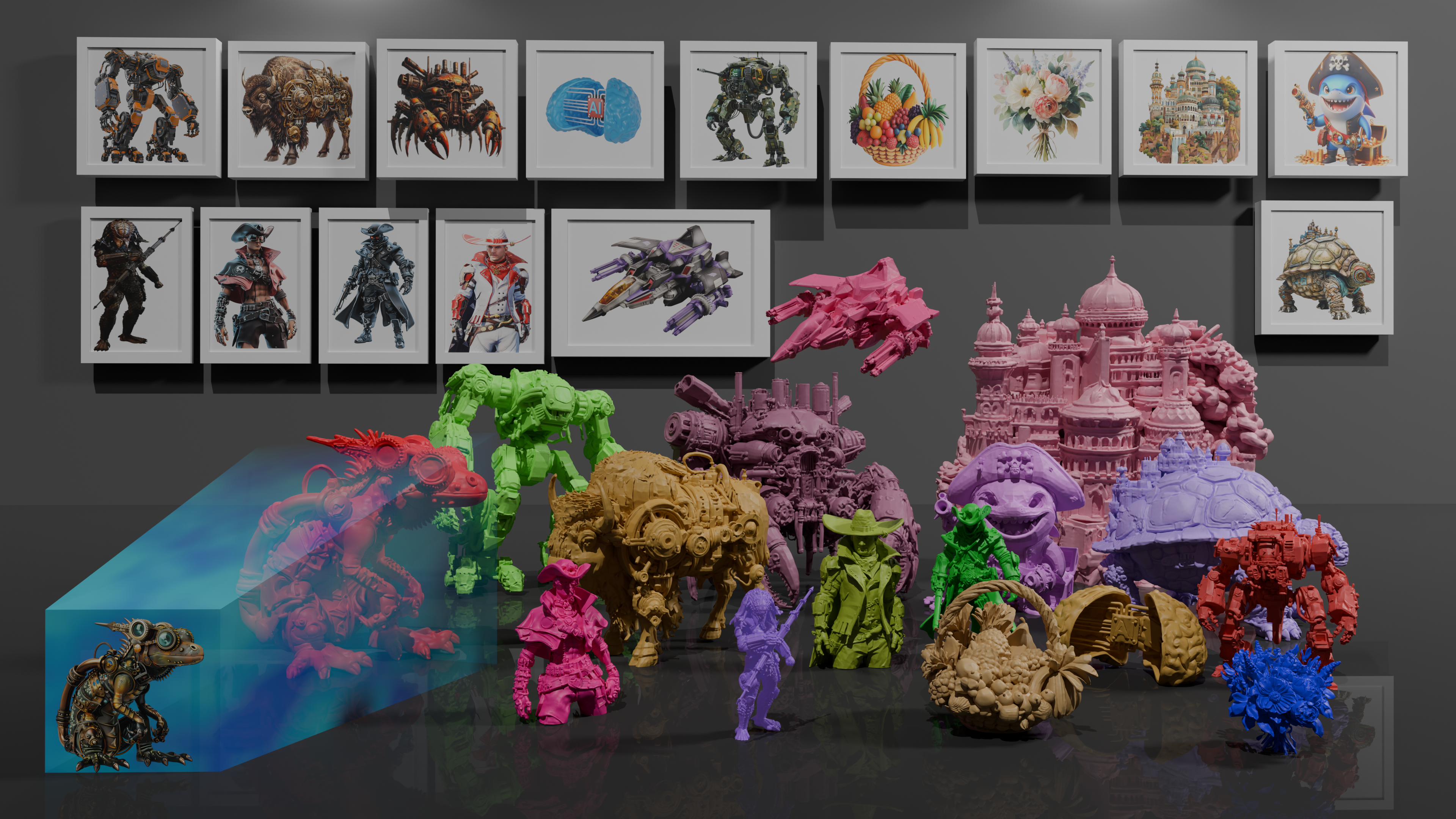
[SIGGRAPH 2026] Pixal3D: Pixel-Aligned 3D Generation from Images

[ECCV 2024] The official implementation of paper "BrushNet: A Plug-and-Play Image Inpainting Model with Decomposed Dual-Branch Diffusion"
This page is also available as structured data, with the same sources and dates.
/api/v1/resources/gh/TencentARC/GAE-GeometricAutoEncoderTake My Repo has not tested this on your machine. Requirements come from the project's own documentation.


