
AIOStreams
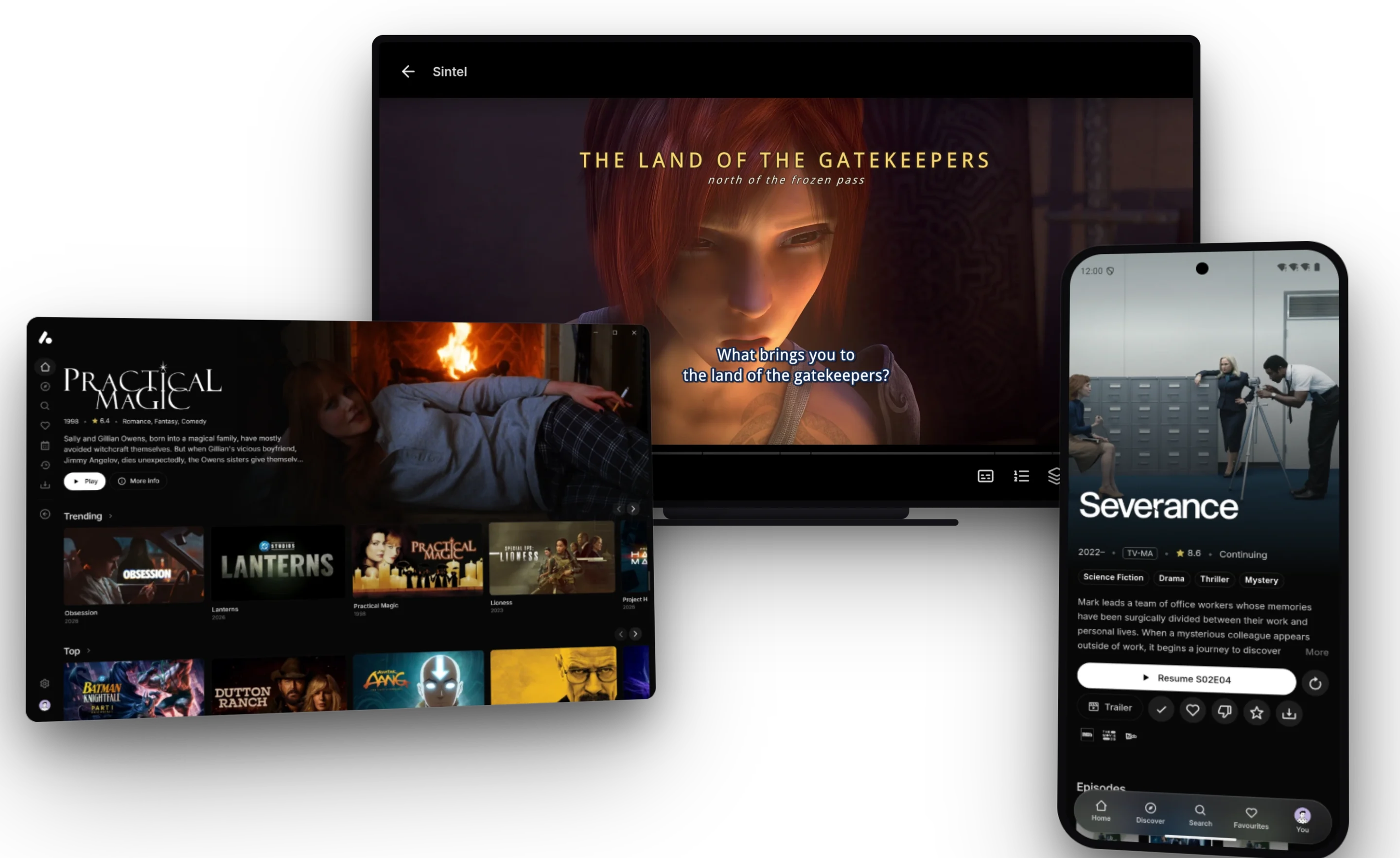
AIOStreams brings your Stremio addons, debrid services and Usenet together into one list, filtered, sorted and formatted your way, and plays it in Stremio or in its own apps for every screen.
- 3.3k
- TypeScript
- AGPL-3.0
- 8 h ago
Stremio and Nuvio addon for movie and series recommendation
Repo TimilsinaBimal/Watchly, read from GitHub 1 min ago. TimilsinaBimal has not joined Take My Repo.
TimilsinaBimal/Watchly is a public repo on GitHub by TimilsinaBimal. Stremio and Nuvio addon for movie and series recommendation. It declares the MIT license on GitHub. It is written mainly in Python, has 152 stars and last changed on 2026-11-13. Nobody has reviewed it on Take My Repo yet, which says nothing about its quality. Read from GitHub on 2026-11-21.
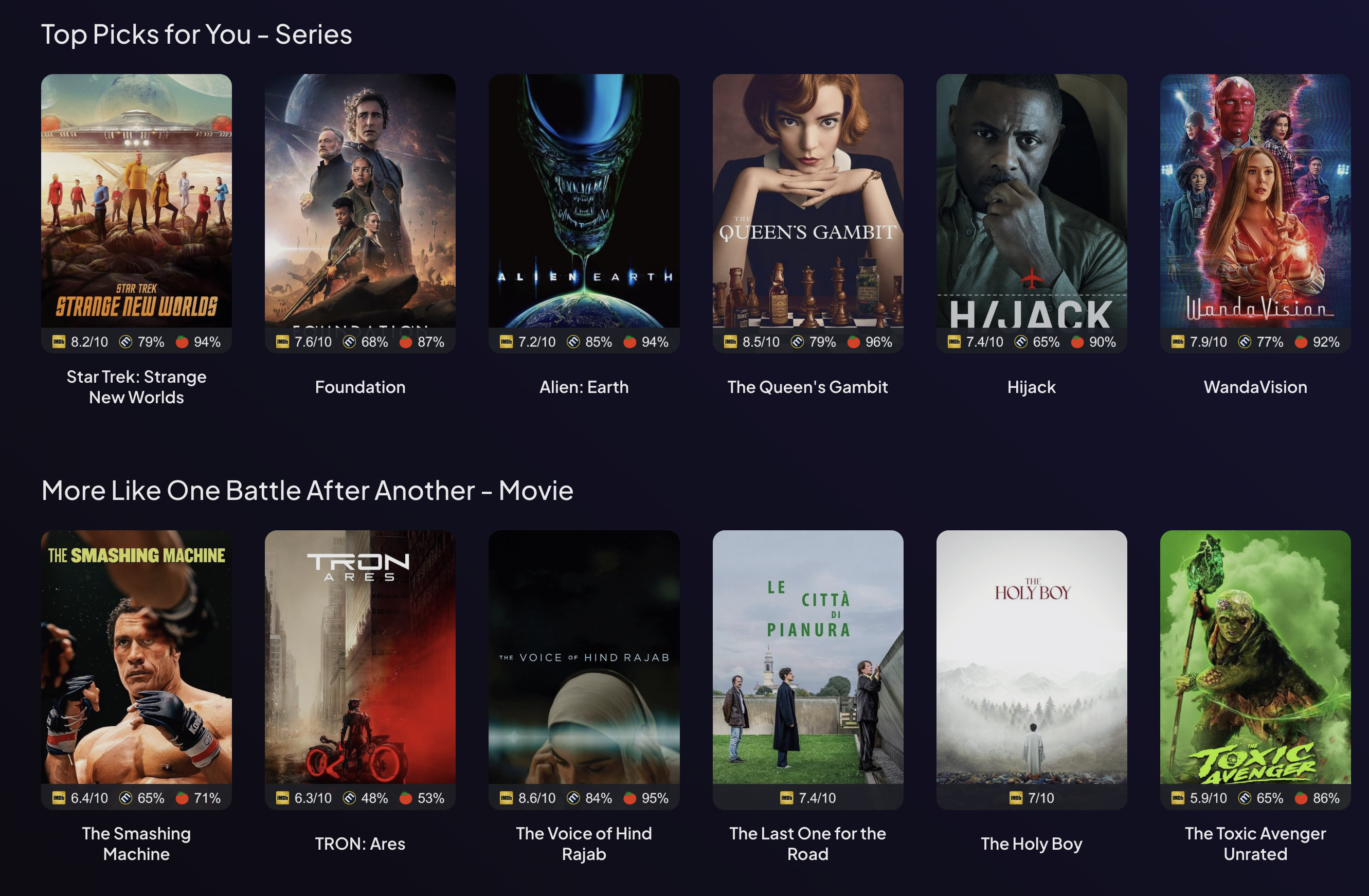
Watchly is a Stremio catalog addon that fills your Stremio home with personalized movie and series recommendations built from your own watch history. It reads what you've watched, rated, and loved — from Stremio, Trakt, Simkl, MDBList, or Nuvio — builds a numerical taste profile from it, and serves a set of recommendation rows ("Top Picks for You", "Because you watched …", genre and keyword catalogs, and more) using metadata from TMDB.
Everything is configured through a web page; you paste the resulting manifest URL into Stremio once, and the catalogs keep refreshing in the background.
/configure page and connect a history source (Stremio login, Trakt/Simkl via OAuth, or an MDBList API key). Your credentials are encrypted and stored in Redis under a short opaque token. That token is embedded in your personal manifest URL.Each user's state is keyed entirely on their token. You can switch history sources at any time; the library and profile are rebuilt from the new source.
You choose which of these to enable on the configure page. Each can be toggled per content type (movies / series), renamed, hidden from the home page, or shuffled.
| Catalog | ID | What it shows |
|---|---|---|
| Top Picks for You | watchly.rec |
Your strongest personalized recommendations, combining profile-driven TMDB discovery with picks seeded from your library. |
| Because you watched / loved | watchly.item |
Titles similar to one recent item. The seed is chosen at random from your 3 most-recent loved + 3 most-recent watched items; the row title becomes "Because you loved X" or "Because you watched X" accordingly. |
| Genre & Keyword Catalogs | watchly.theme |
Dynamic, Netflix-style rows built from your favorite genres, keywords, and countries (e.g. "American Horror", "Based on a Novel"). Up to ~4 rows each for movies and series, varying with your history. |
| From your favourite Creators | watchly.creators |
Recommendations from directors and lead actors who recur across multiple items in your library — not one-offs. |
| Based on what you loved | watchly.all.loved |
Recommendations drawn from your entire set of loved items. |
| Based on what you liked | watchly.liked.all |
Recommendations drawn from your entire set of liked items. |
Watchly works for users who keep their library in different places. Pick one source per install:
NUVIO_BASE_URL / NUVIO_PUBLISHABLE_KEY to point Watchly at your backend (see Configuration reference).A single install uses exactly one source at a time. Switching sources rebuilds your library and profile from the new account.
All of these are set on the configure page and stored with your token:
mainstream, balanced, gems (highly rated, less popular), or all. Controls the quality/popularity band candidates must fall in.
Find more screenshots here.
Docker is the recommended way to self-host. Watchly requires a Redis instance; a server TMDB API key is optional but recommended.
Create a docker-compose.yml:
services:
  redis:
    image: redis:7-alpine
    container_name: watchly-redis
    restart: unless-stopped
    volumes:
      - redis_data:/data

  watchly:
    image: ghcr.io/timilsinabimal/watchly:latest
    container_name: watchly
    restart: unless-stopped
    ports:
      - "8000:8000"
    env_file:
      - .env
    depends_on:
      - redis

volumes:
  redis_data:
Create a .env file (see the configuration reference for all options):
# Required
TOKEN_SALT=generate_a_long_random_secret
HOST_NAME=https://your-public-addon-url

# Optional, recommended
TMDB_API_KEY=your_tmdb_api_key_here

# Redis (matches the compose service name)
REDIS_URL=redis://redis:6379/0

# Optional — enable Trakt / Simkl (see "Optional integrations")
# TRAKT_CLIENT_ID=
# TRAKT_CLIENT_SECRET=   # only for legacy (non-PKCE) Trakt apps
# SIMKL_CLIENT_ID=
# SIMKL_CLIENT_SECRET=
HOST_NAME must be the public URL where the addon is reachable. It is used to build OAuth callback URLs and the manifest URL, so it has to match what Stremio (and Trakt/Simkl) will see.
Start it:
docker-compose up -d
Configure and install:
Open http://localhost:8000/configure (or your HOST_NAME), connect a history source, pick your catalogs, and paste the generated manifest URL into Stremio.
A Community Applications-style template lives at unraid/watchly.xml.
https://raw.githubusercontent.com/TimilsinaBimal/Watchly/main/unraid/watchly.xml — or add
https://github.com/TimilsinaBimal/Watchly under Template Repositories and pick Watchly from the template list.redis://YOUR-UNRAID-IP:6379/0), and the host name your Stremio clients will reach the addon on.Watchly keeps every account, cache and rendered row in Redis, so it needs one it can reach on every request.
redis:7-alpine service in the compose file above costs nothing, has no command or connection limits, and never gets deleted for being idle.Roughly how much a user costs: serving a cached row takes about 3 commands (alias lookup, warm-up check, catalog read), so a home screen of ~10 rows plus the manifest is ~35. Each row is rebuilt once a day, about 10 more commands per row. A user who opens Stremio a few times a day comes to about 150–250 commands, or 5–8K a month.
| Upstash free | Redis Cloud free (Deploy button) | Docker Redis | |
|---|---|---|---|
| Commands | 500K / month (~60–100 users) | 100 ops/sec | no limit |
| Data | 256 MB | 30 MB | your disk |
| Connections | not published | 30 | no limit |
| TLS | always on (rediss://) |
not available on free | local network |
| Idle database | archived after 30 days, restorable | deleted after 14 days without commands | never |
| Next step up | pay as you go, $0.20 per 100K commands | paid plans from $5 / month | — |
Sources: Upstash pricing, Upstash FAQ, Redis Cloud Essentials limits, Redis Cloud TLS, Redis pricing. Checked September 2026; confirm current limits before you pick.
Redis Cloud's free plan is the weaker fit on Vercel: each function instance opens up to REDIS_MAX_CONNECTIONS (20) connections, so two instances can exhaust its 30, and a home screen requests every row at once, which a few users together can push past 100 ops/sec. It is fine for trying Watchly out; switch to Upstash before you share the instance.
iad1 (Washington, D.C.), so AWS us-east-1 is the usual choice.rediss://default:<password>@<host>:<port> URL from the redis-cli snippet. Don't use the REST URL and token (UPSTASH_REDIS_REST_*, KV_REST_API_*): they are for Upstash's HTTP API, which Watchly's Redis client can't speak.REDIS_URL to that URL.The rediss:// scheme turns on TLS, and redis-py handles it with no extra settings.
The Deploy button's Redis store creates a free Redis Cloud database and adds REDIS_URL to the project for you. On the free plan, set REDIS_MAX_CONNECTIONS=10 so two instances stay under its 30-connection limit, and remember that the database is deleted after 14 days with no commands.
Vercel detects the FastAPI app with no extra config and runs it on Python 3.12, the version pyproject.toml and .python-version pin. A running instance also serves this guide at /self-host.
REDIS_URL to the project. For an instance you'll keep, skip it and set up Upstash instead (see Choose a Redis).TOKEN_SALT (for example openssl rand -hex 32) and HOST_NAME (https://<project-name>.vercel.app), then deploy. TMDB_API_KEY is optional but recommended: add it under Settings → Environment Variables (see Configuration reference).HOST_NAME, fix it under Settings → Environment Variables.https://<your-domain>/configure and set up your catalogs.Leave APP_ENV unset: the production default refuses to start with the placeholder TOKEN_SALT.
Limits. Watchly finishes some work after it has answered a request, and Vercel's Python runtime has no way to keep the function alive for it, so that work may be paused or cut short:
If you want background refreshes to run reliably, use Docker.
All settings are environment variables. Only TOKEN_SALT and HOST_NAME are strictly required, plus a reachable Redis.
| Variable | Description |
|---|---|
TMDB_API_KEY |
Optional, recommended. Each user enters their own TMDB key on the configure page; this server key is the fallback. Without it the configure page offers English only, and accounts saved before the page asked for a key have none to use. |
TOKEN_SALT |
Secret used to derive the encryption key for stored credentials. Set a long random value — the default change-me is insecure. |
HOST_NAME |
Public base URL of the addon (used for manifest and OAuth callback URLs). |
| Variable | Default | Description |
|---|---|---|
REDIS_URL |
redis://redis:6379/0 |
Redis connection URL. Redis is required. |
REDIS_MAX_CONNECTIONS |
20 |
Max Redis connections per process. |
REDIS_CONNECTIONS_THRESHOLD |
100 |
Background Redis-heavy jobs back off above this many total clients. |
REDIS_TOKEN_KEY |
watchly:token: |
Key prefix for stored user tokens. |
| Variable | Default | Description |
|---|---|---|
TRAKT_CLIENT_ID / TRAKT_CLIENT_SECRET |
— | Trakt OAuth app credentials; enable Trakt as a history source. The secret is only needed for legacy apps — PKCE apps (the Trakt default now) have none. |
SIMKL_CLIENT_ID / SIMKL_CLIENT_SECRET |
— | Simkl OAuth app credentials; enable Simkl as a history source. |
NUVIO_BASE_URL / NUVIO_PUBLISHABLE_KEY |
Nuvio cloud API / its key | Point the Nuvio history source and its sign-in flow at a self-hosted Nuvio backend. Set both together — the server reads history and installs the addon, the browser creates the session. |
| Variable | Default | Description |
|---|---|---|
PORT |
8000 |
HTTP port. |
ADDON_ID |
com.bimal.watchly |
Stremio addon ID in the manifest. |
ADDON_NAME |
Watchly |
Display name in the manifest. |
APP_ENV |
production |
development, production, or vercel. |
TOKEN_TTL_SECONDS |
0 |
Token expiry in seconds; 0 = never expire. |
AUTO_UPDATE_CATALOGS |
true |
Refresh dynamic catalogs in the background on a schedule. |
CATALOG_REFRESH_INTERVAL_SECONDS |
86400 |
Background refresh interval (24 h). |
CATALOG_CACHE_TTL |
60 |
Cache-Control max-age, in seconds, that Stremio may reuse a catalog response for. |
CATALOG_STALE_TTL |
604800 |
Soft-expiration fallback for cached catalogs (7 d). |
RECOMMENDATION_SOURCE_ITEMS_LIMIT |
10 |
Number of library items used to seed recommendations. |
LIBRARY_ITEMS_LIMIT |
20 |
Library item cap used in parts of the pipeline. |
ANNOUNCEMENT_HTML |
"" |
Optional HTML banner shown on the configure page. |
ALLOW_SIGNUPS |
true |
Set to false to lock the instance to existing accounts; new signups are rejected. |
These are only needed if you want the corresponding feature; Watchly runs fine with just TMDB + Redis.
HOST_NAME/auth/trakt/callback and put the client ID in TRAKT_CLIENT_ID. New Trakt apps use PKCE and are not issued a secret; set TRAKT_CLIENT_SECRET only if your app has one.HOST_NAME/auth/simkl/callback and put the credentials in SIMKL_CLIENT_ID / SIMKL_CLIENT_SECRET.Dependencies are managed with uv; a requirements.txt is kept in sync for non-uv environments. Python 3.12+ is required, and a running Redis is needed for most functionality.
# Clone
git clone https://github.com/TimilsinaBimal/Watchly.git
cd Watchly

# Install dependencies
uv sync

# Run the dev server (auto-reload)
uv run main.py --dev
# or
uvicorn app.core.app:app --reload
Create a .env with at least TMDB_API_KEY, TOKEN_SALT, HOST_NAME, and REDIS_URL before running. The configure UI is served at /configure.
# Tests (pytest is installed into the venv on demand)
PYTHONPATH=. uv run --with pytest pytest tests/
PYTHONPATH=. uv run --with pytest pytest tests/test_catalog_endpoint.py -v

# Lint / format (also enforced by pre-commit on commit)
pre-commit run --all-files
black .      # line length 120, py312
isort .      # black profile
flake8 .     # config in setup.cfg
Watchly is a FastAPI service that speaks the Stremio addon protocol. The request flow for every authenticated endpoint is:
app/services/context.py:load_user_context — decrypts the token, parses settings, resolves auth, and builds the LibraryCollection from the configured watch_history_source.app/services/recommendation/catalog_service.py — routes the catalog ID to a recommendation engine (Top Picks, theme, item, creators, all-loved/liked).The taste-profile pipeline lives in app/services/profile/, all external HTTP goes through app/core/base_client.py:BaseClient (retries, timeouts, structured errors), and Redis (app/services/user_cache.py, app/services/redis_service.py) is the source of truth for user state.
app/
  api/            # FastAPI routers: manifest, catalog, tokens, oauth, dashboard, validation, health …
  core/           # app setup, config/settings, base HTTP client, security, constants
  models/         # Pydantic models (library, profile, …)
  services/
    profile/      # taste-profile builder
    recommendation/ # catalog routing + per-type engines, scoring, diversity, filtering
    poster_ratings/ # RPDB / Top Posters / custom overlays
    stremio/      # Stremio library + auth
    tmdb/         # TMDB client, genres, countries
    …             # trakt, simkl, gemini, translation, caching, catalog updater
  static/, templates/  # the configure UI and dashboard
| Endpoint | Purpose |
|---|---|
GET /configure |
Web UI for setup and catalog selection. |
GET /{token}/manifest.json |
Per-user Stremio manifest. |
GET /{token}/catalog/{type}/{id}.json |
Catalog data for a content type and catalog ID. |
POST /tokens/ |
Create a token from submitted credentials/settings. |
GET /auth/trakt, GET /auth/simkl |
OAuth start; /callback variants complete the flow. |
GET /{token}/dashboard/data |
User dashboard data. |
GET /health, GET /stats |
Readiness probe and usage stats. |
Contributions of all sizes are welcome!
If you find Watchly useful, please consider supporting the project:
Found a bug or have a feature request? Please open an issue on GitHub.
Thank you to everyone who has contributed to the project!
Special thanks to The Movie Database (TMDB) for the rich metadata that powers Watchly's recommendations, and to Trakt and Simkl for their history APIs.
TimilsinaBimal/Watchly is a public repo on GitHub by TimilsinaBimal. Stremio and Nuvio addon for movie and series recommendation.
It declares the MIT license on GitHub.
Its maker has not tagged a system, so it is unknown here. Its README says what it needs.
Open "Take it" on its page: Take My Repo writes an install plan for your machine and hands it to your AI agent (Claude Code, Codex or Cursor), which asks you before each step. Take My Repo has not tested it on any machine.
Its last change on GitHub was on 2026-11-13. Take My Repo does not judge from that whether it is maintained.
Nobody has reviewed it on Take My Repo yet, which says nothing about its quality.
AIOStreams brings your Stremio addons, debrid services and Usenet together into one list, filtered, sorted and formatted your way, and plays it in Stremio or in its own apps for every screen.
A high-performance proxy server for streaming media, supporting HTTP(S), HLS, and MPEG-DASH with real-time DRM decryption, acestream, xtreamcode proxy
Self-hosted server that turns your Telegram channels into a multi-user Stremio & Nuvio addon: web panel, catalogs, tokens, subscriptions. Updates: t.me/TGMediaServer
Self-hosted Telegram MTProto stream bridge and local file downloader for Stremio, Nuvio, addon-based music players such as Eclipse and BitChord, and web browsers.
A media server that holds no media. One install serves Plex, Jellyfin, Emby, Infuse, Swiftfin, Silo and Stremio apps, streaming the TMDB catalogue on demand from your debrid accounts or Usenet.
Blurring the background of an Image using Image Segmentation Algorithms.
Project Mainly focused for Visit Nepal 2020. Where Visitors can find the details of famous places of Nepal, Nearby Hotels, Activities. Also Visitors can create their Profile and Share their journey to Nepal.
Classify News Articles in different Categories Using NLP Techniques!