
Maple.Json.ObjectAsPrimitiveConverter
Provides the ObjectAsPrimitiveConverter for System.Text.Json that allows to serialize and deserialize objects properties as using primitive types.
- 0
- MIT
- 6 wk ago
Repo TomMaple/Maple.Json.ObjectAsPrimitiveConverter, read from GitHub 18 h ago. TomMaple has not joined Take My Repo.
In short
TomMaple/Maple.Json.ObjectAsPrimitiveConverter is a public repo on GitHub by TomMaple. Provides the ObjectAsPrimitiveConverter for System.Text.Json that allows to serialize and deserialize objects properties as using primitive types. It declares the MIT license on GitHub. It is written mainly in C#, has 0 stars and last changed on 2026-10-14. Nobody has reviewed it on Take My Repo yet, which says nothing about its quality. Read from GitHub on 2026-11-24.
Maple.Json.ObjectAsPrimitiveConverter
Provides the ObjectAsPrimitiveConverter for System.Text.Json that allows to serialize and deserialize objects properties using primitive types.
It is based on the implementation from: https://stackoverflow.com/a/65974452
Give it a star ⭐
Do you like it? Show your support by giving this project a star!
How it works
Consider the following JSON as an example:
{
  "NullProperty": null,
  "StringProperty": "Hello, World!",
  "IntProperty": -234,
  "DecimalProperty": 123.456,
  "ArrayProperty": [1, null, "abc", true]
}
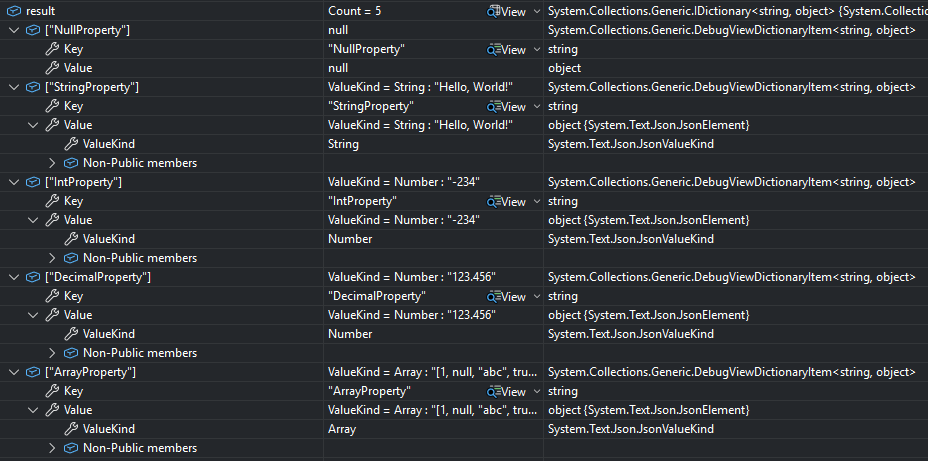
When using System.Text.Json to deserialize this JSON to an object, the result value will look like this:

When using System.Text.Json to deserialize this JSON to an IDictionary<string, object>, the result value will look like this:
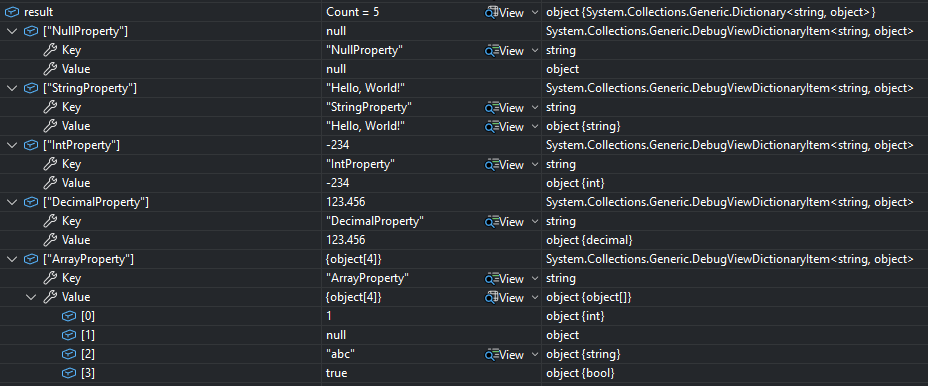
When using System.Text.Json to deserialize this JSON to an object with the ObjectAsPrimitiveConverter, the result value will look like this:
Quick Start
Adding the NuGet package
Add the Maple.Json.ObjectAsPrimitiveConverter package to your project using the NuGet Package Manager in your IDE or the dotnet tool in the console:
dotnet add package Maple.Json.ObjectAsPrimitiveConverter
Using the ObjectAsPrimitiveConverter
In a method to deserialize JSON to an object:
var result = JsonSerializer.Deserialize<object>(json, new JsonSerializerOptions
{
    Converters = { new ObjectAsPrimitiveConverter() }
});
Global settings
ASP.NET Core controller-based application
builder.Services.AddControllers()
    .AddJsonOptions(options =>
    {
        options.JsonSerializerOptions.Converters.Add(new ObjectAsPrimitiveConverter());
    });
ASP.NET Core minimal API application
builder.Services.ConfigureHttpJsonOptions(options =>
{
    options.SerializerOptions.Converters.Add(new ObjectAsPrimitiveConverter());
});
Azure Functions (isolated worker model) application
builder.Services.Configure<WorkerOptions>(options =>
{
    options.SerializerOptions.Converters.Add(new ObjectAsPrimitiveConverter());
});
Azure Functions (isolated worker model) application with ASP.NET Core integration
builder.Services.Configure<Microsoft.AspNetCore.Http.Json.JsonOptions>(options =>
{
    options.SerializerOptions.Converters.Add(new ObjectAsPrimitiveConverter());
});
Configuration
new ObjectAsPrimitiveConverter(floatFormat, unknownNumberFormat, detectDateTime, objectFormat);
Detect date-time
| Name | Value | Description |
|---|---|---|
| None | 0 | Do not detect date-time values. |
| DateTimeOffset | 1 | Detect date-time values with timezone and deserialize them as System.DateTimeOffset (DateTimeOffset) values. |
| DateTime | 2 | Detect date-time values without timezone and deserialize them as System.DateTime (DateTime) values. |
| DateOnly | 4 | Detect date values without time and deserialize them as System.DateOnly (DateOnly) values. |
| TimeOnly | 8 | Detect time values without date and deserialize them as System.TimeOnly (TimeOnly) values. |
Float format
| Name | Value | Description |
|---|---|---|
| Decimal | 0 | Serialize a floating-point number as a System.Decimal (decimal) value. |
| Double | 1 | Serialize a floating-point number as a System.Double (double) value. |
| Single | 2 | Serialize a floating-point number as a System.Single (float) value. |
Object format
| Name | Value | Description |
|---|---|---|
| Dictionary | 0 | Serialize an object as a System.Collections.Generic.IDictionary<string, object> value. |
| Expando | 1 | Serialize an object as a System.Dynamic.ExpandoObject value. |
Unknown number format
| Name | Value | Description |
|---|---|---|
| Error | 0 | Throw an exception when an unknown number format is detected. |
| JsonElement | 1 | Serialize an unknown number format as a System.Text.Json.JsonElement (JsonElement) value. |
Type mapping
When deserializing with the ObjectAsPrimitiveConverter, each JSON value is converted to a CLR type as follows:
| JSON value | CLR type |
|---|---|
null |
null |
true / false |
System.Boolean (bool) |
| String | System.String (string), or a date/time type when detection is enabled and the value matches |
| Integer number | The smallest of System.Int32 (int), System.Int64 (long), or System.Numerics.BigInteger (BigInteger) that can represent the value |
| Floating-point number | decimal, double, or float, depending on the Float format |
| Number that cannot be represented | Throws, or produces a JsonElement, depending on the Unknown number format |
| Array | System.Object[] (object[]) whose elements are converted using these same rules |
| Object | An IDictionary<string, object> or an ExpandoObject, depending on the Object format, whose values are converted using the same rules |
Integer numbers are widened only as needed: values that fit in int become int, larger values that fit in long become long, and values beyond long become BigInteger.
A number is treated as floating-point when it contains a decimal point or an exponent, so values written in exponent notation without a decimal point (for example 1e5 or 5e-1) are converted using the Float format.
Comments
The converter honours the ReadCommentHandling setting of the JsonSerializerOptions:
JsonCommentHandling.Disallow(the default) — a comment causes aJsonException.JsonCommentHandling.Skip— comments are ignored, including comments between array elements, between object members, and immediately before a closing]or}.
Comments never appear in the deserialized result.
var result = JsonSerializer.Deserialize<object>(json, new JsonSerializerOptions
{
    ReadCommentHandling = JsonCommentHandling.Skip,
    Converters = { new ObjectAsPrimitiveConverter() }
});
Learn More
Documentation
See also
Questions
What is Maple.Json.ObjectAsPrimitiveConverter?
TomMaple/Maple.Json.ObjectAsPrimitiveConverter is a public repo on GitHub by TomMaple. Provides the ObjectAsPrimitiveConverter for System.Text.Json that allows to serialize and deserialize objects properties as using primitive types.
Is Maple.Json.ObjectAsPrimitiveConverter open source?
It declares the MIT license on GitHub.