rea
Reverse engineer anything with agents, from app behavior down to native binaries.
- 477k
- TypeScript
- MIT
- 4 h ago
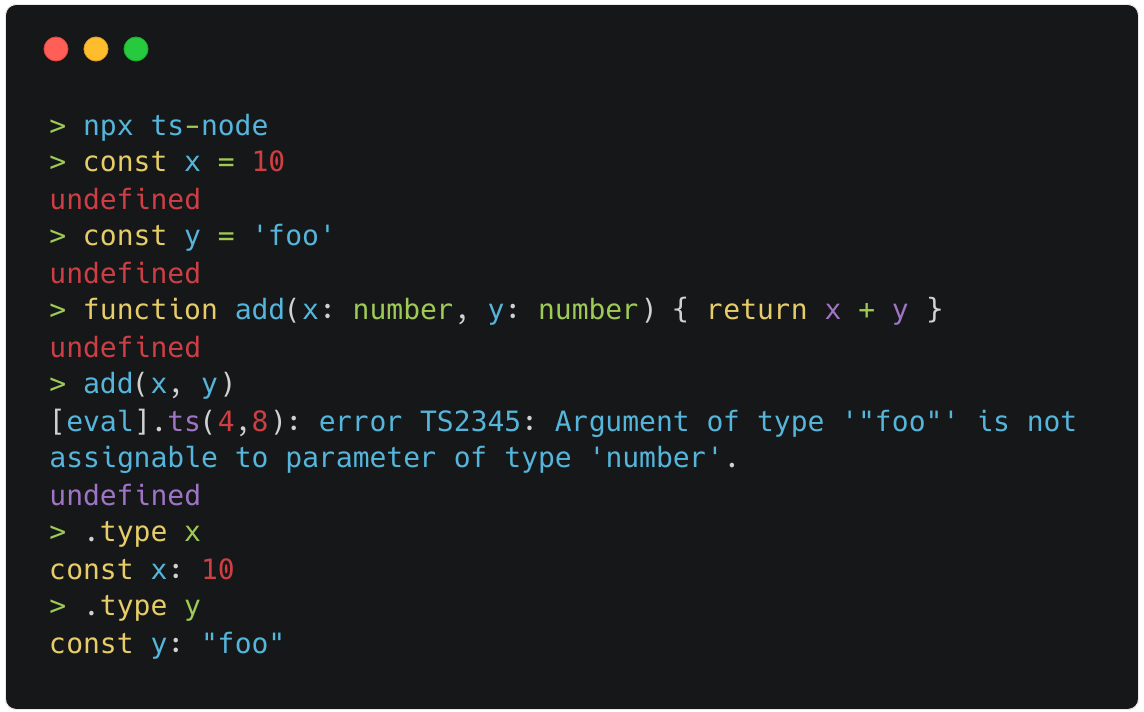
TypeScript execution and REPL for node.js
Repo TypeStrong/ts-node, read from GitHub 1 min ago. TypeStrong has not joined Take My Repo.
TypeStrong/ts-node is a public repo on GitHub by TypeStrong. TypeScript execution and REPL for node.js. It declares the MIT license on GitHub. It is written mainly in TypeScript, has 13,117 stars and last changed on 2024-07-18. Nobody has reviewed it on Take My Repo yet, which says nothing about its quality. Read from GitHub on 2026-11-24.
TypeScript execution and REPL for node.js, with source map and native ESM support.
The latest documentation can also be found on our website: https://typestrong.org/ts-node
ts-node is a TypeScript execution engine and REPL for Node.js.
It JIT transforms TypeScript into JavaScript, enabling you to directly execute TypeScript on Node.js without precompiling. This is accomplished by hooking node's module loading APIs, enabling it to be used seamlessly alongside other Node.js tools and libraries.
tsconfig.json parsing
# Locally in your project.
npm install -D typescript
npm install -D ts-node

# Or globally with TypeScript.
npm install -g typescript
npm install -g ts-node

# Depending on configuration, you may also need these
npm install -D tslib @types/node
Tip: Installing modules locally allows you to control and share the versions through package.json. ts-node will always resolve the compiler from cwd before checking relative to its own installation.
# Execute a script as `node` + `tsc`.
ts-node script.ts

# Starts a TypeScript REPL.
ts-node

# Execute code with TypeScript.
ts-node -e 'console.log("Hello, world!")'

# Execute, and print, code with TypeScript.
ts-node -p -e '"Hello, world!"'

# Pipe scripts to execute with TypeScript.
echo 'console.log("Hello, world!")' | ts-node

# Equivalent to ts-node --transpileOnly
ts-node-transpile-only script.ts

# Equivalent to ts-node --cwdMode
ts-node-cwd script.ts

# Equivalent to ts-node --esm
ts-node-esm script.ts
To write scripts with maximum portability, specify options in your tsconfig.json and omit them from the shebang.
#!/usr/bin/env ts-node

// ts-node options are read from tsconfig.json

console.log("Hello, world!")
Including options within the shebang requires the env -S flag, which is available on recent versions of env. (compatibility)
#!/usr/bin/env -S ts-node --files
// This shebang works on Mac and Linux with newer versions of env
// Technically, Mac allows omitting `-S`, but Linux requires it
To test your version of env for compatibility with -S:
# Note that these unusual quotes are necessary
/usr/bin/env --debug '-S echo foo bar'
You can register ts-node without using our CLI: node -r ts-node/register and node --loader ts-node/esm
In many cases, setting NODE_OPTIONS will enable ts-node within other node tools, child processes, and worker threads. This can be combined with other node flags.
NODE_OPTIONS="-r ts-node/register --no-warnings" node ./index.tsOr, if you require native ESM support:
NODE_OPTIONS="--loader ts-node/esm"This tells any node processes which receive this environment variable to install ts-node's hooks before executing other code.
If you are invoking node directly, you can avoid the environment variable and pass those flags to node.
node --loader ts-node/esm --inspect ./index.ts
You can require ts-node and register the loader for future requires by using require('ts-node').register({ /* options */ }).
Check out our API for more features.
ts-node supports a variety of options which can be specified via tsconfig.json, as CLI flags, as environment variables, or programmatically.
For a complete list, see Options.
ts-node CLI flags must come before the entrypoint script. For example:
$ ts-node --project tsconfig-dev.json say-hello.ts Ronald
Hello, Ronald!ts-node automatically finds and loads tsconfig.json. Most ts-node options can be specified in a "ts-node" object using their programmatic, camelCase names. We recommend this because it works even when you cannot pass CLI flags, such as node --require ts-node/register and when using shebangs.
Use --skipProject to skip loading the tsconfig.json. Use --project to explicitly specify the path to a tsconfig.json.
When searching, it is resolved using the same search behavior as tsc. By default, this search is performed relative to the entrypoint script. In --cwdMode or if no entrypoint is specified -- for example when using the REPL -- the search is performed relative to --cwd / process.cwd().
You can use this sample configuration as a starting point:
{
  // This is an alias to @tsconfig/node16: https://github.com/tsconfig/bases
  "extends": "ts-node/node16/tsconfig.json",

  // Most ts-node options can be specified here using their programmatic names.
  "ts-node": {
    // It is faster to skip typechecking.
    // Remove if you want ts-node to do typechecking.
    "transpileOnly": true,

    "files": true,

    "compilerOptions": {
      // compilerOptions specified here will override those declared below,
      // but *only* in ts-node.  Useful if you want ts-node and tsc to use
      // different options with a single tsconfig.json.
    }
  },
  "compilerOptions": {
    // typescript options here
  }
}
Our bundled JSON schema lists all compatible options.
@tsconfig/bases maintains recommended configurations for several node versions. As a convenience, these are bundled with ts-node.
{
  "extends": "ts-node/node16/tsconfig.json",

  // Or install directly with `npm i -D @tsconfig/node16`
  "extends": "@tsconfig/node16/tsconfig.json",
}If no tsconfig.json is loaded from disk, ts-node will use the newest recommended defaults from
@tsconfig/bases compatible with your node and typescript versions.
With the latest node and typescript
TypeStrong/ts-node is a public repo on GitHub by TypeStrong. TypeScript execution and REPL for node.js.
It declares the MIT license on GitHub.
Its maker has not tagged a system, so it is unknown here. Its README says what it needs.
Open "Take it" on its page: Take My Repo writes an install plan for your machine and hands it to your AI agent (Claude Code, Codex or Cursor), which asks you before each step. Take My Repo has not tested it on any machine.
Its last change on GitHub was on 2024-07-18. GitHub counts 230 open issues and pull requests. Take My Repo does not judge from that whether it is maintained.
The Frontend Stack for Agents & Generative UI. React, Angular, Mobile, Slack, and more. Makers of the AG-UI Protocol
freeCodeCamp.org's open-source codebase and curriculum. Learn math, programming, and computer science for free.
Rich MySQL Terminal Client with AutoCompletion, Syntax Highlighting, and Dataframes
Nobody has reviewed it on Take My Repo yet, which says nothing about its quality.
Take My Repo cannot say: it does not audit code and has not run ts-node. What is known comes from GitHub. It declares the MIT license on GitHub. Its last change was on 2024-07-18. It has 13,117 stars, which measure popularity, not safety. Nobody has reviewed it on Take My Repo yet, which says nothing about its quality. Read the source before you run it. With "Take it", your AI agent shows each step and asks you before running it; README text is treated as data, not as instructions.