UltimaScraperAPI

UltimaScraperAPI
Wrapper for OnlyFans, Fansly, LoyalFans
- 113
- AGPL-3.0
- 4 d ago
Repo UltimaHoarder/UltimaScraperAPI, read from GitHub 22 h ago. UltimaHoarder has not joined Take My Repo.
In short
UltimaHoarder/UltimaScraperAPI is a public repo on GitHub by UltimaHoarder. Wrapper for OnlyFans, Fansly, LoyalFans. It declares the AGPL-3.0 license on GitHub. It is written mainly in Python, has 113 stars and last changed on 2026-11-17. Nobody has reviewed it on Take My Repo yet, which says nothing about its quality. Read from GitHub on 2026-11-20.
In the maintainer's words. Shown from GitHub; Take My Repo does not keep a copy.
UltimaScraperAPI
UltimaScraperAPI is a modular Python scraping framework designed to interact with premium content platforms such as OnlyFans, Fansly, and LoyalFans. It provides a unified, async-first API for authentication, user data retrieval, posts, messages, and media downloads with comprehensive session management and caching capabilities.
Platform Status:
- ✅ OnlyFans: Fully supported and stable
- 🚧 Fansly: Work in progress with limited functionality
- 🚧 LoyalFans: Work in progress with limited functionality
📚 Documentation
Getting Started
- Installation Guide - Installation methods and requirements
- Quick Start Tutorial - Get up and running in minutes
- Configuration - Complete configuration reference
User Guides
- Authentication - How to authenticate with platforms
- Working with APIs - Common operations and patterns
- Proxy Support - Configure proxies and VPNs
- Session Management - Redis integration and caching
API Reference
- OnlyFans API - Complete OnlyFans API reference
- Fansly API - Fansly API reference (WIP)
- LoyalFans API - LoyalFans API reference (WIP)
- Helpers - Utility functions and helpers
Development
- Architecture - System design and architecture
- Contributing Guide - How to contribute
- Testing - Running and writing tests
✨ Features
- 🌐 Multi-Platform Support: OnlyFans (stable), Fansly (WIP), and LoyalFans (WIP)
- ⚡ Async-First Design: Built with
asyncioandaiohttpfor high performance - 🔐 Flexible Authentication: Cookie-based and guest authentication flows
- 📦 Unified Data Models: Consistent Pydantic models for users, posts, messages, and media
- 🔧 Highly Extensible: Modular architecture makes adding new platforms easy
- 🌍 Advanced Networking: Session management, connection pooling, proxy support (HTTP/HTTPS/SOCKS)
- 🔄 WebSocket Support: Real-time updates and live notifications
- 💾 Redis Integration: Optional caching, session persistence, and rate limiting
- 📡 Typed Event Models: Shared Redis pub/sub schemas for scrape and download progress
- 📈 Progress Callbacks: Per-page progress hooks for large post, story, and message scrapes
- 📊 Type Safety: Comprehensive type hints and validation with Pydantic v2
- 🔒 DRM Support: Widevine CDM integration for encrypted content
- 🧭 URL Diagnostics: Decode signed CDN URLs to detect expiry and IP locks
- 🎯 Rate Limiting: Built-in rate limiting and exponential backoff
- 🛡️ Error Handling: Comprehensive error handling with retry mechanisms
- 📝 Comprehensive Logging: Detailed logging for debugging and monitoring
📋 Requirements
- Python: 3.10, 3.11, 3.12, 3.13, or 3.14 (but less than 4.0)
- Package Manager: uv (recommended) or pip
- Optional: Redis 6.2+ for caching and session management
🚀 Installation
Using uv (Recommended)
uv is a fast Python package installer and resolver:
# Install uv if you haven't already
pip install uv

# Install UltimaScraperAPI
uv pip install ultima-scraper-api
Using pip
pip install ultima-scraper-api
From Source
For development or the latest features:
# Clone the repository
git clone https://github.com/UltimaHoarder/UltimaScraperAPI.git
cd UltimaScraperAPI

# Install with uv
uv pip install -e .

# Or with pip
pip install -e .
Virtual Environment (Recommended)
Always use a virtual environment to avoid dependency conflicts:
# Create virtual environment
python -m venv venv

# Activate it
source venv/bin/activate  # Linux/macOS
venv\Scripts\activate     # Windows

# Install the package
uv pip install ultima-scraper-api
💡 Quick Start
Basic Usage
import asyncio
from pathlib import Path
from ultima_scraper_api import UltimaScraperAPI
from ultima_scraper_api.config import UltimaScraperAPIConfig

async def main():
    # Initialize configuration
    config = UltimaScraperAPIConfig()

    # Initialize UltimaScraperAPI
    api = UltimaScraperAPI(config)
    await api.init()  # Initialize the API

    # Get OnlyFans API instance
    onlyfans_api = api.api_instances.OnlyFans

    # Authentication credentials
    # Obtain these from your browser's Network tab (F12)
    # See: https://ultimahoarder.github.io/UltimaScraperAPI/user-guide/authentication/
    auth_json = {
        "id": 123456,
        "cookie": "your_cookie_value",
        "user_agent": "your_user_agent",
        "x-bc": "your_x-bc_token"
    }

    # Login with context manager for automatic cleanup
    authed = await onlyfans_api.login(auth_json=auth_json)

    if authed and authed.is_authed():
        # Get authenticated user info
        me = await authed.get_authed_user()
        print(f"Logged in as: {me.username}")

        # Get user profile
        user = await authed.get_user("username")
        if user:
            print(f"User: {user.username} ({user.name})")

            # Fetch user's posts
            posts = await user.get_posts(limit=10)
            print(f"Found {len(posts)} posts")

            # Download media from posts
            download_dir = Path("downloads")
            download_dir.mkdir(exist_ok=True)

            for post in posts:
                if post.media:
                    for media in post.media:
                        print(f"Downloading: {media.id}")

                        # Get media URL using url_picker
                        from ultima_scraper_api.apis.onlyfans import url_picker
                        media_url = url_picker(post.get_author(), media)

                        if media_url:
                            # Download media content
                            response = await authed.auth_session.request(
                                media_url.geturl(),
                                premade_settings=""
                            )

                            if response:
                                content = await response.read()

                                # Save to file
                                filename = f"{media.id}.{media.type}"
                                filepath = download_dir / filename
                                with open(filepath, 'wb') as f:
                                    f.write(content)
                                print(f"  ✓ Saved: {filename}")

if __name__ == "__main__":
    asyncio.run(main())
Downloading DRM-Protected Content
For DRM-protected content, you need to configure Widevine CDM and follow a multi-step process:
import asyncio
from pathlib import Path
from ultima_scraper_api import UltimaScraperAPI
from ultima_scraper_api.config import UltimaScraperAPIConfig, DRM

async def download_drm_content():
    # Configure DRM settings
    config = UltimaScraperAPIConfig()
    config.settings.drm.device_client_blob_filepath = Path("/path/to/device_client_id_blob")
    config.settings.drm.device_private_key_filepath = Path("/path/to/device_private_key")

    # Initialize API
    api = UltimaScraperAPI(config)
    await api.init()

    onlyfans_api = api.api_instances.OnlyFans
    auth_json = {
        "id": 123456,
        "cookie": "your_cookie_value",
        "user_agent": "your_user_agent",
        "x-bc": "your_x-bc_token"
    }

    authed = await onlyfans_api.login(auth_json=auth_json)

    if authed and authed.is_authed():
        # Get DRM manager
        only_drm = authed.drm

        if only_drm:
            user = await authed.get_user("username")
            posts = await user.get_posts(limit=10)

            download_dir = Path("downloads")
            download_dir.mkdir(exist_ok=True)

            for post in posts:
                if post.media:
                    for media in post.media:
                        # Check if media has DRM protection
                        if media.files and media.files.drm:
                            print(f"Processing DRM-protected media: {media.id}")

                            # Get cookies for DRM requests
                            cookies = media.files.drm.dash.__drm_media__.get_cookies()

                            # Resolve DRM URLs and get decryption key
                            video_url, audio_url, key = await media.files.drm.resolve_drm()

                            # Download encrypted video
                            response = await authed.auth_session.request(
                                video_url,
                                premade_settings="",
                                custom_cookies=cookies
                            )

                            enc_video_filepath = download_dir / f"{video_url.split('/')[-1]}"
                            with open(enc_video_filepath, "wb") as f:
                                f.write(await response.read())
                            print(f"  Downloaded encrypted video: {enc_video_filepath.name}")

                            # Download encrypted audio
                            response = await authed.auth_session.request(
                                audio_url,
                                premade_settings="",
                                custom_cookies=cookies
                            )

                            enc_audio_filepath = download_dir / f"{audio_url.split('/')[-1]}"
                            with open(enc_audio_filepath, "wb") as f:
                                f.write(await response.read())
                            print(f"  Downloaded encrypted audio: {enc_audio_filepath.name}")

                            # Decrypt files
                            decrypted_video = only_drm.decrypt_file(enc_video_filepath, key)
                            decrypted_audio = only_drm.decrypt_file(enc_audio_filepath, key)
                            print(f"  Decrypted video: {decrypted_video.name}")
                            print(f"  Decrypted audio: {decrypted_audio.name}")

                            # Merge video and audio
                            output_filepath = download_dir / f"{media.id}_final.mp4"
                            future = only_drm.enqueue_merge_task(
                                output_filepath,
                                [decrypted_video, decrypted_audio]
                            )

                            # Wait for merge to complete
                            success = await asyncio.wrap_future(future)

                            if success:
                                print(f"  ✓ Merged to: {output_filepath.name}")

                                # Clean up temporary files
                                enc_video_filepath.unlink()
                                enc_audio_filepath.unlink()
                                decrypted_video.unlink()
                                decrypted_audio.unlink()

if __name__ == "__main__":
    asyncio.run(download_drm_content())
DRM Setup Requirements:
-
Widevine CDM Files: You need valid Widevine CDM files:
device_client_id_blob: Client ID blob filedevice_private_key: Private key file
-
FFmpeg: Required for merging video and audio streams
# Install FFmpeg
sudo apt install ffmpeg  # Ubuntu/Debian
brew install ffmpeg      # macOS
-
Configure in your config:
config.settings.drm.device_client_blob_filepath = Path("/path/to/device_client_id_blob")
config.settings.drm.device_private_key_filepath = Path("/path/to/device_private_key")
Note: DRM content requires proper Widevine CDM setup. Obtaining CDM files is beyond the scope of this documentation and must comply with applicable laws and terms of service.
Credential Extraction
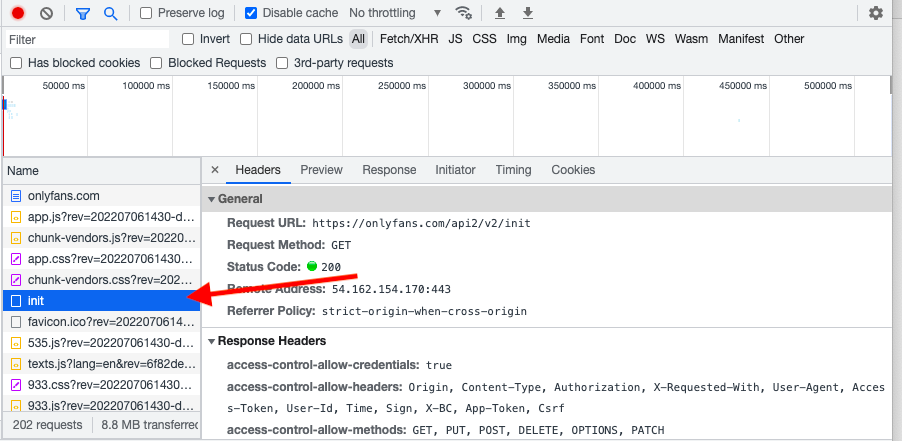
You need three pieces of information from your browser:
- Cookie: Your session cookie
- User-Agent: Your browser's user agent string
- x-bc (OnlyFans only): Dynamic authorization token
Quick Steps:
- Open your browser and navigate to the platform
- Open Developer Tools (F12)
- Go to the Network tab
- Look for API requests and copy the required headers
For detailed instructions with screenshots, see the Authentication Guide.
Guest Mode (Limited Access)
Some platforms support guest access for public content:
async with api.login_context(guest=True) as authed:
    # Limited operations available (public profiles, posts, etc.)
    user = await authed.get_user("public_username")
    if user:
        print(f"Public profile: {user.username}")
🔧 Configuration
Basic Configuration
from ultima_scraper_api import UltimaScraperAPIConfig

# Load from JSON file
config = UltimaScraperAPIConfig.from_json_file("config.json")

# Or create programmatically
config = UltimaScraperAPIConfig()
Environment Variables
# Set up your credentials
export ONLYFANS_AUTH_ID="123456"
export ONLYFANS_COOKIE="your_cookie_value"
export ONLYFANS_USER_AGENT="Mozilla/5.0 ..."
export ONLYFANS_XBC="your_x-bc_token"
Then load them in your code:
import os

auth_json = {
    "id": int(os.getenv("ONLYFANS_AUTH_ID", "0")),
    "cookie": os.getenv("ONLYFANS_COOKIE"),
    "user_agent": os.getenv("ONLYFANS_USER_AGENT"),
    "x-bc": os.getenv("ONLYFANS_XBC")
}
Proxy Configuration
Configure HTTP, HTTPS, or SOCKS proxies:
from ultima_scraper_api import UltimaScraperAPIConfig
from ultima_scraper_api.config import Proxy

config = UltimaScraperAPIConfig()
config.settings.network.proxies.append(
    Proxy(url="http://proxy.example.com:8080")
    # Or SOCKS proxy:
    # Proxy(url="socks5://proxy.example.com:1080")
)
Redis Configuration
Enable Redis for caching and session management:
from ultima_scraper_api.config import Redis

config = UltimaScraperAPIConfig()
config.settings.redis = Redis(
    host="localhost",
    port=6379,
    db=0,
    password="your_password"  # Optional
)
For complete configuration options, see the Configuration Guide.
📖 Usage Examples
Fetching Subscriptions
async with api.login_context(auth_json) as authed:
    # Get all active subscriptions
    subscriptions = await authed.get_subscriptions()

    for sub in subscriptions:
        user = sub.user
        print(f"{user.username} - Subscribed: {sub.subscribed_at}")
        print(f"  Expires: {sub.expires_at}")
        print(f"  Price: ${sub.price}")
Getting Messages
async with api.login_context(auth_json) as authed:
    # Get a specific user
    user = await authed.get_user("username")

    # Fetch message conversation
    messages = await user.get_messages(limit=50)

    for msg in messages:
        print(f"[{msg.created_at}] {msg.from_user.username}: {msg.text}")

        # Check for media attachments
        if msg.media:
            print(f"  Attachments: {len(msg.media)} media files")
Downloading Stories
import aiofiles

async with api.login_context(auth_json) as authed:
    user = await authed.get_user("username")

    # Get active stories
    stories = await user.get_stories()

    for story in stories:
        if story.media:
            for media in story.media:
                # Resolve and download media content
                media_url = story.url_picker(media)
                if not media_url:
                    continue
                response = await authed.auth_session.request(
                    media_url.geturl(),
                    premade_settings=""
                )
                if not response:
                    continue
                content = await response.read()

                # Save to file
                filename = f"stories/{media.id}.{media.type}"
                async with aiofiles.open(filename, "wb") as f:
                    await f.write(content)

                print(f"Downloaded: {filename}")
Pagination and Progress Tracking
UserModel.get_posts, get_stories, and get_messages accept an optional
on_progress callback (and job_id for Redis event correlation) so you can
stream progress as pages are fetched:
async with api.login_context(auth_json) as authed:
    user = await authed.get_user("username")

    async def on_progress(done_pages: int, total_pages: int, items_so_far: int):
        print(f"Posts: page {done_pages}/{total_pages} — {items_so_far} fetched")

    # Fetch all posts up to the user's total in one call (paginated internally)
    posts = await user.get_posts(on_progress=on_progress)

    # Or filter by date / label
    archived = await user.get_posts(label="archived")

    from datetime import datetime, timezone
    recent = await user.get_posts(
        after_date=datetime(2026, 1, 1, tzinfo=timezone.utc),
    )

    print(f"Total posts: {len(posts)}")
Search Chats (3.0.0b4+)
async with api.login_context(auth_json) as authed:
    chats = await authed.search_chats("happy birthday", limit=50)
    for chat in chats:
        print(chat.user.username)
Diagnosing Signed CDN URLs
from ultima_scraper_api.helpers import diagnose_url

media_url = post.url_picker(media)
diag = diagnose_url(media_url.geturl()) if media_url else None
if diag:
    print(diag.get_diagnosis())  # e.g. "URL valid for ~5.2 hours" or "URL expired ..."
Concurrent Operations
import asyncio

async with api.login_context(auth_json) as authed:
    # Get multiple users concurrently
    usernames = ["user1", "user2", "user3"]

    tasks = [authed.get_user(username) for username in usernames]
    users = await asyncio.gather(*tasks, return_exceptions=True)

    for username, user in zip(usernames, users):
        if isinstance(user, Exception):
            print(f"Error fetching {username}: {user}")
        else:
            print(f"Fetched: {user.username} - {user.posts_count} posts")
For more examples and patterns, see the Working with APIs Guide.
🛠️ Development
Setting Up Development Environment
# Clone the repository
git clone https://github.com/UltimaHoarder/UltimaScraperAPI.git
cd UltimaScraperAPI

# Create and activate virtual environment
python -m venv venv
source venv/bin/activate  # Linux/macOS
venv\Scripts\activate     # Windows

# Install in development mode with dev dependencies
uv pip install -e ".[dev]"
# Or with pip
pip install -e ".[dev]"
Running Tests
# Run all tests
pytest

# Run with coverage report
pytest --cov=ultima_scraper_api --cov-report=html

# Run specific test file
pytest tests/test_onlyfans.py

# Run with verbose output
pytest -v
Code Quality
# Format code with Black
black ultima_scraper_api/ tests/

# Check formatting without changing files
black --check ultima_scraper_api/

# Type checking (if using mypy)
mypy ultima_scraper_api/
Building Documentation
# Install the documentation tools (Python 3.11 or newer)
uv sync --group docs

# Serve documentation locally with live reload
uv run zensical serve -a localhost:8001
# Open http://localhost:8001 in your browser

# Build the static site into site/, failing on any warning
uv run zensical build --strict
Pushes to main publish the site to GitHub Pages through .github/workflows/docs.yml.
Using Nox for Automation
# Run all sessions (tests, linting, docs)
nox

# Run specific session
nox -s tests
nox -s lint
nox -s docs
For detailed contribution guidelines, see the Contributing Guide.
🤝 Contributing
Contributions are welcome! Please read the Contributing Guide for details on:
- Code of conduct
- Development setup
- Submitting pull requests
- Writing tests
- Documentation standards
📦 Project Structure
UltimaScraperAPI/
├── ultima_scraper_api/       # Main package
│   ├── apis/                 # Platform-specific APIs
│   │   ├── onlyfans/        # OnlyFans implementation
│   │   ├── fansly/          # Fansly implementation (WIP)
│   │   └── loyalfans/       # LoyalFans implementation (WIP)
│   ├── classes/             # Utility classes
│   ├── helpers/             # Helper functions
│   ├── managers/            # Session/scrape managers
│   └── models/              # Data models
├── docs/                    # Zensical documentation source
├── tests/                   # Test files
├── typings/                 # Type stubs
└── pyproject.toml          # Project configuration
📄 License
This project is licensed under the GNU Affero General Public License v3.0 - see the LICENSE file for details.
What This Means
- ✅ You can use this commercially
- ✅ You can modify the code
- ✅ You can distribute it
- ⚠️ You must disclose source code when distributing
- ⚠️ You must use the same license for derivatives
- ⚠️ Network use requires source code disclosure
⚠️ Disclaimer
This software is provided for educational and research purposes. Users are responsible for complying with the terms of service of any platforms they interact with using this software.
🙏 Acknowledgments
Built with industry-leading open source libraries:
- aiohttp - Async HTTP client/server framework
- Pydantic - Data validation using Python type hints
- httpx - Modern HTTP client
- Redis - In-memory data structure store for caching
- websockets - WebSocket client and server
- Zensical - Documentation site generator
- pytest - Testing framework
- Black - Code formatter
Special thanks to all contributors and the open source community!
📞 Support & Community
- 📖 Documentation - Comprehensive guides and API reference
- 🐛 Issue Tracker - Report bugs or request features
- 💬 Discussions - Ask questions and share ideas
- 📦 Releases - Version history and changelogs
Getting Help
If you encounter issues:
- Check the documentation first
- Search existing issues for similar problems
- Create a new issue with a detailed description and minimal reproduction example
- Join the discussions for community support
Made with ❤️ by UltimaHoarder
Questions
What is UltimaScraperAPI?
UltimaHoarder/UltimaScraperAPI is a public repo on GitHub by UltimaHoarder. Wrapper for OnlyFans, Fansly, LoyalFans.
Is UltimaScraperAPI open source?
It declares the AGPL-3.0 license on GitHub.
Does UltimaScraperAPI run on macOS, Windows or Linux?
Its maker has not tagged a system, so it is unknown here. Its README says what it needs.
How do I install UltimaScraperAPI?
Open "Take it" on its page: Take My Repo writes an install plan for your machine and hands it to your AI agent (Claude Code, Codex or Cursor), which asks you before each step. Take My Repo has not tested it on any machine.
Is UltimaScraperAPI still maintained?
Its last change on GitHub was on 2026-11-17. Take My Repo does not judge from that whether it is maintained.
What do people who ran UltimaScraperAPI say?
Nobody has reviewed it on Take My Repo yet, which says nothing about its quality.
Similar repos
All alternatives to UltimaScraperAPI GitHubRepo
OF-DRM