
STREAMLINE
Simple Transparent End-To-End Automated Machine Learning Pipeline for Supervised Learning in Tabular Binary Classification Data
- 83
- Jupyter Notebook
- GPL-3.0
- 2 mo ago

An automated, rigorous, and largely scikit-learn based machine learning analysis pipeline for binary classification. Adopts current best practices to avoid bias, optimize performance, ensure replicatability, capture complex associations (e.g. interactions and heterogeneity), and enhance interpretability. Includes (1) exploratory analysis, (2) data cleaning, (3) partitioning, (4) scaling, (5) imput
Repo UrbsLab/AutoMLPipe-BC, read from GitHub 1 min ago. UrbsLab has not joined Take My Repo.
UrbsLab/AutoMLPipe-BC is a public repo on GitHub by UrbsLab. An automated, rigorous, and largely scikit-learn based machine learning analysis pipeline for binary classification. Adopts current best practices to avoid bias, optimize performance, ensure replicatability, capture complex associations (e.g. interactions and heterogeneity), and enhance interpretability. Includes (1) exploratory analysis, (2) data cleaning, (3) partitioning, (4) scaling, (5) imput. It declares the GPL-3.0 license on GitHub. It is written mainly in Jupyter Notebook, has 7 stars and last changed on 2022-05-07. Nobody has reviewed it on Take My Repo yet, which says nothing about its quality. Read from GitHub on 2026-11-22.
AutoMLPipe-BC is the first stable version of our AutoML tool applied in a recently submitted publication. We have rebranded and expanded this prototype implementation now found at the following repository: https://github.com/UrbsLab/STREAMLINE
As this repository will no longer be developed or improved upon, we strongly recommend interested users use the 'STREAMLINE' tool rather than 'AutoMLPIPE-BC'.
AutoMLPipe-BC is an automated, rigorous, and largely scikit-learn based machine learning (ML) analysis pipeline for binary classification. Adopts current best practices to avoid bias, optimize performance, ensure replicatability, capture complex associations (e.g. interactions and heterogeneity), and enhance interpretability. Includes (1) exploratory analysis, (2) data cleaning, (3) partitioning, (4) scaling, (5) imputation, (6) filter-based feature selection, (7) collective feature selection, (8) modeling with 'Optuna' hyperparameter optimization across 13 implemented ML algorithms (including three rule-based machine learning algorithms: ExSTraCS, XCS, and eLCS), (9) testing evaluations with 16 classification metrics, model feature importance estimation, (10) automatically saves all results, models, and publication-ready plots (including proposed composite feature importance plots), (11) non-parametric statistical comparisons across ML algorithms and analyzed datasets, and (12) automatically generated PDF summary reports.
We have recently submitted a publication introducing and applying this pipeline. We will have a preprint posted for citation soon.
This AutoML tool empowers anyone with a basic understanding of python to easily run a comprehensive and customizable machine learning analysis. Unlike most other AutoML tools, AutoMLPipe-BC was designed as a framework to rigorously apply and compare a variety of ML modeling algorithms and collectively learn from them as opposed to simply identifying a best performing model and/or attempting to evolutionarily optimize the analysis pipeline itself. Instead, its design focused on automating (1) application of best practices in data science and ML for binary classification, (2) avoiding potential sources of bias (e.g. by conducting data transformations, imputation, and feature selection within distinct CV partitions), (3) providing transparency in the modeling and evaluation of models, (4) the detection and characterization of complex patterns of association (e.g. interactions and heterogeneity), (5) generation of publication-ready plots/figures, and (6) generation of a PDF summary report for quick interpretation. Overall, the goal of this pipeline is to provide an interpretable framework to learn from the data as well as the strengths and weaknesses of the ML algorithms or as a baseline to compare other AutoML strategies.
The following 13 ML modeling algorithms are currently included as options: 1. Naive Bayes (NB), 2. Logistic Regression (LR), 3. Decision Tree (DT), 4. Random Forest (RF), 5. Gradient Boosting (GB), 6. XGBoost (XGB), 7. LGBoost (LGB), 8. Support Vector Machine (SVM), 9. Artificial Neural Network (ANN), 10. K-Nearest Neighbors (k-NN), 11. Eductional Learning Classifier System (eLCS), 12. 'X' Classifier System (XCS), and 13. Extended Supervised Tracking and Classifying System (ExSTraCS). Classification-relevant hyperparameter values and ranges have been included for the (Optuna-driven) automated hyperparameter sweep.
This pipeline does NOT: (1) conduct feature engineering, or feature construction, (2) conduct feature encoding (e.g. apply one-hot-encoding to categorical features, or numerically encode text-based feature values), (3) account for bias in data collection, or (4) conduct anything beyond simple data cleaning (i.e. it only removes instances with no class label, or where all features are missing). These elements should be conducted externally at the discretion of the user.
We do not claim that this is the best or only viable way to assemble an ML analysis pipeline for a given classification problem, nor that the included ML modeling algorithms are necessarily the best options for inclusion.
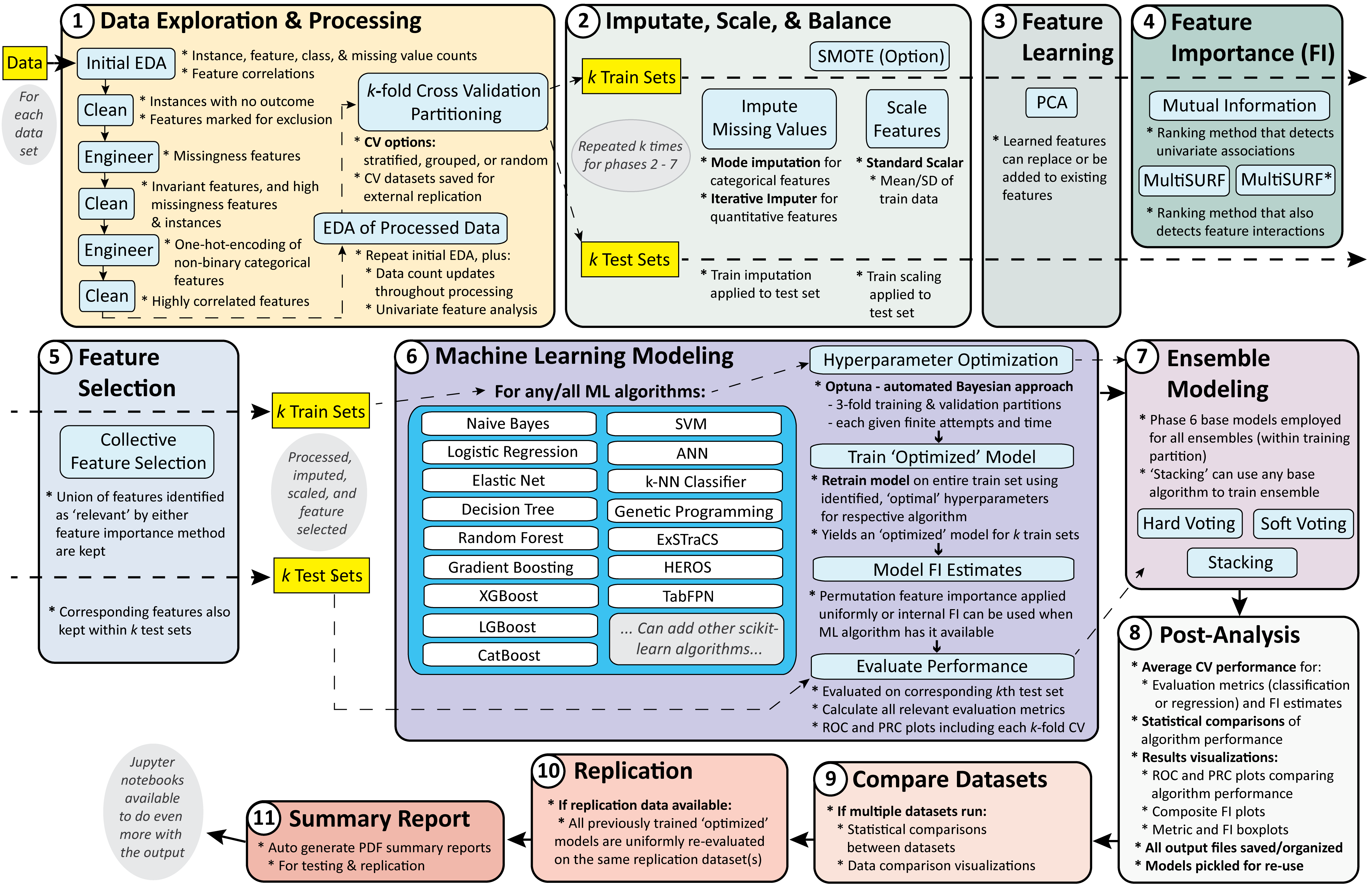
This schematic breaks the overall pipeline down into 4 generalized stages: (1) preprocessing and feature transformation, (2) feature importance evaluation and selection, (3) modeling, and (4) postprocessing.

AutoMLPipe-BC is coded in Python 3 relying heavily on pandas and scikit-learn as well as a variety of other python packages.
This multi-phase pipeline has been set up in a way that it can be easily run in one of three ways:
To use AutoMLPipe-BC, download this GitHub repository to your local working directory.
To be able to run AutoMLPipe-BC you will need Python 3, Anaconda (recommended rather than individually installing all individual packages), and a handful of other Python packages that are not included within Anaconda. Anaconda is a distribution of Python and R programming languages for scientific computing, that aims to simplify package management and deployment. The distribution includes data-science packages suitable for Windows, Linux, and macOS. We recommend installing the most recent stable version of Anaconda (https://docs.anaconda.com/anaconda/install/) within your computing environment (make sure to install a version appropriate for your operating system). Anaconda also includes jupyter notebook.
As an alternative to installing Anaconda, you will need to install Python 3, as well as all python packages used by AutoMLPipe-BC, e.g. pandas, and numpy (not listed in detail here). At the time of development we had installed 'Anaconda3-2020.07-Linux-x86_64.sh' on our Linux computing cluster, which used Python 3.8.3. We also tested this in windows using 'Anaconda3-2021.05-Windows-x86_64', which used Python 3.8.8.
In addition to the above you will also need to install the following packages in your computing environment: skrebate, xgboost, lightgbm, scikit-eLCS, scikit-XCS, scikit-ExSTraCS, optuna, plotly, and kaleido. Installation commands are given below (along with the version used at time of posting):
pip install skrebate==0.7
pip install xgboost
pip install lightgbm
pip install scikit-eLCS
pip install scikit-XCS
pip install scikit-ExSTraCS
pip install optuna
Plotly, an open-source, interactive data visualization library. Used by optuna to generate hyperparameter sweep visualizations (5.1.0)
pip install plotly
Kaleido a package for static image export for web-based visualization. This again is needed to generate hyperparameter sweep visualizations in optuna. We found that getting this package to work properly can be tricky and so far noted that it only works with version 0.03.post1. If the pipeline is getting hung up in modeling, try setting 'export_hyper_sweep_plots' to False to avoid the issue. These plots are nice to have but not necessary for the overall pipeline. (0.0.3.post1)
pip install kaleido==0.0.3.post1
pip install fpdf
Here we give an overview of the codebase and how to run AutoMLPipe-BC in different contexts.
The base code for AutoMLPipe-BC is organized into a series of script phases designed to best optimize the parallelization of a given analysis. These loosely correspond with the pipeline schematic above. These phases are designed to be run in order. Phases 1-7 make up the core automated pipeline, with Phase 7 and beyond being run optionally based on user needs. In general this pipeline will run more slowly when a larger number of 'target' dataset are being analyzed and when a larger number of CV 'folds' are requested.
Phase 1: Exploratory Analysis
Phase 2: Data Preprocessing
Phase 3: Feature Importance Evaluation
Phase 4: Feature Selection
Phase 5: Machine Learning Modeling
Phase 6: Statistics Summary
Phase 7: [Optional] Compare Datasets
Phase 8: [Optional] Generate PDF Training Summary Report
Phase 9: [Optional] Apply Models to Replication Data
Phase 10: [Optional] Generate PDF 'Apply Replication' Summary Report
Phase 11: [Optional] File Cleanup
Here we detail how to run AutoMLPipe-BC within the provided jupyter notebook. This is likely the easiest approach for those newer to python, or for those who wish to explore, or easily test the code. However depending on the size of the target dataset(s) and the pipeline settings, this can take a long time to run locally. The included notebook is set up to run on included example datasets (HCC data taken from the UCI repository). NOTE: The user will still need to update the local folder/file paths in this notebook to be able for it to correctly run.
The primary way to run AutoMLPipe-BC is via the command line, one phase at a time (running the next phase only after the previous one has completed). As indicated above, each phase can run locally (not parallelized) or parallelized using a Linux based computing cluster. With a little tweaking of the 'Main' scripts this code could also be parallelized with cloud computing. We welcome help in extending the code for that purpose.
Below we give an example of the set of all commands needed to run AutoMLPipe-BC in it's entirety using mostly default run parameters. In this example we specify instance and class label run parameters to emphasize the importance setting these values correctly.
python ExploratoryAnalysisMain.py --data-path /mydatapath/TestData --out-path /myoutputpath/output --exp-name hcc_test --inst-label InstanceID --class-label Class --run-parallel False

python DataPreprocessingMain.py --out-path /myoutputpath/output --exp-name hcc_test --run-parallel False

python FeatureImportanceMain.py --out-path /myoutputpath/output --exp-name hcc_test --run-parallel False

python FeatureSelectionMain.py --out-path /myoutputpath/output --exp-name hcc_test --run-parallel False

python ModelMain.py --out-path /myoutputpath/output --exp-name hcc_test --run-parallel False

python StatsMain.py --out-path /myoutputpath/output --exp-name hcc_test --run-parallel False

python DataCompareMain.py --out-path /myoutputpath/output --exp-name hcc_test --run-parallel False

python PDF_ReportTrainMain.py --out-path /myoutputpath/output --exp-name hcc_test --run-parallel False

python ApplyModelMain.py --out-path /myoutputpath/output --exp-name hcc_test --rep-data-path /myrepdatapath/TestRep  --data-path /mydatapath/TestData/hcc-data_example.csv --run-parallel False

python PDF_ReportApplyMain.py --out-path /myoutputpath/output --exp-name hcc_test --rep-data-path /myrepdatapath/TestRep  --data-path /mydatapath/TestData/hcc-data_example.csv --run-parallel False

python FileCleanup.py --out-path /myoutputpath/output --exp-name hcc_test
Below we give the same set of AutoMLPipe-BC run command, however in each, the run parameter --run-parallel is left to its default value of 'True'.
python ExploratoryAnalysisMain.py --data-path /mydatapath/TestData --out-path /myoutputpath/output --exp-name hcc_test --inst-label InstanceID --class-label Class

python DataPreprocessingMain.py --out-path /myoutputpath/output --exp-name hcc_test

python FeatureImportanceMain.py --out-path /myoutputpath/output --exp-name hcc_test

python FeatureSelectionMain.py --out-path /myoutputpath/output --exp-name hcc_test

python ModelMain.py --out-path /myoutputpath/output --exp-name hcc_test

python StatsMain.py --out-path /myoutputpath/output --exp-name hcc_test

python DataCompareMain.py --out-path /myoutputpath/output --exp-name hcc_test

python PDF_ReportTrainMain.py --out-path /myoutputpath/output --exp-name hcc_test

python ApplyModelMain.py --out-path /myoutputpath/output --exp-name hcc_test --rep-data-path /myrepdatapath/TestRep  --data-path /mydatapath/TestData/hcc-data_example.csv

python PDF_ReportApplyMain.py --out-path /myoutputpath/output --exp-name hcc_test --rep-data-path /myrepdatapath/TestRep  --data-path /mydatapath/TestData/hcc-data_example.csv

python FileCleanup.py --out-path /myoutputpath/output --exp-name hcc_test
After running any of Phases 1-6 a 'phase-complete' file is automatically generated for each job run locally or in parallel. Users can confirm that all jobs for that phase have been completed by running the phase command again, this time with the argument '-c'. Any incomplete jobs will be listed, or an indication of successful completion will be returned.
For example, after running ModelMain.py, the following command can be given to check whether all jobs have been completed.
python ModelMain.py --out-path /myoutputpath/output --exp-name hcc_test -c
Here we review the run parameters available for each of the 11 phases and provide some additional run examples. The additional examples illustrate how to flexibly adapt AutoMLPipe-BC to user needs. All examples below assume that class and instance labels set to default values for simplicity. Run parameters that are necessary to set are marked as 'MANDATORY' under 'default'.
Run parameters for ExploratoryAnalysisMain.py:
| Argument | Description | Default Value |
|---|---|---|
| --data-path | path to directory containing datasets | MANDATORY |
| --out-path | path to output directory | MANDATORY |
| --exp-name | name of experiment output folder (no spaces) | MANDATORY |
| --class-label | outcome label of all datasets | Class |
| --inst-label | instance label of all datasets (if present) | None |
| --fi | path to .csv file with feature labels to be ignored in analysis | None |
| --cf | path to .csv file with feature labels specified to be treated as categorical | None |
| --cv | number of CV partitions | 10 |
| --part | 'S', or 'R', or 'M', for stratified, random, or matched, respectively | S |
| --match-label | only applies when M selected for partition-method; indicates column with matched instance ids | None |
| --cat-cutoff | number of unique values after which a variable is considered to be quantitative vs categorical | 10 |
| --sig | significance cutoff used throughout pipeline | 0.05 |
| --export-fc | run and export feature correlation analysis (yields correlation heatmap) | True |
| --export-up | export univariate analysis plots (note: univariate analysis still output by default) | False |
| --rand-state | "Dont Panic" - sets a specific random seed for reproducible results | 42 |
| --run-parallel | if run parallel | True |
| --queue | specify name of parallel computing queue (uses our research groups queue by default) | i2c2_normal |
| --res-mem | reserved memory for the job (in Gigabytes) | 4 |
| --max-mem | maximum memory before the job is automatically terminated | 15 |
| -c | Boolean: Specify whether to check for existence of all output files | Stores False |
Run on dataset with a match label (i.e. a column that identifies groups of instances matched by one or more covariates to remove their effect). Here we specify the use of matched CV partitioning and indicate the column label including the matched instance group identifiers. All instances with the same unique identifier in this column are assumed to be a part of a matched group, and are kept together within a given data partition.
python ExploratoryAnalysisMain.py --data-path /mydatapath/MatchData --out-path /myoutputpath/output --exp-name match_test --part M --match-label MatchGroups
A convenience for running the analysis, but ignoring one or more feature columns that were originally included in the dataset.
python ExploratoryAnalysisMain.py --data-path /mydatapath/TestData --out-path /myoutputpath/output --exp-name hcc_test --fi /mydatapath/ignoreFeatureList.csv
By default AutoMLPipe-BC uses the --cat-cutoff parameter to try and automatically decide what features to treat as categorical (i.e. are there < 10 unique values in the feature column) vs. continuous valued. With this option the user can specify the list of feature names to explicitly treat as categorical. Currently this only impacts the exploratory analysis as well as the imputation in data preprocessing. The identification of categorical variables within AutoMLPipe-BC has no impact on ML modeling.
python ExploratoryAnalysisMain.py --data-path /mydatapath/TestData --out-path /myoutputpath/output --exp-name hcc_test --cf /mydatapath/categoricalFeatureList.csv
Run parameters for DataPreprocessingMain.py:
| Argument | Description | Default Value |
|---|---|---|
| --out-path | path to output directory | MANDATORY |
| --exp-name | name of experiment output folder (no spaces) | MANDATORY |
| --scale | perform data scaling (required for SVM, and to use Logistic regression with non-uniform feature importance estimation) | True |
| --impute | perform missing value data imputation (required for most ML algorithms if missing data is present) | True |
| --multi-impute | applies multivariate imputation to quantitative features, otherwise uses median imputation | True |
| --over-cv | overwrites earlier cv datasets with new scaled/imputed ones | True |
| --run-parallel | if run parallel | True |
| --queue | specify name of parallel computing queue (uses our research groups queue by default) | i2c2_normal |
| --res-mem | reserved memory for the job (in Gigabytes) | 4 |
| --max-mem | maximum memory before the job is automatically terminated | 15 |
| -c | Boolean: Specify whether to check for existence of all output files | Stores False |
Run parameters for FeatureImportanceMain.py:
| Argument | Description | Default Value |
|---|---|---|
| --out-path | path to output directory | MANDATORY |
| --exp-name | name of experiment output folder (no spaces) | MANDATORY |
| --do-mi | do mutual information analysis | True |
| --do-ms | do multiSURF analysis | True |
| --use-turf | use TURF wrapper around MultiSURF | False |
| --turf-pct | proportion of instances removed in an iteration (also dictates number of iterations) | 0.5 |
| --n-jobs | number of cores dedicated to running algorithm; setting to -1 will use all available cores | 1 |
| --inst-sub | sample subset size to use with multiSURF | 2000 |
| --run-parallel | if run parallel | True |
| --queue | specify name of parallel computing queue (uses our research groups queue by default) | i2c2_normal |
| --res-mem | reserved memory for the job (in Gigabytes) | 4 |
| --max-mem | maximum memory before the job is automatically terminated | 15 |
| -c | Boolean: Specify whether to check for existence of all output files | Stores False |
Run parameters for FeatureSelectionMain.py:
| Argument | Description | Default Value |
|---|---|---|
| --out-path | path to output directory | MANDATORY |
| --exp-name | name of experiment output folder (no spaces) | MANDATORY |
| --max-feat | max features to keep. None if no max | 2000 |
| --filter-feat | filter out the worst performing features prior to modeling | True |
| --top-results | number of top features to illustrate in figures | 20 |
| --export-scores | export figure summarizing average feature importance scores over cv partitions | True |
| --over-cv | overwrites working cv datasets with new feature subset datasets | True |
| --run-parallel | if run parallel | True |
| --queue | specify name of parallel computing queue (uses our research groups queue by default) | i2c2_normal |
| --res-mem | reserved memory for the job (in Gigabytes) | 4 |
| --max-mem | maximum memory before the job is automatically terminated | 15 |
| -c | Boolean: Specify whether to check for existence of all output files | Stores False |
Run parameters for ModelMain.py:
| Argument | Description | Default Value |
|---|---|---|
| --out-path | path to output directory | MANDATORY |
| --exp-name | name of experiment output folder (no spaces) | MANDATORY |
| --do-all | run all modeling algorithms by default (when set False, individual algorithms are activated individually) | True |
| --do-NB | run naive bayes modeling | True |
| --do-LR | run logistic regression modeling | True |
| --do-DT | run decision tree modeling | True |
| --do-RF | run random forest modeling | True |
| --do-GB | run gradient boosting modeling | True |
| --do-XGB | run XGBoost modeling | True |
| --do-LGB | run LGBoost modeling | True |
| --do-SVM | run support vector machine modeling | True |
| --do-ANN | run artificial neural network modeling | True |
| --do-KN | run k-neighbors classifier modeling | True |
| --do-eLCS | run eLCS modeling (a basic supervised-learning learning classifier system) | True |
| --do-XCS | run XCS modeling (a supervised-learning-only implementation of the best studied learning classifier system) | True |
| --do-ExSTraCS | run ExSTraCS modeling (a learning classifier system designed for biomedical data mining) | True |
| --metric | primary scikit-learn specified scoring metric used for hyperparameter optimization and permutation-based model feature importance evaluation | balanced_accuracy |
| --subsample | for long running algos (XGB,SVM,ANN,KN), option to subsample training set (0 for no subsample) | 0 |
| --use-uniformFI | overrides use of any available feature importance estimate methods from models, instead using permutation_importance uniformly | False |
| --n-trials | # of bayesian hyperparameter optimization trials using optuna | 100 |
| --timeout | seconds until hyperparameter sweep stops running new trials (Note: it may run longer to finish last trial started) | 300 |
| --export-hyper-sweep | export optuna-generated hyperparameter sweep plots | False |
| --do-LCS-sweep | do LCS hyperparam tuning or use below params | False |
| --nu | fixed LCS nu param | 1 |
| --iter | fixed LCS # learning iterations param | 200000 |
| --N | fixed LCS rule population maximum size param | 2000 |
| --lcs-timeout | seconds until hyperparameter sweep stops for LCS algorithms | 1200 |
| --run-parallel | if run parallel | True |
| --queue | specify name of parallel computing queue (uses our research groups queue by default) | i2c2_normal |
| --res-mem | reserved memory for the job (in Gigabytes) | 4 |
| --max-mem | maximum memory before the job is automatically terminated | 15 |
| -c | Boolean: Specify whether to check for existence of all output files | Stores False |
| -r | Boolean: Rerun any jobs that did not complete (or failed) in an earlier run. | Stores False |
By default AutoMLPipe-BC runs all ML modeling algorithms. If the user only wants to run one (or a small number) of these algorithms, they can run the following command first turning all algorithms off, then specifying the ones to activate. In this example we only run random forest. Other algorithms could be specified as True here to run them as well.
python ModelMain.py --out-path /myoutputpath/output --exp-name hcc_test --do-all False --do-RF True
By default AutoMLPipe-BC uses any feature importance estimation that may already be available for a given algorithm. However, Naive Bayes, Support Vector Machines (for non-linear kernels), ANN, and k-NN do not have such built in estimates. By default, these instead estimate model feature importances using a permutation-based estimator. However, to more consistently compare feature importance scores across algorithms, the user may wish to apply the permutation-based estimator uniformly across all algorithms. This is illustrated in the following example:
python ModelMain.py --out-path /myoutputpath/output --exp-name hcc_test --use-uniformFI True
By default AutoMLPipe-BC uses balanced accuracy as it's primary evaluation metric for both hyperparameter optimization and permutation-based model feature importance evaluation. However any classification metrics defined by scikit-learn (see https://scikit-learn.org/stable/modules/model_evaluation.html) could be used instead. We chose balanced accuracy because it equally values accurate prediction of both 'positive' and 'negative' classes, and accounts for class imbalance. In this example we change this metric to the F1 score.
python ModelMain.py --out-path /myoutputpath/output --exp-name hcc_test --metric f1
By default AutoMLPipe-BC uses all available training instances to train each specified ML algorithm. However XGB, SVM, ANN, and k-NN can run very slowly when the number of training instances is very large. To be able to run these algorithms in a reasonable amount of time this pipeline includes the option to specify a random (class-balance-preserved) subset of the training instances upon which to train. In this example we set this training sample to 2000. This will only be applied to the 4 aformentioned algorithms. All others will still train on the entire training set.
python ModelMain.py --out-path /myoutputpath/output --exp-name hcc_test --subsample 2000
Run parameters for StatsMain.py:
| Argument | Description | Default Value |
|---|---|---|
| --out-path | path to output directory | MANDATORY |
| --exp-name | name of experiment output folder (no spaces) | MANDATORY |
| --plot-ROC | Plot ROC curves individually for each algorithm including all CV results and averages | True |
| --plot-PRC | Plot PRC curves individually for each algorithm including all CV results and averages | True |
| --plot-box | Plot box plot summaries comparing algorithms for each metric | True |
| --plot-FI_box | Plot feature importance boxplots and histograms for each algorithm | True |
| --top-results | Number of top features to illustrate in figures | 20 |
| --run-parallel | if run parallel | True |
| --queue | specify name of parallel computing queue (uses our research groups queue by default) | i2c2_normal |
| --res-mem | reserved memory for the job (in Gigabytes) | 4 |
| --max-mem | maximum memory before the job is automatically terminated | 15 |
| -c | Boolean: Specify whether to check for existence of all output files | Stores False |
Run parameters for DataCompareMain.py:
| Argument | Description | Default Value |
|---|---|---|
| --out-path | path to output directory | MANDATORY |
| --exp-name | name of experiment output folder (no spaces) | MANDATORY |
| --run-parallel | if run parallel | True |
| --queue | specify name of parallel computing queue (uses our research groups queue by default) | i2c2_normal |
| --res-mem | reserved memory for the job (in Gigabytes) | 4 |
| --max-mem | maximum memory before the job is automatically terminated | 15 |
Run parameters for PDF_ReportTrainMain.py:
| Argument | Description | Default Value |
|---|---|---|
| --out-path | path to output directory | MANDATORY |
| --exp-name | name of experiment output folder (no spaces) | MANDATORY |
| --run-parallel | if run parallel | True |
| --queue | specify name of parallel computing queue (uses our research groups queue by default) | i2c2_normal |
| --res-mem | reserved memory for the job (in Gigabytes) | 4 |
| --max-mem | maximum memory before the job is automatically terminated | 15 |
Run parameters for ApplyModelMain.py:
| Argument | Description | Default Value |
|---|---|---|
| --out-path | path to output directory | MANDATORY |
| --exp-name | name of experiment output folder (no spaces) | MANDATORY |
| --rep-path | path to directory containing replication or hold-out testing datasets (must have at least all features with same labels as in original training dataset) | MANDATORY |
| --dataset | path to target original training dataset | MANDATORY |
| --export-fc | run and export feature correlation analysis (yields correlation heatmap) | True |
| --plot-ROC | Plot ROC curves individually for each algorithm including all CV results and averages | True |
| --plot-PRC | Plot PRC curves individually for each algorithm including all CV results and averages | True |
| --plot-box | Plot box plot summaries comparing algorithms for each metric | True |
| --top-results | Number of top features to illustrate in figures | 20 |
| --match-label | applies if original training data included column with matched instance ids | None |
| --run-parallel | if run parallel | True |
| --queue | specify name of parallel computing queue (uses our research groups queue by default) | i2c2_normal |
| --res-mem | reserved memory for the job (in Gigabytes) | 4 |
| --max-mem | maximum memory before the job is automatically terminated | 15 |
Run parameters for PDF_ReportApplyMain.py:
| Argument | Description | Default Value |
|---|---|---|
| --out-path | path to output directory | MANDATORY |
| --exp-name | name of experiment output folder (no spaces) | MANDATORY |
| --rep-path | path to directory containing replication or hold-out testing datasets (must have at least all features with same labels as in original training dataset) | MANDATORY |
| --dataset | path to target original training dataset | MANDATORY |
| --run-parallel | if run parallel | True |
| --queue | specify name of parallel computing queue (uses our research groups queue by default) | i2c2_normal |
| --res-mem | reserved memory for the job (in Gigabytes) | 4 |
| --max-mem | maximum memory before the job is automatically terminated | 15 |
Run parameters for FileCleanup.py:
| Argument | Description | Default Value |
|---|---|---|
| --out-path | path to output directory | MANDATORY |
| --exp-name | name of experiment output folder (no spaces) | MANDATORY |
| --del-time | delete individual run-time files (but save summary) | True |
| --del-oldCV | path to target original training dataset | True |
If for some reason a ModelJob.py job fails, or must be stopped because it's taking much longer than expected, we have implemented a run parameter (-r) in ModelMain.py allowing the user to only rerun those failed/stopped jobs rather than the entire modeling phase. After using -c to confirm that some jobs have not completed, the user can instead use the -r command to search for missing jobs and rerun them. Note that a new random seed or a more limited hyperparameter range may be needed for a specific modeling algorithm to resolve job failures or overly long runs (see below).
One known issue is that the Optuna hyperparameter optimization does not have a way to kill a specific hyperparameter trial during optimization. The 'timeout' option does not set a global time limit for hyperparameter optimization, i.e. it won't stop a trial in progress once it's started. The result is that if a specific hyperparameter combination takes a very long time to run, that job will run indefinitely despite going past the 'timeout' setting. There are currently two recommended ways to address this.
First, try to kill the given job(s) and use the -r command for ModelMain.py. When using this command, a different random seed will automatically which can resolve the run completion, but will impact perfect reproducibility of the results.
Second, go into the code in ModelJob.py and limit the hyperparameter ranges specified (or do this directly in the jupyter notebook if running from there). Specifically eliminate possible hyperparameter combinations that might lead the hyperparameter sweep to run for a very long time (i.e. way beyond the 'timeout' parameter).
UrbsLab/AutoMLPipe-BC is a public repo on GitHub by UrbsLab. An automated, rigorous, and largely scikit-learn based machine learning analysis pipeline for binary classification. Adopts current best practices to avoid bias, optimize performance, ensure replicatability, capture complex associations (e.g. interactions and heterogeneity), and enhance interpretability. Includes (1) exploratory analysis, (2) data cleaning, (3) partitioning, (4) scaling, (5) imput.
It declares the GPL-3.0 license on GitHub.
Its maker tagged it for macOS, Windows and Linux, or as Docker or cross-platform. That is declared by the maker; Take My Repo has not tested it.
Open "Take it" on its page: Take My Repo writes an install plan for your machine and hands it to your AI agent (Claude Code, Codex or Cursor), which asks you before each step. Take My Repo has not tested it on any machine.
Simple Transparent End-To-End Automated Machine Learning Pipeline for Supervised Learning in Tabular Binary Classification Data
Its last change on GitHub was on 2022-05-07. GitHub counts 0 open issues and pull requests. Take My Repo does not judge from that whether it is maintained.
Nobody has reviewed it on Take My Repo yet, which says nothing about its quality.
Example PyKE code and Jupyter Notebook for a simple backwards chaining expert system as described in this lecture on YouTube: https://www.youtube.com/watch?v=mzsk5_EmZq8
A scikit-learn-compatible Python implementation of eLCS, a supervised learning variant of Learning Classifier Systems
A scikit-learn implementation based on ExSTraCS 2.0
scikit learn compatible implementation of XCS, the most popular and best studied learning classifier system algorithm to date.
The Heuristic Evolutionary Rule Optimization System (HEROS) is a supervised rule-based machine learning algorithm designed to agnostically model diverse structured data problems and yield compact human interpretable solutions. This implementation is scikit-learn compatible.

