
ComfyUI
The most powerful and modular diffusion model GUI, api and backend with a graph/nodes interface. The fastest local inference engine in the world.
- 148k
- Python
- GPL-3.0
- 2 h ago
Turn a song and one line about its world into a lip-synced music video. ComfyUI nodes and a Studio app that run locally on open-weights models.
Repo VisualFrisson/ComfyUI-OneShotMV, read from GitHub 1 min ago. VisualFrisson has not joined Take My Repo.
VisualFrisson/ComfyUI-OneShotMV is a public repo on GitHub by VisualFrisson. Turn a song and one line about its world into a lip-synced music video. ComfyUI nodes and a Studio app that run locally on open-weights models. It declares the MIT license on GitHub. It is written mainly in Python, has 29 stars and last changed on 2026-11-20. Nobody has reviewed it on Take My Repo yet, which says nothing about its quality. Read from GitHub on 2026-11-23.
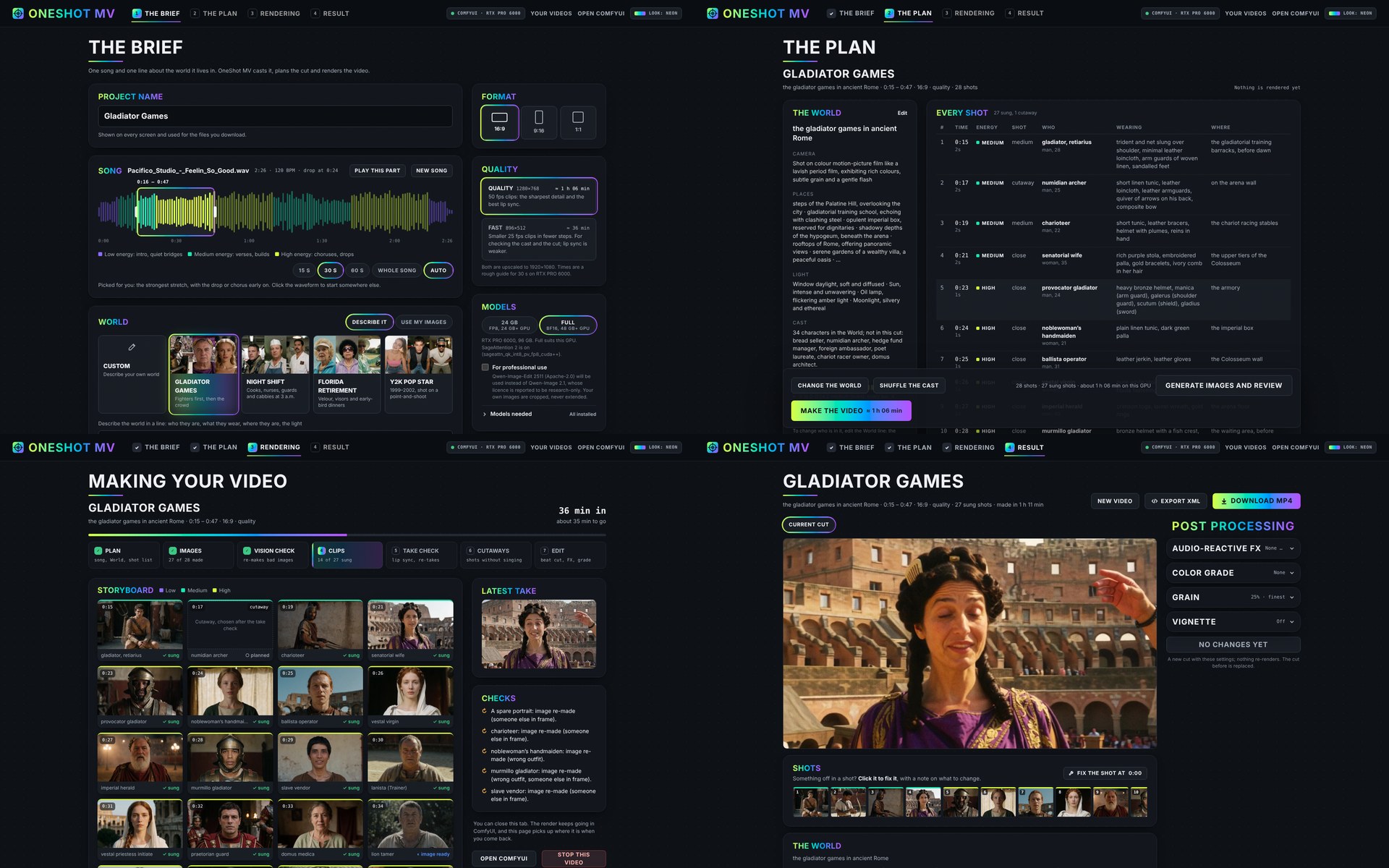
Give OneShot MV a song and one line about the world it lives in. It listens to the song, invents a cast for that world, plans every shot around the song's energy, and renders a lip-synced music video where a different invented person sings each line, or one singer sings them all (Single Artist). Then it edits the whole video for you: every shot cut to the music, audio-reactive FX on the drums, and a finished MP4 at the end, with no timeline work. LTX-2.3 is the core video model: every clip in the video is made by LTX-2.3. Everything runs locally in ComfyUI on open-weights models.
Made for Comfy's Open Source Higgsfield challenge. Every face in this repo is invented, and so is everyone in the videos, unless you give Single Artist a photo of yourself or of someone who agreed to it.
Every moving frame in the video comes from LTX-2.3; the image models only make each shot's first frame.
| Who it's for | What it is | |
|---|---|---|
| The Studio (recommended) | Everyone | An app inside ComfyUI: the brief, the plan, live rendering, the result, post processing and fixes. |
| The ComfyUI workflow | People who build in ComfyUI | The Director node: a song, a World and the same settings the Studio has, also in ComfyUI's App mode. |
| The Comfy SDK | Scripts and automation | run_sdk.bat or sdk_run.py: one command takes a song and a World line to an MP4. |
All three drive the same nodes, and every run shows up in the Studio under Your videos.
With ComfyUI running, open http://127.0.0.1:8188/oneshot-mv/ or click OneShot MV in ComfyUI's top bar. ComfyUI serves the page itself, so there is nothing else to install.

While it works there is a Cancel or Stop button; it removes only this video's jobs from
ComfyUI's queue. The steps at the top stay clickable: an earlier step is grayed out but readable,
with Restart from this stage next to its heading. Restarting makes a new video, and the old one
stays in Your videos. In the workflow, the Director's review_images does the same as Generate
images and review.
Every video starts with FX on Subtle, no color grade (a natural base grade is always applied), grain at 25% and the finest size, and no vignette. The project name is used for the run folder and the downloaded files. The Look menu in the top bar switches the Studio between four color palettes.
To click through every screen on a finished video without rendering anything, open http://127.0.0.1:8188/oneshot-mv/?demo. Starting a video, rendering, Apply and fixes are simulated there in seconds, and nothing is sent to ComfyUI.
Open an example from Templates in the left sidebar, under Extensions, ComfyUI-OneShotMV. You can
also drag a file from example_workflows/ onto the canvas.
OneShotMV.json is the Director: a song and a World line (or a folder of your own images), then
the Studio's settings.OneShotMV_App.json opens in ComfyUI's App mode: a song, a World line and a few settings, then
Run. App / Graph at the top left shows the graph behind it.OneShotMV_Recut.json cuts a finished run again with other FX or without the finish.Turn preview_only on and run once to see the plan in the summary without rendering anything.
Then turn it off and run again; the song analysis and the World are cached, so the second run
starts faster. The Director queues every job itself, and the video lands in
output/oneshot-mv/runs/<run>/final_<format>.mp4.
sdk_run.py makes a whole video through the Comfy SDK: a
Crowd video from a World line, or a video from a folder of your own images (Single Artist is in the
Studio and the workflow). It uploads the song, runs the Director and prints the shot plan. The run's stages then render in
ComfyUI, a Run Result job waits for the finished video, and the SDK downloads it into
oneshot_mv_out/.
Comfy Cloud doesn't install custom node packs yet, so the SDK talks to your own ComfyUI through
Comfy's open-source comfy-api-proxy, which gives
a local ComfyUI the same API as Comfy Cloud. sdk_run.py starts the proxy for you; start ComfyUI
first.
On Windows with ComfyUI portable, double-click run_sdk.bat in the pack folder. The first time,
it installs comfy-sdk and comfy-api-proxy into .sdk\ next to it and leaves ComfyUI's own
packages alone. It asks for the song (drag the file in), the World line and the length. You can
also pass options:
run_sdk.bat --song "song.wav" --world "the gladiator games in ancient Rome" --seconds 40
Anywhere else:
pip install comfy-sdk comfy-api-proxy
python sdk_run.py --song track.wav --world "a 1965 airline: pilots, stewardesses and passengers" --preview
python sdk_run.py --song track.wav --world "a 1965 airline: pilots, stewardesses and passengers" --seconds 30
python sdk_run.py --song track.wav --format 9:16 --fx intense --cuts-high "to the music (intense)"
python sdk_run.py --song track.wav --world-images "D:/shoots/october" --image-order "random order"
python sdk_run.py --recut "<run folder>" --fx none
python sdk_run.py --help lists every option: length and start, format, quality, seed, FX, the
cut for each energy level, cast order, crowd, cutaway share, take-check rounds and the model set.
--preview prints the plan without rendering. To use another deployment that has the OneShot MV nodes, set
COMFY_BASE_URL, and COMFY_API_KEY if it needs one.
One line is enough. "The gladiator games in ancient Rome" gets you gladiators, an emperor, senators and noblewomen in the arena, the stands and the imperial box, all in period clothes.
For more control, write it the way the Studio's examples are written: the tone, then the people in the order you want them, then the places, then the light.
A 1980s Florida retirement community, played completely straight and over the top: seniors in their seventies and eighties with big attitude, in velour tracksuits, sun visors, pearls, gold chains and oversized sunglasses, at aqua aerobics in the condo pool, the bingo hall, the shuffleboard court, the early-bird buffet and rows of golf carts; harsh Florida sun and sun-faded pastel color
What you write is followed, and what you leave out is filled in. A short line gets a general World; the more you say, the closer it sticks:
Some things that help:
Instead of writing a World, give the tool a folder of images you have already made. It skips its own image stage and animates yours:
In the Studio, choose Use my images on the World card, then upload a folder or type the path
of a folder on this computer. In the workflow, put the folder in the Director's world_images
(a full path, or a folder inside ComfyUI's input or output folder) and pick image_order and
image_fit. Use only images you made or have the rights to.
After the World comes who sings. Crowd (the default) casts a different invented person for each line. Single Artist (experimental) has one person sing every line, in the World's outfits, places and light (true to its period, as for Crowd), with quick costume changes on the drop:
artist_photo (the example workflow has one, bypassed). Use only a photo of
yourself or of someone who agreed to it. One photo is enough, and the best one is sharp, of
just them, facing the camera with the head straight, in soft even light, with the whole face
showing (no sunglasses, hat brim or hair across it); head and shoulders is ideal. Makeup and
jewelry in the photo tend to carry over.The portraits come out in the video's shape, so a tall phone photo keeps its head. Cutaways show
the World's places with nobody in them. The crowd behind the singer is off unless you set crowd
to on.
Each main image is an edit of the photo that keeps only the face: the hairstyle, outfit, light and place come from the World. Single Artist is experimental: the likeness varies from shot to shot, and the photo's clothes or jewelry can carry over into some shots. Check the images with Generate images and review and fix any that miss.
Qwen-Image 2.1 makes the artist's portraits and looks; it kept the face best in our tests.
Single Artist also needs the LTX union-control LoRA and the comfyui_controlnet_aux node pack (see the model tables). The Brief says if anything is missing.
| Setting | Choices | Default |
|---|---|---|
| Length and start | seconds (0 = the whole song); a start time, or auto | 30 s from the strongest stretch |
| Format | 16:9 (1920×1080), 9:16 (1080×1920), 1:1 (1080×1080) | 16:9 |
| Quality | quality (clips at 1280×768 for 16:9, 50 fps, three stages), fast (896×512, 25 fps, two stages with fewer steps; for checking the cast and the cut, lip sync is weaker) | quality |
| Cuts, per energy level | every 2 bars, every bar, to the music (subtle), to the music (intense) | low: every 2 bars; medium: every bar; high: to the music (subtle) |
| Audio-reactive FX | none, subtle, intense (per energy level in the Studio) | subtle |
| Cast order | as written, mixed | as written |
| Crowd behind singers | auto, on, off | auto |
| Images not in the video's shape (World images) | crop (around the face), extend (Qwen-Image 2.1 draws the missing sides) | crop |
| Cutaway share | 0 to 0.5 of the shots | 0.125 |
| Take-check rounds | 0 to 3 | 2 |
| Seed | any number | 1 |
| Models | 24gb (fp8), full (bf16, 48 GB+ GPUs); auto picks one for your GPU | auto |
Quality and fast are both upscaled to 1080p (1920×1080, 1080×1920 or 1080×1080) and cut at 25 fps. Quality renders the clips at 50 fps, which gives the mouths smoother timing; 9:16 and 1:1 use the same sizes turned or squared (768×1280 and 1024×1024 at quality, 512×896 and 768×768 at fast).
"To the music" cuts on the beat to a new face in the same spot: about every half bar on subtle, about every beat on intense.
ComfyUI/custom_nodes/ and restart ComfyUI:
cd ComfyUI/custom_nodes
git clone https://github.com/VisualFrisson/ComfyUI-OneShotMV
..\..\..\python_embeded\python.exe -m pip install -r requirements.txt
pip install -r requirements.txt in ComfyUI's environment.models/diffusion_models,
LoRAs in models/loras, text encoders in models/text_encoders, VAEs in models/vae, the
LTX-2.3 checkpoint in models/checkpoints and its upscaler in models/latent_upscale_models.
Sub-folders are fine: OneShot MV looks each file up by name. If you rename a file, change its
name in fv/models.json (24 GB set) or fv/models_full.json (full set).syncnet_v2.model and sfd_face.pth in ComfyUI/models/syncnet/.
They come from the Oxford VGG SyncNet page
and are mirrored in syncnet-python.
Without them the take check skips lip sync.det_10g.onnx, w600k_r50.onnx, for
non-commercial research use only) in ComfyUI/models/insightface/models/buffalo_l/. They run
with onnxruntime (pip install onnxruntime-gpu with ComfyUI's Python). Without them the
framing checks are skipped.pip install sageattention gets version 1, which OneShot MV doesn't use; version 2 comes
from a prebuilt wheel or a build (see its page). OneShot MV picks the kernel for your card:
the one in fv/models.json (ltx23_sage, made for RTX 40 and 50 cards) when it can run,
otherwise SageAttention's own choice for the card (auto, RTX 30 and newer), otherwise none.
Without it the clips render the same, only slower. The Models card on the Brief says
which it uses, and a clip that still fails is re-shot without it.The default model set is made for 24 GB GPUs (RTX 3090, 4090 or 5090) and wants at least 64 GB of
system RAM, because ComfyUI keeps part of LTX-2.3 in RAM while it renders. The full set wants a
GPU with 48 GB or more. The Studio's Models card (24 GB or Full), the Director's models setting
and sdk_run.py --models choose the set. Until you pick one, the full set is used on a 48 GB+ GPU
when its files are installed, and the 24 GB set otherwise; memory set aside with --reserve-vram
counts against the card. Under the set, Models needed (folded until you open it) says how
many files aren't installed and lists each file the video needs with these settings (video, image,
image edit and language, each model with its LoRAs), the folder under ComfyUI/models it goes in,
and a tick or a cross for whether ComfyUI has it. A missing file's name
is its download link (from fv/downloads.json): save it into that folder, click refresh, and the
cross turns into a tick. ComfyUI sees new model files without a restart.
OneShot MV was built and tested on an NVIDIA RTX PRO 6000 (96 GB) with the full set. Times on that card:
| Video | Time |
|---|---|
| 32 s, quality | about 70 min |
| 1 min, quality | about 2 to 3 h |
| 1:51, quality | about 6 h 45 min |
| Re-cut (post processing) | about 2 min |
| Fix one shot | about 10 to 15 min, mostly model loading |
| 1:04, quality, 24 GB set on the same card held to 24 GB | about 3 h 35 min |
On a cold start, loading LTX-2.3 and its Gemma 3 text encoder (about 65 GB with the full set) takes 5 to 9 minutes from a SATA SSD and about a minute from NVMe.
The 24 GB time comes from the same card with ComfyUI held to 24 GB (--reserve-vram 72, without
--highvram). It is about 1.6 times the full set, and most of the extra time is the lip-sync
clips: LTX-2.3 fp8 and its LoRAs are larger than 24 GB, so ComfyUI swaps part of them in from
system RAM on every step (about 2 minutes a clip instead of 45 seconds). Fast renders
smaller clips in fewer steps; use Quality for anything you'll show. A real 24 GB card has
less compute than the RTX PRO 6000, so expect it to take longer still.
Each run has its own folder, output/oneshot-mv/runs/<run>/, with:
final_<format>.mp4, the EDL, and the XML once you export it;plan.json (the World, the cast and every shot) and the check reports;jobs/), so any shot can be queued again.pip install "opencv-python<5". "No clips
rendered" means the clips failed for another reason (the first error in the console), not
OpenCV.ltx23_sage in fv/models.json to "" (off) or "auto".--highvram: ComfyUI keeps LoRA weight backups on the GPU and
overflows into shared memory. The Director adds Weight Backups to RAM after the LTX loaders to
prevent this.| Node | What it does |
|---|---|
| OneShot MV: Director | Takes a song and a World line, then plans, casts and queues the whole run. |
| OneShot MV: Vision Check | Checks every portrait and cutaway image and redoes the wrong ones (the Director queues it). |
| OneShot MV: Take QC | Checks every take, lip sync included, re-shoots bad ones, then queues the cut. |
| OneShot MV: Assemble | Cuts a run together with FX and the finish. Run it again to re-cut; nothing re-renders. |
| OneShot MV: Run Result | Reports where a run is and returns the finished video as a job output (the SDK uses it). |
| OneShot MV: World Preview | Shows what a World line turns into before you spend a run on it. |
| OneShot MV: Lip Sync Score | Scores a finished run's lip sync with SyncNet, take by take. |
| OneShot MV: Finish | Applies the finish (grade, grain, vignette) to any frames. |
| OneShot MV: Keep Models Loaded, Weight Backups to RAM, Free Memory | Memory helpers for the Director's jobs. |
| OneShot MV: Load Image / Video / Audio (path) | Loaders for the Director's jobs. |
| OneShot MV: Face Match | Puts a look's face where its lead's face is (Single Artist's looks). |
| OneShot MV: Fit to Shape | Brings the artist's photo to the video's shape without cropping, so a tall photo keeps its head (Single Artist). |
| OneShot MV: Extend Canvas | Puts an image on a canvas of the video's shape, with masks for pasting the original back over the redrawn canvas (World images with Extend). |
fv/packs/crowd.json holds the casting rules, the edit and the effects of Crowd runs;
fv/packs/artist.json those of Single Artist.
The code is MIT. The models are open weights, none are included here, and each has its own license (listed in the tables below): check the ones that apply to your use.
The 24 GB set (the default) uses fp8 files and one Krea 2 Turbo model for both passes of every image. The full set uses the original bf16 files, with Krea 2 Raw and the Turbo LoRA for the second pass. Both use the same LTX LoRAs, upscaler and VAE.
| Model | 24 GB set (default) | Full set (48 GB+) | Download |
|---|---|---|---|
| LTX-2.3 22B dev | ltx-2.3-22b-dev-fp8.safetensors, 29.1 GB |
ltx-2.3-22b-dev.safetensors, 46.1 GB |
Lightricks/LTX-2.3-fp8, Lightricks/LTX-2.3 |
| Gemma 3 12B IT | gemma_3_12B_it_fp8_scaled.safetensors, 13.2 GB |
gemma_3_12B_it.safetensors, 24.4 GB |
Comfy-Org/ltx-2 |
| Krea 2 Turbo | krea2_turbo_fp8_scaled.safetensors, 13.1 GB |
krea2_turbo_bf16.safetensors, 26.3 GB |
Comfy-Org/Krea-2 |
| Krea 2 Raw and the Turbo LoRA (rank 64) | not used | krea2_raw_bf16.safetensors, 26.3 GB, and krea2_turbo_lora_rank_64_bf16.safetensors, 0.5 GB |
Comfy-Org/Krea-2 |
| Qwen3-VL 4B (Krea 2's text encoder) | qwen3vl_4b_fp8_scaled.safetensors, 5.2 GB |
qwen3vl_4b_bf16.safetensors, 8.9 GB |
Comfy-Org/Krea-2 |
| Both sets | The LTX-2.3 distilled LoRA 384 v1.1 (7.6 GB), the IC-LoRA Detailer (about 2.4 GB), Crisp and Soft Enhance (about 0.7 GB), the spatial upscaler x2 v1.1 (1.0 GB) and the Qwen-Image VAE (0.25 GB) | See the table below | |
| Single Artist, and World images with Extend: Qwen-Image 2.1 and its Qwen3-VL 8B text encoder | qwen_image_2.1_int8_convrot.safetensors, 7.3 GB, and qwen3vl_8b_int8_convrot.safetensors, 9.4 GB |
qwen_image_2.1_bf16.safetensors, 14.2 GB, and qwen3vl_8b_bf16.safetensors, 17.5 GB |
Comfy-Org/Qwen-Image-2.1 |
| Single Artist, both sets | The Qwen-Image 2.1 VAE (0.7 GB) and the union-control LoRA (0.65 GB) | See the tables below |
In all, the 24 GB set is about 73 GB to download and the full set about 144 GB. Single Artist
adds about 18 GB (24 GB set) or 33 GB (full set).
Put the diffusion models in models/diffusion_models (the older models/unet folder works too;
keep one copy).
Every run uses:
| Model | Used for | License | Download |
|---|---|---|---|
| Krea 2 Turbo, the Qwen3-VL 4B text encoder and the Qwen-Image VAE (full set: also Krea 2 Raw and the Turbo LoRA) | Every portrait and cutaway image | Krea 2 Community License: commercial use of the model and its images only for companies under US$1M annual revenue (Qwen3-VL and the VAE are Apache-2.0 upstream) | Comfy-Org/Krea-2 |
| LTX-2.3 22B dev, the distilled LoRA 384 v1.1 and the spatial upscaler x2 v1.1 | Every clip: lip sync and cutaways | LTX-2 Community License: free under US$10M annual revenue; label output as machine-generated; no impersonation without consent | Lightricks/LTX-2.3 |
| LTX-2 19B IC-LoRA Detailer | Fine detail in every clip | LTX-2 Community License | Lightricks/LTX-2-19b-IC-LoRA-Detailer |
| LTX2.3 Crisp Enhance and Soft Enhance (community LoRAs by vrgamedevgirl84) | Sharpness and detail in every clip | No license stated by the author. To run without them, remove them from ltx23_loras in fv/models.json |
CivitAI: LTX 2.3 Enhancers |
| Gemma 3 12B IT | LTX-2.3's text encoder; it also writes the World and the cutaway prompts and runs the vision check | Gemma Terms of Use and Prohibited Use Policy | Comfy-Org/ltx-2 |
Hybrid Demucs (HDEMUCS_HIGH_MUSDB_PLUS) |
Vocal and drum stems | Code MIT; no separate weights license is published | Downloaded by torchaudio on first use |
The optional checks (Install, step 4):
| Model | Used for | License | Download |
|---|---|---|---|
| SyncNet v2 and the S3FD face detector | Lip-sync scores and each take's sync offset | Research use under CC-BY (Oxford VGG); no license stated for S3FD | VGG SyncNet page |
insightface buffalo_l (det_10g, w600k_r50) |
Framing and identity checks | Non-commercial research use only | insightface model zoo |
Single Artist also uses (Crowd runs never load them):
| Model | Used for | License | Download |
|---|---|---|---|
| Qwen-Image 2.1, its VAE and the Qwen3-VL 8B text encoder | The artist's portraits and looks (also World images with Extend) | Reported as the Qwen Research License (research use); check the model page before any commercial use | Comfy-Org/Qwen-Image-2.1 |
| LTX-2.3 IC-LoRA Union Control (ref0.5) | Pose-matched looks | LTX-2 Community License | Lightricks/LTX-2.3-22b-IC-LoRA-Union-Control |
| DWPose and YOLOX-L (TorchScript) | Pose guides for looks | Apache-2.0 | Downloaded by comfyui_controlnet_aux |
File names are set in fv/models.json and fv/models_full.json.
The code is MIT (see LICENSE). Vendored code keeps its own license (fv/syncnet/, see its
NOTICE file). The models are under their own licenses, listed above, and are not included. Only
publish videos made with music you have the rights to, label them as AI-generated, and only cast
invented people or people who have agreed to it.
VisualFrisson/ComfyUI-OneShotMV is a public repo on GitHub by VisualFrisson. Turn a song and one line about its world into a lip-synced music video. ComfyUI nodes and a Studio app that run locally on open-weights models.
It declares the MIT license on GitHub.
Its maker tagged it for Windows. That is declared by the maker; Take My Repo has not tested it.
Open "Take it" on its page: Take My Repo writes an install plan for your machine and hands it to your AI agent (Claude Code, Codex or Cursor), which asks you before each step. Take My Repo has not tested it on any machine.
Its last change on GitHub was on 2026-11-20. GitHub counts 0 open issues and pull requests. Take My Repo does not judge from that whether it is maintained.
The most powerful and modular diffusion model GUI, api and backend with a graph/nodes interface. The fastest local inference engine in the world.
Nobody has reviewed it on Take My Repo yet, which says nothing about its quality.
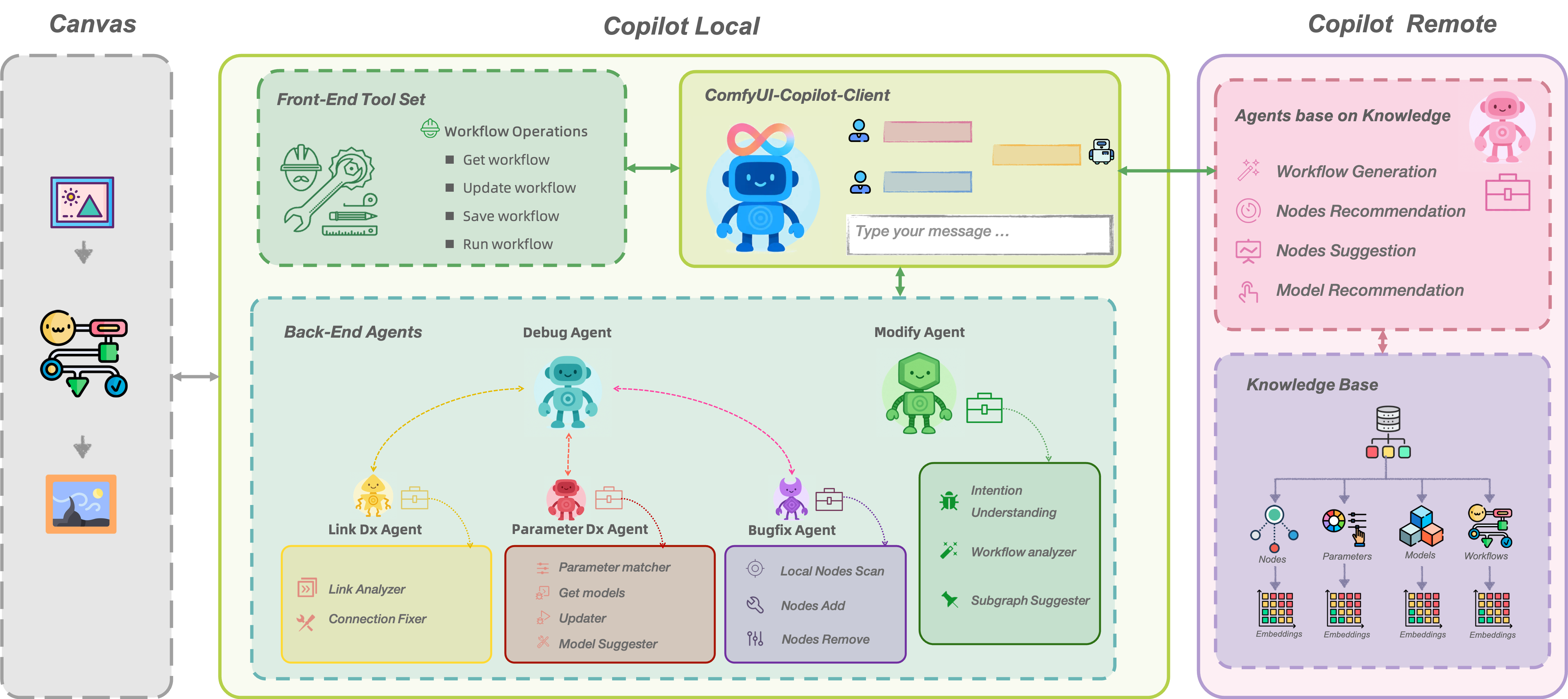
An AI-powered custom node for ComfyUI designed to enhance workflow automation and provide intelligent assistance
ComfyUI custom nodes providing unified image and mask resizing with support for multiple scaling modes, aspect-ratio preservation, center crop alignment, and stable tensor-based mask transformations, and more.