Firefly
Firefly: 大模型训练工具,支持训练Qwen2.5、Qwen2、Yi1.5、Phi-3、Llama3、Gemma、MiniCPM、Yi、Deepseek、Orion、Xverse、Mixtral-8x7B、Zephyr、Mistral、Baichuan2、Llma2、Llama、Qwen、Baichuan、ChatGLM2、InternLM、Ziya2、Vicuna、Bloom等大模型
- 6.6k
- Python
- 2 y ago
A camera proxy for Reolink: pulls video over Reolink's own protocol and serves RTSP and HTTP for Frigate, go2rtc or any NVR. No ffmpeg in the serving path.
Repo VoltTech21/reostream, read from GitHub 1 d ago. VoltTech21 has not joined Take My Repo.
VoltTech21/reostream is a public repo on GitHub by VoltTech21. A camera proxy for Reolink: pulls video over Reolink's own protocol and serves RTSP and HTTP for Frigate, go2rtc or any NVR. No ffmpeg in the serving path. It declares the AGPL-3.0 license on GitHub. It is written mainly in Go, has 230 stars and last changed on 2026-11-18. Nobody has reviewed it on Take My Repo yet, which says nothing about its quality. Read from GitHub on 2026-11-22.
A camera proxy for Reolink cameras. It sits between your cameras and Frigate (or any NVR), pulls video over Reolink's own Baichuan protocol, and serves it as RTSP and HTTP MPEG-TS.
It does not replace Frigate. Frigate still does detection and recording; reostream only changes where Frigate gets the video from.
Reolink cameras --Baichuan--> reostream --RTSP--> go2rtc / Frigate / Blue Iris
                                        --HTTP--> mpv / VLC / scripts
Reolink's RTSP server is broken on some models. On a Duo 3 it gave green blocks, gray frames and smearing. Same camera, same encoder, same thirty minutes, both transports:
| transport | segments | segments with bitstream errors |
|---|---|---|
| Baichuan | 184 | 0 |
| RTSP | 178 | 147 |
Reolink's own NVR looks fine because it uses Baichuan, not RTSP. A fisheye here also loses
about 21% of its frames over RTSP. Method in docs/measurements.md.
Neolink did this first and made the protocol understandable. It has had no commits since January 2025. reostream is a new implementation, not a fork.
docker run -d --name reostream --restart unless-stopped \
  --network host \
  -v reostream-data:/data \
  ghcr.io/volttech21/reostream:latest

docker logs reostream
Host networking lets reostream see your real network: it finds cameras on its own
(battery ones too), and cameras can upload clips to it. Where you can't use it, map the
ports instead: -p 8560:8560 -p 8561:8561 -p 8562:8562 -p 2121-2131:2121-2131.
http://<host>:8562/claim and paste it.Your streams are at rtsp://<host>:8561/<camera> and http://<host>:8560/<camera>.ts.
On Unraid, install reostream from Community Apps. Prefer compose, a plain binary or systemd? See docs/setup.md.
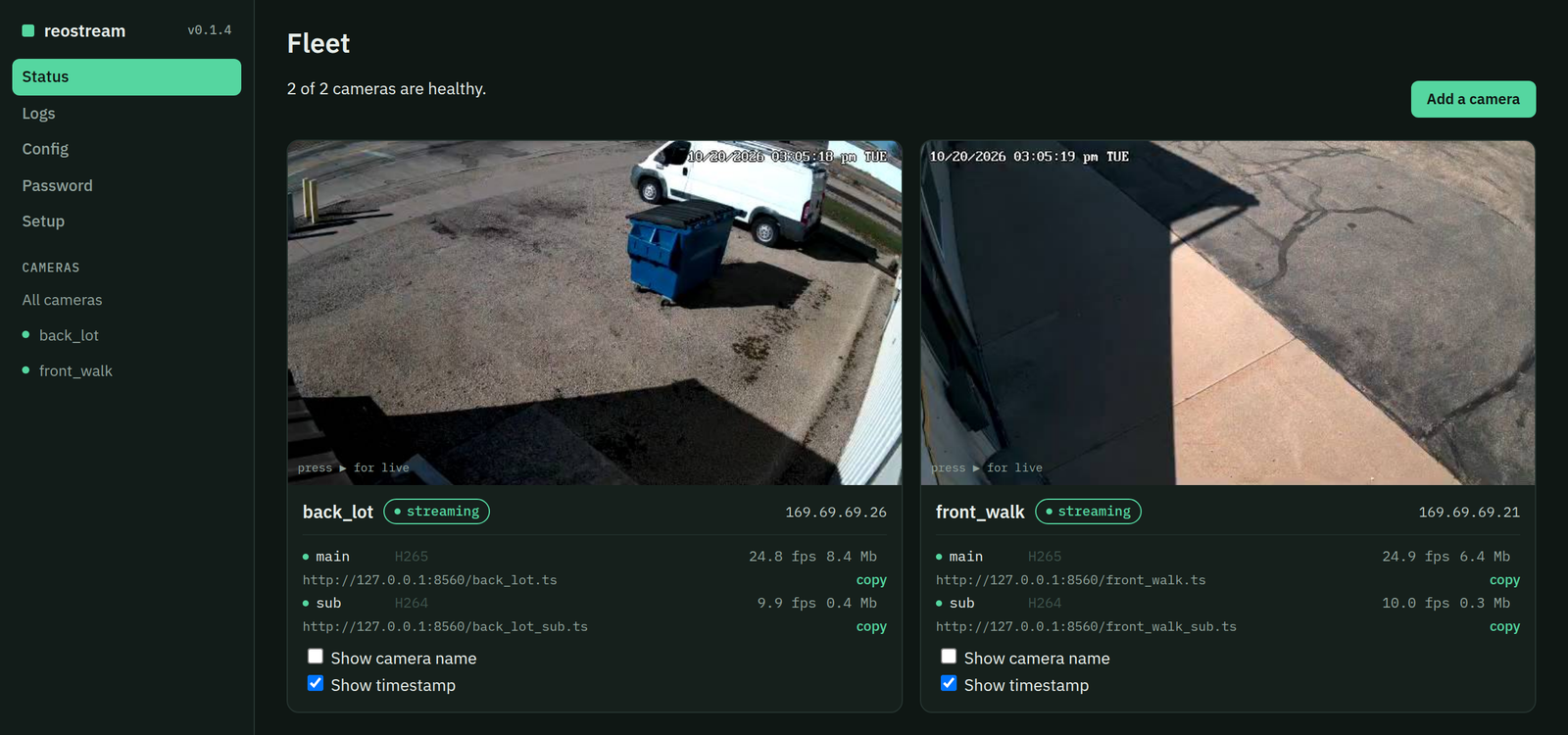
Feed go2rtc from reostream's RTSP, and point Frigate at go2rtc. One camera connection then serves detect, record and live view.
go2rtc:
  streams:
    driveway:
      - rtsp://reostream:8561/driveway
      - ffmpeg:driveway#audio=opus
    driveway_sub:
      - rtsp://reostream:8561/driveway_sub

cameras:
  driveway:
    ffmpeg:
      inputs:
        - path: rtsp://127.0.0.1:8554/driveway_sub
          input_args: preset-rtsp-restream
          roles: [detect]
        - path: rtsp://127.0.0.1:8554/driveway
          input_args: preset-rtsp-restream
          roles: [record, audio]
The #audio=opus line is optional; it gives browsers and apps audio in live view.
Name the go2rtc stream exactly like the Frigate camera (driveway above). Frigate's own
page can pick another stream through live.streams, but the Advanced Camera Card in Home
Assistant ignores that and asks go2rtc for the camera's name, so a different name gives a
blank card.
If Frigate runs on Docker's default bridge network and reostream on host networking,
127.0.0.1 inside the Frigate container is the container itself, not the host, and gives
"connection refused". Use the host's LAN address in the go2rtc URLs instead.
If a camera's main stream runs at about half its frame rate, look at its Frame Rate Mode in the Reolink app or on its Settings tab: on Auto some cameras lower the frame rate in low light. Set it to Constant.
Read RTSP over TCP, which go2rtc and Frigate's presets do. Over UDP a big keyframe is
hundreds of packets and losing any one damages the frame: a 16 MP Duo 3 main stream read
over UDP had 101 of 394 frames damaged even on loopback. When recordings show green or gray
smears, look at go2rtc's /api/streams: a reader's senders show a drops count (left out
while it is zero), which is where frames dropped on the way to Frigate show up, since
neither reostream nor Frigate logs them.
Without go2rtc, Frigate can read http://reostream:8560/driveway.ts directly.
The streams are open to your network by default. To ask for a login, set username and
password under [rtsp] (it covers ports 8560 and 8561) and use
rtsp://user:password@reostream:8561/driveway; see docs/setup.md.
| RTSP, port 8561 | HTTP, port 8560 | |
|---|---|---|
/<cam> |
/<cam>.ts |
main stream |
/<cam>_sub |
/<cam>_sub.ts |
sub stream |
/<cam>_extern |
/<cam>_extern.ts |
extern: the middle stream (about 896x512 H.264) most clients never offer |
Also on port 8560:
/<cam>.keyframe |
latest keyframe, raw |
/<cam>.frames |
raw access units with a small header, for your own decoder; see docs/setup.md |
/<cam>.still.ts |
the latest keyframe as a one-frame MPEG-TS; never touches the camera |
/api/status |
per-stream JSON: connected, fps, bitrate, clients, reconnects, last error |
/metrics |
the same for Prometheus |
No ffmpeg, GStreamer or RTSP server in the serving path.
On my own cameras:
| Model | Count | Firmware |
|---|---|---|
| RLC-810A (8 MP bullet) | 6 | v3.1.0.956_24022103 |
| FE-P (fisheye) | 1 | v3.0.0.5336_2509021915 |
| Duo 3 PoE (dual lens panorama) | 1 | v3.0.0.5049_2506302188 |
| TrackMix PoE (PTZ, auto tracking) | 1 | v3.2.0.5931_2601294931 |
| Argus PT Ultra (battery, Wi-Fi) | 1 | v3.0.0.5808_26041006 |
reostream has been the only video path for this fleet's Frigate since September: 23
streams, 69 Mbps, about 60% of one CPU core, 29-59 MB of memory. Numbers in
docs/measurements.md.
Reported working by users (thank you!):
| Model | What works | Reported in |
|---|---|---|
| RLC-833A (v3.1.0.3016) | video, two-way talk | GitHub #18 |
| E1 Pro (v3.1.0.1414) | video, two-way talk | GitHub #18 |
| E1 | video, privacy mode | GitHub #13 |
| E1 Zoom 8 MP | video, two-way talk, pan/tilt | |
| RLC-822A (6 cameras) | video | GitHub #1 |
| Video Doorbell PoE (D340P, v3.0.0.6460) | video, audio, two-way talk | GitHub #1, Reddit |
| Video Doorbell (wired 2K) | video | |
| Video Doorbell Wi-Fi (2nd gen, v3.0.0.7106) | video (main, sub, extern), motion, two-way talk (silent on v3.0.0.6460) | Reddit, GitHub #7, #36 |
| CX820 | video | |
| Duo Floodlight Wi-Fi v2 | video | |
| Duo 4K Wi-Fi (3 cameras) | video | |
| RLC-811A (v3.1.0.4695) | video, audio | |
| Lumus Pro | video (Frigate: NVIDIA decoding works; on Intel, hardware decoding off for it) | GitHub #17, Reddit |
| RLC-410-5MP | video (Frigate) | |
| RLC-420 | video (Frigate) | |
| RLC-420-5MP | video (Frigate) | |
| RLC-422 | video (Frigate) | |
| RLC-510A | video (Frigate) | |
| RLC-520A | video (Frigate) | |
| Duo PoE | video (Frigate) | |
| Duo 2 PoE | video (Frigate) | |
| Duo Floodlight PoE | video (Frigate) | |
| E1 Outdoor | video (Frigate) | |
| FE-W | video (Frigate) | |
| CX810 (v3.1.0.6126) | video, audio | |
| RLC-522 (v3.0.0.757) | video | GitHub #35 |
| RLC-820A | video | |
| RLC-510WA (Wi-Fi) | video | |
| RLC-823S2 (v3.1.0.5714) | video (Frigate) | GitHub #33 |
| Elite Floodlight (Wi-Fi) | video (main and sub, Frigate) | |
| Solar Floodlight Cam (battery, Wi-Fi; v3.0.0.6133) | video on demand, live motion from waking, Frigate | GitHub #36 |
Your camera not here? Open an issue with the model, firmware and what worked, and it goes on the list.
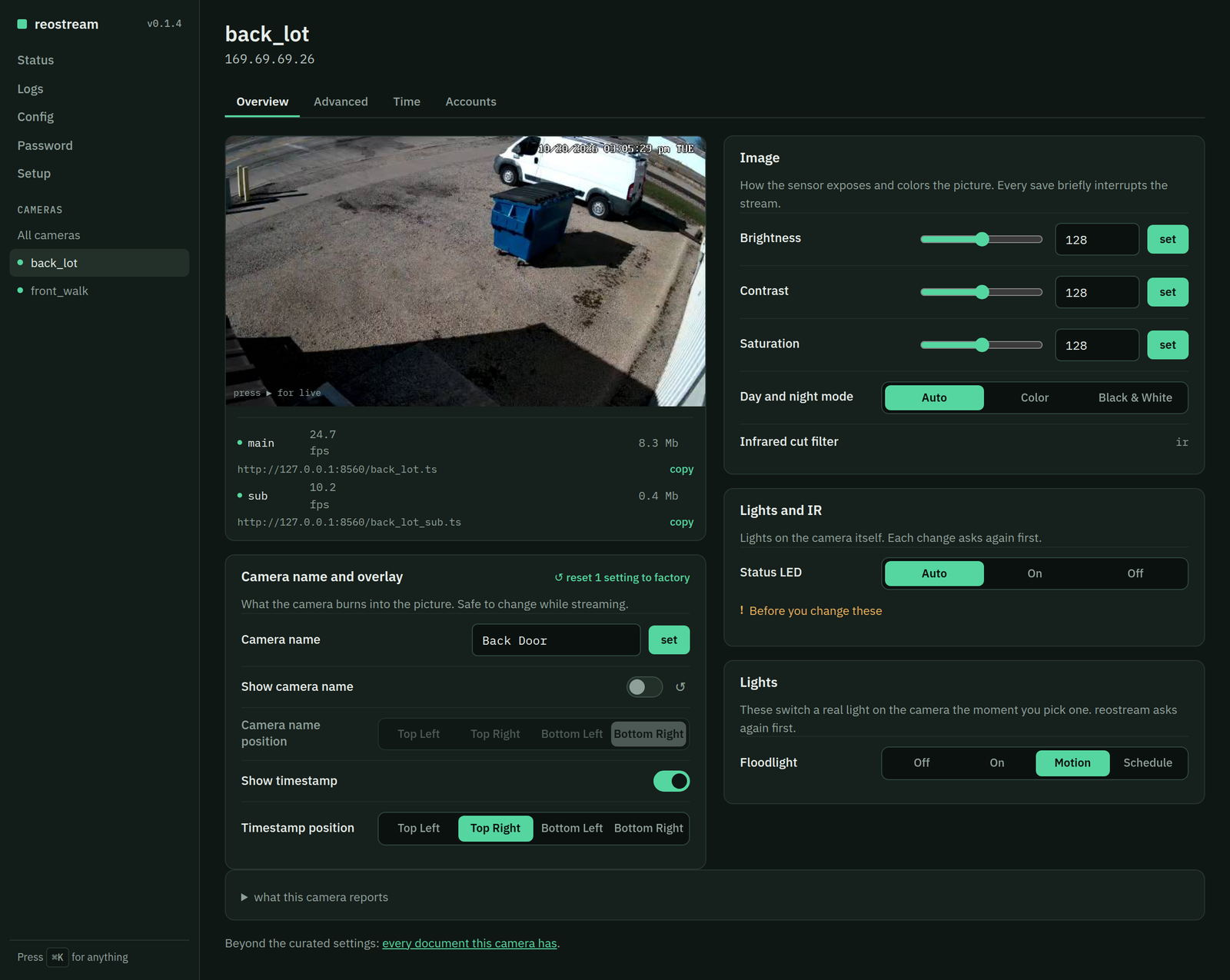
Each camera has a page with three tabs:
reocam, a separate command line tool, reads and changes camera settings over the same protocol. Streaming does not
need it.
reocam -address 192.0.2.50 -password secret probe
probe reports which messages the camera answers. See docs/control.md for reading
and writing settings and what to watch out for.
docs/setup.md: other ways to run it, the config file, the control page, RTSP, the frames feed,
recordings and saved clips, alerts, battery camerasdocs/control.md: camera control with reocamdocs/protocol.md: what the Baichuan wire actually doesdocs/measurements.md: how every number above was measuredAGPL v3. Free to use, run and modify. If you distribute a modified version or run one as a service for others, you must publish your changes.
A commercial license without that obligation is available. See COPYRIGHT.
VoltTech21/reostream is a public repo on GitHub by VoltTech21. A camera proxy for Reolink: pulls video over Reolink's own protocol and serves RTSP and HTTP for Frigate, go2rtc or any NVR. No ffmpeg in the serving path.
It declares the AGPL-3.0 license on GitHub.
Its maker tagged it for macOS, Windows and Linux, or as Docker or cross-platform. That is declared by the maker; Take My Repo has not tested it.
Open "Take it" on its page: Take My Repo writes an install plan for your machine and hands it to your AI agent (Claude Code, Codex or Cursor), which asks you before each step. Take My Repo has not tested it on any machine.
Its last change on GitHub was on 2026-11-18. GitHub counts 23 open issues and pull requests. Take My Repo does not judge from that whether it is maintained.
Firefly: 大模型训练工具,支持训练Qwen2.5、Qwen2、Yi1.5、Phi-3、Llama3、Gemma、MiniCPM、Yi、Deepseek、Orion、Xverse、Mixtral-8x7B、Zephyr、Mistral、Baichuan2、Llma2、Llama、Qwen、Baichuan、ChatGLM2、InternLM、Ziya2、Vicuna、Bloom等大模型
Nobody has reviewed it on Take My Repo yet, which says nothing about its quality.
Unified UI and API for processing and training images for facial recognition.
Smart IP camera stream finder. Tests 102K+ URL patterns in 30 seconds. Supports 67K camera models. Generates ready Frigate/go2rtc configs.
π RuView turns commodity WiFi signals into real-time spatial intelligence, vital sign monitoring, and presence detection — all without a single pixel of video.
[ACL 2024] An Easy-to-use Knowledge Editing Framework for LLMs.