john
John the Ripper jumbo - advanced offline password cracker, which supports hundreds of hash and cipher types, and runs on many operating systems, CPUs, GPUs, and even some FPGAs
- 14k
- C
- 10 d ago
Example UPduino project setup for Linux, macOS and WIndows+WSL for synthesis and simulation
Repo XarkLabs/upduino-example, read from GitHub 2 min ago. XarkLabs has not joined Take My Repo.
XarkLabs/upduino-example is a public repo on GitHub by XarkLabs. Example UPduino project setup for Linux, macOS and WIndows+WSL for synthesis and simulation. It declares no license on GitHub. Public does not mean open source: without a license, nobody is granted the right to reuse it. It is written mainly in Makefile, has 9 stars and last changed on 2024-09-03. Nobody has reviewed it on Take My Repo yet, which says nothing about its quality. Read from GitHub on 2026-11-25.
John the Ripper jumbo - advanced offline password cracker, which supports hundreds of hash and cipher types, and runs on many operating systems, CPUs, GPUs, and even some FPGAs
Simple voltage glitcher implementation for the iCEBreaker FPGA board
This project tries to provide a "starting project design" for the UPduino FPGA board using open source tools using a (hopefully) robust Makefile and a small example and useful info to help you get started to making your own designs. Mostly a "fancy blinky" project.
This example is MIT-0 licensed. This means you are free to do as you wish with it, including putting your name on it and applying a different license - you are encouraged to make it into your project.
There are a few areas where this may be helpful to get you started. First, the Makefile is setup for:
This setup was also designed to be fairly easy to get up and running on multiple operating systems (Linux, macOS and Windows using WSL2) with a minimum of hassle and dependencies:
NOTE: While the tools themselves can run native on Windows (typically with MSYS2), that tends to make things difficult for a portable project like this due to (mostly) shell and path issues so I leave that as an "exercise for the reader" (and WSL2 works fairly well).
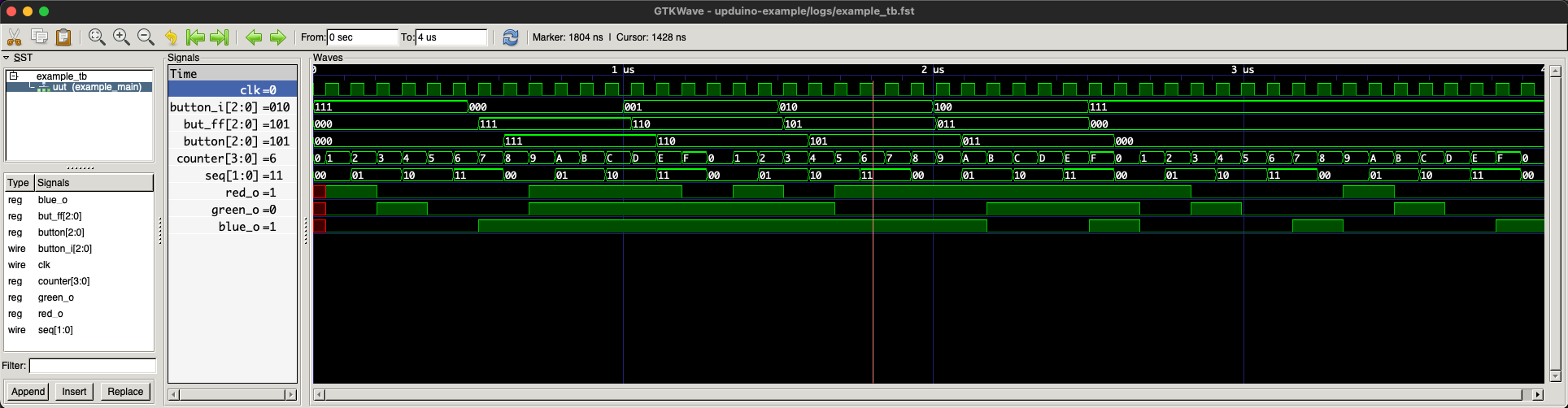
In addition to this, the example design serves as an example of how to use a few basic useful features of the UPduino and iCE40UltraPlus5K FPGA:
This Makefile also handles most of the typically needed options and is fairly well commented to help you understand the build and synthesis process (and tweak it for your project).
In addition, the dependencies needed for this project should be just make
(typically installed by default or a build-essential or similar package) and
the open source FPGA tools that are all the ones this project needs are
conveniently built and packaged up nightly for common operating systems here
YosysHQ oss-cad-suite. Go to
releases,
download the package for your computer, extract it and either add its bin to
your PATH (I recommend at the very beginning to avoid issues) or "source
/oss-cad-suite/environment" (which will do that along
with a bit of additional setup). You can also build the needed packages from
source, or perhaps your distribution has them available as a (recent enough)
package.
See INSTALLATION.md for details on installing the dependencies needed for this project.
See BUILDING.md for details on building this project.
If you are wondering why this project is using SystemVerilog instead of "regular" Verilog, understand that SystemVerilog is just the latest version of Verilog (and given a new name since it got "fancy"). It is designed to be entirely backwards compatible with Verilog. While SystemVerilog has added a huge number of things to "regular" Verilog, most can be ignored for the purposes of FPGA synthesis (most of it is for complex simulation and verification). The open source tools support only a subset of SystemVerilog but this is enough for some "quality of life" improvements and can make some things less error prone and confusing.
The main additional SystemVerilog features used in this design are:
.sv for the file extension (largely for potentially improved syntax
highlighting)logic instead of choosing between reg or wire (except on input
ports, which use logic wire)always_ff for synchronous blocks (those with clocked logic)always_comb for combinatorial blocks (logic without a clock)'0 to mean any number of zero bits (as wide as the destination)enum and typedef for enumerations and more expressive and
readable typespackage to group common design parameters
together (along with package namespace prefix e.g. package::member and import)This design also attempts to follow the "best practices" outlined in the excellent book RTL Modelling with SystemVerilog for Simulation and Synthesis. In addition this Verilog Style Guide may be helpful.
You are of course free to use whatever text editor you are most comfortable with. Many have syntax highlighting and other features specifically for SystemVerilog (or Verilog) you may find helpful.
It is also worth mentioning that if you use
Visual Studio Code (a freely available editor
from Microsoft for Windows, Linux and macOS), there are several nice
SystemVerilog (and Verilog) extensions available. Some will even run Verilator
(or other utility) in the background and do on the fly "lint" checking with
error and warning "squiggles". This can be extremely helpful when learning
(reducing the frustration from repeatedly having to save, run make and re-read
diagnostic messages over and over as you iterate working to fix issues).
XarkLabs/upduino-example is a public repo on GitHub by XarkLabs. Example UPduino project setup for Linux, macOS and WIndows+WSL for synthesis and simulation.
It declares no license on GitHub. Public does not mean open source: without a license, nobody is granted the right to reuse it.
Its maker has not tagged a system, so it is unknown here. Its README says what it needs.
Verible is a suite of SystemVerilog developer tools, including a parser, style-linter, formatter and language server
AXI SystemVerilog synthesizable IP modules and verification infrastructure for high-performance on-chip communication
Open "Take it" on its page: Take My Repo writes an install plan for your machine and hands it to your AI agent (Claude Code, Codex or Cursor), which asks you before each step. Take My Repo has not tested it on any machine.
Its last change on GitHub was on 2024-09-03. Take My Repo does not judge from that whether it is maintained.
Nobody has reviewed it on Take My Repo yet, which says nothing about its quality.
Take My Repo cannot say: it does not audit code and has not run upduino-example. What is known comes from GitHub. It declares no license on GitHub. Public does not mean open source: without a license, nobody is granted the right to reuse it. Its last change was on 2024-09-03. It has 9 stars, which measure popularity, not safety. Nobody has reviewed it on Take My Repo yet, which says nothing about its quality. Read the source before you run it. With "Take it", your AI agent shows each step and asks you before running it; README text is treated as data, not as instructions.