rlTORCS
A modified version of TORCS for deep reinforcement learning.
- 126
- GPL-3.0
- 9 y ago
Repo YurongYou/rlTORCS, read from GitHub 17 h ago. YurongYou has not joined Take My Repo.
In short
YurongYou/rlTORCS is a public repo on GitHub by YurongYou. A modified version of TORCS for deep reinforcement learning. It declares the GPL-3.0 license on GitHub. It is written mainly in C++, has 126 stars and last changed on 2017-11-17. Nobody has reviewed it on Take My Repo yet, which says nothing about its quality. Read from GitHub on 2026-11-24.
Similar repos
phpdotenv
Loads environment variables from `.env` to `getenv()`, `$_ENV` and `$_SERVER` automagically.


TORCS for Reinforcement Learning
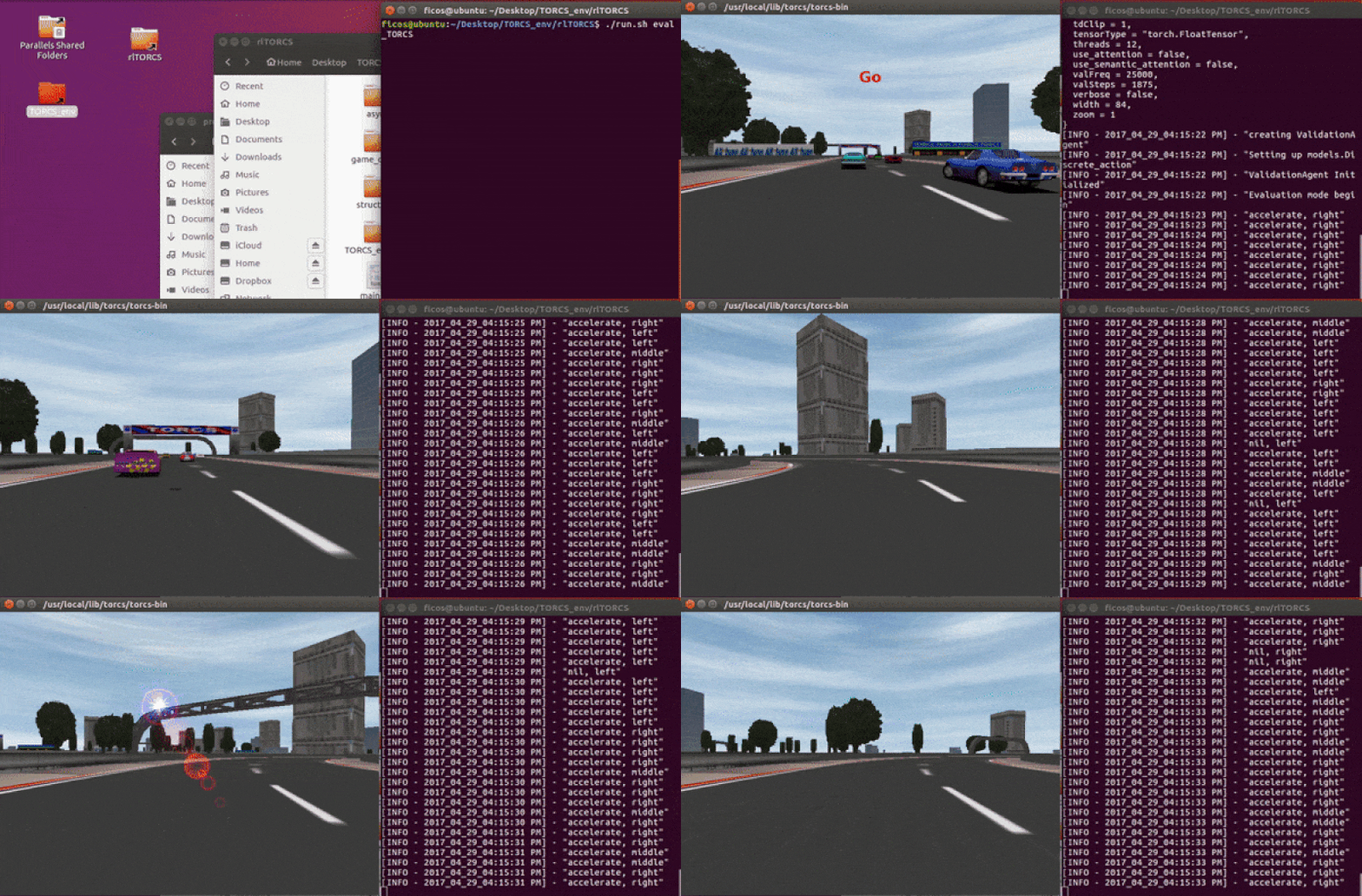
Table of Content
- Overview
- Environment Specification
- System Requirements
- IMPORTANT!!
- Installation
- Interface Specification
- System Explanation in a Nutshell
- Training results
- [Optional] Further Customization
- Reference
Overview
TORCS (The Open Racing Car Simulator) is a famous open-source racing car simulator, which provides a realistic physical racing environment and a set of highly customizable API. But it is not so convenient to train an RL model in this environment, for it does not provide visual API and typically needs to go through a GUI MANU to start the game.
This is a modified version of TORCS in order to suit the needs for deep reinforcement learning training with visual observation. Through this environment, researchers can easily train deep reinforcement learning models on TORCS via a Lua interface (Python interface might also be supported soon).
The original TORCS environment is modified in order to
- Be able to start a racing game with visual output without going through a GUI MANU
- Obtain the first-person visual observation in games
- Provide fast and user-friendly environment-agent communication interface for training
- Train visual RL models on TORCS on a server (machines without display output)
- Support multi-thread RL training on TORCS environment
- Support semantic segmentation on the visual in inputs via some hacks
This environment interface is originally written for my RL research project, and I think open-sourcing this can make it much easier for current studies on both autonomous cars and reinforcement learning.
Update: training code uploaded! Modified from Atari, See ./train_rl.
Environment Specification
This repository contains
torcs-1.3.6the source code of a modified torcs-1.3.6TORCSctrl.cppa dynamic linking library for communications between RL models (in lua) and TORCStrain_rl/TORCSthe lua interfacestrain_rlrl training codemakefilefor compilingTORCSctrl.soinstall.shfor installing torcs
System Requirements
- ubuntu 14.04+ (16.04 is preferable, see below)
- torch
- luasocket
- torchx
- itorch (https://github.com/facebookarchive/iTorch)
- nnlr
- dpnn
- luaposix
- logroll
- classic
- tds
IMPORTANT!!
If you want to run this environment on a server (without display device) with Nvidia graphic cards, please make sure your Nvidia drivers are installed with flag
--no-opengl-files! (otherwise, there will be problems when using xvfb, see this)In order to correctly install the dependency packages and if you are using a desktop version of Ubuntu, please go to System Settings -> Software & Updates and tick the source code checkbox before installation, or you should modify your
/etc/apt/sources.list.If your server is Ubuntu 14.04, please do
  cd torcs-1.3.6
  ./configure --disable-xrandr
before installation, otherwise, there will also be some problems when using xvfb.
Installation
Just run install.sh in the root folder with sudo:
sudo ./install.sh
After installation, in command line, type torcs (xvfb-run -s "-screen 0 640x480x24" torcs if on a server). If there jumps off a torcs window (or there are no errors popping up on the command line), the installation has succeeded. Press ctrl + \ to terminate it (ctrl + c has been masked.).
Interface Specification
The overall interface of this environment follows https://github.com/Kaixhin/rlenvs#api
[NOTICE] You need to call cleanUp() if the whole training ends.
Folder Structure
Make sure the folder structure of the environment interface is like this
\TORCS
- Env.lua
- Torcs.lua
- TorcsContinuous.lua
- TORCSctrl.so
- TorcsDiscrete.lua
- TorcsDiscreteConstDamagePos.lua
\game_config
- aaa.xml
- bbb.xml
...
Basic Usage (on a desktop ubuntu)
local TorcsDiscrete = require 'TORCS.TorcsDiscrete'

-- configure the environment
local opt = {}
opt.server = false
opt.game_config = 'quickrace_discrete_single_ushite-city.xml'
opt.use_RGB = false
opt.mkey = 817
opt.auto_back = false

local env = TorcsDiscrete(opt)
local totalstep = 817
print("begin")
local reward, terminal, state = 0, false, env:start()
repeat
	repeat
		reward, observation, terminal = env:step(doSomeActions(state))
		nowstep = nowstep + 1
	until terminal

	if terminal then
		reward, terminal, state = 0, false, env:start()
	end
until nowstep >= totalstep
print("finish")
env:cleanUp()
Basic Usage (on a server ubuntu)
Before running the environment, run this in a terminal window:
./xvfb_init.sh 99
Then a xvfb is set up on display port 99, allowing at most 14 TORCS environment simultaneously running on this xvfb
Example script: test.lua
-- test.lua
local TorcsDiscrete = require 'TORCS.TorcsDiscrete'

-- configure the environment
local opt = {}
opt.server = true
opt.game_config = 'quickrace_discrete_single_ushite-city.xml'
opt.use_RGB = false
opt.mkey = 817
opt.auto_back = false

local env = TorcsDiscrete(opt)
local totalstep = 817
print("begin")
local reward, terminal, state = 0, false, env:start()
repeat
	repeat
		reward, observation, terminal = env:step(doSomeActions(state))
		nowstep = nowstep + 1
	until terminal

	if terminal then
		reward, terminal, state = 0, false, env:start()
	end
until nowstep >= totalstep
print("finish")
env:cleanUp()
Run the script while the xvfb is running:
export DISPLAY=99:
th test.lua
Options Specification
You can pass a table to the environment to configure the racing car environment:
server: bool value, settrueto run on a servergame_config: string, the name of game configuration file, should be stored in thegame_configfolderuse_RGB: bool value, settrueto use RGB visual observation, otherwise grayscale visual observationmkey: integer, the key to set up memory sharing. Different running environment should have different mkeyauto_back: bool value, setfalseto disable the car's ability to reverse its gear (for going backward)
Multithread Example
See torcs_test.lua.
Action Space
We provide environments with two different action spaces. Note that different action space should choose different types of game configurations respectively (see Further Customization section below for explanations on game configuration).
In original torcs, the driver can have controls on four different actions:
- throttle: real value ranging from
[0, 1].0for zero acceleration,1for full acceleration - brake: a real value ranging from
[0, 1].0for zero brake,1for full brake - steer: a real value ranging from
[-1, 1].-1for full left-turn,1for full right-turn - gear: a integer ranging from
[-1, 6].-1for going backward.
The following is my customization, you can customize the action space by yourself (see Further Customization section).
Discrete Action Space (train_rl/TORCS/TorcsDiscrete.lua)
This environment has a discrete action space:
1 : brake = 0, throttle = 1, steer =  1
2 : brake = 0, throttle = 1, steer =  0
3 : brake = 0, throttle = 1, steer = -1
4 : brake = 0, throttle = 0, steer =  1
5 : brake = 0, throttle = 0, steer =  0
6 : brake = 0, throttle = 0, steer = -1
7 : brake = 1, throttle = 0, steer =  1
8 : brake = 1, throttle = 0, steer =  0
9 : brake = 1, throttle = 0, steer = -1
The corresponding driver controlled by this environment is torcs-1.3.6/src/drivers/ficos_discrete/ficos_discrete.cpp. Note that the action will be performed in a gradually changing way, e.g., if the current throttle command of the driver is 0 while the action is 2, then the actual action will be some value between 0 and 1. Such customization mimics the way a human controls a car using a keyboard. See torcs-1.3.6/src/drivers/ficos_discrete/ficos_discrete.cpp:drive for more details.
Continuous Action Space (train_rl/TORCS/TorcsContinuous.lua)
There are two dimensions of continuous actions in this environment:
brake/throttle: a real value ranging from
[-1, 1].-1for full brake,1for full throttle, i.e.if action[1] > 0 then throttle = action[1] brake = 0 else brake = -action[1] throttle = 0 endsteer: a real value ranging from
[-1, 1].-1for full left-turn,1for full right-turn
In above two customized environment, note that
- There are hard-coded ABS and ASR strategies on corresponding drivers
- gear changes automatically
Training example
Before running the environment, run this in a terminal window and keep it running:
./xvfb_init.sh 99
then
cd train_rl
export DISPLAY=99:
./run.sh train_TORCS_slowmulti_ushite_city_seed1
Tracks
You can customize the racing track by the way stated in Customize the Race section. Here we provide some game configuration on different tracks, see *.xml files, which are named in format quickrace_<discrete|continuous>_<single|multi>_<trackname>.xml, in the game_config folder.
Reward
You can modify the original reward function of the environment by override reward() function, as in TorcsDiscreteConstDamagePos.
System Explanation in a Nutshell
In this section, we briefly explain how the racing car environment works.
In TORCS environment, when the game is running, it actually maintains a state machine (see torcs-1.3.6/src/libs/raceengineclient/racestate.cpp). On each update of the the state (in 500 Hz), the underlying physical states are updated (e.g. update each cars' speed according to its previous speed and acceleration, etc.), and in 50 Hz, each of car drivers is queried for actions. Drivers can have access to a variety of information (e.g. speed, distance, etc.) to decide what action it will take (i.e. decide the value of throttle, brake, steer, gear, etc.). You can refer to this on how to customize drivers.
Agent-Environment Communication
To make it possible to run RL model in torch or python, we use memory sharing method to set up IPC between the environment and the model (thanks to DeepDriving from Princeton).
Once the environment is set up, it will request a portion of shared memory using the given mkey. If the RL agent running in another process also requests a portion of shared memory of the same size with the same mkey, then it can see the information written by the customized driver in TORCS.
The customized driver can regularly write information about the current racing status into that memory, and wait for the agent for its action (also, write in different part of that memory). Those information can be
- current first-person view from the driver
- the speed of the car
- the angle between the car and the tangent of the track
Questions
What is rlTORCS?
YurongYou/rlTORCS is a public repo on GitHub by YurongYou. A modified version of TORCS for deep reinforcement learning.
Is rlTORCS open source?
It declares the GPL-3.0 license on GitHub.
Does rlTORCS run on macOS, Windows or Linux?
Its maker has not tagged a system, so it is unknown here. Its README says what it needs.
How do I install rlTORCS?
Open "Take it" on its page: Take My Repo writes an install plan for your machine and hands it to your AI agent (Claude Code, Codex or Cursor), which asks you before each step. Take My Repo has not tested it on any machine.
Is rlTORCS still maintained?
Its last change on GitHub was on 2017-11-17. Take My Repo does not judge from that whether it is maintained.