rea
Reverse engineer anything with agents, from app behavior down to native binaries.
- 477k
- TypeScript
- MIT
- 33 min ago
A controllable workflow for making videos with code, open source: say one sentence, a coding agent (Claude Code, Codex) writes the code and renders the film, and you direct every step in a visual Studio. 用代码做视频的一套可控工作流:说一句话,agent 写代码出片;每一步看得见、改得动、能重做,你在 Studio 里当导演。
Repo ZLHad/OpenVideoHarness, read from GitHub 9 h ago. ZLHad has not joined Take My Repo.
ZLHad/OpenVideoHarness is a public repo on GitHub by ZLHad. A controllable workflow for making videos with code, open source: say one sentence, a coding agent (Claude Code, Codex) writes the code and renders the film, and you direct every step in a visual Studio. 用代码做视频的一套可控工作流:说一句话,agent 写代码出片;每一步看得见、改得动、能重做,你在 Studio 里当导演。. It declares the MIT license on GitHub. It is written mainly in Python, has 43 stars and last changed on 2026-11-24. Nobody has reviewed it on Take My Repo yet, which says nothing about its quality. Read from GitHub on 2026-11-24.
Reverse engineer anything with agents, from app behavior down to native binaries.
The agent that grows with you
An open-source, controllable workflow for making videos with code. Say what you want in one sentence, and a coding agent such as Claude Code or Codex writes the code and renders the film. Every step shows up in Studio: point at a shot, say what to change, and compare the two cuts.
Plenty of tools can turn a sentence or two into a video. The hard part is doing it under control, repeatably and at volume, inside your own workflow. That is what this project is for.
Quick start · Studio demo, 17 s with sound · Showcase films

All made with it. A dozen films in a month, about 100 minutes in all; the longest runs 33 minutes in 4K.
11 video types · 43 styles · 5 engines · voice, music, sound effects and captions included · runs on your own computer · MIT
You need macOS or Linux, Git, Node.js 22+, Chrome, FFmpeg, Python 3 with uv, and a signed-in Claude Code or Codex installation. Requirements and limits
curl -fsSL https://raw.githubusercontent.com/ZLHad/OpenVideoHarness/main/install.sh | bashChoose where to start your film. Use whichever suits you: a film started anywhere shows up in Studio.
bin/vh studio from the install folder. Select Claude Code or Codex in the agent column and choose Set it up if the adapter is missing. Send your request there.cd ~/OpenVideoHarness && codex or cd ~/OpenVideoHarness && claude, then send your request.~/OpenVideoHarness by default) as the project and send your request.open-video-harness with Claude Code and with Codex. So whichever project is open, ask for a video and the agent finds the workbench and follows it. Films go under the workbench's projects/ unless you name another place. To install the skill alone, see install options.For a first run, try this silent sample.
Quick draft: make a silent 15-second vertical explainer showing why doubling a square’s side length quadruples its area. Use a grid and on-screen text.
The agent keeps the source and exports together in the film's project folder. With quick it goes straight through to a checked video. Ask for standard or studio to review the direction and draft, with a separate storyboard review when the next step is costly.
Step-by-step guide · Install options and updates
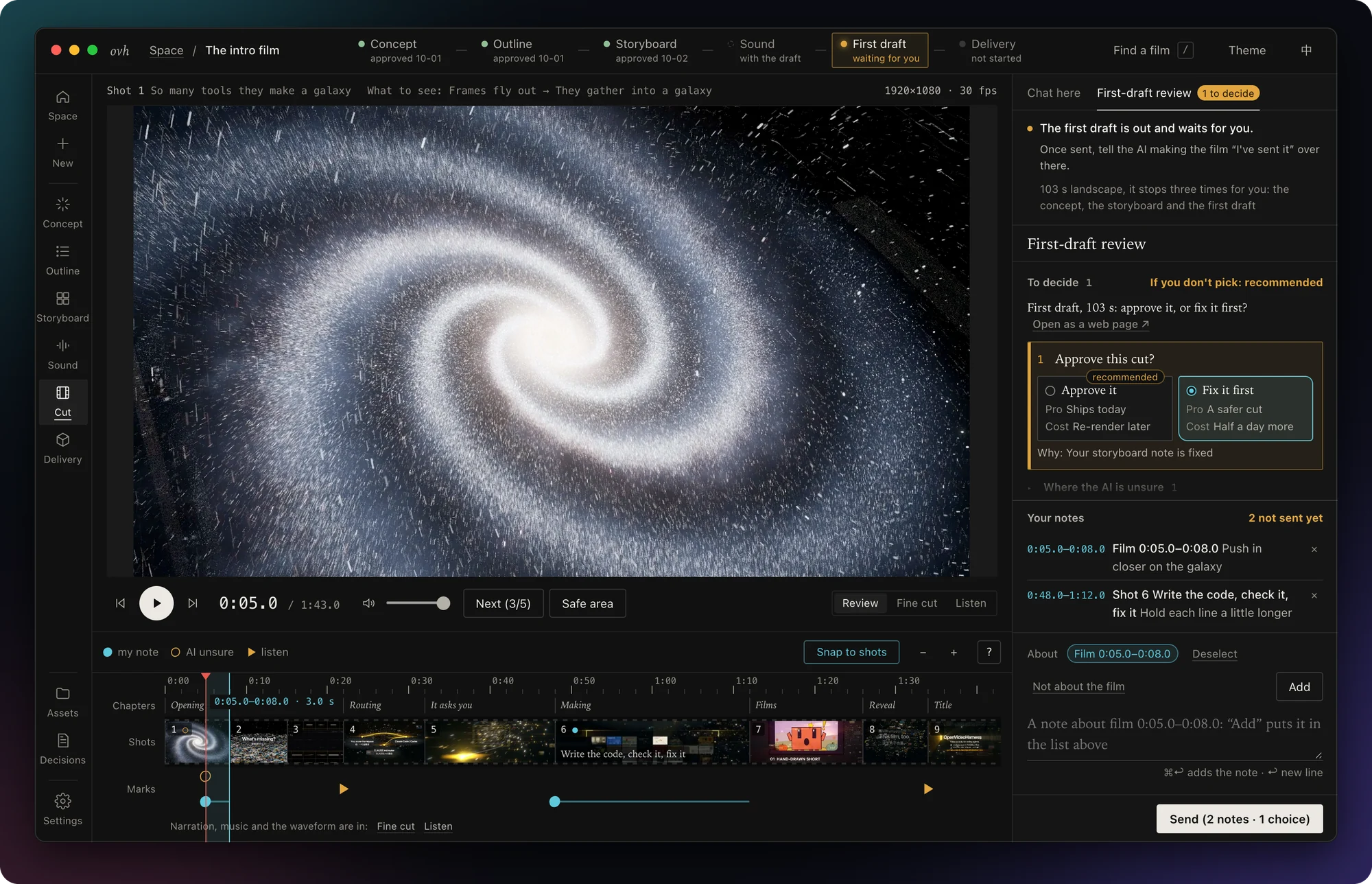
Making a film in Studio. Along the top, where the film has got to. Point at a few seconds of the timeline, or at a shot, and write a note. On the right, what waits for your decision; send it all together. The film on screen is this repo's own intro film.
 Time is the only input. This flash is counted in microseconds. |
The film is code, so it stays under control. Every frame depends on time alone, so the same moment always draws the same frame: it can be redone and spot-checked. A few seconds of a finished 4K film can be redrawn and put back without touching the rest. A render that stops picks up where it stopped. Every render is kept as a version, so the cut before and the cut after can be watched side by side. |
 Studio in 17 seconds: look, point, say, decide. Click for the version with sound. |
The whole process, in one window. On top of the skills and the command line, we built Studio, a visual window that makes the whole production easier to keep in hand: where each film has got to and who it waits for, at a glance; in review, point at a second and write a line, then hand a few of them to the agent together; what you decide is a few cards, a click each. It comes down to four moves: look at where the film has got to, point at a second or a shot, say what to change, and decide on a card. Its look, its language, the default agent and the API keys of online services are all set on Studio's settings page, with no config file to touch. |
 Said at the concept stop: "glass, cosmos, a starry sky… dizzying". |
You direct. It does the work. It stops for you at the concept and the first draft; when the film is long, heavy to render or costs money, at the storyboard too. Want to decide the hook, the voice or the cover as well? Name them. Want none of it? Say "just make it". |
 A stock chart that is also a mountain range. |
It settles what to say before it starts making. Two or three concept cards come first, each with a frame and a hook. It says what every other film on your topic looks like, then goes somewhere else. |
 The agent going through its own frames. |
It checks its own work before you see it. An agent can't see video or hear sound, so it measures everything it can. It reads contact sheets against a 20-point checklist, measures the sound, and hands the draft to a reviewer with a fresh context, who scores it on 8 points. bin/vh check catches frozen frames, flashes, subtitles too short to read and wrong colour tags, and names a way out of each. |
 A generated plate, with code on top, both on record. |
Any material can go into the cut. Pictures drawn in code, archive footage, generated images, 3D models, recorded sound, and your own photos and recordings (those two still experimental) can share one film. One ledger keeps where each file came from, its licence and what it cost. No budget, no paid call. |
math-explainer.mp4▶ Press play and turn the sound on: each harmonic sounds its own note. |
Sound is part of the same process. Voice, music, sound effects and captions are part of the process, so there is nothing to stitch on afterwards. The narration or the music goes down first, every word and beat gets a time, and the picture hangs on those times. The score can be written as code or be a track of your own, and sound effects land on the frame where things happen. |
 From a film of 33 minutes. |
Long films hold up. Shots, captions and chapters hang on the narration's words, so adding a pause moves the picture with it. Edit lists join pages and footage, renders resume, and the upload copy fits the platform's limit. The longest so far runs 33 minutes in 4K. |
And it fits into your own workflow. The whole thing is docs written for an agent plus one command line, bin/vh. A film is a folder, and its source, storyboard and review record are text. Switch agents, script it, make a dozen films a month: it is the same process.
Nor is it one AI look. Left alone, AI video drifts toward one face: dark background, glow, glass cards. Here are 32 of its 43 styles, all rendering the same sentence:

On top of the skills and the command line, we built Studio, a visual window that makes it easier to keep the whole making of a film in hand. Using it comes down to four things: see where a film has got to, point at the picture and say something, decide on cards, and talk to the agent.
ZLHad/OpenVideoHarness is a public repo on GitHub by ZLHad. A controllable workflow for making videos with code, open source: say one sentence, a coding agent (Claude Code, Codex) writes the code and renders the film, and you direct every step in a visual Studio. 用代码做视频的一套可控工作流:说一句话,agent 写代码出片;每一步看得见、改得动、能重做,你在 Studio 里当导演。.
It declares the MIT license on GitHub.
The agent harness performance optimization system. Skills, instincts, memory, security, and research-first development for Claude Code, Codex, Opencode, Cursor and beyond.
Open-source code2video templates for AI agents (Claude Code, Codex, Cursor): video as code, rendered to MP4. HTML/WebGL motion graphics, logos, explainers and captions via HyperFrames, plus AI-footage templates with Seedance, Kling, Veo and ElevenLabs through varg.
A cross-platform desktop All-in-One assistant for Claude Code, Codex, OpenCode,DeepSeek Harness and more. Only official website: ccswitch.io
Its maker tagged it for macOS, Windows and Linux, or as Docker or cross-platform. That is declared by the maker; Take My Repo has not tested it.
Open "Take it" on its page: Take My Repo writes an install plan for your machine and hands it to your AI agent (Claude Code, Codex or Cursor), which asks you before each step. Take My Repo has not tested it on any machine.
Its last change on GitHub was on 2026-11-24. GitHub counts 1 open issue and pull requests. Take My Repo does not judge from that whether it is maintained.
Nobody has reviewed it on Take My Repo yet, which says nothing about its quality.
Take My Repo cannot say: it does not audit code and has not run OpenVideoHarness. What is known comes from GitHub. It declares the MIT license on GitHub. Its last change was on 2026-11-24. It has 43 stars, which measure popularity, not safety. Nobody has reviewed it on Take My Repo yet, which says nothing about its quality. Read the source before you run it. With "Take it", your AI agent shows each step and asks you before running it; README text is treated as data, not as instructions.