
rea
Reverse engineer anything with agents, from app behavior down to native binaries.
- 475k
- TypeScript
- MIT
- 24 min ago
A json parser for c++11 or above that aims to ensure the simplicity of the API while ensuring efficiency.
Repo acking-you/ejson4cpp, read from GitHub 9 min ago. acking-you has not joined Take My Repo.
acking-you/ejson4cpp is a public repo on GitHub by acking-you. A json parser for c++11 or above that aims to ensure the simplicity of the API while ensuring efficiency. It declares the MIT license on GitHub. It is written mainly in C++, has 42 stars and last changed on 2025-01-02. Nobody has reviewed it on Take My Repo yet, which says nothing about its quality. Read from GitHub on 2026-11-23.
简中 | English

ejosn4cpp: means that this is a very easy to use and very efficiency c++ json parsing library. It supports c++11 and above, and is fully cross-platform.
The use of easy is reflected in:
Performance efficiency is reflected in:
The native benchmark (3000 lines of json) results are shown in the figure.
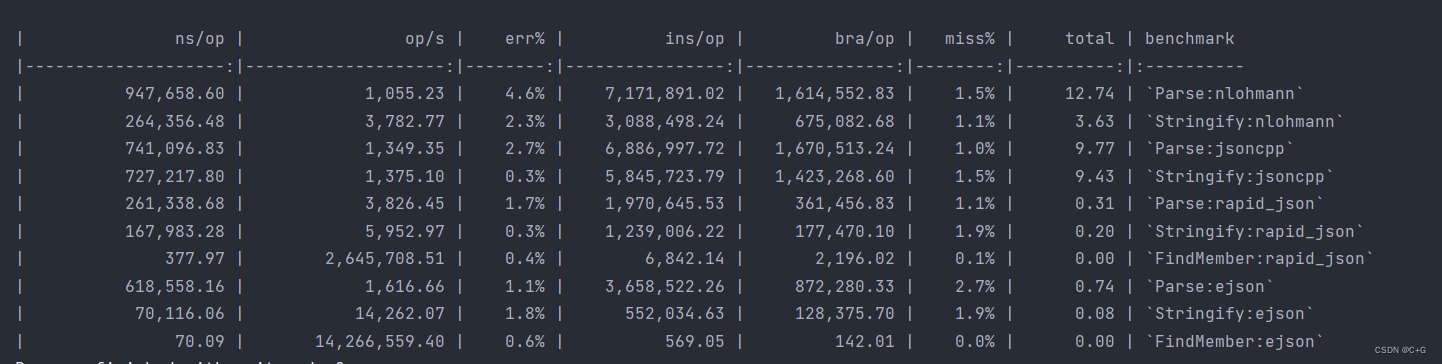
nlohmann-json and jsoncpp, but only half the performance of rapidjson.rapidjson, I found that the nodes of each element are organized in the form of an array, and no other advanced data structures are used, so I specifically tested him to find members, and found that the performance is indeed O(n) level.The code repository of benchmark: https://github.com/ACking-you/bench_json4cpp
Example:
struct student
{
   int         id{};
   double      score{};
   std::string name;
   ALIAS_EJSON(id,studentNo) //Take an alias
   OPTION_EJSON(name,"null") //Allows the value to not exist when parsed and assigned the value you specify if it does not exist

   AUTO_GEN_INTRUSIVE(student,id,score,name) //Register the corresponding fields for JSON parsing
};
This feature also supports non-intrusive version.
struct student
{
   int         id{};
   double      score{};
   std::string name;
   ALIAS_EJSON(id,studentNo) //Take an alias
   OPTION_EJSON(name,"null") //Allows the value to not exist when parsed and assigned the value you specify if it does not exist
};
AUTO_GEN_NON_INTRUSIVE(student,id,score,name) //Register the corresponding fields for JSON parsing
Note that macros such as
ALIAS_EJSONcan only be used inside the class, and you must ensure that the macro code for the registration field follows these macros.
If you encounter a field in the struct that cannot be directly supported (such as enum), you can customize the parsing process of the corresponding field through the CUSTOM_EJSON macro.
Example:
enum class Type { kStudent, kTeacher };

// A custom parsing process is implemented to strongly convert enumeration types to supported integer types
void custom_solve(ejson::JObject* j, void* v, ejson::EJsonAction action)
{
   switch (action)
   {
      case ejson::EJsonAction::kToJson: j->at("type").get_from(*(int*)v); break;
      case ejson::EJsonAction::kFromJson: j->at("type").get_to(*(int*)v); break;
   }
}

struct people
{
   Type        type{Type::kStudent};
   int         id{};
   double      score{};
   std::string name;
   ALIAS_EJSON(id, studentNo)       // Take an alias
   CUSTOM_EJSON(type, custom_solve) // Customize the parsing process
   OPTION_EJSON(name, "null")       // Allows the value to not exist when parsed and assigned the value you specify if it does not exist
};
AUTO_GEN_NON_INTRUSIVE(people, type, id, score,name)   // Register the corresponding fields for JSON parsing
Please note that the second parameter of the
CUSTOM_EJSONmacro needs to be a function pointer with the corresponding function signaturevoid(JObject,void,EJsonAction), you can write a lambda expression directly, or you can directly separate a function.
The following two methods are recommended for introduction.
Method 1: Introduce via the FetchContent module in cmake
add the following code to the project cmake to introduce, domestic if the network problems can not use this gitee image source: https://gitee.com/acking-you/ejson4cpp.git
include(FetchContent)

FetchContent_Declare(
        ejson4cpp
        GIT_REPOSITORY https://github.com/ACking-you/ejson4cpp.git
        GIT_TAG origin/master
        GIT_SHALLOW TRUE)
FetchContent_MakeAvailable(ejson4cpp)
Link ejson in the target that needs to use the library.
target_link_libraries(target ejson)
Method 2: Download the package manually and introduce it via cmake command
download the project source code via the git command
git clone https://github.com/ACking-you/ejson4cpp.git
Add the project to a subproject.
add_subdirectory(ejson4cpp)
Link ejson in the target that needs to use the library.
target_link_libraries(target ejson)
Here's an example of parsing json's configuration file mapping to C++ structs.
Assuming there are redis, mysql, and logging services that need to be configured via configuration files, we start by writing the structure as follows.
struct server
{
   int port{};
   std::string host;
};

struct log
{
   std::string level;
   std::string filedir;
   std::string formatter;
};

struct config
{
   log logger;
   server redis;
   server mysql;
};
A simulated json configuration file is as follows.
{
"logger": {
  "filedir": "home/project/1",
  "formatter": "default",
  "level": "debug"
},
"mysql": {
  "host": "192.31.1.1",
  "port": 1314
},
"redis": {
  "host": "127.0.0.1",
  "port": 1444
}
}
The function to be implemented now is to read the data from the json configuration file to initialize the config structure, which we can do by following these steps.
See example/example1.cc for the complete code
Make the custom types server, log, and config support json serialization by adding the following macro definition.
// auto generate log/server/config to_json and from_json
AUTO_GEN_NON_INTRUSIVE(log, level, filedir, formatter)
AUTO_GEN_NON_INTRUSIVE(server, host, port)
AUTO_GEN_NON_INTRUSIVE(config, logger, redis, mysql)
Define the config variable and call the FromFile function to complete the requirement.
struct config s_config;
// init config from config.json
Parser::FromFile(CONFIG_PATH, s_config);
If you need to rewrite back to the file, you can call the ToFile function:
// write config to file
Parser::ToFile(CONFIG_PATH, s_config);
If you read the data from a json string and initialize the corresponding variables (deserialization) you can call the FromJSON function:
// init config struct from json string
Parser::FromJSON(j, s_config);
If you need to convert variables to json strings (serialization), you can call the ToJSON function:
auto json_str = Parser::ToJSON(s_config);
Well, after the above two steps, you have learned the core usage of the whole library, and yes, this library promotes the use of direct functions instead of classes to achieve the corresponding functions, which will reduce your memory and thinking process. Of course, if you need to use it in more detail, you can learn about the usage of the JObject class, which is written in great detail in the API introduction.
In the process of back-end development, the data coming from the front-end is often json data, so let's use this library to simulate a simple back-end business.
For example, in the comment section of a video platform, the first thing that comes to mind is a comment, and then the user who sent it.
Then we can abstract out the comment and user_info structures that represent the messages that need to be displayed on the front end, and then it looks like the following structures on our C++ back end.
The full code is in example/example2.cc
struct user_info
{
   bool is_follow{};//whether to follow
   int64_t id{};//id information
   int64_t follow_count{};//number of bloggers to follow
   int64_t follower_count{};//number of followers
   std::string name;//username
};

struct comment
{
   int64_t id{};//id information
   int64_t user_id{};//user id information
   std::string created_date;//create time
   std::string content;//comment content
};
Then our backend logic might go through the following process.
So let's simulate the above process:
the front-end data.
const char* comment_json = "{\n"
    " \"content\": \"This is a \\\\\\"test\\\\"comment\\",\n"
    " \"created_date\": \"2023-01-16\",\n"
    " \"id\": 1,\n"
    " \"user_id\": 10\n"
    "}";
const char* user_info_json = "{\n"
    " \"follow_count\": 12,\n"
    " \"follower_count\": 23,\n"
    " \"id\": 1,\n"
    " \"is_follow\": false,\n"
    " \"name\": \"someone's name\"\n"
    "}";
Converting data to C++ structs. You need to add the following macro first to make the corresponding structure support json interconversion.
AUTO_GEN_NON_INTRUSIVE(user_info, is_follow, id, follow_count, follower_count,name)
AUTO_GEN_NON_INTRUSIVE(comment, id, user_id, created_date, content)
Then call the corresponding function to convert.
comment cmt;
user_info uinfo;
Parser::FromJSON(comment_json, cmt);
Parser::FromJSON(user_info_json, uinfo);
handle the business logic, this is skipped.
Save data to database, this simulates saving data to file.
We can create a JObject of type dict_t, then put the structure we just put in as a key-value pair, and finally call the ToFile function.
// 4. save data to database (we simulate it to local file)
auto object = JObject::Dict();
object.at("comment").get_from(cmt);
object.at("user_info").get_from(uinfo);
ejson::Parser::ToFile(DATA_PATH, object);
The following json data is eventually obtained to the file.
{
  "comment": {
    "content": "This is a \"test\"comment",
    "created_date": "2023-01-16",
    "id": 1,
    "user_id": 10
  },
  "user_info": {
    "follow_count": 12,
    "follower_count": 23,
    "id": 1,
    "is_follow": false,
    "name": "someone's name"
  }
}
You can view the description of all class members by clicking on doc/html/index.html. If you need the documentation in other languages, you can generate it yourself via Doxygen.
All static member functions exposed to the public are named in PascalCase style. As follows.
acking-you/ejson4cpp is a public repo on GitHub by acking-you. A json parser for c++11 or above that aims to ensure the simplicity of the API while ensuring efficiency.
It declares the MIT license on GitHub.
Its maker has not tagged a system, so it is unknown here. Its README says what it needs.
Open "Take it" on its page: Take My Repo writes an install plan for your machine and hands it to your AI agent (Claude Code, Codex or Cursor), which asks you before each step. Take My Repo has not tested it on any machine.
Transforms complex documents like PDFs and Office docs into LLM-ready markdown/JSON for your Agentic workflows.
A curated list of awesome C++ (or C) frameworks, libraries, resources, and shiny things. Inspired by awesome-... stuff.
For developers, who are building real-time data-driven applications, Redis is the preferred, fastest, and most feature-rich cache, data structure server, and document and vector query engine.
Its last change on GitHub was on 2025-01-02. Take My Repo does not judge from that whether it is maintained.
Nobody has reviewed it on Take My Repo yet, which says nothing about its quality.
Take My Repo cannot say: it does not audit code and has not run ejson4cpp. What is known comes from GitHub. It declares the MIT license on GitHub. Its last change was on 2025-01-02. It has 42 stars, which measure popularity, not safety. Nobody has reviewed it on Take My Repo yet, which says nothing about its quality. Read the source before you run it. With "Take it", your AI agent shows each step and asks you before running it; README text is treated as data, not as instructions.


