awesome-blender
🪐 A curated list of awesome Blender add-ons, AI/MCP tools, tutorials, and 3D resources.
- 7.7k
- TypeScript
- CC0-1.0
- 3 d ago
Render selected frames addon for Blender 2.8
Repo agapas/render-selected-frames, read from GitHub 14 min ago. agapas has not joined Take My Repo.
agapas/render-selected-frames is a public repo on GitHub by agapas. Render selected frames addon for Blender 2.8. It declares the GPL-3.0 license on GitHub. It is written mainly in Python, has 5 stars and last changed on 2020-05-10. Nobody has reviewed it on Take My Repo yet, which says nothing about its quality. Read from GitHub on 2026-11-25.
🪐 A curated list of awesome Blender add-ons, AI/MCP tools, tutorials, and 3D resources.
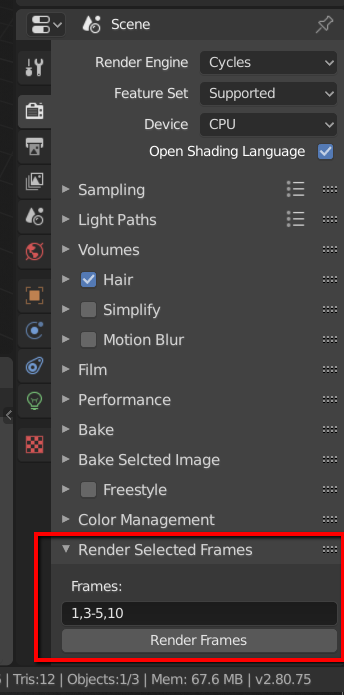
Simple addon for blender 3d to render selected frames. The result images are saved with the settings from the animation output.
Made and tested on Blender 2.80 (windows64). If you need version for Blender 2.79 or older, check the link: render-selected-frames-blender2.79
Input frames can be set like in example: '1,3-5,10,7', so in this case following frames will be rendered: 1, 3, 4, 5, 7, 10.
If the steps above don't work, try:
This project is licensed under the [GNU v3.0] License - see the LICENSE.md file for details.
agapas/render-selected-frames is a public repo on GitHub by agapas. Render selected frames addon for Blender 2.8.
It declares the GPL-3.0 license on GitHub.
Its maker has not tagged a system, so it is unknown here. Its README says what it needs.
Open "Take it" on its page: Take My Repo writes an install plan for your machine and hands it to your AI agent (Claude Code, Codex or Cursor), which asks you before each step. Take My Repo has not tested it on any machine.
Community plugin to control Blender 3D with any LLM of your choice. Not affiliated with the official Blender Foundation.
Open-source AI video editor: edit your own footage, or create and remake any video with Claude Code, Codex or the free Studio app. Write HTML, render MP4. By HeyGen.
Fake Blender Python API module collection for the code completion.
Its last change on GitHub was on 2020-05-10. GitHub counts 1 open issue and pull requests. Take My Repo does not judge from that whether it is maintained.
Nobody has reviewed it on Take My Repo yet, which says nothing about its quality.
Take My Repo cannot say: it does not audit code and has not run render-selected-frames. What is known comes from GitHub. It declares the GPL-3.0 license on GitHub. Its last change was on 2020-05-10. It has 5 stars, which measure popularity, not safety. Nobody has reviewed it on Take My Repo yet, which says nothing about its quality. Read the source before you run it. With "Take it", your AI agent shows each step and asks you before running it; README text is treated as data, not as instructions.