ECC
The agent harness performance optimization system. Skills, instincts, memory, security, and research-first development for Claude Code, Codex, Opencode, Cursor and beyond.
- 310k
- JavaScript
- MIT
- 2 d ago
VectorFall 0.1: personal supercomputing. A GPU-hosted algorithms lab for you and your AI agents, on any NVIDIA card from a 1 GB Quadro K420 on. Free for non-commercial use.
Repo ahtx/vectorfall, read from GitHub 16 min ago. ahtx has not joined Take My Repo.
ahtx/vectorfall is a public repo on GitHub by ahtx. VectorFall 0.1: personal supercomputing. A GPU-hosted algorithms lab for you and your AI agents, on any NVIDIA card from a 1 GB Quadro K420 on. Free for non-commercial use. It declares no license on GitHub. Public does not mean open source: without a license, nobody is granted the right to reuse it. It is written mainly in Python, has 0 stars and last changed on 2026-11-25. Nobody has reviewed it on Take My Repo yet, which says nothing about its quality. Read from GitHub on 2026-11-25.
The agent harness performance optimization system. Skills, instincts, memory, security, and research-first development for Claude Code, Codex, Opencode, Cursor and beyond.
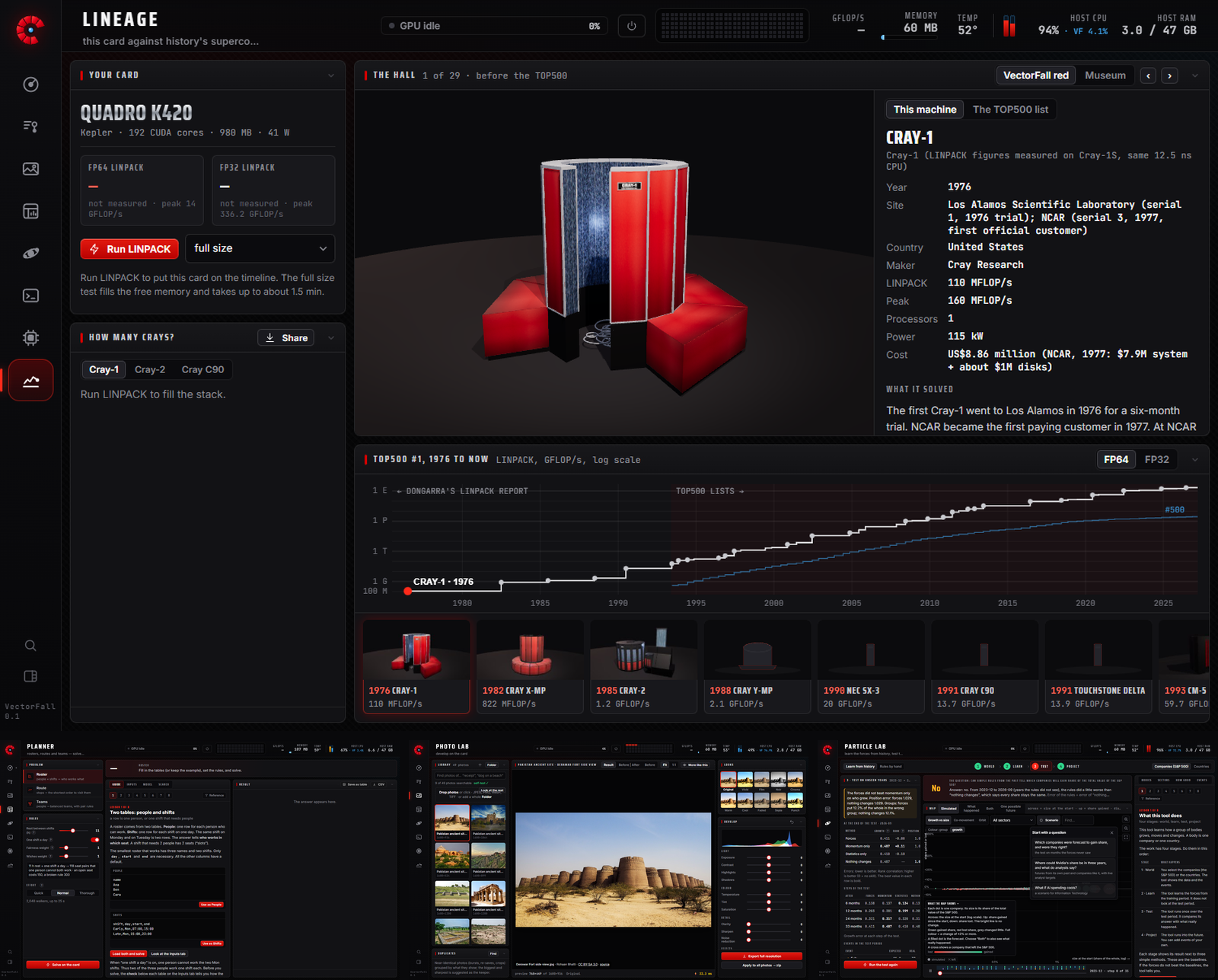
VectorFall is personal supercomputing. It is a GPU algorithms lab for you and for your AI agents. You bring your own data: tables, text, audio, images and time series. VectorFall runs serious algorithms on the data with your NVIDIA card. It scores each result against chance and against simple baselines, so you can see if the result is real.
VectorFall runs on NVIDIA cards from the 1 GB Quadro K420 (Kepler, 2012) to current cards. One image serves every
card. Every operation is a registered model. You can use each model from the web interface, from the REST API
(/v1, OpenAPI 3.1), from JSON-RPC 2.0 (/v1/rpc), from MCP (/mcp, for AI agents) and from the vf command-line
client.
On Linux, with Docker or Podman and the NVIDIA driver:
curl -fsSLO https://raw.githubusercontent.com/ahtx/vectorfall/v0.1.0/install.sh
bash install.sh
vfctl status
The installer checks the driver and the GPU access, asks which card to use, gets the image, starts the server and
shows the address. Then open http://localhost:8092 in a browser. For the options, the Windows steps and the
manual steps, see docs/INSTALL.md.
vfctl.The image has CUDA 10.2 and CuPy 9.6. CUDA 10.2 is the last CUDA toolkit with support for the Quadro K420 and other Kepler cards at compute capability 3.0 or 3.2. CuPy compiles kernels when they are first used. On newer cards, the driver compiles the PTX code for the card.
| Architecture | Compute capability | Examples | Driver | Status |
|---|---|---|---|---|
| Kepler | sm_30 to sm_37 | GTX 600/700, Quadro K420 to K6000, Tesla K40/K80 | 470 (the last driver for Kepler) | Tested: Quadro K420 |
| Maxwell | sm_50 to sm_53 | GTX 750/900, Quadro K1200, M4000 | 580 or earlier (580 is the last branch for Maxwell) | Tested: Quadro K1200 |
| Pascal | sm_60 to sm_62 | GTX 10 series, Quadro P series, Tesla P100 | 580 or earlier | Tested: GTX 1080 |
| Volta | sm_70, sm_72 | Titan V, Tesla V100 | 580 or earlier | Expected to work, not tested yet |
| Turing | sm_75 | RTX 20 series, GTX 16 series, T4 | current | Expected to work, not tested yet |
| Ampere | sm_80 to sm_87 | RTX 30 series, A100, A2000 | current | RTX 3080 tested with the rc3 image (PTX) |
| Ada Lovelace | sm_89 | RTX 40 series, L4 | current | Expected to work (PTX), not tested yet |
| Hopper, Blackwell | sm_90 to sm_120 | H100, RTX 50 series | current | Expected to work (PTX), not tested yet |
Driver notes:
vfctl gpu select.| What | Where |
|---|---|
| Web interface | http://localhost:8092 |
| HTTPS (the browser allows the microphone and the camera only on HTTPS) | https://localhost:8493 (self-signed certificate) |
| REST API and OpenAPI document | http://localhost:8092/v1, /v1/openapi.json, /v1/docs |
| JSON-RPC 2.0 and OpenRPC | POST /v1/rpc, method rpc.discover |
| MCP for AI agents (streamable HTTP) | http://localhost:8092/mcp |
| Command-line client | curl -o vf http://localhost:8092/v1/cli && python3 vf list |
| Version and health | http://localhost:8092/api/version |
To connect an MCP client, give it the URL http://localhost:8092/mcp. Each model is a tool. The tool names use _
in place of ., for example sim_finance.
Use /mcp?tools=plan,problem to load the tools for planning and problem templates. Use /mcp?tools=discover to
start with a short list. The agent can list groups with vf_groups, choose tools with vf_tools or vf_find, load
their input schemas with vf_describe, and call a tool with vf_run. For keyword search with schemas in the same
response, use /mcp?tools=find.
Look after the server with vfctl (see docs/VFCTL.md):
vfctl status          # container, card, version, address, jobs
vfctl doctor          # checks with PASS, WARN or FAIL and a fix for each problem
vfctl logs -f         # the server log
vfctl backup          # save the data folder
The settings are in the .env file of the VectorFall folder (default ~/vectorfall/.env). The installer writes
it. .env.example lists every key. After you change .env, run vfctl restart.
| Key | What it is | Default |
|---|---|---|
VF_GPU |
The card: a UUID or an index from nvidia-smi -L |
chosen by the installer |
VF_ENGINE |
docker or podman |
the engine that works |
VF_IMAGE |
The image | ghcr.io/ahtx/vectorfall:0.1.0 |
VF_BIND |
127.0.0.1 (this computer only) or 0.0.0.0 (the local network too) |
127.0.0.1 |
VF_PORT, VF_TLS_PORT |
The HTTP port and the HTTPS port | 8092, 8493 |
VF_DATA |
The data folder | ./data |
VF_TLS_HOSTS |
The names and addresses that the HTTPS certificate covers. Delete data/run/tls/ to make a new certificate after a change. |
localhost,127.0.0.1 |
VF_TRUSTED_NETS |
More networks (CIDR) that can use the Console, in addition to private ranges and loopback | none |
VF_URL |
The server address for the vf client |
http://localhost:8092 |
The Console runs Python code on the server. Only callers from loopback, private networks and VF_TRUSTED_NETS can
use it.
docker build -t ghcr.io/ahtx/vectorfall:0.1.0 --build-arg VF_VERSION=$(cat VERSION) .
The build uses only public sources: Ubuntu 18.04 (pinned by digest) and the CUDA 10.2 installer from NVIDIA (pinned
by sha256). The first build downloads 2.5 GB. bash install.sh --build builds the image and installs it.
Each operation is one decorated Python function in app/models/. See MODELS.md. The web interface,
REST, JSON-RPC, MCP and the vf client get the new model automatically. To test every model that does not change
stored data, run vf test. To test the API contract against a running server, run
VF_URL=http://localhost:8092 python3 tests/test_api_contract.py.
VectorFall stands on the work of many people. Thank you to the authors of NVIDIA CUDA, CuPy, NumPy, SciPy, FastAPI, Uvicorn, Pydantic, Pillow, pdfminer.six, python-docx, python-pptx, openpyxl, XlsxWriter and three.js. The sample music is by Kevin MacLeod (incompetech.com), the classic novels come from Project Gutenberg, and the sample photos come from Wikimedia Commons. See CREDITS.md and NOTICE.
Free for non-commercial use (PolyForm Noncommercial 1.0.0). Commercial use requires a licence: see COMMERCIAL-LICENSE.md. Contributions: see CONTRIBUTING.md and CLA.md. Third-party notices: see NOTICE.
Copyright (c) 2026 Amir Husain.
ahtx/vectorfall is a public repo on GitHub by ahtx. VectorFall 0.1: personal supercomputing. A GPU-hosted algorithms lab for you and your AI agents, on any NVIDIA card from a 1 GB Quadro K420 on. Free for non-commercial use.
It declares no license on GitHub. Public does not mean open source: without a license, nobody is granted the right to reuse it.
Its maker has not tagged a system, so it is unknown here. Its README says what it needs.
VoiceStudio is the open-source, fully-local ElevenLabs alternative — voice cloning, voice design, video dubbing, dictation, transcription & audiobook creation in 646 languages.
Tensors and Dynamic neural networks in Python with strong GPU acceleration
Reverse engineer anything with agents, from app behavior down to native binaries.
Open "Take it" on its page: Take My Repo writes an install plan for your machine and hands it to your AI agent (Claude Code, Codex or Cursor), which asks you before each step. Take My Repo has not tested it on any machine.
Its last change on GitHub was on 2026-11-25. Take My Repo does not judge from that whether it is maintained.
Nobody has reviewed it on Take My Repo yet, which says nothing about its quality.
Take My Repo cannot say: it does not audit code and has not run vectorfall. What is known comes from GitHub. It declares no license on GitHub. Public does not mean open source: without a license, nobody is granted the right to reuse it. Its last change was on 2026-11-25. It has 0 stars, which measure popularity, not safety. Nobody has reviewed it on Take My Repo yet, which says nothing about its quality. Read the source before you run it. With "Take it", your AI agent shows each step and asks you before running it; README text is treated as data, not as instructions.