hypit
Clone any viral video with AI agents. Not just a script, the whole workflow: swap the face, the words, the B-roll, ship 100 variants in one command, and get your 100M views.
- 31k
- TypeScript
- 5 h ago
decksh implements a domain-specific scripting language for presentations, visualizations, and information displays
Repo ajstarks/decksh, read from GitHub 2 d ago. ajstarks has not joined Take My Repo.
ajstarks/decksh is a public repo on GitHub by ajstarks. decksh implements a domain-specific scripting language for presentations, visualizations, and information displays. It declares no license on GitHub. Public does not mean open source: without a license, nobody is granted the right to reuse it. It is written mainly in Go, has 91 stars and last changed on 2026-10-05. Nobody has reviewed it on Take My Repo yet, which says nothing about its quality. Read from GitHub on 2026-11-23.
Clone any viral video with AI agents. Not just a script, the whole workflow: swap the face, the words, the B-roll, ship 100 variants in one command, and get your 100M views.
AI turns documents or topics into real, native PowerPoint decks—with native shapes, transitions and animations, data-backed charts and tables on demand, audio narration from speaker notes, and support for your own .pptx templates. · by Hugo He
decksh is a domain-specific language (DSL) for generating deck markup.
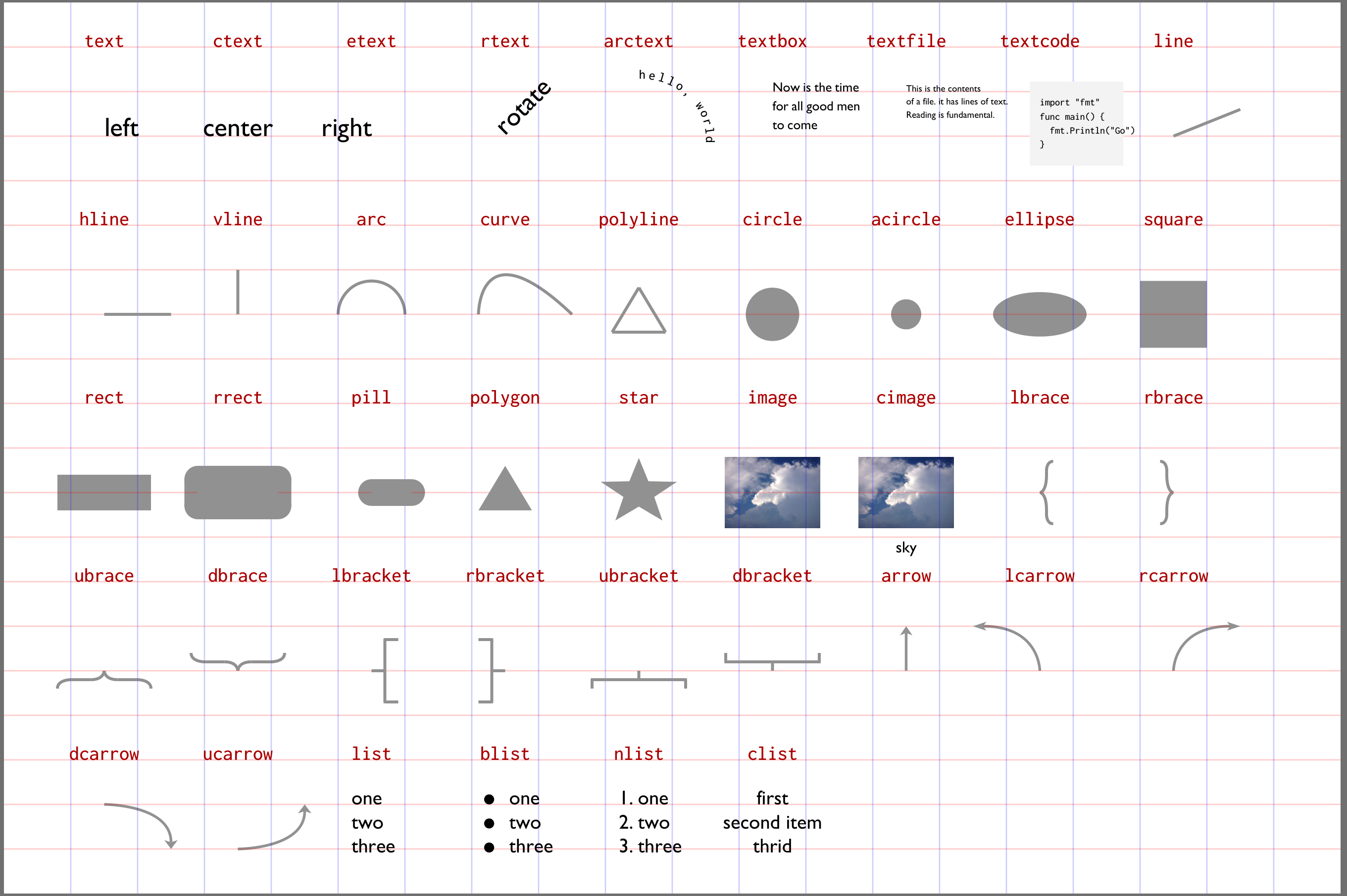
decksh elements
go get github.com/ajstarks/decksh                        # install the package
go install github.com/ajstarks/decksh/cmd/decksh@latest  # install the decksh command
The current version is 2026-07-13-1.1.0
decksh overviewdecksh object referenceThe Process function reads decksh commands from an io.Reader and writes deck markup to an io.Writer, returning an error.
For example:
package main

import (
    "fmt"
    "os"
    "strings"

    "github.com/ajstarks/decksh"
)

func main() {
    input := `
    deck
        slide
            ctext "hello, world" 50 50 10
        eslide
    edeck
    `
    err := decksh.Process(os.Stdout, strings.NewReader(input))
    if err != nil {
        fmt.Fprintf(os.Stderr, "%v\n", err)
    }
}
Produces:
<deck>
<slide>
<text align="c" xp="50" yp="50" sp="10" >hello, world</text>
</slide>
</deck>
This repository also contains cmd/decksh, a client decksh command:
decksh reads from the specified input, and writes deck markup to the specified output destination:
$ decksh                   # input from stdin, output to stdout
$ decksh -o foo.xml        # input from stdin, output to foo.xml
$ decksh foo.sh            # input from foo.sh output to stdout
$ decksh -o foo.xml foo.sh # input from foo.sh output to foo.xml
$ decksh -version          # show decksh version
$ decksh -dump ...         # show decksh variables
Typically, decksh acts as the head of a rendering pipeline, where another deck client renders the markup. This example uses pdfdeck
$ decksh text.dsh | pdfdeck -stdout -pagesize 1200,900 - > text.pdf
decksh hello, world:
// hello world
deck
    slide "black" "white"
        ctext "hello world" 50 25 15
        circle 0 0 120 "blue"
    eslide
edeck
produces:
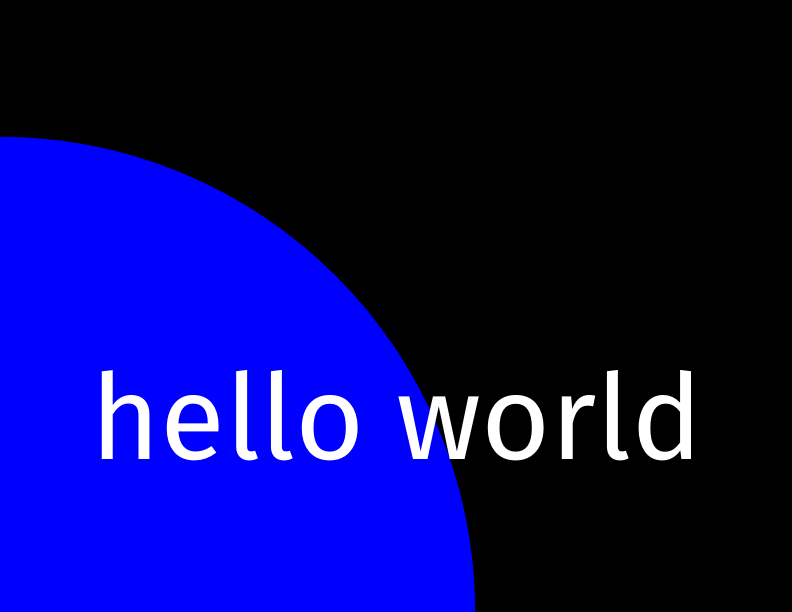
This deck script:
// Example deck
midx=50
midy=50
iw=640
ih=480

imfile="follow.jpg"
imlink="https://budnitzbicycles.com"
imscale=58
dtop=87

opts="-fulldeck=f -textsize 1  -xlabel=2  -barwidth 1.5"
deck
    slide "white" "black"
        ctext "Deck elements" midx dtop 5
        cimage "follow.jpg" "Dreams" 72 midy iw ih imscale imlink
        textblock "Budnitz #1, Plainfield, NJ, May 10, 2015" 55 35 10 1 "serif" "white"

        // List
        blist 10 75 3
            li "text, image, list"
            li "rect, ellipse, polygon"
            li "line, arc, curve"
        elist

        // Graphics
        gy=10
        c1="red"
        c2="blue"
        c3="green"
        rect    15 gy 8 6              c1
        ellipse 27.5 gy 8 6            c2
        polygon "37 37 45" "7 13 10"   c3
        line    50 gy 60 gy 0.25       c1
        arc     70 gy 10 8 0 180 0.25  c2
        curve   80 gy 95 25 90 gy 0.25 c3


        // Chart
        chleft=10
        chright=45
        chtop=42
        chtbottom=28
        dchart -left chleft -right chright -top chtop -bottom chbottom opts AAPL.d
    eslide
edeck
Produces:
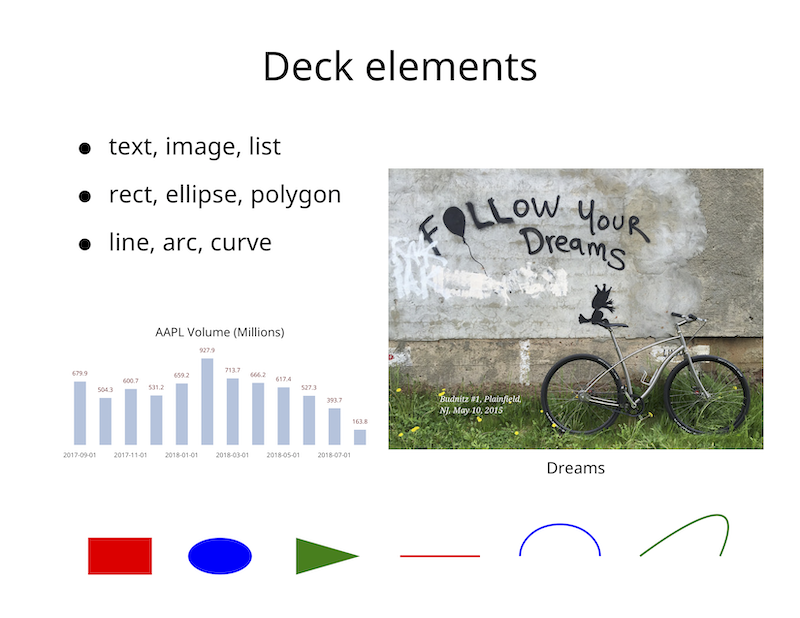
Text, font, color, caption and link arguments follow Go conventions (surrounded by double quotes).
decksh (like the deck markup it produces) uses a traditional Cartesian
coordinate system: The origin (0,0) is at the lower left, x increases to the
right, and y increases upwards. The coordinate system is expliticly based on
the percentages, with x and y ranging from 0-100. For example (50, 50) is the
middle of the canvas, (100,100) is the upper right, (100,0) is the lower
right, and (0,100) is the upper left.
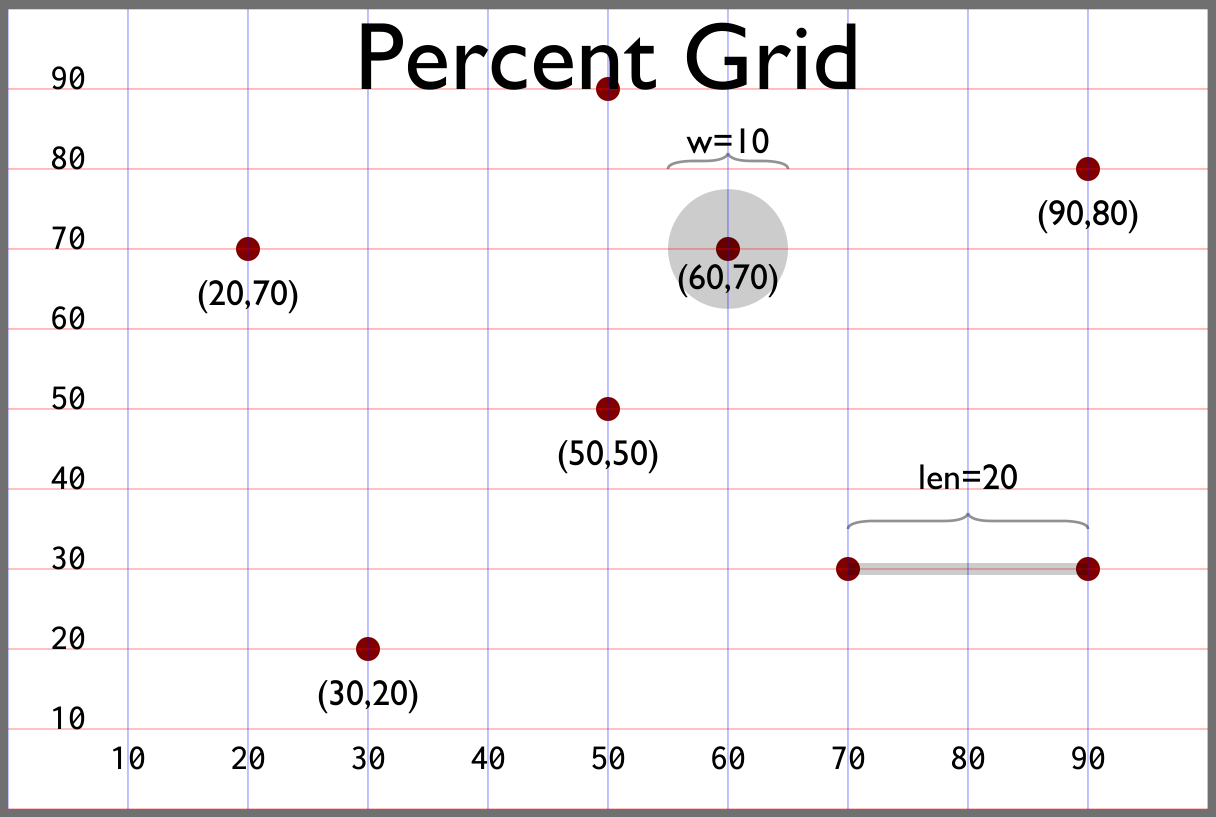
Make rulers with an interval (default 5), with optional color
ruler [increment] [color]
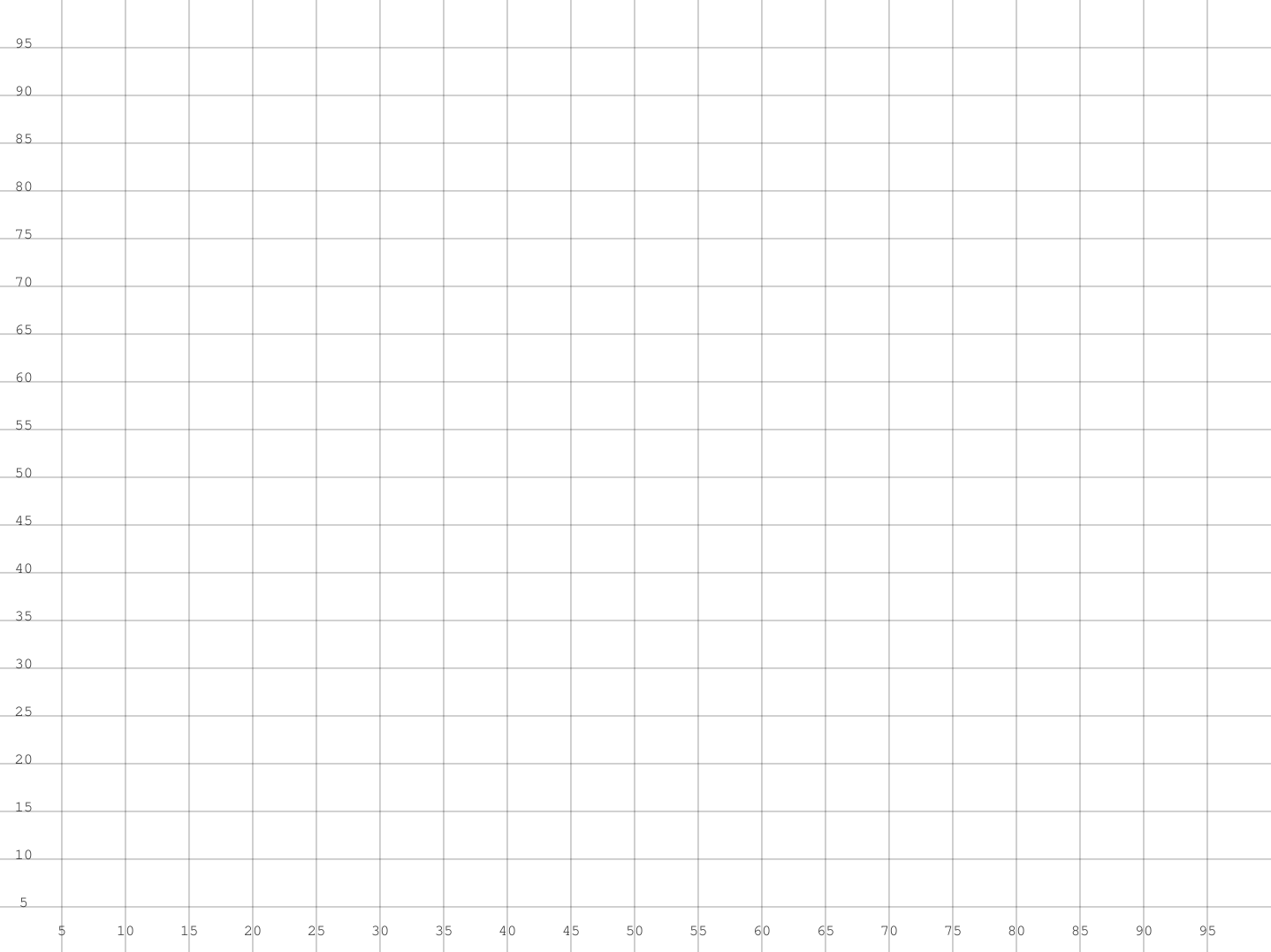
Make a ruler with lat/long interval (default 10, degrees), with optional color
georuler [increment] [color]
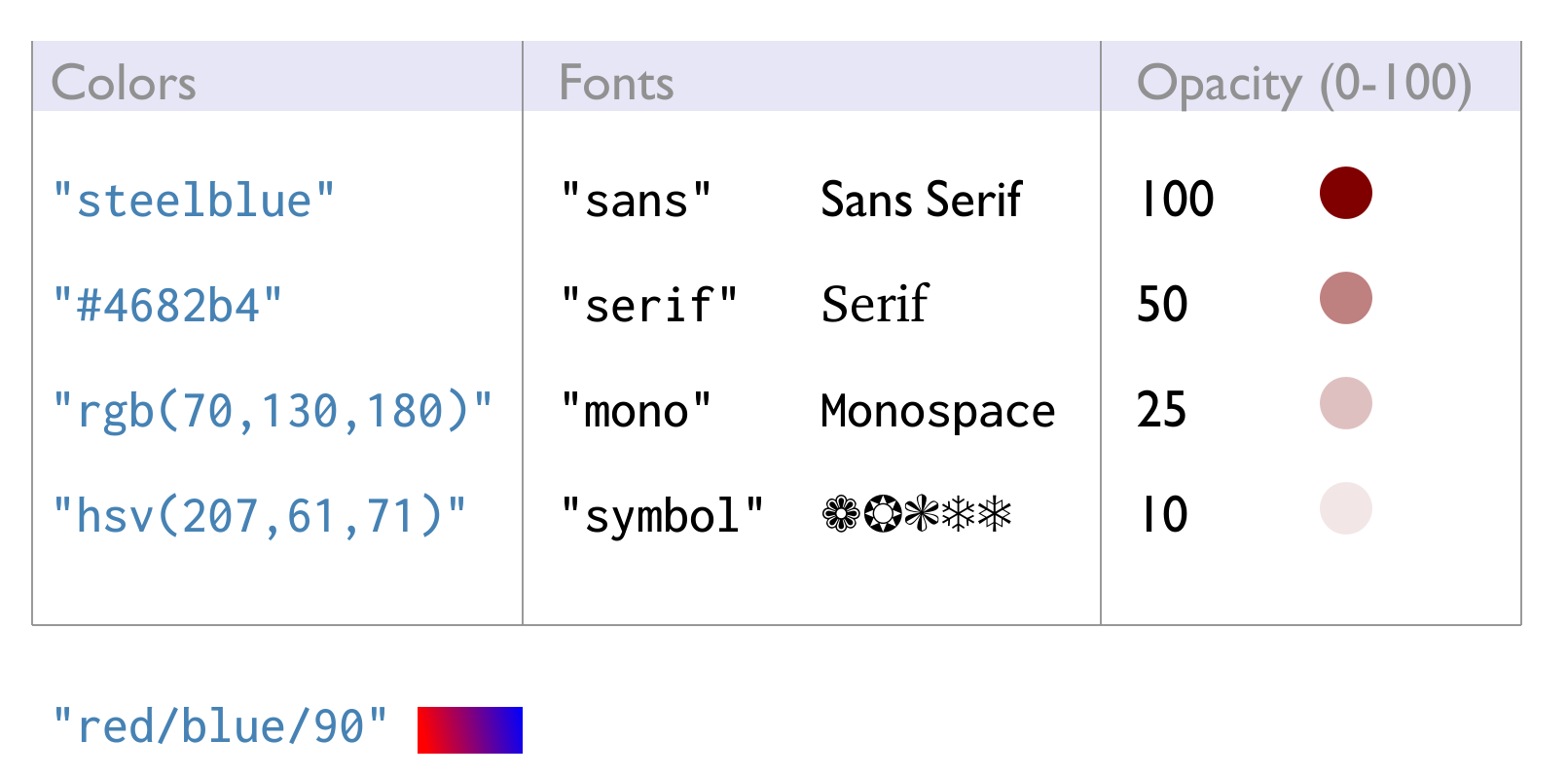
Colors formats are:
"rgb(128,0,128)" ."#aa00aa","hsv(360,30,30)" (pdfdeck and pngdeck support this syntax)Color gradients (used for slide backgrounds and rectangle and square fills) are specified as color1/color2/percent, for example, "blue/white/90"
Coordinates, dimensions, scales and opacities are floating point numbers ranging from from 0-100 (representing percentages of the canvas width and percent opacity). Some arguments are optional, and if omitted defaults are applied (black for text, gray for graphics, 100% opacity).
Canvas size and image dimensions are in pixels.
Fonts may be:
deck
edeck
slide [bgcolor] [fgcolor]
eslide
Note that doc/edoc and page/epage are may also be used as synomyms for deck/edeck and slide/eslide.
canvas w h
id=<number> defines a constant, which may be then subtitited. For example:
x=10
y=20
text "hello, world" x y 5
The special identifier, deckshVersion contains the string denoting the version of decksh.
id+=<number> increment the value of id by <number>
x+=5
id-=<number> decrement the value of id by <number>
x-=10
id*=<number> multiply the value of id by <number>
x*=50
id*=<number> divide the value of id by <number>
x/=100
Addition id=<id> + number or <id>
tx=10
spacing=1.2

sx=tx-10
vx=tx+spacing
Subtraction id=<id> - number or <id>
a=x-10
Muliplication id=<id> * number or <id>
a=x*10
Division id=<id> / number or <id>
a=x/10
Modulo id=<id> % number or <id>
a=x%10
Assign (x,y) coordinates to the specified identifier. The x coordinate is
id_x and the y coordinate is id_y. The expression with the parentheses
may be a constant, variable or binary expression.
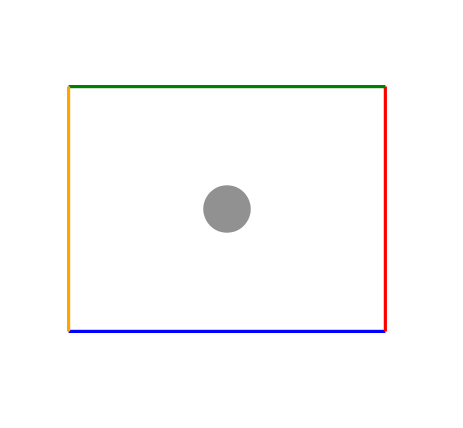
This code:
    a=40
    b=40
    c=20

    p0=(50,50)
    p1=(a,b)
    p2=(a+c,b)
    p3=(a+c,b+c)
    p4=(a,b+c)

    circle p0_x p0_x 3
    line p1_x p1_y p2_x p2_y 0.2 "blue"
    line p2_x p2_y p3_x p3_y 0.2 "red"
    line p3_x p3_y p4_x p4_y 0.2 "green"
    line p4_x p4_y p1_x p1_y 0.2 "orange"
makes this:
x=polarx cx cy r theta
y=polary cx cy r theta
Return the polar coordinate given the center at (cx, cy), radius r, and angle theta (in degrees)
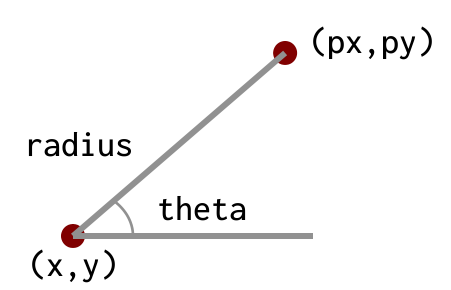
p=polar cx cy r theta
Return the polar coordinates (p_x) and (p_y) given the center at (cx, cy), radius r, and angle theta (in degrees)
The keyword dump causes a sorted list of variables and their values to
be printed on standard error.
For example, given:
deck
    slide
        x=50
        y=50
        s=5
        message="Hello, decksh"
        ctext message  x y s
    eslide
    dump
edeck
Produces:
deckshVersion   = "2024-12-15-1.0.0"
message         = "Hello, decksh"
s               = 5
x               = 50
y               = 50
You can also specify that specific variables are shown, dump x y shows:
x               = 50
y               = 50
a=area d
c=area a+b
return the circular area, a for the diameter d.
Assign a string variable with formatted text (using package fmt floating point format strings). Up to five variables may be used.
w1=10
w2=20+100

s0=format "Widget 1: %.2f" w1
s1=format "Widget 2: %.3f" w2
st=format "Total Widgets: %v" s1+w2
Large numbers may also be formatted with commas using the %, format string. For example:
s=format "%," 123456789 // s contains 123,456,789
x=random min max

assign a random number in the specified range
decksh supports these math functions:
return the coine of the number of expression (id or binary operation)
a=4
b=10
x=cosine 4
x=cosine a+b
x=cosine b
return the sine of the number of expression (id or binary operation)
a=4
b=10
x=sine 4
x=sine a+b
x=sine b
return the square root of the number of expression (id or binary operation)
a=4
b=10
x=sqrt 4
x=sqrt a+b
x=sqrt b
return the square root of the number of expression (id or binary operation)
a=4
b=10
x=tangent 4
x=tangent a+b
x=tangent b
x=vmap v vmin vmax min max
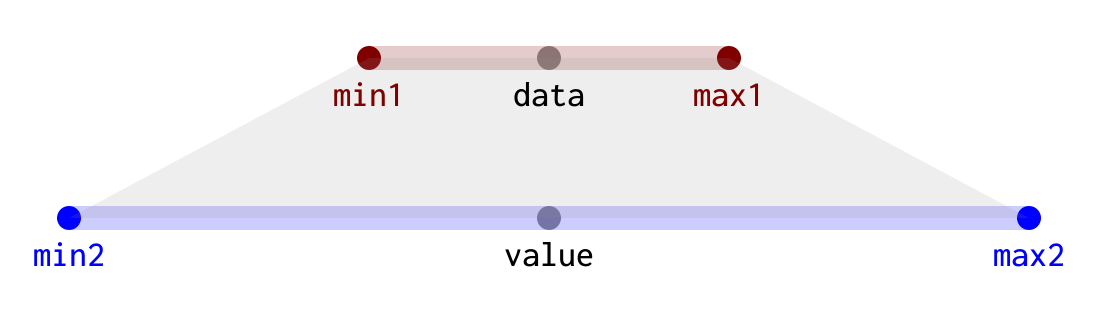
For value v, map the range vmin-vmax to min-max.
x=substr string begin end
assigns a substring given beginning and ending indicies.
- may be used as a shorthand for the beginning and end.
s="hello, world"
a=substr s - -                  // a="hello, world"
b=substr s - 4                  // b="hello"
c=substr s 7 -                  // c="world"
d=substr s 3 8                  // d="lo, wo"
e=substr "This is a test"  5 8  // e="is a"
Loop over statements, with x starting at begin, ending at end with an
optional increment (if omitted the increment is 1). Substitution of x
occurs in statements.
for x=begin end [increment]
    statements
efor
Loop over statements, with x ranging over the strings within [].
Substitution of x will occur in statements.
for x=["abc" "def" "ghi"]
    statements
efor
Loop over statements with x ranging over the numbers within ().
Substitution of x will occur in statements.
for x=(11 56 89 90 230)
    statements
efor
Loop over statements, with x ranging over the contents "file".
Substitution of x will occur in statements.
for x="file"
    statements
efor
Specify the conditional execution of decksh statements with if condition,
else and eif. The else block is optional. The values for v1 and
v2 may be either numbers of strings. (For strings only == and
!= apply). The conditions are:
if v1 condition v2

where condition is:
== or eq   equals                 if x == y
!= or ne   not equals             if x != y
<  or lt   less than              if x > y
>  or gt   greater than           if x < y
>= or ge   greater than or equal  if x >= y
<= or ge   less than or equal     if x <= y
>< or bt   between                if x >< y z
ajstarks/decksh is a public repo on GitHub by ajstarks. decksh implements a domain-specific scripting language for presentations, visualizations, and information displays.
It declares no license on GitHub. Public does not mean open source: without a license, nobody is granted the right to reuse it.
Its maker has not tagged a system, so it is unknown here. Its README says what it needs.
Bring data to life with SVG, Canvas and HTML. :bar_chart::chart_with_upwards_trend::tada:
Put the output from any script or program into your macOS Menu Bar (the BitBar reboot)
12 weeks, 26 lessons, 52 quizzes, classic Machine Learning for all
Open "Take it" on its page: Take My Repo writes an install plan for your machine and hands it to your AI agent (Claude Code, Codex or Cursor), which asks you before each step. Take My Repo has not tested it on any machine.
Its last change on GitHub was on 2026-10-05. GitHub counts 1 open issue and pull requests. Take My Repo does not judge from that whether it is maintained.
Nobody has reviewed it on Take My Repo yet, which says nothing about its quality.
Take My Repo cannot say: it does not audit code and has not run decksh. What is known comes from GitHub. It declares no license on GitHub. Public does not mean open source: without a license, nobody is granted the right to reuse it. Its last change was on 2026-10-05. It has 91 stars, which measure popularity, not safety. Nobody has reviewed it on Take My Repo yet, which says nothing about its quality. Read the source before you run it. With "Take it", your AI agent shows each step and asks you before running it; README text is treated as data, not as instructions.