Mi Empresa — Landing Page
Español · English
Español
Índice
Descripción
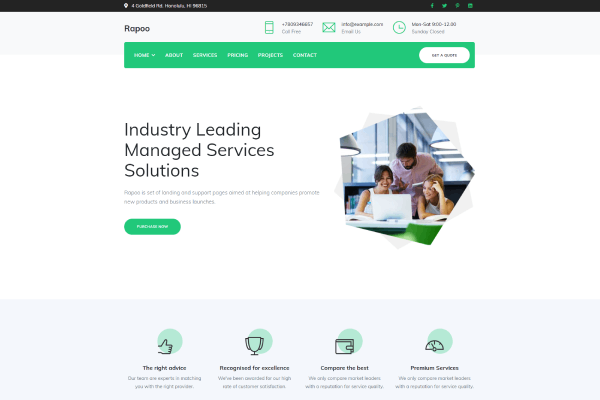
Landing page de una sola página para una empresa tecnológica ficticia. Está construida con HTML, CSS y JavaScript puros (sin frameworks ni proceso de build) y usa efectos de scroll, un vídeo de fondo y contenido embebido de YouTube, Blogger y Google Maps.
El proyecto sirve como plantilla base para una web corporativa sencilla: portada, presentación, blog, galería y formulario de contacto.
Secciones de la página
| Sección |
Ancla |
Contenido |
| Inicio |
#inicio |
Portada tipo parallax con vídeo de fondo y botón de contacto |
| Conócenos |
#video |
Vídeo de YouTube embebido |
| Blog |
#blog |
Entrada de Blogger embebida en un iframe |
| Galería |
#galeria |
Tres imágenes con texto superpuesto al pasar el ratón |
| Contacto |
#contacto |
Formulario y mapa de Google Maps |
| Pie |
— |
Aviso de copyright |
Tecnologías
- HTML5 semántico.
- CSS3: variables, grid, animaciones y efecto parallax.
- JavaScript vanilla para rotar el título de la pestaña cada 10 segundos.
- Recursos externos: YouTube, Blogger y Google Maps embebidos.
Requisitos
Solo un navegador moderno. No necesita Node.js ni ningún servidor de aplicaciones.
Cómo ejecutarla
Abre index.html en el navegador, o sirve la carpeta para evitar restricciones de file://:
python -m http.server 8000
Después visita http://localhost:8000.
Personalización
- Textos e imágenes: edita
index.html y sustituye los archivos de assets/images/.
- Colores y tipografía: modifica las variables de
css/styles.css.
- Vídeo de fondo: el HTML referencia
assets/videos/video.mp4, pero ese archivo no está incluido en el repositorio. Añádelo en esa ruta para que la portada muestre el vídeo; si no, se verá solo el fondo definido en CSS.
- Blog y mapa: cambia las URLs de los
iframe por las de tu propio blog y tu ubicación.
- Formulario: es solo maquetación; para recibir los mensajes hay que conectarlo a un servicio o backend.
Estructura del proyecto
Web-Blogger/
├── index.html
├── css/
│   └── styles.css
├── js/
│   └── scripts.js
├── assets/
│   ├── icons/
│   │   └── empresa.ico
│   └── images/
│       ├── background.jpg
│       ├── conocenos.jpg
│       ├── fondo.jpg
│       ├── imagen1.jpg
│       ├── imagen2.jpg
│       └── imagen3.jpg
├── LICENSE
└── README.md
Notas
- El título de la pestaña alterna entre «Mi Empresa» y «🏠| Home» cada 10 segundos (
js/scripts.js).
- Al ser una página estática, se puede publicar directamente en GitHub Pages, Netlify o cualquier hosting de archivos.
Licencia
Este proyecto se distribuye bajo la licencia MIT. Consulta LICENSE.
English
Table of contents
Overview
A single-page landing site for a fictional technology company, built with plain HTML, CSS and JavaScript (no frameworks, no build step). It includes scroll effects, a background video, and embedded YouTube, Blogger and Google Maps content.
It works as a starting template for a simple corporate site: hero, about, blog, gallery and contact form.
Page sections
| Section |
Anchor |
Content |
| Home |
#inicio |
Parallax hero with background video and contact button |
| About |
#video |
Embedded YouTube video |
| Blog |
#blog |
Blogger post embedded in an iframe |
| Gallery |
#galeria |
Three images with hover captions |
| Contact |
#contacto |
Form and Google Maps embed |
| Footer |
— |
Copyright notice |
Tech stack
- Semantic HTML5.
- CSS3: variables, grid, animations and parallax.
- Vanilla JavaScript to rotate the browser tab title every 10 seconds.
- External embeds: YouTube, Blogger and Google Maps.
Requirements
Any modern browser. No Node.js or application server needed.
How to run
Open index.html in your browser, or serve the folder to avoid file:// restrictions:
python -m http.server 8000
Then visit http://localhost:8000.
Customization
- Text and images: edit
index.html and replace the files in assets/images/.
- Colors and fonts: change the variables in
css/styles.css.
- Background video: the HTML points to
assets/videos/video.mp4, but that file is not included in the repository. Add it at that path to enable the hero video; otherwise only the CSS background is shown.
- Blog and map: replace the
iframe URLs with your own blog and location.
- Form: markup only; connect it to a service or backend to actually receive messages.
Project structure
Web-Blogger/
├── index.html
├── css/
│   └── styles.css
├── js/
│   └── scripts.js
├── assets/
│   ├── icons/
│   │   └── empresa.ico
│   └── images/
│       ├── background.jpg
│       ├── conocenos.jpg
│       ├── fondo.jpg
│       ├── imagen1.jpg
│       ├── imagen2.jpg
│       └── imagen3.jpg
├── LICENSE
└── README.md
Notes
- The tab title alternates between "Mi Empresa" and "🏠| Home" every 10 seconds (
js/scripts.js).
- Being a static page, it can be published directly on GitHub Pages, Netlify or any file hosting.
License
This project is released under the MIT License. See LICENSE.