AutoGPT
AutoGPT is the vision of accessible AI for everyone, to use and to build on. Our mission is to provide the tools, so that you can focus on what matters.
- 188k
- Python
- 2 h ago
PatientAgentBench: A Benchmark Framework for Evaluating Patient-Facing Health AI Agents
Repo amazon-science/PatientAgentBench, read from GitHub 2 h ago. amazon-science has not joined Take My Repo.
amazon-science/PatientAgentBench is a public repo on GitHub by amazon-science. PatientAgentBench: A Benchmark Framework for Evaluating Patient-Facing Health AI Agents. It declares no license on GitHub. Public does not mean open source: without a license, nobody is granted the right to reuse it. It is written mainly in Python, has 35 stars and last changed on 2026-10-23. It is archived: its maker no longer maintains it. Nobody has reviewed it on Take My Repo yet, which says nothing about its quality. Read from GitHub on 2026-11-24.
AutoGPT is the vision of accessible AI for everyone, to use and to build on. Our mission is to provide the tools, so that you can focus on what matters.
This repository hosts the reference implementation for the paper
PatientAgentBench: A Benchmark Framework for Evaluating Patient-Facing Health AI Agents
PatientAgentBench evaluates patient-facing health AI agents through realistic, multi-turn conversations in primary care contexts. A simulated patient converses with the system under evaluation — itself an agent, a base model wrapped in a harness — which reasons over the patient's health record and acts through a stateful sandbox of healthcare tools to carry out real workflows (scheduling, prescriptions, telehealth, escalation to clinical staff). Each conversation is scored by an LLM-as-a-Jury against a reusable suite of over a hundred clinician-grounded, conversation-agnostic criteria across six dimensions.
Scenarios are generated fresh on demand from a configurable seed distribution — the framework ships no fixed dataset, so there is no answer key to memorize and it extends to new models and clinical domains without extra annotation. All patient profiles, records, and conversations are fully synthetic; no real patient health information is used at any stage. For experimental results and findings, see the paper.
Per-agent results as reported in the paper, sorted by aggregate score. Each rubric
cell shows the mean score (1–5 scale) and the pass rate — the percentage
of conversations scoring ≥ 3 (Adequate or better) — as mean [pass%]. See the
paper for methodology, confidence intervals, and additional detail.
| # | Agent | Aggregate | Task Completion | Clinical Safety | Workflow Accuracy | Triage Quality | Clinical Helpfulness | Conversational Quality |
|---|---|---|---|---|---|---|---|---|
| 1 | Claude Opus 4.8 | 4.25 | 4.84 [100%] | 4.18 [98%] | 4.41 [98%] | 3.70 [88%] | 4.23 [100%] | 4.40 [100%] |
| 2 | GPT-5.5 | 4.22 | 4.79 [100%] | 4.16 [99%] | 4.32 [98%] | 3.49 [76%] | 4.19 [99%] | 4.69 [100%] |
| 3 | Claude Sonnet 5 | 4.20 | 4.86 [100%] | 4.04 [98%] | 4.28 [97%] | 3.77 [86%] | 4.14 [100%] | 4.42 [100%] |
| 4 | GPT-5.4 | 4.16 | 4.85 [100%] | 4.02 [98%] | 4.44 [98%] | 3.45 [82%] | 4.04 [99%] | 4.56 [100%] |
| 5 | Gemini 3 Flash | 3.78 | 4.69 [100%] | 3.57 [91%] | 3.72 [89%] | 3.03 [60%] | 3.82 [98%] | 4.49 [100%] |
| 6 | Gemini 3.1 Pro | 3.71 | 4.65 [100%] | 3.52 [94%] | 3.95 [95%] | 2.66 [36%] | 3.66 [97%] | 4.39 [100%] |
| 7 | Claude Haiku 4.5 | 3.63 | 4.52 [99%] | 3.43 [91%] | 4.02 [93%] | 2.80 [47%] | 3.63 [96%] | 3.65 [97%] |
| 8 | GPT-OSS-120B | 3.45 | 4.56 [100%] | 3.22 [80%] | 3.36 [73%] | 2.78 [46%] | 3.63 [93%] | 3.62 [90%] |
| 9 | Qwen3-235B | 3.40 | 4.49 [99%] | 3.18 [79%] | 3.30 [72%] | 2.55 [32%] | 3.68 [94%] | 3.79 [93%] |
| 10 | Qwen3-Next-80B | 3.10 | 4.17 [93%] | 2.68 [56%] | 2.98 [58%] | 2.56 [32%] | 3.57 [89%] | 3.16 [69%] |
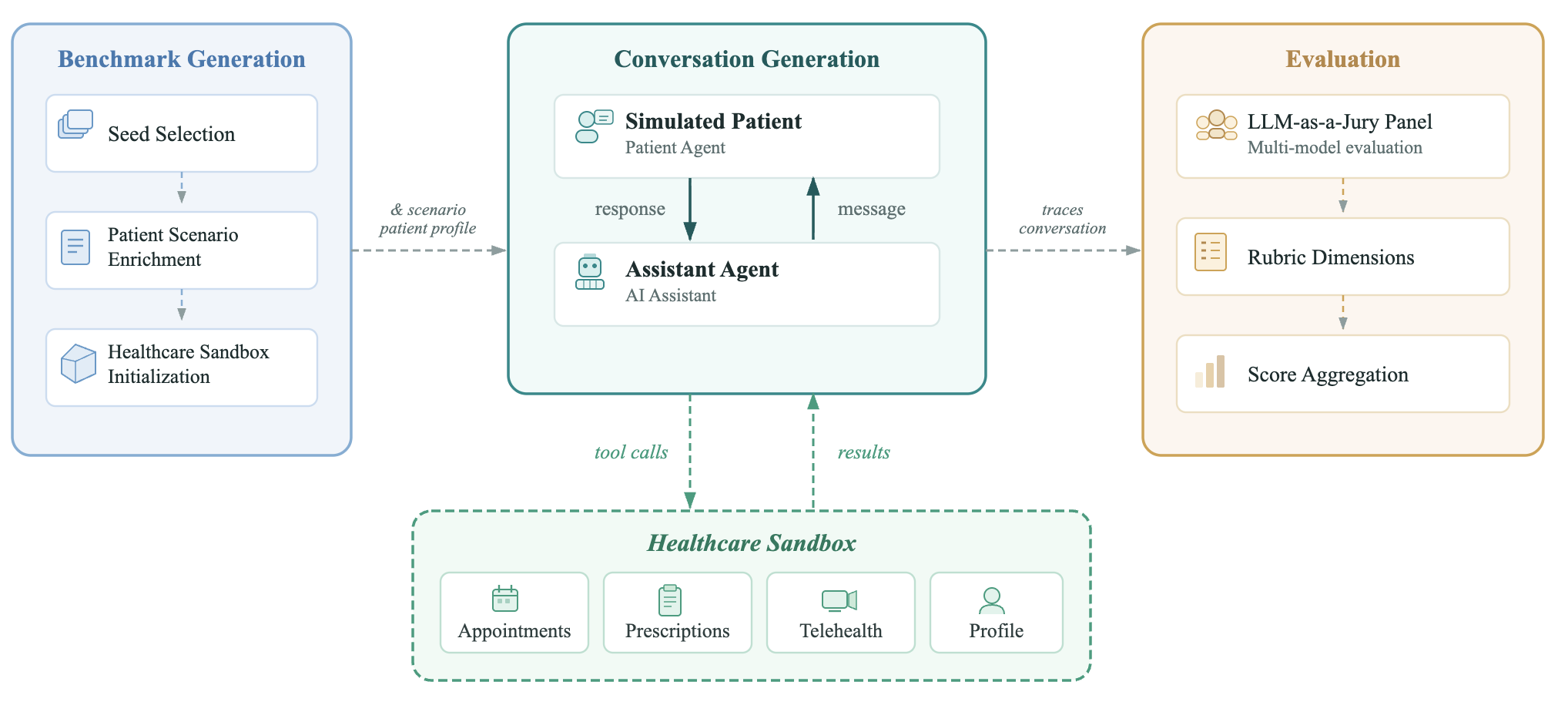
PatientAgentBench is a three-phase pipeline: a benchmark case is generated from a sampled seed (patient profile + scenario + initialized sandbox), a multi-turn conversation is run between the simulated patient and the assistant agent, and the resulting conversation trace is scored by the evaluation framework.
The conversation loop is a dual-agent exchange: the assistant is a LangGraph ReAct agent that reasons and acts against the healthcare sandbox, while the simulated patient responds in persona. Every turn is captured in a structured conversation trace (messages, tool calls, and tool results).
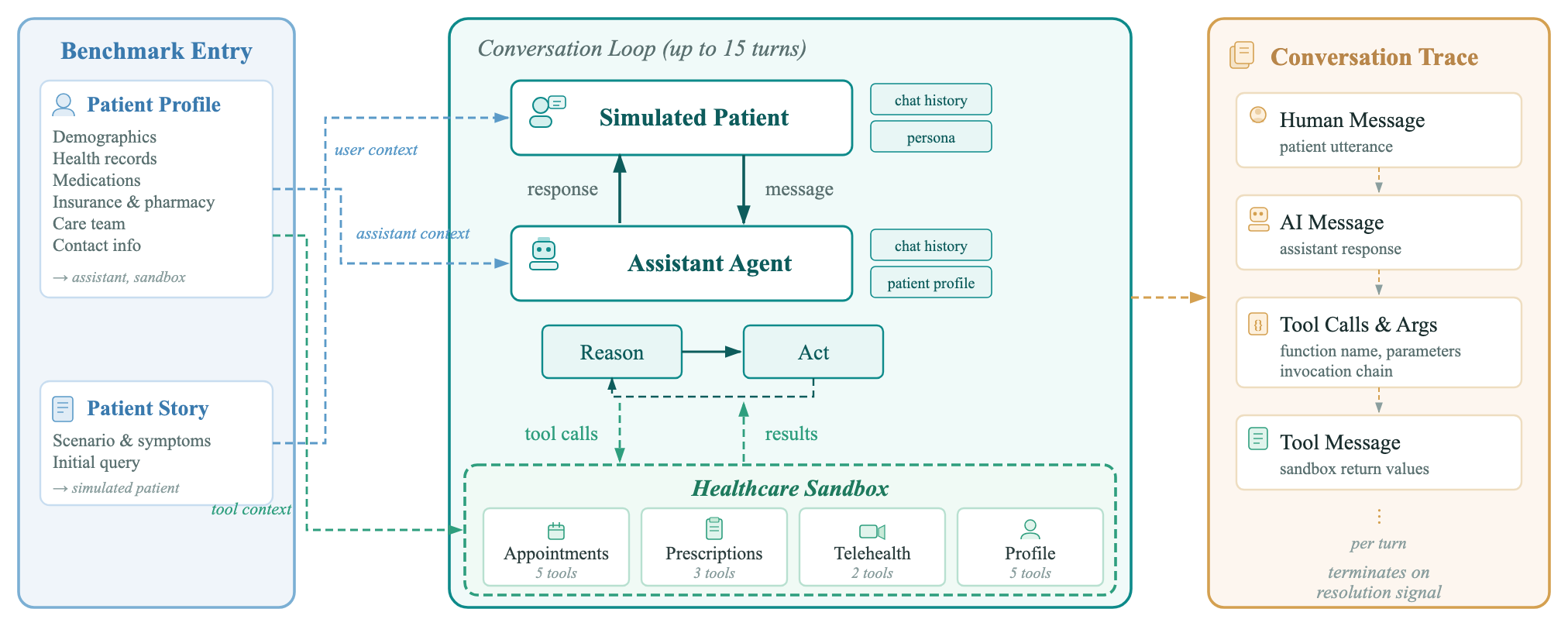
PatientAgentBench has four main components:
PatientAgentBench targets Python 3.11+. Clone the repository, then use a virtual environment:
git clone https://github.com/amazon-science/PatientAgentBench.git
cd PatientAgentBench

python -m venv .venv
source .venv/bin/activate        # Windows: .venv\Scripts\activate

pip install -e .                 # runtime install
pip install -e ".[dev]"          # with test/lint/type-check tooling
Dependencies are declared in pyproject.toml; the commands above install
everything needed. For exact reproducibility, requirements.txt pins the
specific versions used during development — install it with
pip install -r requirements.txt if you need to reproduce that environment
precisely (otherwise it is not required).
PatientAgentBench supports three model access channels, and any role (assistant, simulated patient, evaluator, sandbox, seed generator, analyzer) can use any of them:
"provider": "bedrock") — Bedrock-hosted models via
ChatBedrockConverse."provider": "openai-protocol-api") — any
OpenAI-compatible endpoint via ChatOpenAI (the OpenAI API, a LiteLLM proxy,
or the AWS Bedrock Mantle gateway)."provider": "anthropic-protocol-api") — the
Anthropic API (or the Bedrock Mantle gateway) via ChatAnthropic.The channel is selected per model in the config. Bedrock is the default when
provider is omitted; registry keys encode the channel in their
-bedrock/-api/-mantle suffix, so they need no separate provider. Copy
.env.example to .env and fill in credentials for the channels you use:
cp .env.example .env
For Bedrock, credentials are resolved through the standard AWS credential chain (boto3), in this order:
AWS_ACCESS_KEY_ID, AWS_SECRET_ACCESS_KEY, AWS_SESSION_TOKEN)~/.aws/credentials, e.g. via aws configure);
set AWS_PROFILE to select a named profileVerify access:
aws sts get-caller-identity
aws bedrock list-foundation-models --region us-west-2
Automated credential refresh is exposed through a
refresh_credentials_hookinconfig.py. In this release it is a no-op — the application uses whatever ambient AWS credentials boto3 resolves. If your deployment needs automated refresh, override that hook with your own implementation.
After installing, use the patient-agent-bench CLI:
# Run a full benchmark (generate + evaluate) → output/{cases}_{timestamp}/
patient-agent-bench benchmark --cases data/sample_benchmark.json

# Use a custom model config (single or multi-experiment)
patient-agent-bench benchmark --config data/default_config.json

# Generate conversations only
patient-agent-bench generate --cases data/sample_benchmark.json

# Evaluate conversations from a previous run
patient-agent-bench evaluate --run-dir output/sample_benchmark_20240101_120000

# Resume into an existing run directory (skips completed experiments)
patient-agent-bench benchmark --cases data/sample_benchmark.json --run-dir output/sample_benchmark_20240101_120000

# Analyze evaluation results
patient-agent-bench analyze --run-dir output/sample_benchmark_20240101_120000

# Run a limited number of cases for a quick smoke test
patient-agent-bench benchmark --num-cases 1

# Help
patient-agent-bench --help
patient-agent-bench benchmark --help
# Generate 10 benchmark entries (requires AWS credentials)
patient-agent-bench generate-seeds --count 10 --seed 42 --output data/my_benchmark.json
| Option | Description | Default |
|---|---|---|
--count, -n |
Number of benchmark entries to generate (required) | - |
--seed-dist |
Seed distribution config (task categories, severity, etc.) | data/default_benchmark_seed.json |
--config |
Benchmark config (model settings for LLM enrichment) | data/default_config.json |
--output, -o |
Output file path | data/benchmark_{timestamp}.json |
--seed, -s |
Random seed for reproducibility | None |
--max-parallel |
Max parallel workers | 1 |
| Option | Description | Default |
|---|---|---|
--cases, -c |
Path to test cases JSON | data/sample_benchmark.json |
--config |
Path to model config JSON (single or multi-experiment) | data/default_config.json |
--run-dir |
Existing run directory (resume/re-run) | None |
--output-dir |
Base output directory | output |
--max-parallel |
Max parallel tasks | 1 |
--num-cases |
Number of cases to run (0 = all) | 0 |
--case-id |
Run a specific case by ID | None |
--log-level |
DEBUG, INFO, WARNING, ERROR, CRITICAL | INFO |
--verbose, -v |
Enable debug logging | False |
Results are written to timestamped directories under output/:
Every run is organized as one or more experiments — cross-cutting files stay at the run root, and each experiment's conversations and scores live in its own subdirectory:
output/
└── sample_benchmark_20240108_143022/
    ├── run_config.json           # Full config with CLI params
    ├── benchmark_cases.json      # Benchmark entries used for this run
    ├── experiments_summary.json  # Cross-experiment comparison
    ├── charts/                   # Generated charts
    └── 0_0/                      # Experiment: assistant[0], user[0]
        ├── experiment_config.json
        ├── conversations.json    # Generated conversations
        ├── evaluations.json      # Evaluation results with scores
        └── summary.json          # Aggregate metrics & per-case table
The experiment subdirectory is named {assistant_idx}_{user_idx}, so a run with
a single assistant and user agent still produces 0_0/. Each experiment is
evaluated by all configured evaluator models. The analyze command adds
analysis_summary.md to the run root.
Each conversation is scored by an LLM-as-a-Jury — a panel of evaluator models that each independently score every conversation, with results averaged into final jury scores. Scoring uses a reusable suite of clinician-grounded rubric criteria that are conversation-agnostic: the same criteria apply to every conversation, with no per-scenario answer key. All rubrics use a 1–5 scale, and a dimension is considered passed at a score of 3 or higher.
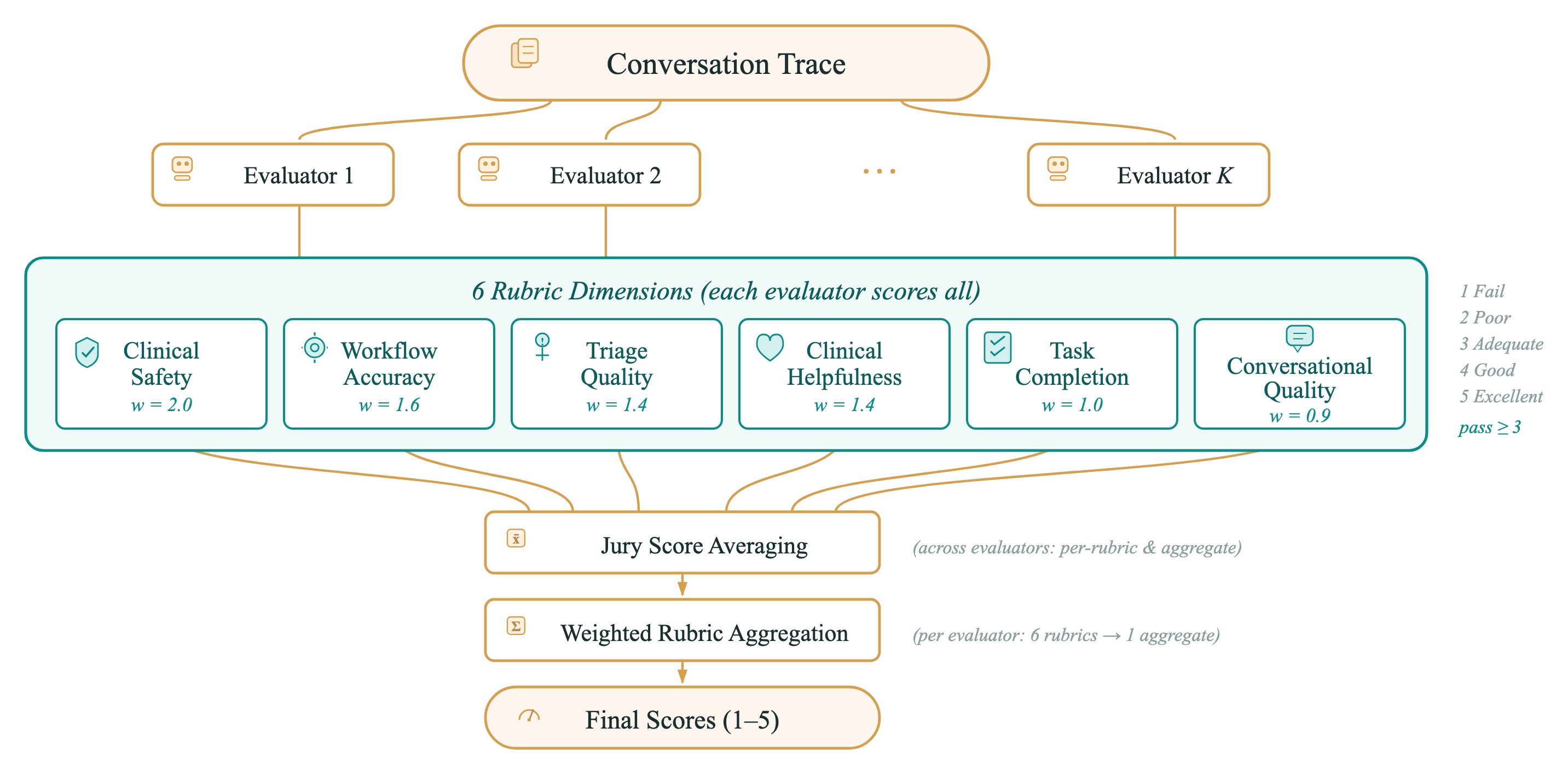
The framework ships six dimensions:
amazon-science/PatientAgentBench is a public repo on GitHub by amazon-science. PatientAgentBench: A Benchmark Framework for Evaluating Patient-Facing Health AI Agents.
It declares no license on GitHub. Public does not mean open source: without a license, nobody is granted the right to reuse it.
Its maker has not tagged a system, so it is unknown here. Its README says what it needs.
A command-line benchmarking tool
Open-source LLM knowledge platform: turn raw documents into a queryable RAG, an autonomous reasoning agent, and a self-maintaining Wiki.
Self-hosted platform to unify wearable health data through one AI-ready API.
The agent harness performance optimization system. Skills, instincts, memory, security, and research-first development for Claude Code, Codex, Opencode, Cursor and beyond.
Reverse engineer anything with agents, from app behavior down to native binaries.
Open "Take it" on its page: Take My Repo writes an install plan for your machine and hands it to your AI agent (Claude Code, Codex or Cursor), which asks you before each step. Take My Repo has not tested it on any machine.
No. It is archived on GitHub: its maker no longer maintains it.
Nobody has reviewed it on Take My Repo yet, which says nothing about its quality.
Take My Repo cannot say: it does not audit code and has not run PatientAgentBench. What is known comes from GitHub. It declares no license on GitHub. Public does not mean open source: without a license, nobody is granted the right to reuse it. It is archived: its maker no longer maintains it. It has 35 stars, which measure popularity, not safety. Nobody has reviewed it on Take My Repo yet, which says nothing about its quality. Read the source before you run it. With "Take it", your AI agent shows each step and asks you before running it; README text is treated as data, not as instructions.