Python Cookiecutter Project Template
Overview
This project provides a tool to generate Python project templates using Cookiecutter, GitHub CLI, and GitHub Actions CI/CD. It automates the setup of a new Python package/project using modern, industry-standard tools and practices. It includes a comprehensive setup for linting, testing, continuous integration, and more. The template is fully customizable and can be adapted to fit your specific needs.
Features
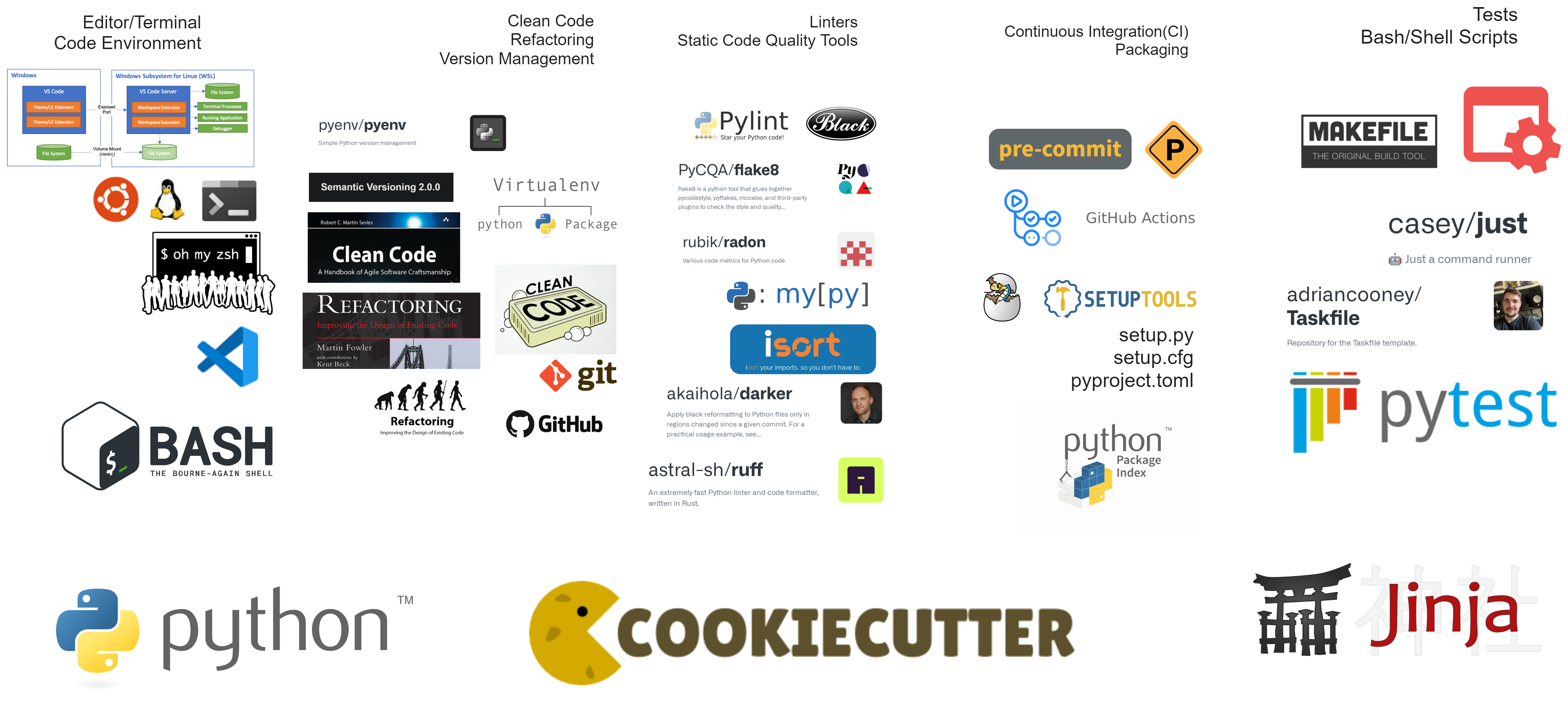
Automated Repository Creation: Generates a new GitHub repository with the necessary boilerplate code.
.
├── Makefile
├── README.md
├── pyproject.toml
├── run.sh
├── src
│   └── package_import_name/
├── tests/
└── version.txt
Customizable Configuration: Allows specifying repository name, visibility (public/private), package import name, upserting PyPI Secrets.
Pre-configured Setup: Includes configuration files like pyproject.toml, .gitignore, Makefile, .vscode settings, etc.
CI/CD Integration: Incorporates a GitHub Actions workflow for linting, testing, and building the package.
Secrets Management: Automatically sets up PyPI tokens for publishing packages.
VS Code Integration:: Includes settings for VS Code to ensure a consistent development experience.
Auto-completion | Syntax highlighting | Auto-formatting on save | Linting error detection | Test discovery and execution
Benefits
- Saves Time: Automates repetitive setup tasks for new Python projects.
- Ensures Best Practices: Pre-configured with industry-standard tools and practices.
- Customizable: Easily adapt the template to fit your specific needs.
Quick Local Start Guide for Development
# Install cookiecutter into an isolated virtual environment
python -m venv ./venv/
source ./venv/bin/activate
pip install --upgrade pip
pip install cookiecutter

# cookie cut the template, answering the prompts, e.g.
#  - repo_name: my-awesome-package
#  - package_import_name: my_awesome_package
cookiecutter https://github.com/avr2002/python-cookiecutter-template.git
Usage
Fork the repository to your GitHub account.
Setup a Personal Access Token: Create a PERSONAL_GITHUB_TOKEN Token with following Permissions and add it as a secret to the repository.
| Permission |
Access |
| Administration |
Read and write |
| Actions |
Read and write |
| Contents |
Read and write |
| Environments |
Read and write |
| Metadata |
Read-only |
| Pull requests |
Read and write |
| Secret scanning alerts |
Read and write |
| Secrets |
Read and write |
| Variables |
Read and write |
| Workflows |
Read and write |
Optional: If you intent to publish the package to PyPI, create a PyPI token and add it as a secret to the repository. The secret should be named as TEST_PYPI_TOKEN and PROD_PYPI_TOKEN for production and test PyPI tokens respectively.
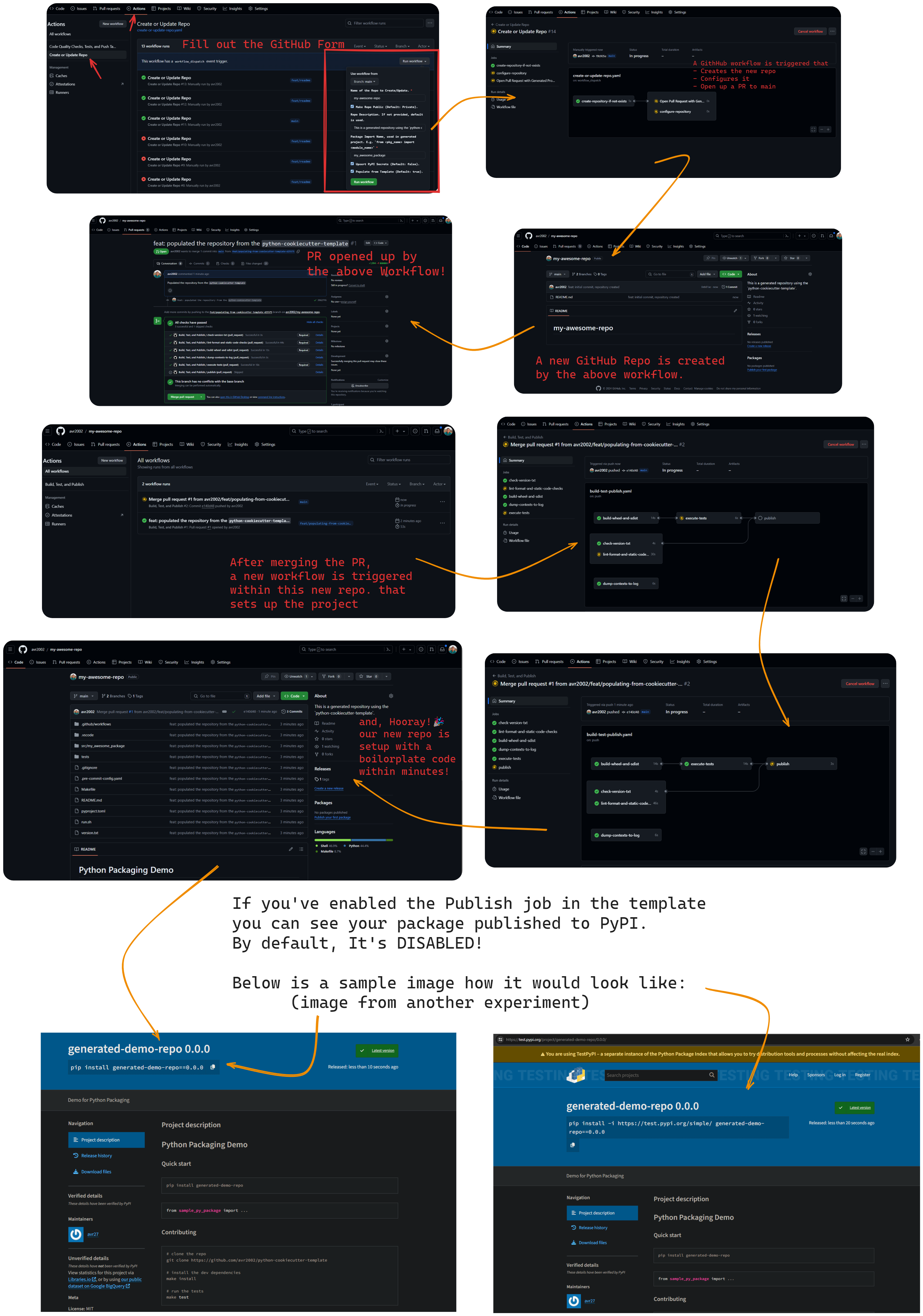
Run the Workflow: Trigger the GitHub Actions workflow(Create or Update Repo) via the GitHub UI.
Fill the Form: Provide the necessary inputs such as repository name and package import name.
Review and Merge: A pull request will be created with the generated boilerplate code. Review and merge it to start using your new project setup.
Clone the repository and start developing your Python package/project. Customize the template as needed.
By default, publish to PyPI has been disabled in the github actions workflow.
- To enable it, uncomment the
Publish job in the workflow file newly_generated_repo/.github/workflows/build-test-publish.yaml and provide the necessary PyPI token secret.
Project Architecture
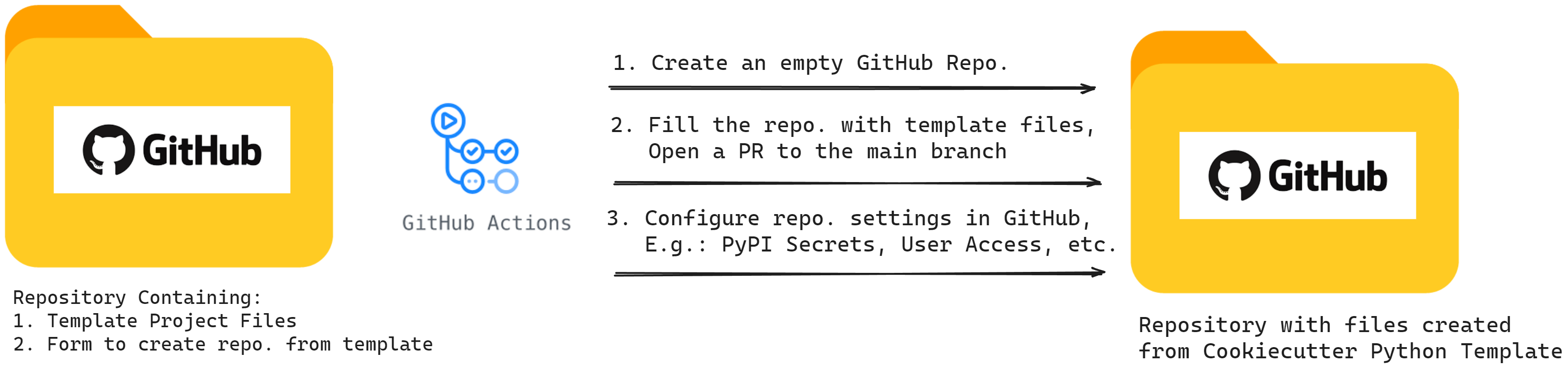
This project consists of a tool designed to generate GitHub repositories pre-configured with all necessary files and settings to streamline Python development. The architecture involves two main repositories and uses several key tools.
Repositories
Python Cookiecutter Template: This repository contains template files for generating new Python project repositories.
- Template Files: Include
Makefile, .pre-commit-config.yaml, pyproject.toml, source(src/) and tests/ folders, and more.
- Placeholders: Uses placeholders (e.g.,
{{ cookiecutter.repo_name }}) for project-specific values that will be populated during repository generation.
Generated Repositories: Created using the template from the Cookiecutter repository, these repositories are pre-configured with all necessary files and settings.
Process
- Repository Creation: A GitHub Actions workflow triggers the creation of an empty repository on GitHub.
- File Generation: The workflow populates the template files with project-specific values provided through a form.
- Commit and PR:
- The populated files are committed to a new branch in the generated repository.
- A pull request (PR) is automatically opened from this branch to the main branch.
- CI/CD: The presence of a GitHub Actions workflow file in the PR triggers a build, running linting and tests to ensure the configuration works correctly.
- Repository Configuration: Additional configurations, such as setting PyPI secrets and user access, are automated using GitHub's API.
Tools Used
- Cookiecutter: A framework for creating project templates. It uses placeholders to generate files with project-specific values.
- Jinja: A templating engine used by Cookiecutter for string substitution in files and filenames.
- GitHub CLI: A command-line tool for interacting with GitHub, allowing automation of repository creation, secret setting, and other tasks.
- Pytest: A testing framework for Python. The project uses an advanced pytest plugin for running tests in parallel, enhancing test efficiency.
- SetupTools: A package development tool that simplifies the process of packaging and distributing Python projects.
- Linting Tools: Includes
flake8, autoflake, black, isort, black, mypy, radon, ruff, pytest, pytest-cov, and pre-commit for ensuring code quality and consistency.
Workflow Summary
- Form Submission: Users fill out a form to provide details for the new repository.
- Workflow Execution: The GitHub Actions workflow handles repository creation, file generation, and initial PR creation.
- Automated Testing: The generated repository undergoes automated testing to ensure all configurations are correct.
graph TD;
    A[Create Repo if Not Exists] ---> B[Configure Repo, i.e. PyPI Secrects, Branch Protection, etc.]
    A ---> C[Open a PR with Boilerplate Code]
Folder Structure
.
├── Makefile
├── README.md
├── assets/
├── cookiecutter.json
├── pyproject.toml
├── requirements.txt
├── run.sh
├── .github/workflows/
│   └── code-quality-checks-and-tests.yaml
│   └── create_or_update_repo.yml
├── tests/
│   ├── conftest.py
│   ├── consts.py
│   ├── fixtures/
│   ├── functional_tests/
│   └── utils/
├── version.txt
└── {{cookiecutter.repo_name}}/
    ├── all the boilerplate code is here
✍🏼Amit Vikram Raj