
reactivesearch-api
API Gateway for Elasticsearch with declarative querying and out-of-the-box access controls
- 212
- Apache-2.0
- 5 wk ago
Repo appbaseio/reactivesearch-api, read from GitHub 8 h ago. appbaseio has not joined Take My Repo.
In short
appbaseio/reactivesearch-api is a public repo on GitHub by appbaseio. API Gateway for Elasticsearch with declarative querying and out-of-the-box access controls. It declares the Apache-2.0 license on GitHub. It is written mainly in Go, has 212 stars and last changed on 2026-10-20. Nobody has reviewed it on Take My Repo yet, which says nothing about its quality. Read from GitHub on 2026-11-23.
Similar repos
mall
mall项目是一套电商系统,包括前台商城系统及后台管理系统,基于Spring Boot+MyBatis实现,采用Docker容器化部署。 前台商城系统包含首页门户、商品推荐、商品搜索、商品展示、购物车、订单流程、会员中心、客户服务、帮助中心等模块。 后台管理系统包含商品管理、订单管理、会员管理、促销管理、运营管理、内容管理、统计报表、财务管理、权限管理、设置等模块。

ReactiveSearch API
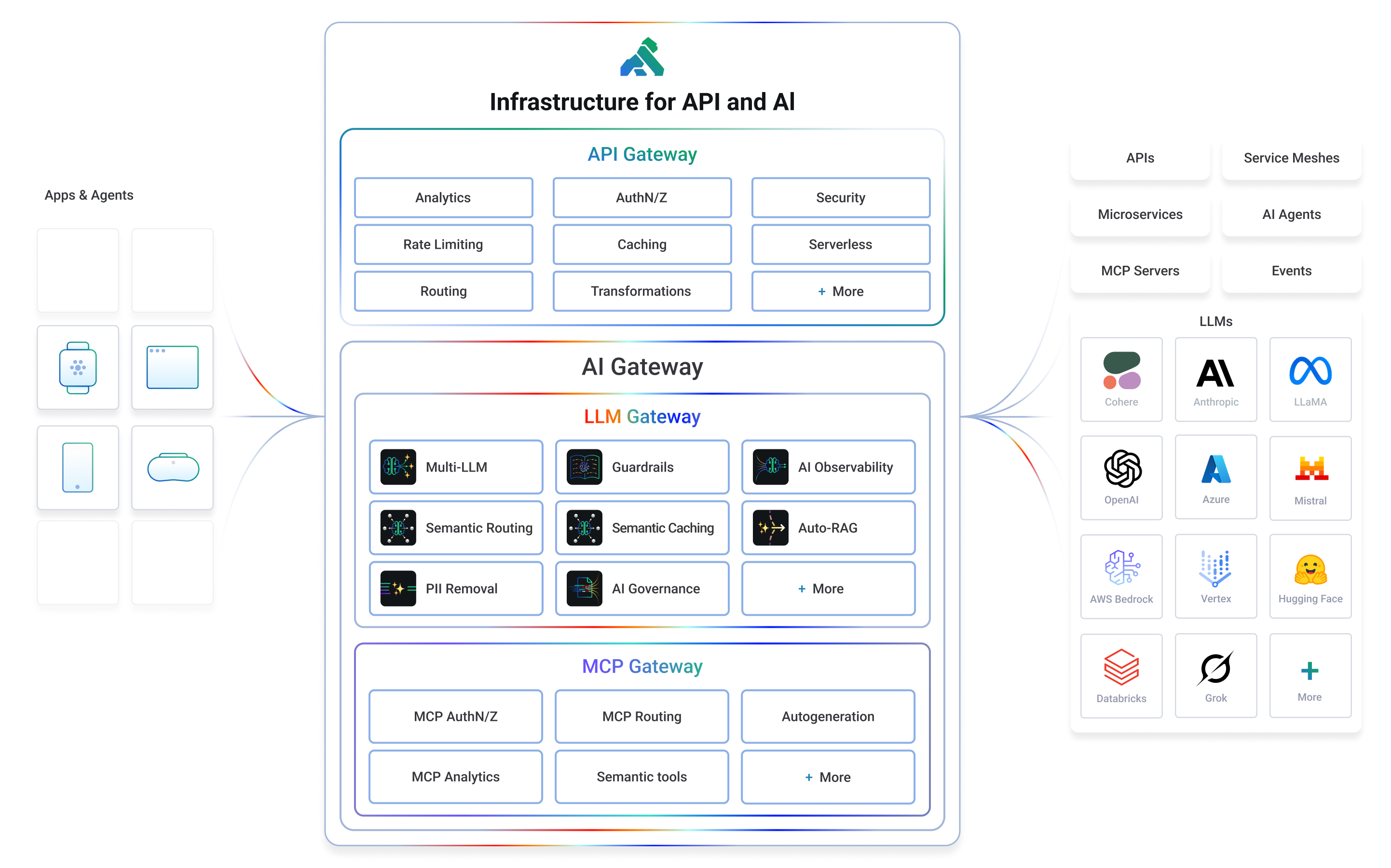
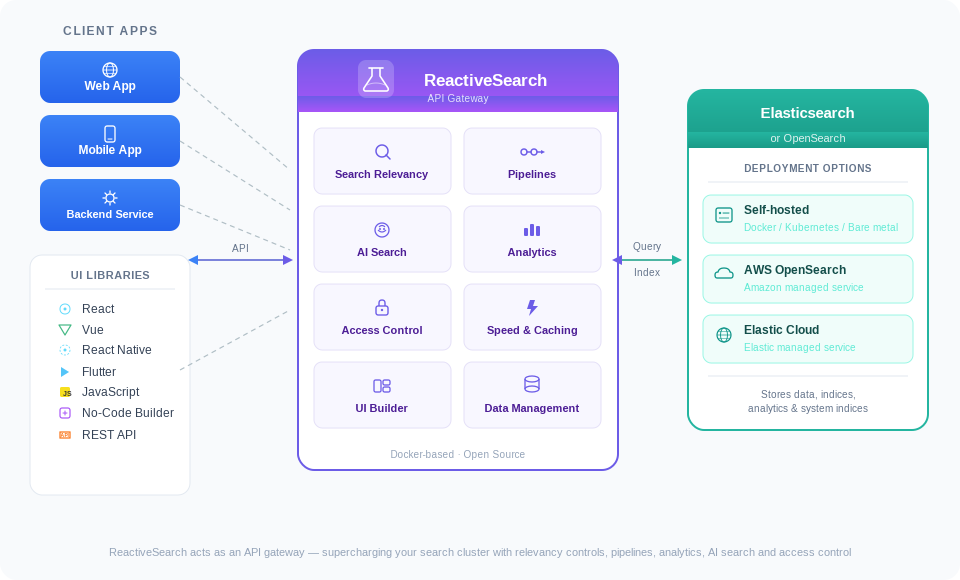
ReactiveSearch API is an open-source, self-hosted search middleware for Elasticsearch and OpenSearch. It is a versatile stack for incrementally adopting AI for your site search — author composable search pipelines, build UIs, analyze performance and scale securely.
Why ReactiveSearch API
1. A secure gateway to Elasticsearch and OpenSearch
ReactiveSearch sits between your application and the search cluster so clients never talk to Elasticsearch directly. API keys and users support granular permissions: restrict by index pattern, API category (Docs, Search, Indices, Cat, Clusters, Analytics, etc.), individual ACLs, operations (read / write / delete), source IPs, HTTP referers, include/exclude fields, per-category rate limits and time-to-live expiration. JWT-based auth with configurable RSA public keys is also supported. You get a production-ready search endpoint without handing out cluster credentials or full DSL access.
2. Search pipelines — fully programmable request lifecycle
Pipelines let you define the entire request/response lifecycle as a DAG of stages. Choose from 28+ pre-built stages (reactivesearchQuery, elasticsearchQuery, useCache, recordAnalytics, kNN, openAIEmbeddings, AIAnswer, httpRequest and more) or write custom JavaScript functions with full async/await and fetch support. Stages run in parallel, trigger conditionally and chain with needs dependencies — making it possible to enrich queries with external APIs or ML models, merge results and reshape responses without touching application code.
3. AI and vector search, built in
- OpenAI Embeddings stage generates vector embeddings at query time or index time and feeds them directly into kNN queries.
- kNN stage executes vector similarity search natively on Elasticsearch / OpenSearch.
- AI Answer stage sends top search results as context to GPT and returns a natural-language answer alongside traditional results — with session support for follow-up questions.
- Knowledge Graph integration via pipeline scripts to merge structured data from external APIs into search responses.
4. Composable query API — safe to expose, easy to target
Search is expressed as independent, composable query blocks wired together with the react property — each block maps to a facet, filter or result set without nested DSL. Because the format is declarative (no arbitrary scripts in queries), it is safe to expose to web and mobile clients. The API is also a stable, documented contract for tools, agents and UI libraries to generate against: the same query shape maps 1-to-1 to ReactiveSearch and Searchbox component props across React, Vue, React Native, Flutter and Vanilla JS.
5. Query rules, search relevancy and suggestions
Query rules let you promote, hide or inject results, replace search terms, add filters and schedule rules via cron — all configurable as data, not code. Search Relevancy persists per-index relevancy profiles (field weights, fuzziness, language settings) applied automatically to queries. Suggestions powers seven types out of the box — popular, recent, predictive, featured, FAQ, document and index — for a complete search-as-you-type experience.
6. Analytics, caching and observability
Analytics records every search, click, conversion, favorite and saved search via dedicated pipeline stages, feeding actionable insights such as slow queries, zero-result searches and geo distribution. Caching via the useCache stage serves repeat queries from a configurable in-memory cache with sub-millisecond latency. Request logging and audit trails capture what was sent to the cluster, so you can debug relevance and performance without reproducing production traffic locally.
Full API reference is available here.
Deploy to Render

Deploy ReactiveSearch API to Render in one click. For a fully free stack, pair it with Aiven's free OpenSearch — host search on Aiven and the API on Render's free web service tier.
- Create a free OpenSearch service on Aiven and copy its connection URI.
- Click Deploy to Render above and set
ES_CLUSTER_URLto that URI (basic auth may be embedded in the URL). - After deploy, verify the API is up:
curl https://<your-service>.onrender.com -u rs-demo:rs-password
Recommended environment variables (defaults are pre-filled in render.yaml where noted):
| Variable | Default | Description |
|---|---|---|
ES_CLUSTER_URL |
— | Upstream Elasticsearch / OpenSearch URL (required) |
RS_SETUP_PROFILE |
minimal |
Meta indices to create at startup |
USERNAME |
rs-demo |
Master user created on first start |
PASSWORD |
rs-password |
Password for the master user |
PORT |
set by Render | Listen port (Render injects this automatically) |
Getting Started
Get up and running in minutes. Four steps to a fully functional search stack with Elasticsearch, search pipelines, analytics and a visual dashboard.
Prerequisites: Docker and Docker Compose installed on your machine.
1. Clone and start the services
Clone the Docker Compose template and start all services with a single command.
git clone https://github.com/appbaseio/reactivesearch-api-docker.git \
  && cd reactivesearch-api-docker

docker-compose -f docker-compose-with-elasticsearch.yaml up -d
This starts Elasticsearch, ReactiveSearch API, Nginx (with TLS) and Fluent Bit — all with a single command.
Using OpenSearch instead? Replace the compose file with
docker-compose-with-opensearch.yaml.
2. Verify the service is running
Once the containers are up, verify ReactiveSearch is accessible.
curl http://localhost:8000 -u rs-admin-user:rs-password
You should see a response like:
{
  "name": "elasticsearch",
  "cluster_name": "docker-cluster",
  "version": {
    "number": "8.17.0"
  },
  "tagline": "You Know, for Search"
}
This confirms ReactiveSearch is running and connected to your search cluster.
3. Connect the Dashboard
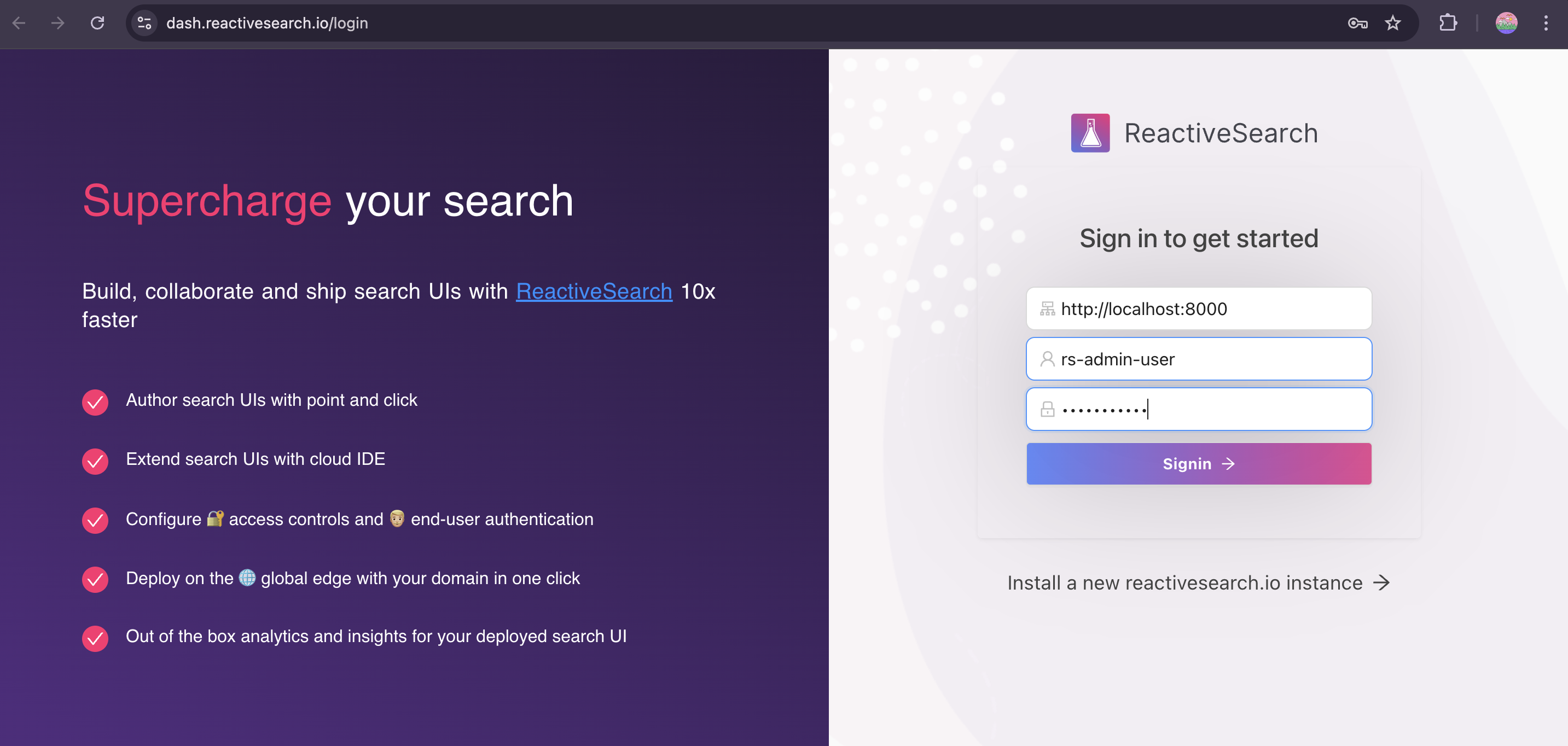
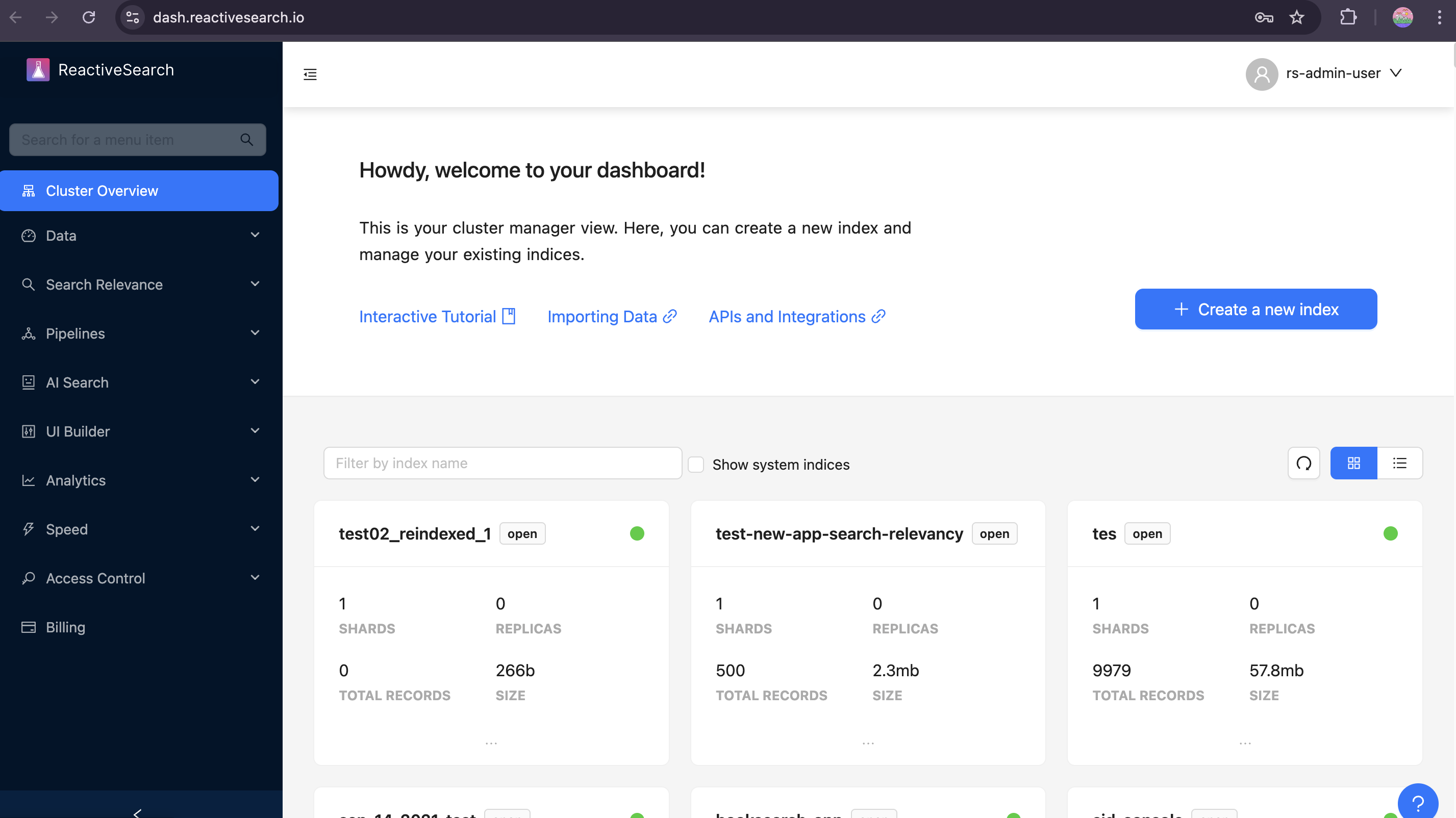
Open dash.reactivesearch.io in your browser. Enter your ReactiveSearch URL, username and password:
- URL:
http://localhost:8000 - Username:
rs-admin-user - Password:
rs-password
4. Start building
After signing in you'll land on the Cluster Overview — your central hub for managing indices, configuring search relevancy, building search UIs, setting up analytics and more.
What's next?
- Quickstart Guide — Import data, preview search and build your first search UI.
- Create a Search Pipeline — Learn how to create a search pipeline.
- Build a Search UI — Hands-on demos to build search UIs with ReactiveSearch.
Building
To build from source you need Git and Go (version 1.25.14 or higher).
You can build the binary locally by executing the following command from the project directory:
make
This produces an executable & plugin libraries in the root project directory. To start the Reactivesearch server, run:
./build/reactivesearch --env=config/manual.env --log=info
Alternatively, you could execute the following commands to start the server without producing an executable, (but still produce the plugin libraries):
make plugins
go run main.go --env=config/manual.env
Note: Running the executable assumes an active Elasticsearch upstream whose URL is provided in the .env file.
ElasticSearch Plugin changes
If the ES plugin's static files are changed (in the plugins/elasticsearch/api directory) then the following command should be run in the root of the repo:
cd plugins/elasticsearch && go-bindata -o api.go -pkg static api/
NOTE: Above command uses
go-bindatapackage that needs to be installed in the machine and available as a binary. It is not required in the final production build so is not added as a dependency in the go.mod.
Logging
Define the run time flag (log) to change the default log mode, the possible options are:
debug
Most verbose, use this to get logs for elasticsearch interactions.
info
Prints the basic information
error (default)
Only log the errors
profiling
Set the profiling flag to true at runtime to enable net profiling endpoints. Profiling endpoints are exposed at /debug/pprof route.
Profiling CPU (time taken):
An example of profiling for CPU usage is: /debug/pprof/profile (will wait for 30s and return a profile), or You can directly hit go tool pprof -http=":8080" http://localhost:8000/debug/pprof/profile to get a profile UI (top, graph, flamegraph) for time taken.
Profiling Heap:
An example for profiling for heap usage is: /debug/pprof/heap (will return a profile for the point in time), or You can directly hit go tool pprof -http=":8080" http://localhost:8000/debug/pprof/heap to get a profile UI (top, graph, flamegraph) of heap usage.
diff-logs
Set the diff-logs flag to false (defaults to true) at runtime to disable the use of log diffing algorithm. For high-throughput use-cases (100 requests/sec or above), the log diffing algorithm consumes signficant CPU usage (about ~2 CPU cores per 100 requests/sec) that can be saved by turning off log diffing.
TLS Support
You can optionally start Reactivesearch to serve https requests instead of http requests using the flag https. You also need to provide the server key & certificate file location through the environment file. config/manual.env is configured to use demo server key & certificates, which works for localhost.
go run main.go --log=info --env=config/manual.env --https
If you wish to manually test TLS support at localhost, curl needs to be also passed an extra parameter providing the cacert, in this case.
curl https://foo:bar@localhost:8000/_user --cacert sample/rootCA.pem
JWT Key Loading through HTTP
If you wish to test loading JWT Key through HTTP, you can use the following commands to start a HTTP server serving the key
    cd sample
    python -m SimpleHTTPServer 8500
Then start ReactiveSearch using the command:
go run main.go --log=info --env=config/manual-http-jwt.env
ReactiveSearch also exposes an API endpoint to set the key at runtime, so this need not be set initially.
Run Tests
Currently, tests are implemented for auth, permissions, users and billing modules. You can run tests using:
make test
or
go test -p 1 ./...
Extending ReactiveSearch API
The functionality in ReactiveSearch can extended via plugins. A ReactiveSearch plugin can be considered as a service in itself; it can have its own set of routes that it handles (keeping in mind it doesn't overlap with existing routes of other plugins), define its own chain of middlewares and more importantly its own database it intends to interact with (in our case it is Elasticsearch). For example, one can easily have multiple plugins providing specific services that interact with more than one database. The plugin is responsible for its own request lifecycle in this case.
However, it is not necessary for a plugin to define a set of routes for a service. A plugin can easily be a middleware that can be used by other plugins with no new defined routes whatsoever. A middleware can either interact with a database or not is an implementation choice, but the important point here is that a plugin can be used by other plugins as long as it doesn't end up being a cyclic dependency.
Questions
What is reactivesearch-api?
appbaseio/reactivesearch-api is a public repo on GitHub by appbaseio. API Gateway for Elasticsearch with declarative querying and out-of-the-box access controls.
Is reactivesearch-api open source?
It declares the Apache-2.0 license on GitHub.
Does reactivesearch-api run on macOS, Windows or Linux?
Its maker tagged it for macOS, Windows and Linux, or as Docker or cross-platform. That is declared by the maker; Take My Repo has not tested it.