REQUESTS
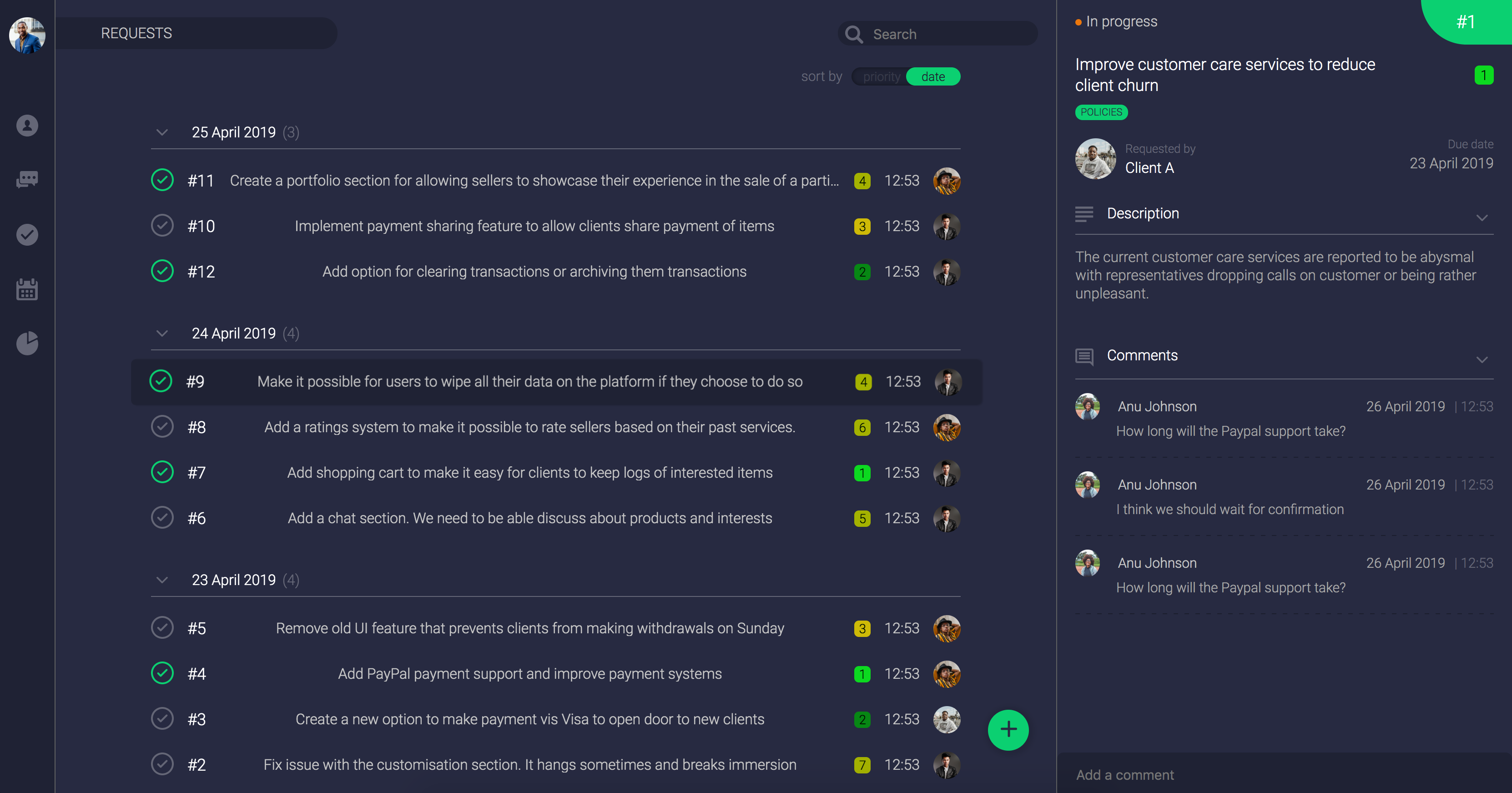
You can find the mockups here
Requests is part of a larger application. It allows the staff of an imaginary company to register and track clients' feature requests.
See Requests running here
🛠 INSTALLATION
REQUIREMENTS
- Python 3.7+ - Python interpreter
- Pip (Should be installed along with Python) - Python package manager
- Nodejs - Javascript server-side Virtual Machine
- NPM (Should be installed along with Nodejs) - Nodejs package manager
- PostgreSQL - Database management system
STEPS
Clone the repository
git clone https://www.github.com/appcypher/requests.git
Change working directory to project's directory
cd requests
Create requests and requests_test databases
Install dependecies and build project
. requests.sh build
Activate the project's virtual environment.
pipenv shell
Apply migration files.
flask db upgrade -d server/migrations
Add seeds to the database.
flask model seed all
Start the flask app
flask run
Visit localhost:5000 on your browser to see the page.
✅ TESTING
REQUIREMENTS
STEPS
You can run all the tests in a single command.
pipenv run pytest
Some useful defaults are already set in pytest.ini file
The tests are all unit tests, so you can run them individually
pipenv run pytest -k test_client_model_gets_all_rows_correctly_after_saving
📦 STARTING UP DOCKER CONTAINERS
REQUIREMENTS
STEPS
Start all the project's containers together with docker-compose
docker-compose -f docker/compose.yml up
You can also build and start them individually
Build and start flask app container
docker image build -t flask-app:latest -f ./docker/app/Dockerfile ./
docker container create --name flask-app -p 80:80 flask-app
docker container start flask-app
Build and start nginx server container
docker image build -t nginx-server:latest -f ./docker/server/Dockerfile ./docker/server/
docker container create --name nginx-server -p 80:80 nginx-server
docker container start nginx-server
🚀 DEPLOYMENT TO AWS ECS
This project contains a buildspec.yml file for automating deployment. The deployment process relies on a few AWS automation services like CodePipeline and CodeBuild. Ideally the buildspec file needs to be customized for your use case. However, if you are willing to take the manual approach, you can follow the steps below.
REQUIREMENTS
- AWS - Amazon web services
- Github - Git repository hub
- AWS EB CLI - Command line tool for managing Amazon Elastic Beanstalk (EB) applications remotely
STEPS
For the following to work, you need to have configured your AWS CLI using your EC2 keypairs.
Initialize the platform by following the prompt given by
eb init
Create an environement.
eb create request_app_environment
Deploy the application.
eb deploy
⚙️ AVAILABLE TASK RUNNERS
flask model seed all → Seeds the database with relevant initial datanpm run build:prod → Builds the frontend code with optimizations turned on and generates a sourcemapnpm run build:dev:watch → Watches the frontend code for any change and rebuilds with debug options enabledsh requests.sh --help → Shows helpful information about requests.sh scriptsh requests.sh build → Downloads and builds the projects dependenciessh requests.sh start → Starts the flask application using a Gunicorn (wsgi) server
↔️ API
A detailed documentation of the API is available here.
The project's Postman collection can be accessed with the button below.

This project doesn't do any user authentication, it is assumed the larger app has this figured out already.
REQUESTS
- GET:
/api/v1/requests → Gets all the requests
- POST:
/api/v1/requests → Saves a request
- GET:
/api/v1/requests/:id → Gets the request with the specified id
COMMENTS
- GET:
/api/v1/requests/:id/comments → Gets all the comments under a request
- POST:
/api/v1/requests/:id/comments → Adds a new comment under a request
STAFF
- GET:
/api/v1/staff/:id → Gets the staff with the specified id
CLIENT
- GET:
/api/v1/client/:id → Gets the client with the specified id
🥘 MADE WITH
MOCKUP
Figma → Cloud-based design tool
CLIENT
Knockout → MVVM-based JavaScript libraryJQuery → A fast, small and feature-rich JavaScript libraryWebpack → Package bundler with minificationSCSS → Flexible superset of CSS
SERVER
Flask → Micro web framework for PythonSQLAlchemy → SQL database ORMMarshmallow → Serialization and validation toolGunicorn → WSGI-compliant web serverNginx → Web server for reverse proxying, load balancing, caching and more
DATABASE
PostgreSQL → Database management system
CI/CD
Docker → Container and image creation and management toolCircleCI → Continous integration servicesCodeClimate → Code maintenance and coverage servicesCoveralls → Code coverage report servicesAmazon ECS & Elastic Beanstalk → Amazon's container orchestration servicesAmazon CodePipeline, CodeBuild, CodeCommit → A set of AWS automation services for CI/CD
TESTS
Pytest → Testing framework
👍 CREDITS
This project looks nicer; thanks to the free icons and logos provided by these awesome creators
🤝 LICENSE
Apache License 2.0