NCRFpp
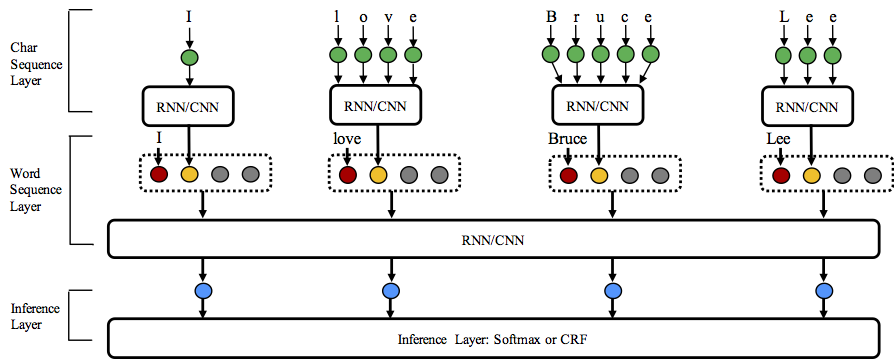
NCRF++, a Neural Sequence Labeling Toolkit. Easy use to any sequence labeling tasks (e.g. NER, POS, Segmentation). It includes character LSTM/CNN, word LSTM/CNN and softmax/CRF components.
- 1.9k
- Python
- Apache-2.0
- 4 y ago
A full-stack RAG demo you can run locally or deploy to a VPS: upload a PDF, build a per-browser vector index (FAISS), chat with an LLM using retrieved context. The UI is a React + TypeScript SPA; the API is FastAPI + LangChain with a multi-agent pipeline, Sentry tunneling, & sensible production defaults (CORS, rate limits, session disk cleanup)
Repo arnobt78/RAG-PDF-Chat-Multi-Agent-Pipeline--Python-React-FullStack, read from GitHub 19 h ago. arnobt78 has not joined Take My Repo.
arnobt78/RAG-PDF-Chat-Multi-Agent-Pipeline--Python-React-FullStack is a public repo on GitHub by arnobt78. A full-stack RAG demo you can run locally or deploy to a VPS: upload a PDF, build a per-browser vector index (FAISS), chat with an LLM using retrieved context. The UI is a React + TypeScript SPA; the API is FastAPI + LangChain with a multi-agent pipeline, Sentry tunneling, & sensible production defaults (CORS, rate limits, session disk cleanup). It declares no license on GitHub. Public does not mean open source: without a license, nobody is granted the right to reuse it. It is written mainly in TypeScript, has 6 stars and last changed on 2026-08-08. Nobody has reviewed it on Take My Repo yet, which says nothing about its quality. Read from GitHub on 2026-11-22.

A production-style, educational full-stack RAG project that demonstrates how to turn PDF documents into searchable knowledge and chat with them using modern AI models. It is designed for learners and builders who want to understand document chunking, embeddings, vector search, SSE streaming responses, multi-provider model fallback, and practical deployment (Vercel + Coolify VPS) end to end.
contact@arnobmahmud.com)
.env) explainedThis app lets a user upload a PDF and ask questions about it. The backend:
It is intentionally a Vite SPA + FastAPI split (not Next.js), so you can learn CORS, env vars, reverse proxies, and separate frontend/backend deploys the way many real products do.
Highlights for learners:
X-Chat-Session-Id) — no login required:free, Groq, Gemini, …).env for local, Vercel, and Coolify.| Term | What it is | Why it matters here |
|---|---|---|
| RAG | Retrieval Augmented Generation: find relevant text first, then ask the LLM | Answers stay grounded in your PDF |
| Embedding | Numbers that represent meaning of text | Similar sentences land near each other in vector space |
| FAISS | Fast similarity search over vectors (Facebook AI) | Speedy “which chunks match this question?” |
| Chunking | Split a long PDF into smaller pieces | Models have context limits; retrieval needs units |
| SSE | Server-Sent Events — one-way stream from server → browser | Token-by-token “typing” answers |
| Session ID | UUID stored in the browser, sent as X-Chat-Session-Id |
Each visitor gets their own FAISS folder |
| LRU eviction | Drop least-recently-used sessions when the cap is hit | Keeps disk usage bounded on a demo VPS |
| CORS | Browser rule: which websites may call your API | Must list your Vercel origin on Coolify |
| Failover | Try next provider/model when one fails | Free tiers rate-limit and deprecate models often |
| IndexedDB | Browser database for larger local data | Chat history stays on the device (not on the server) |
Browser (Vite React SPA)
  ├─ localStorage: X-Chat-Session-Id (UUID)
  ├─ localStorage: model / streaming / sources prefs
  ├─ IndexedDB: chat transcripts keyed by PDF name
  └─ HTTP → FastAPI (VITE_API_BASE_URL)

FastAPI (Coolify / local Uvicorn)
  ├─ POST /upload  → PDF → chunks → embeddings → FAISS (per session)
  ├─ POST /ask | /ask/stream → retrieve → multi-agent pipeline → LLM
  ├─ GET /models, /health, /status, /pipeline-info, /runtime-summary
  └─ POST /api/oversight → Sentry envelope tunnel (optional)
Teaching tip: Open the browser Network tab while you chat. You should see /upload, then /ask or /ask/stream, always with header X-Chat-Session-Id.
Default chat model (code + .env.example): openai/gpt-oss-20b:free (OpenRouter free tier). Catalogs live in backend/app/config.py and the frontend fallback list frontend/src/types/index.ts (AI_MODELS).
| Library | Role for learners |
|---|---|
| Vite | Fast dev server + production bundler for the SPA |
| React 18 | UI components and hooks |
| TypeScript | Typed props, API payloads, model IDs |
| React Router | /, /chat, /about, /api-status |
| Tailwind CSS | Utility-first styling |
| Framer Motion | Landing / section motion (chat streaming uses CSS for stability) |
| Radix UI | Accessible dialogs, menus, tooltips |
| Sonner | Toast notifications |
| Sentry React SDK | Optional errors/replay — only if VITE_SENTRY_DSN is set |
| Library | Role for learners |
|---|---|
| FastAPI | Typed HTTP API + automatic OpenAPI at /docs |
| Uvicorn | ASGI server |
| Pydantic / pydantic-settings | Request schemas + env-driven config |
| LangChain | PDF load, split, LLM glue |
| FAISS | Vector index on disk per session |
| sentence-transformers | Local embedding fallback if cloud embeddings fail |
| sse-starlette | SSE streaming responses |
| httpx / tenacity | HTTP clients and retries |
rag-pdf-chat/
├── README.md
├── SECURITY.md                      # private vulnerability reporting
├── AGENTS.md / CLAUDE.md            # agent / contributor workflow hints
├── .agile-v/                        # project memory / requirements trail
├── docs/                            # deploy + model-selection guides
├── package.json                     # root: npm run check / build
├── scripts/check-backend.sh
├── frontend/
│   ├── .env.example
│   ├── package.json
│   ├── vite.config.ts
│   ├── vercel.json
│   └── src/
│       ├── main.tsx                 # Sentry init (env DSN), React root
│       ├── App.tsx                  # routes, providers, ErrorBoundary
│       ├── pages/                   # home, chat, about, api-status
│       ├── components/
│       │   ├── chat/                # ChatContainer, upload, model selector…
│       │   ├── layout/              # header, footer, page shell
│       │   ├── sections/            # landing marketing sections
│       │   └── ui/                  # button, glass-card, dialogs…
│       ├── hooks/                   # useChat, usePDFUpload, useHealth…
│       ├── context/                 # ChatProvider (parallel path; /chat uses hooks)
│       ├── lib/                     # api.ts, storage, sentry, env
│       └── types/                   # ChatEntry, AI_MODELS, API types
└── backend/
    ├── .env.example
    ├── Dockerfile
    ├── requirements.txt
    ├── requirements-dev.txt
    ├── tests/test_chat_stream_sse.py
    └── app/
        ├── main.py                  # CORS, lifespan, routers
        ├── config.py                # AI_PROVIDERS + Settings
        ├── routes/                  # health, upload, chat, tunnel, runtime
        ├── services/                # FAISS, LLM, rate limit, cleanup
        ├── agents/                  # multi-step RAG pipeline
        └── models/schemas.py        # Pydantic request/response models
Agent-oriented map (shorter): docs/PROJECT_WALKTHROUGH.md.
| Route | Page | What you see |
|---|---|---|
/ |
Home | Hero, features, pipeline, models, CTA |
/chat |
Chat | Upload PDF, ask questions, stream answers |
/about |
About | Project story / credits |
/api-status |
API status | Live health / runtime summary from backend |
| Piece | Path | Reuse idea |
|---|---|---|
ChatContainer |
components/chat/chat-container.tsx |
Orchestrates upload + chat + prefs — copy as a “chat screen” shell |
ChatMessage / ChatInput |
components/chat/ |
Message bubbles + composer for any assistant UI |
PDFUpload |
components/chat/pdf-upload.tsx |
Drag/drop file UX |
ModelSelector |
components/chat/model-selector.tsx |
Fetches GET /models, falls back to AI_MODELS |
| UI primitives | components/ui/ |
Buttons, glass cards, dialogs — design-system starters |
api.ts |
lib/api.ts |
Central fetch + streamQuestion + session header |
storage.ts |
lib/storage.ts |
localStorage prefs + IndexedDB sessions |
State model note: this project does not use React Query or Redis. Live UI updates via React state; persistence is device-local. /chat uses useChat / usePDFUpload hooks.
User uploads a PDF → POST /upload → backend extracts text, chunks (CHUNK_SIZE / CHUNK_OVERLAP), embeds, writes FAISS under faiss_index/sessions/<session-id>/.
POST /ask/stream (SSE events: status / token / done / error).POST /ask (single JSON answer).Toggle “include sources” → backend may return page/snippet metadata so learners can see grounding context.
Frontend sends a preferred model id. Backend walks configured providers (PROVIDER_PRIORITY in config.py) and models until one succeeds (rate limits, outages, deprecations).
Free-tier guidance: docs/LLM_MODEL_SELECTION.md.
X-Chat-Session-Id.FAISS_SESSION_MAX_AGE_DAYS.VITE_SENTRY_DSN is set (never hardcode a DSN in source).development events are dropped in client code.POST /api/oversight to reduce ad-block drops.Data routes that touch FAISS expect header:
X-Chat-Session-Id: <uuid>.
| Method | Endpoint | Purpose |
|---|---|---|
GET |
/ |
Basic status |
GET |
/health |
Healthcheck (Coolify / Docker) |
GET |
/models |
Model catalog for the selector |
GET |
/pipeline-info |
Human-readable agent pipeline stages |
GET |
/status |
Whether this session has a PDF loaded |
GET |
/runtime-summary |
Provider readiness / counters for status UI |
POST |
/upload |
Upload PDF and build index |
POST |
/ask |
Question → JSON answer |
POST |
/ask/stream |
Question → SSE stream |
POST |
/api/oversight |
Sentry tunnel |
Interactive docs when the API is running: http://127.0.0.1:8000/docs
curl -X POST "http://127.0.0.1:8000/ask" \
  -H "Content-Type: application/json" \
  -H "X-Chat-Session-Id: 11111111-2222-4333-8444-555555555555" \
  -d '{"question":"Summarize this PDF","model":"openai/gpt-oss-20b:free","include_sources":true}'
event: status
data: {"message":"Retrieving..."}

event: token
data: {"content":"Hello"}

event: done
data: {"answer":"Hello world","model_used":"openai/gpt-oss-20b:free"}
.env) explained.env to open the UI?.env for layout browsing.sentence-transformers (CPU, no key — slower first download).Never commit real .env files. Copy from the examples only.
backend/.envcd backend
cp .env.example .env
OPENROUTER_API_KEY=sk-or-v1-your_key_here
OPENROUTER_API_BASE=https://openrouter.ai/api/v1
Get a key: https://openrouter.ai/keys
.env.example)DEFAULT_MODEL=openai/gpt-oss-20b:free
DEFAULT_PROVIDER=openrouter
CORS_ORIGINS=http://localhost:5173,http://127.0.0.1:5173,http://localhost:3000
If DEFAULT_MODEL / DEFAULT_PROVIDER are omitted, code defaults in backend/app/config.py still apply (openai/gpt-oss-20b:free + openrouter). Coolify env vars override those defaults when set.
| Variable | Required? | Purpose |
|---|---|---|
OPENROUTER_API_KEY |
Yes for primary path | Main LLM + embedding gateway |
OPENROUTER_API_BASE |
Recommended | OpenRouter base URL |
DEFAULT_MODEL |
Optional | Override default model id |
DEFAULT_PROVIDER |
Optional | Hint / default provider name |
CORS_ORIGINS |
Yes in production | Comma-separated frontend origins |
GROQ_API_KEY |
Optional | Groq failover |
GOOGLE_API_KEY |
Optional | Gemini failover |
HF_API_KEY |
Optional | Hugging Face router failover |
OPENAI_DIRECT_API_KEY |
Optional | Paid OpenAI last resort |
FAISS_PERSIST_DIR |
Optional | Index directory (default faiss_index) |
MAX_VECTOR_SESSIONS |
Optional | LRU session cap |
FAISS_SESSION_MAX_AGE_DAYS |
Optional | Startup cleanup age |
RATE_LIMIT_UPLOAD_PER_MINUTE |
Optional | Upload budget per IP |
RATE_LIMIT_ASK_PER_MINUTE |
Optional | Ask/stream budget per IP |
SENTRY_DSN |
Optional | Backend Sentry |
SENTRY_ENVIRONMENT |
Optional | e.g. production |
DEBUG |
Optional | Extra debug behavior |
Legacy aliases still work: OPENAI_API_KEY / OPENAI_API_BASE → OpenRouter fields.
frontend/.envcd frontend
cp .env.example .env
VITE_API_BASE_URL=http://localhost:8000
If unset in dev, the app defaults API base to http://localhost:8000.
| Variable | Required? | Purpose |
|---|---|---|
VITE_API_BASE_URL |
Yes | Public HTTPS API URL (no trailing slash) |
VITE_APP_ENV |
Recommended | e.g. production (Sentry environment label) |
VITE_SENTRY_DSN |
Optional | Browser Sentry — empty = Sentry off |
VITE_SENTRY_TRACES_RATE |
Optional | e.g. 0.2 |
VITE_FAISS_SESSION_MAX_AGE_DAYS |
Optional | Keep UI copy aligned with backend retention |
VITE_DEV_PROXY_TARGET |
Optional | When using Vite proxy + VITE_API_BASE_URL=/api |
Fork tip: use your own Sentry project DSN. Do not commit DSNs into source.
cd backend
python -m venv .venv
source .venv/bin/activate   # Windows: .venv\Scripts\activate
pip install -r requirements.txt
cp .env.example .env
# Edit .env → set OPENROUTER_API_KEY
uvicorn app.main:app --reload --host 0.0.0.0 --port 8000
http://127.0.0.1:8000http://127.0.0.1:8000/docscd frontend
npm install
cp .env.example .env # optional if defaults are fine
npm run dev
App: http://localhost:5173
/chat./models and Network.backend/app/agents/ to see pipeline stages.backend/Dockerfile/backendPORT=3000 is common in this project’s playbooks)CORS_ORIGINS to your Vercel origin(s)DEFAULT_MODEL=openai/gpt-oss-20b:free (or omit to use code default)FAISS_PERSIST_DIR on a volumeDeeper guides: docs/DOCKER_VPS_BACKEND_PLAYBOOK.md, docs/COOLIFY_PUBLIC_BACKEND_GUIDE.md.
frontendnpm run builddistnpm install --legacy-peer-deps (if peer conflicts)VITE_API_BASE_URL=https://your-backend-domainVITE_APP_ENV=productionGuardrails: docs/VERCEL_PRODUCTION_GUARDRAILS.md.
frontend/src/components/ui + lib/utils.ts (cn helper).ChatInput / ChatMessage / PDFUpload.lib/api.ts at your API base and session header convention.routes/) separate from services and agents.config.py’s AI_PROVIDERS + Settings pattern for env-driven failover.PDF → chunks → embeddings → vector store → retrieve(k) → prompt(LLM) → answer
Swap FAISS for Pinecone/pgvector later; keep the same pipeline stages.
npm run check          # frontend typecheck+lint + backend script
npm run build          # frontend production build
npm run build:all      # check then build
cd frontend
npm run typecheck
npm run lint
npm run build
# from repo root
npm run check:backend
# or manually:
cd backend
pip install -r requirements.txt -r requirements-dev.txt
bash ../scripts/check-backend.sh
Included test: backend/tests/test_chat_stream_sse.py (SSE token + done flow with fakes).
| Symptom | Likely fix |
|---|---|
| CORS errors in browser | Add Vercel origin to CORS_ORIGINS, redeploy backend |
| Chat works locally, fails on Vercel | Set VITE_API_BASE_URL to HTTPS API; redeploy frontend |
| No model / empty answers | Invalid or missing provider key; check Coolify env |
| Wrong PDF answers after refresh | Session header changed or FAISS session pruned |
| Old default model in production | Coolify still has DEFAULT_MODEL=openai/gpt-4o-mini — update + Redeploy |
| Sentry noise from localhost | Expected before harden; client now drops localhost/dev; use env-only DSN |
/wp-json/... 404 in logs |
Internet scanners — ignore |
| Coolify UI blocked | Update Hetzner firewall allowlist for your current public IP (ports 22 / 8000) |
| Doc | Topic |
|---|---|
docs/PROJECT_WALKTHROUGH.md |
Short agent/dev map |
docs/LLM_MODEL_SELECTION.md |
Free-tier providers + failover strategy |
docs/DOCKER_VPS_BACKEND_PLAYBOOK.md |
Docker / VPS ops |
docs/VERCEL_PRODUCTION_GUARDRAILS.md |
Frontend deploy tips |
SECURITY.md |
Vulnerability reporting |
CLAUDE.md / AGENTS.md |
Agent workflow |
npm run check (and backend checks) before opening a PR.This project is licensed under the MIT License. Feel free to use, modify, and distribute the code as per the terms of the license.
This is an open-source project - feel free to use, enhance, and extend this project further!
If you have any questions or want to share your work, reach out via GitHub or my portfolio at https://www.arnobmahmud.com.
Enjoy building and learning! 🚀
Thank you! 😊
arnobt78/RAG-PDF-Chat-Multi-Agent-Pipeline--Python-React-FullStack is a public repo on GitHub by arnobt78. A full-stack RAG demo you can run locally or deploy to a VPS: upload a PDF, build a per-browser vector index (FAISS), chat with an LLM using retrieved context. The UI is a React + TypeScript SPA; the API is FastAPI + LangChain with a multi-agent pipeline, Sentry tunneling, & sensible production defaults (CORS, rate limits, session disk cleanup).
It declares no license on GitHub. Public does not mean open source: without a license, nobody is granted the right to reuse it.
NCRF++, a Neural Sequence Labeling Toolkit. Easy use to any sequence labeling tasks (e.g. NER, POS, Segmentation). It includes character LSTM/CNN, word LSTM/CNN and softmax/CRF components.
Its maker has not tagged a system, so it is unknown here. Its README says what it needs.
Open "Take it" on its page: Take My Repo writes an install plan for your machine and hands it to your AI agent (Claude Code, Codex or Cursor), which asks you before each step. Take My Repo has not tested it on any machine.
Its last change on GitHub was on 2026-08-08. Take My Repo does not judge from that whether it is maintained.
Nobody has reviewed it on Take My Repo yet, which says nothing about its quality.
Easy-to-use and powerful LLM and SLM library with awesome model zoo.
Langchain-Chatchat(原Langchain-ChatGLM)基于 Langchain 与 ChatGLM, Qwen 与 Llama 等语言模型的 RAG 与 Agent 应用 | Langchain-Chatchat (formerly langchain-ChatGLM), local knowledge based LLM (like ChatGLM, Qwen and Llama) RAG and Agent app with langchain
Milvus is a high-performance, cloud-native vector database built for scalable vector ANN search
The agent harness performance optimization system. Skills, instincts, memory, security, and research-first development for Claude Code, Codex, Opencode, Cursor and beyond.
A full-stack warehouse and stock inventory management system built with Next.js, React, Prisma, and MongoDB. It helps store owners, suppliers, and clients manage products, orders, invoices, warehouses, and support tickets with role-based access, analytics dashboards, QR codes, payments (Stripe), shipping (Shippo), and email (Brevo).
A comprehensive, production-ready hotel booking platform built with the MERN stack (MongoDB, Express.js, React, Node.js) featuring advanced search, booking management, analytics dashboard, and payment integration.
A healthcare patient management application using Next.js that allows patients to easily register, book, and manage their appointments with doctors, featuring administrative tools for scheduling, confirming, and canceling appointments, along with SMS notifications
A modern, fully responsive coffee shop landing page built with Next.js 15, React, TypeScript, and TailwindCSS. This project is designed for learning and instruction: it showcases the App Router, client & server components, advanced animations (GSAP, Framer Motion, Locomotive Scroll), SEO metadata, component-based structure
A fullstack food ordering platform built with the MERN stack (MongoDB, Express.js, React, Node.js). It provides a modern, scalable, production-ready solution for online food ordering, restaurant management, real-time order tracking. The project is split into a robust backend REST API, feature-rich, responsive frontend SPA, ease of learning or reuse
A modern, responsive, and feature-rich travel and camping web application built with Next.js, React, and Tailwind CSS. This project provides a beautiful UI/UX for exploring camping destinations, viewing features, and guiding users through an engaging journey experience.