
openscad-cli
cli to make 3d model via openscad core engine
- 5
- 7 wk ago
Repo atom2ueki/openscad-cli, read from GitHub 22 min ago. atom2ueki has not joined Take My Repo.
In short
atom2ueki/openscad-cli is a public repo on GitHub by atom2ueki. cli to make 3d model via openscad core engine. It declares no license on GitHub. Public does not mean open source: without a license, nobody is granted the right to reuse it. It is written mainly in TypeScript, has 5 stars and last changed on 2026-10-06. Nobody has reviewed it on Take My Repo yet, which says nothing about its quality. Read from GitHub on 2026-11-25.
openscad-cli
An agent-facing CLI over the OpenSCAD core engine: build, validate and export parametric 3D-printable and laser-cuttable models, with JSON on stdout so a program — or an AI agent — can branch on structured results instead of scraping log text.
$ openscad-cli build bracket.scad -o bracket.stl --json
{
  "schema": "openscad-cli/result@1",
  "status": "ok",
  "outputs": [{ "format": "stl", "path": "bracket.stl", "bytes": 13284 }],
  "stats": { "triangles": 224, "volume": 4820.4, "area": 3910.2,
             "boundingBox": { "size": [60, 40, 12] } },
  "diagnostics": [],
  "echo": ["label=OPENSCAD-CLI w=60 d=40 h=12"]
}
A real export
The brief, put the way you would put it to an agent that has the skill loaded:
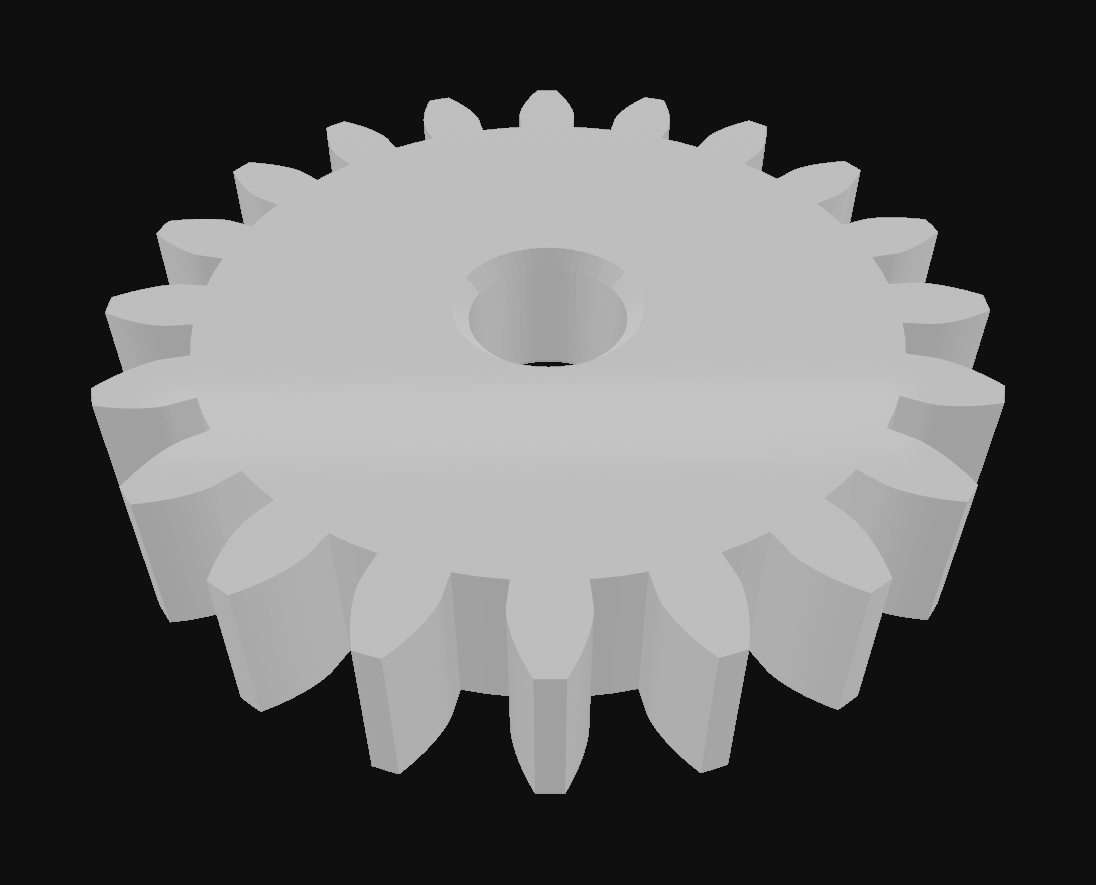
A 20-tooth involute spur gear, module 2, 8 mm face, 8 mm bore with a 0.8 mm lead-in chamfer at both ends. It has to print without support, and the teeth have to mesh with an identical gear.
The result — that gear.stl, opened in a third-party viewer:

$ openscad-cli build gear.scad -o gear.stl
{
  "schema": "openscad-cli/result@1",
  "status": "ok",
  "outputs": [{ "format": "stl", "path": "gear.stl", "bytes": 189684 }],
  "stats": { "triangles": 3792, "volume": 9279.104, "area": 4605.891,
             "degenerateTriangles": 0,
             "boundingBox": { "size": [43.999, 43.999, 8] } },
  "diagnostics": [],
  "echo": ["pitch_dia = 40, tip_dia = 44, root_dia = 35, face = 8, teeth = 20, ..."]
}
Note what is not in that output: no WARNING, no Geometries may not be generated, nothing an agent has to interpret. "status": "ok" with an empty
diagnostics array is the whole contract — no log scraping, no guessing
whether the part will print. Here it means a watertight mesh, 9279.104 mm³
against a 44 × 44 × 8 envelope, and no degenerate or sliver triangles, which
are three numbers a slicer would otherwise be the first to discover.
The teeth are a true involute, not a trapezoid approximation: the flanks track
the analytic curve to within 0.1 µm on average and 3.2 µm at worst, and
the tooth measures 2.9915 mm at the pitch circle against a theoretical
2.9916 mm. That is the difference between a gear that meshes and a decorative
one, and it is not something status: "ok" will tell you.
The engine drew nothing. It cannot — see below. The image is that gear.stl
opened in a third-party viewer; the geometry is entirely the CLI's and the
engine's. The .scad behind it is a scratch model kept out of this repo, so the
numbers above are the point rather than a file to download.
What it is, and what it is not
The OpenSCAD engine is vendored as a pinned git submodule and built with
-DHEADLESS=ON -DNULLGL=ON, which drops the Qt GUI and the whole OpenGL
renderer stack. The result is a genuinely headless binary: no display server,
no OpenGL, no Qt. This is the same configuration the official
openscad/openscad-wasm port uses.
No PNG, no interactive preview, no animation. Those need a GL context. Every
mesh and vector export works: stl off obj wrl 3mf and dxf svg pdf pov.
openscad-cli info states this explicitly rather than letting you discover it.
openscad-cli is a thin, opinionated layer in front of that engine. It does
not fork, patch, or reimplement OpenSCAD. Its job is the agent contract:
- JSON results with a versioned schema
- structured diagnostics with a stable
code, a source location and a hint - dependency-aware caching — editing an
included library invalidates, which a source-hash-only cache gets wrong - independent mesh verification (volume, area, degenerate and sliver detection)
- six meaningful exit codes instead of the engine's two
- a skill that ships inside the binary, so documentation cannot drift from code
Install
macOS (Homebrew)
brew tap atom2ueki/openscad-cli
brew install atom2ueki/openscad-cli/openscad-cli
Linux (AppImage) — download openscad-cli-<version>-linux-<arch>.AppImage,
chmod +x, and run it. No package manager required.
Any platform with Node.js ≥ 20 — the npm package is the CLI, pure JavaScript, zero runtime dependencies. It then needs an OpenSCAD executable:
npm install -g openscad-cli
export OPENSCAD_ENGINE=/path/to/openscad
openscad-cli doctor
From source
git clone --recurse-submodules https://github.com/atom2ueki/openscad-cli
cd openscad-cli
npm ci && npm run build
packaging/build-engine.sh full      # needs cmake + the engine's dependencies
Commands
build <file.scad>            render and export          (the main one)
validate <file.scad>         parse and evaluate, write nothing
variants <file.scad>         render a parameter matrix  (NDJSON results)
inspect <file.scad>          --ast --csg --echo --params
convert <file.scad>          re-export / change format
info                         engine, formats, capabilities, licence
doctor                       environment check; exit 3 if unusable
skill                        print the agent skill bundle
raw -- <engine-args>         pass arguments to the engine untouched
Global options: -D name=value, --output-format json|text, --engine,
--timeout, --strict, --no-cache, --no-verify, --workdir,
--max-dim, --max-triangles, --quiet, --verbose.
| Exit | Meaning |
|---|---|
| 0 | success (possibly with warnings) |
| 1 | model error — parse, evaluation or render failure |
| 2 | usage error |
| 3 | engine unavailable |
| 4 | validation failed under --strict |
| 5 | timeout |
| 6 | internal CLI error |
Every build also writes a sidecar manifest at <output>.openscad.json, so a
later step can read the result without re-parsing stdout.
Using it as an agent skill
openscad-cli skill > openscad.md
SKILL.md plus four references — language, commands, design rules for
printable parts, and troubleshooting keyed by diagnostic code — and the design
knowledge base under kb/. They are generated from inside the installed CLI, so
the skill can never document a flag that a given build does not have.
packaging/install-skill.sh copies the same bundle, straight from skill/, into
each agent runtime on the machine that reads skills from a data directory — Mavis
(~/.minimax/skills/) and omp (~/.agents/skills/). Pass a directory to install
somewhere else instead.
The knowledge base
skill/kb/ is the part of the skill that is about design rather than about
this CLI: a distilled corpus of proven parametric parts — threaded containers,
flat-pack springs, joins, print-in-place mechanisms, surface textures, hull
constructions, BOSL2 idioms — with the exact numbers and the failure modes their
authors documented in comments.
An agent starts at kb/INDEX.md, which routes by what you are building, states
the two rules that decide most print failures (keep every force path in-plane
with the layer lines; never let two CSG faces be exactly coincident), and lists
the non-negotiable numbers (1 mm minimum wall, 0.2 mm layer, 0.3 mm compliant
clearance, 0.05 mm anti-coplanar pad).
The technique pages are hand-written. kb/catalog.md and kb/catalog.json are
generated from the upstream corpus and list every module and function in its
libraries with parameters:
scripts/kb/fetch-upstream.sh    # clone the pinned corpus into .kb-src/ (git-ignored)
node scripts/kb/generate.mjs    # regenerate skill/kb/catalog.{md,json}
The corpus (jhermann/things, Apache-2.0)
is fetched on demand, never vendored: it is 140 MB of models and binary assets,
and no upstream file or binary is redistributed here. See
THIRD_PARTY_LICENSES.md.
The short version of the loop:
openscad-cli doctor                              # once
openscad-cli validate model.scad                 # fast, writes nothing
openscad-cli build model.scad -o part.stl        # export
# read status, diagnostics, stats.volume
Why the engine reports no volume, and we compute it anyway
The engine's --summary JSON reports dimensions, facets, and sometimes a
bounding_box — but no area and no volume, and the geometry object is
backend- and dimension-dependent. Verified against OpenSCAD 2026.09.23:
| Backend / shape | geometry keys |
|---|---|
| cgal, 3D | bounding_box, convex, dimensions, facets, triangular |
| manifold, 3D | dimensions, facets, simple, vertices — no bounding_box |
| manifold, 2D | bounding_box, contours, convex, dimensions |
Volume and surface area are the two numbers that decide whether a part will
print, so openscad-cli reads the exported mesh itself and computes them with
the signed-tetrahedron method. A box of 20 × 10 × 5 reports exactly 1000 mm³ and
700 mm². It also flags degenerate triangles, slivers, and a surface that does
not close — a volume near zero against a non-zero bounding box is the signature
of a non-manifold result, which is exactly what slicers reject.
Mesh analysis runs only for mesh formats. Running an STL reader over a DXF would invent a 10 × 5 mm plate as 1.5 × 10⁴⁴ mm³.
Caching
The cache key covers the engine identity, the model text, the -D defines and
the export settings. Validity is then narrowed by the engine's own dependency
list (-d deps.mk), which names every file the run read — so editing an
included library invalidates correctly. Only successful runs are cached, and
manifests are written atomically, so an interrupted run can never leave a
half-written entry that a later run trusts.
Repository layout
src/            the CLI (TypeScript, zero runtime dependencies)
  engine/       discovery, argv construction, process invocation
  diagnostics/  stderr -> structured diagnostics
  verify/       mesh readers and the validation ruleset
  cache/        content-addressed store with dependency invalidation
  commands/     one module per command
engine/         git submodule: the pinned OpenSCAD source
packaging/      build-engine.sh, source tarball, Homebrew, AppImage, Docker
skill/          the agent skill, also printed by `openscad-cli skill`
test/           unit tests (no engine) + integration tests (real engine)
scripts/        licence-header lint and the nine-point compliance gate
Development
npm ci
npm run build
npm test                       # unit tests; integration tests skip if no engine
OPENSCAD_ENGINE=/path/to/openscad npm run test:integration
npm run compliance             # the GPL gate
Without an engine, the 33 unit tests run and the 22 integration tests skip cleanly. The unit tests cover the parts that are easy to get subtly wrong: the diagnostics parser against real engine output, cache-key stability, dependency-file parsing, mesh maths, and the argument parser's refusal to silently ignore an unknown flag.
License and corresponding source
GPL-2.0-or-later. This program embeds and drives the OpenSCAD core engine, which carries the same licence plus its CGAL linking exception, so the combined work is GPL-2.0-or-later.
Every release publishes the complete corresponding source: this project's
sources plus the OpenSCAD tree at the exact pinned commit plus any patches —
assembled by packaging/make-source-tarball.sh and verified in CI. A link to
the repository is not sufficient on its own; the pinned commit can move, and the
release must stay reconstructible years later.
npm run compliance enforces nine checks (licence text, SPDX headers,
third-party notices, source bundle, npm package contents, licence reporting, no
usage restrictions or telemetry, submodule pin, package metadata) and blocks
the release if any fail. See LICENSE, NOTICE and THIRD_PARTY_LICENSES.md.
Questions
What is openscad-cli?
atom2ueki/openscad-cli is a public repo on GitHub by atom2ueki. cli to make 3d model via openscad core engine.
Is openscad-cli open source?
It declares no license on GitHub. Public does not mean open source: without a license, nobody is granted the right to reuse it.
Does openscad-cli run on macOS, Windows or Linux?
Its maker has not tagged a system, so it is unknown here. Its README says what it needs.
How do I install openscad-cli?
Open "Take it" on its page: Take My Repo writes an install plan for your machine and hands it to your AI agent (Claude Code, Codex or Cursor), which asks you before each step. Take My Repo has not tested it on any machine.