MasterCryptoFarmBot
MasterCryptoFarmBot is a foundational system for building crypto farming and airdrop bots for Telegram-based games.
- 244
- Python
- CC0-1.0
- 18 mo ago
R on EC2 with RStudio Server, RStudio Desktop, VS Code, Shiny Server and Positron install options. Supports Bedrock as AI provider for Posit Assistant, and NVIDIA GPU instances
Repo aws-samples/sample-r-server, read from GitHub 1 d ago. aws-samples has not joined Take My Repo.
aws-samples/sample-r-server is a public repo on GitHub by aws-samples. R on EC2 with RStudio Server, RStudio Desktop, VS Code, Shiny Server and Positron install options. Supports Bedrock as AI provider for Posit Assistant, and NVIDIA GPU instances. It declares the MIT-0 license on GitHub. It has 1 stars and last changed on 2026-11-21. Nobody has reviewed it on Take My Repo yet, which says nothing about its quality. Read from GitHub on 2026-11-22.
R with RStudio Server, RStudio Desktop, Shiny, Positron and VS Code on EC2 instance. Includes Amazon Bedrock support for Posit Assistant.
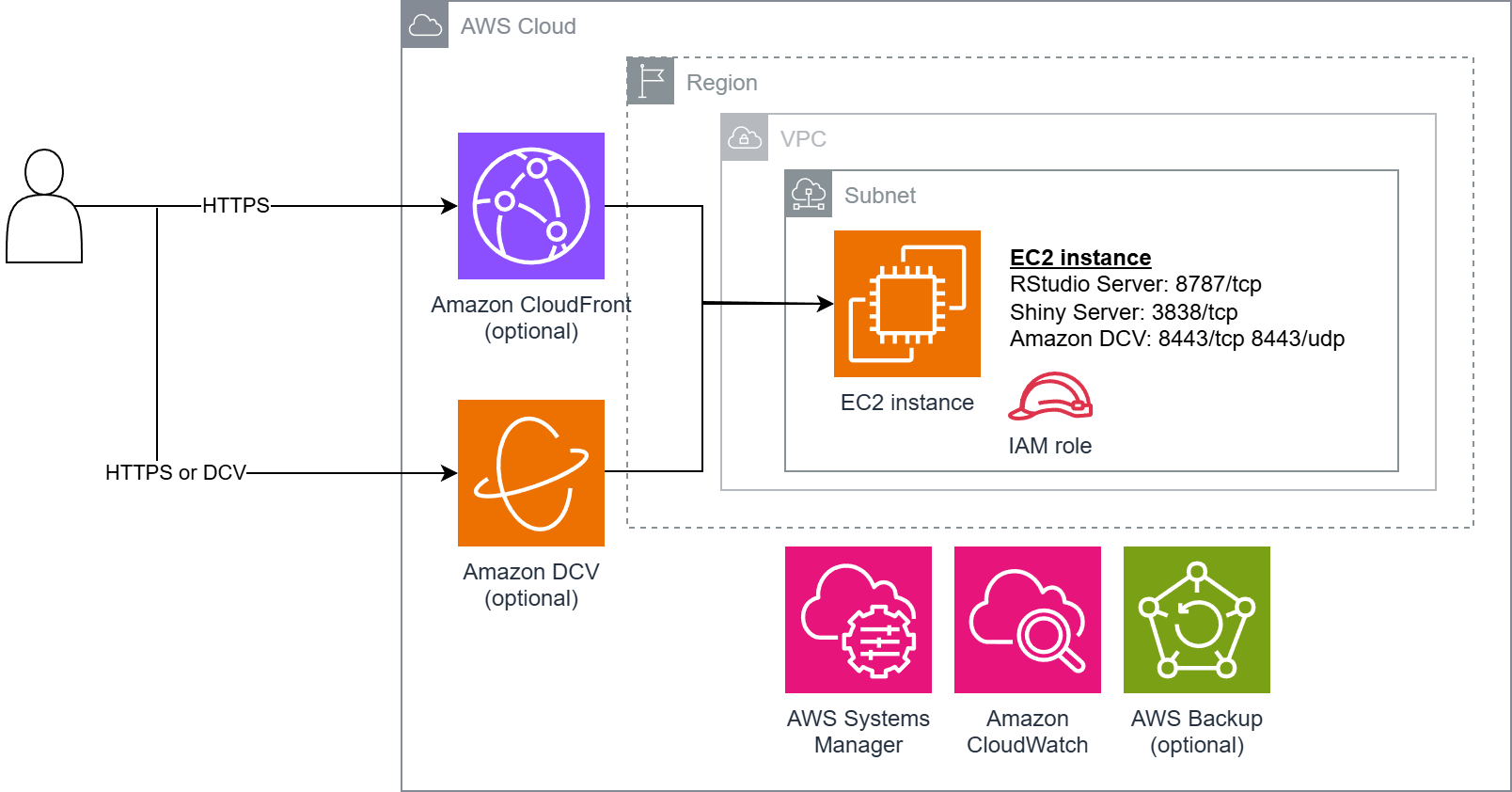
This solution provisions EC2 instance with R, and optionally installs RStudio Server/Posit Workbench, Shiny Server, RStudio Deskop/RStudio Desktop Pro, Positron and Visual Studio Code IDEs. Web and desktop applications can be accessed securely through Amazon CloudFront and Amazon DCV respectively. Amazon Bedrock is available as AI model provider for Posit Assistant. GPU driver will be installed with access to additional NVIDIA software if a NVIDIA GPU instance is specified.
Video showing RStudio Desktop, Positron, Shiny Server, RStudio Server, and Paws library accessing Amazon S3
https://github.com/user-attachments/assets/c177342f-b87d-4451-b2f0-7e0e0200287b
Access to RStudio Server and Shiny Server listening ports on EC2 instance is restricted to CloudFront origin-facing servers only using CloudFront managed prefix list
The CloudFormation template provides the following features:
apt integration for fast R package installAlthough this repository is released under the MIT-0 license, its CloudFormation template installs third party components. Usage indicate license agreement acceptance of all software that is installed on EC2 instance, which include (but is not limited to) the following
RStudio, Shiny Server and Positron are created by Posit Software, PBC. Company offers commercial versions including Posit Workbench, and supports Sagemaker integration
enableDnsSupport and enableDnsHostnames must be enabledAbove configuration are enabled in default VPC
Download Ubuntu-R-server.yaml. Login to AWS CloudFormation console. To create a stack, select Create Stack, Upload a template file, Choose File, select your Ubuntu-R-server.yaml file and choose Next. Enter a Stack name and specify parameters values.
The default values will install RStudio Server with Amazon CloudFront. You need to specify values for ec2KeyPair, vpcID and subnetID.
installRStudioServer: install RStudio Server. Default is Yes. If you wish to install Posit Workbench instead, modify RStudioServerURL belowinstallRStudioDesktop: install RStudio Desktop, Positron and VS Code IDEs. Default is No. For Yes*, template will also install Amazon DCV server for remote graphical desktop access. Select Yes-with-HTTPS-reverse-proxy to use DCV over HTTPS TCP port 443 in addition to default DCV TCP/UDP ports 8443. If you wish to install RStudio Desktop Pro instead, modify RStudioDesktopURL belowinstallShinyServer: install Shiny Server. Default is Noec2Name: EC2 instance nameec2KeyPair: EC2 key pair name. Create key pair if necessaryosVersion : Ubuntu or Ubuntu Pro 26.04/24.04. Default is Ubuntu 26.04 (x86_64)instanceType: EC2 instance type. Default is m7i.large. Adjust instance type/size accordingly based on your compute needs, and verify instance family Region availabilityec2TerminationProtection: enable EC2 termination protection to prevent accidental deletion. Default is YesvpcID: VPC with internet connectivity. Select default VPC if unsuresubnetID: subnet in selected VPC with internet connectivity. Select subnet in default VPC if unsuredisplayPublicIP: set this to No only if your EC2 instance will not receive public IP address. EC2 private IP will be displayed in CloudFormation Outputs section instead. Default is YesassignStaticIP: associates a static public IPv4 address using Elastic IP address. Default is YesingressIPv4: allowed IPv4 source prefix to EC2 instance, e.g. 1.2.3.4/32. You can get your source IP from https://checkip.amazonaws.com. Default is 0.0.0.0/0ingressIPv6: allowed IPv6 source prefix to EC2 instance. Default is ::/0. Subnets in default VPC do not have IPv6 CIDR blocks associated. Specify ::1/128 to block all inbound IPv6 accessallowSSHport: allow inbound SSH. Option does not affect EC2 Instance Connect access. Default is NoEC2 inbound SSH, DCV and HTTPS access from public internet are restricted to ingressIPv4 and ingressIPv6 IP prefixes
volumeSize : EBS root volume size in GiBvolumeType : gp2 or gp3 general purpose EBS type. Default is gp3enableCloudFront: create Amazon CloudFront distribution(s) to RStudio Server and/or Shiny Server. Associated charges are listed on Amazon CloudFront pricing page. Default is YesoriginType: either Custom Origin or VPC Origin. VPC Origin is supported by most AWS Regions, and allows EC2 instance to be in a private subnet with outbound internet IPv4 connectivity. Custom Origin requires EC2 instance to have public internet IPv4 address with assignStaticIP assigned to Yes. Default is Custom OrigincloudFrontLogging: enable CloudFront standard logging to new S3 bucket. Default is NoenableBackup : EC2 data protection with AWS Backup. Associated charges are listed on AWS Backup pricing page. Default is NoscheduleExpression : start time of backup using CRON expression. Default is 1 am dailyscheduleExpressionTimezone : timezone in which the schedule expression is set. Default is Etc/UTCdeleteAfterDays : number of days after backup creation that a recovery point is deleted. Default is 35Template will use the below links to download and install Posit software
RStudioServerURL : RStudio Server download URL. To install Posit Workbench instead, replace URL valueRStudioDesktopURL : RStudio Desktop download URL. To install RStudio Desktop Pro instead, replace URL valuePositronURL : Positron IDE download URLShinyServerURL : Shiny Server download URLenableR53acmeSupport: grant EC2 instance IAM permission for ACME clients such as Certbot to use DNS-01 challenge with your Amazon Route 53 public hosted zone to obtain free HTTPS/TLS certificates. For security reasons, DNS record access is restricted to _acme-challenge.* TXT records using resource record set permissions. Default is YesContinue Next with Configure stack options, Review Stack, and click Submit to launch your stack. It may take more than 30 minutes to provision the EC2 instance. After your stack has been successfully created, its status changes to CREATE_COMPLETE.
The following are available in Outputs section
EC2console: EC2 console URL to manage your EC2 instanceEC2instanceID: EC2 Instance IDEC2instanceConnect: EC2 Instance Connect URL. Functionality is only available under certain conditionsEC2serialConsole: EC2 Serial Console URL. Functionality is available under certain conditionsSSMsessionManager: SSM Session Manager URLEC2iamRole: EC2 IAM roleModify this to grant AWS service access
RStudioServerUrl: RStudio Server CloudFront URLShinyServerUrl: Shiny Server CloudFront URLDCVUrl: Amazon DCV web browser client and native client URLs to access desktop IDEs. Native clients can be installed from https://www.amazondcv.com/DCVhttpsUrl: DCV HTTPS reverse proxy URLsDefault login and password is ubuntu and EC2InstanceID value. To change password, login to EC2 instance (e.g. through EC2instanceConnect or SSMSessionManager) and run the command sudo passwd ubuntu
To troubleshoot any installation issue, you can view contents of the following log files
/var/log/cloud-init-output.log/var/log/install-cfn-helper.log/var/log/install-dcv.log/var/log/install-r.log/var/log/install-sw.logPosit Assistant is a data analysis assistant for Positron and RStudio. It works with range of model providers including Posit AI and Amazon Bedrock.
To verify Amazon Bedrock model access, select and interact with a model from the model catalog in the Amazon Bedrock console playground.
To use Anthropic models, you must complete the First Time Use (FTU) form before invoking the model. Create a support case if you are unable to use any models. For information about model pricing, see Amazon Bedrock pricing
Refer to documentation for RStudio or Positron installation overview.
From RStudio, show sidebar to install Posit Assistant. Click Configure provider. From AI Providers list, locate Amazon Bedrock and click Connect. Select a Region with Anthropic Claude models. Enter either EC2 or do not specify a AWS Profile value.
Below video shows installation and configuration in RStudio Server
https://github.com/user-attachments/assets/40e0f6b8-c87c-4c6c-8672-9f4a13d85572
Extension is enabled and will sign in to Amazon Bedrock by default. Refer to Positron documentation for additional configuration options.
Refer to Getting Started guide
You will need to modify EC2 IAM permissions (EC2iamRole) to provide access to desired AWS services such as SageMaker and S3
To adjust your instance vCPUs count or memory size, you can change instance type
The default login user is ubuntu. To create additional user, e.g. newuser
USER=newuser

sudo useradd -m -s /bin/bash $USER
if [ -f /opt/dcv/dcv-users.txt ]; then
  echo $USER | sudo tee -a /opt/dcv/dcv-users.txt
fi
sudo passwd $USER
If you specify a NVIDIA GPU instanceType, template will install GPU driver and provide NVIDIA repository access, which you can use to install additional NVIDIA software such as CUDA Toolkit. Refer to community article Install NVIDIA GPU driver, CUDA Toolkit, NVIDIA Container Toolkit on Amazon EC2 instances running Ubuntu Linux for installation guidance
R packages can be updated by Ubuntu unattended upgrades. To update Posit software, download and install latest packages from the following links
If you enable AWS Backup (enableBackup), you can restore your EC2 instance from recovery points (backups) in your backup vault. The CloudFormation template creates an IAM role that grants AWS Backup permission to restore your backups. Role name can be located in your CoudFormation stack Resources section as the Physical ID value whose Logical ID value is backupRestoreRole
To secure your EC2 instance, you may want to
ubuntu login user passwordingressIPv4 and ingressIPv6)enableCloudFront) with VPC Origin (originType) for public web accessallowSSHport)installRStudioDesktop)nice-dcv-web-viewer packageenableBackup)Amazon CloudFront (enableCloudFront) supports HTTPS and alternative domain name. You can use AWS Certificate Manager to request a non-exportable public certificate at no additional cost and associate it with your CloudFront distribution.
Template will install a valid IPv4 address certificate for Amazon DCV and HTTPS reverse proxy if installRStudioDesktop and displayPublicIP are Yes. IP address certificates are valid for 160 hours, just over six days, and Certbot will attempt to renew them before expiry. To ensure proper operation, ensure assignStaticIP is set to Yes.
There is no additional charge for using AWS CloudFormation. You pay for AWS resources created using the template the same as if you had created them manually. You only pay for what you use, with no minimum fees and no required upfront commitments.
Where possible, template assigns all created resources with user-defined tags of key names StackName and StackId. You can activate them as cost-allocation tags to track your AWS costs on a detailed level. Refer to AWS Billing User Guide for more information.
To remove created resources, you will need to
See CONTRIBUTING for more information.
This library is licensed under the MIT-0 License. See the LICENSE file.
aws-samples/sample-r-server is a public repo on GitHub by aws-samples. R on EC2 with RStudio Server, RStudio Desktop, VS Code, Shiny Server and Positron install options. Supports Bedrock as AI provider for Posit Assistant, and NVIDIA GPU instances.
It declares the MIT-0 license on GitHub.
Its maker has not tagged a system, so it is unknown here. Its README says what it needs.
Open "Take it" on its page: Take My Repo writes an install plan for your machine and hands it to your AI agent (Claude Code, Codex or Cursor), which asks you before each step. Take My Repo has not tested it on any machine.
Its last change on GitHub was on 2026-11-21. Take My Repo does not judge from that whether it is maintained.
Nobody has reviewed it on Take My Repo yet, which says nothing about its quality.
MasterCryptoFarmBot is a foundational system for building crypto farming and airdrop bots for Telegram-based games.

RepRap Version of the Positron V3 3D-Printer, improved design, no machined parts, integrated PSU
This project delivers AWS CDK Python code to provision serverless infrastructure in AWS Cloud to run Open Source RStudio Server and Shiny.
Assignments Comprising ICS (Information & Cyber Security) and MLA (Machine Learning and Applications)
Paws::Net::MultiplexCaller - Control routing of services to Paws callers
Machine Learning University: Accelerated Natural Language Processing Class
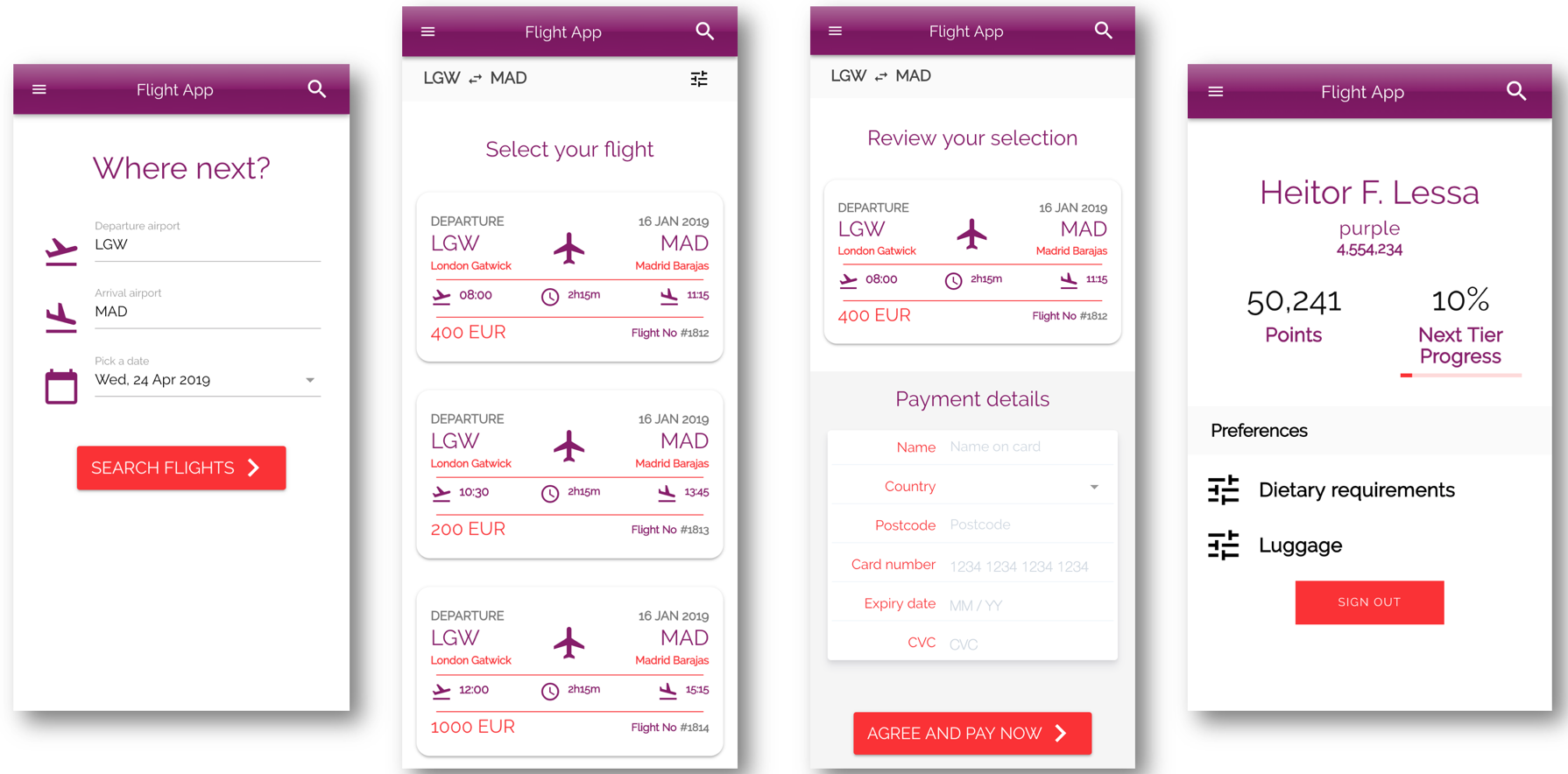
Airline Booking is a sample web application that provides Flight Search, Flight Payment, Flight Booking and Loyalty points including end-to-end testing, GraphQL and CI/CD. This web application was the theme of Build on Serverless Season 2 on AWS Twitch running from April 24th until end of August in 2019.
This is a workshop designed for Amazon Bedrock a foundational model service.
Serverless patterns. Learn more at the website: https://serverlessland.com/patterns.
Machine Learning University: Accelerated Computer Vision Class