
rea
Reverse engineer anything with agents, from app behavior down to native binaries.
- 474k
- TypeScript
- MIT
- 2 h ago
Provides many useful CRUD, Pagination, Sorting operations with Thread-safe Singleton support through the native JDBC API.
Repo bangmaple/BangMapleJDBCRepository, read from GitHub 2 d ago. bangmaple has not joined Take My Repo.
bangmaple/BangMapleJDBCRepository is a public repo on GitHub by bangmaple. Provides many useful CRUD, Pagination, Sorting operations with Thread-safe Singleton support through the native JDBC API. It declares no license on GitHub. Public does not mean open source: without a license, nobody is granted the right to reuse it. It is written mainly in Java, has 8 stars and last changed on 2023-09-19. Nobody has reviewed it on Take My Repo yet, which says nothing about its quality. Read from GitHub on 2026-11-20.
Store.select(UsersDAO.class) to get UsersDAO instance.
Store.select("com.bangmaple.dao.UsersDAO") to also get the UsersDAO instance.Release tab.Remember to also add the JDBC driver.ServletListener class or the class you just created that implementing
the ServletContextListener interface then override the contextInitialized method:import bangmaple.jdbc.utils.ConnectionManager;
import javax.servlet.ServletContextEvent;
import javax.servlet.ServletContextListener;
import javax.servlet.annotation.WebListener;
@WebListener
public class ServletListener implements ServletContextListener {
@Override
public void contextInitialized(ServletContextEvent sce) {
ConnectionManager.PROTOCOL = "jdbc:sqlserver";
ConnectionManager.HOST = "localhost";
ConnectionManager.PORT = 1433;
ConnectionManager.USERNAME = "sa";
ConnectionManager.PASSWORD = "IloveFPT";
}
}
META-INF/context.xml for Database datasource then remember to set the name property
of the Resource tag as JDBCRepository or the ConnectionManager will not initialize
your application, you should configure like this (You don't need to implement ServletListener,
the ConnectionManager will automatically initialize the Connection Pool if you correctly set-up
the context.xml file):<?xml version="1.0" encoding="UTF-8"?>
<Context antiJARLocking="true" path="/">
<Resource name="JDBCRepository" auth="Container" type="javax.sql.DataSource"
username="sa" password="IloveFPT"
driverClassName="com.microsoft.sqlserver.jdbc.SQLServerDriver"
url="jdbc:sqlserver://localhost:1433;databaseName=YOUR_DATABASE_NAME"
maxActive="8" maxIdle="4"/>
</Context>
import bangmaple.jdbc.dao.base.Store;
import bangmaple.jdbc.repository.JdbcRepository;
import bangmaple.jdbc.utils.ConnectionManager;

public class Main {
  public static void main(String[] args) throws Exception {
    JdbcRepository.DEBUG = true;
    ConnectionManager.PROTOCOL = "jdbc:sqlserver";
    ConnectionManager.HOST = "localhost";
    ConnectionManager.PORT = 1433;
    ConnectionManager.USERNAME = "sa";
    ConnectionManager.PASSWORD = "IloveFPT";
  }
}
JdbcRepository.DEBUG variable needed to be set as true. The default value is false.ConnectionManager class.Connection instance.context.xml in the META-INF folder.context.xml file, please
set the name of the data source by JDBCRepository or the ConnectionManager won't initialize your connection pool.| Class | Variable | Description |
|---|---|---|
| JdbcRepository | DEBUG (boolean) | Responsible for logging SQL queries while running the application. |
| ConnectionManager | PROTOCOL (String) | The protocol for connecting to the database vendor. For MSSQL: jdbc:sqlserver |
| ConnectionManager | HOST (String) | The host of the SQL server. Example: localhost |
| ConnectionManager | PORT (Integer) | The port number of the SQL server. Example: 1433 |
| ConnectionManager | USERNAME (String) | The username for logging in to the SQL server. Example: sa |
| ConnectionManager | PASSWORD (String) | The password for logging in to the SQL server. Example: IloveFPT |
import bangmaple.jdbc.annotations.Column;
import bangmaple.jdbc.annotations.Id;
import bangmaple.jdbc.annotations.Table;

@Table(name = "users", catalog = "users_management", schema = "dbo")
public class UsersDTO {
  @Id
  @Column(value = "username")
  private String username;

  @Column(value = "password")
  private String password;

  @Column(value = "fullname")
  private String fullname;

  @Column(value = "role")
  private String role;

  //Constructor + Getter + Setter + ToString
}
| Annotation | Can be applied on | Description |
|---|---|---|
Table |
Class | Make a class become an object for communicating with the database corresponding with the current mapping table. name for specifying the current mapping table, catalog for specifying the current mapping database name. |
Id |
Field | Mark a field as primary key column. Each DTO class must have at least 1 Id annotation applied only for only one field. |
Column |
Field | Mark a field to be mapped with the corresponding table's column. Use value to specify the value. |
import bangmaple.dto.UsersDTO;
import bangmaple.jdbc.utils.ConnectionManager;
import bangmaple.jdbc.dao.base.Store;

public class UsersDAO extends Store<UsersDTO, String> {
  private UsersDAO() {}
}
Store class which will responsible for storing the
DAO classes only one instance each class by the Thread-safe Singleton pattern.Store:Servlet, threads will modify/use the instance safely for CRUD operations by applying this pattern.Store class requires two generic types T and ID:T stands for the matching DTO class. For example the UsersDTO class.ID stands for the matching Id of the DTO class (table) type. For example, my annotated Id field is String type.Store<UsersDTO, String> instead of Store<T, ID>.
For that, we have implemented our CRUD, Pagination, Sorting operations for our application.To retrieve the UsersDAO instance, we have to select the instance:
import bangmaple.jdbc.dao.base.Store;

public class Main {
  public static void main(String[] args) {
    UsersDAO dao = Store.select(UsersDAO.class);
  }
}
This is similar to the usual way that we do:
UsersDAO dao = new UsersDAO();
Please don't initialize the UsersDAO instance by using the new keyword, this is against the Singleton pattern.
Luckily, we have the implemented private constructor to prevent that thing to be happening.
Now we have all the methods we need, I will list them all by the below table:
| Method | Argument(s) | Returns | Description |
|---|---|---|---|
| count() | void | int | Returns the number of entities available. |
| deleteAll() | void | void | Delete all the entities. |
| deleteAllByIds(Iterable<? extends ID>) | List of ids | void | Deletes all instances of entities with the given IDs. |
| deleteById(ID) | The id of the entity | void | Deletes the entity with the given id. |
| existsById(ID) | The id of the entity | boolean | Returns whether an entity with the given id exists. |
| findAll() | void | Iterable | Returns all instances of the type. |
| findAll(Pageable) | Pageable object will be described below | Iterable | Returns entities meeting the paging restriction provided in the Pageable object. |
| findAll(boolean) | boolean will be described below | Iterable | Returns all entities sorted by the given option. |
| findAllByIds(Iterable<? extends ID>) | Iterable | void | Returns all instances of the type {@code T} with the given IDs. |
| findById(ID) | The id of the entity | T | Retrieves an entity by its id. |
| insert(T) | The entity to be inserted | void | Insert the entity to the table as a record. |
| insertAll(Iterable) | The list of entities to be inserted | void | Insert the entities to the table as records. |
| update(T, ID) | The entity to be updated, the id corresponding to the entity to be updated. | void | Update the specified entity with the corresponding id. |
| updateAll(Iterable, Iterable<? extends ID> | The list entities to be updated, the list of ids corresponding to the the list of entities to be updated. | void | Update the specified entities with the corresponding ids. |
findAll(Pageable) and findAll(boolean).Pageable there are many way to use this operation:import bangmaple.jdbc.dao.base.Store;
import bangmaple.jdbc.paging.PageRequest;
import bangmaple.jdbc.paging.Pageable;
public class Main {
public static void main(String[] args) {
UsersDAO dao = Store.select(UsersDAO.class);
Pageable pageable = PageRequest.of(0, 5, Pageable.SORT_DESC);
dao.findAll(pageable);
}
}
PageRequest object, we used the of method. For the example, we want to retrieve 5 records by the first page then we use PageRequest.of(0, 5);.import bangmaple.jdbc.dao.base.Store;
import bangmaple.jdbc.paging.PageRequest;
import bangmaple.jdbc.paging.Pageable;
public class Main {
public static void main(String[] args) {
UsersDAO dao = Store.select(UsersDAO.class);
Pageagle pageable = PageRequest.of(0, 5, Pageable.SORT_DESC);
dao.findAll(pageable);
}
}
Pageable.SORT_DESC this will be described as we want to retrieve 5 records
by the first page in the descending order then we used PageRequest.of(0, 5, Pageable.SORT_DESC).import bangmaple.jdbc.dao.base.Store;
import bangmaple.jdbc.paging.PageRequest;
import bangmaple.jdbc.paging.Pageable;
public class Main {
public static void main(String[] args) {
UsersDAO dao = Store.select(UsersDAO.class);
Pageable pageable = PageRequest.of(0, 5, Pageable.SORT_DESC, "fullname", "role");
dao.findAll(pageable);
}
}
Pagination operation, the records are ordered by the primary key column (property that is annotated with @Id).String.... For example, we want to retrieve 5 records
by the first page in the descending order based on fullname and role then we used PageRequest.of(0, 5, Pageable.SORT_DESC, "fullname", "role").Let say we want to retrieve a list of users by their role name, but we didn't find any method related to that requirement. We can customize to add our method by the following code snippet:
import bangmaple.jdbc.utils.ConnectionManager;
import bangmaple.jdbc.dao.base.Store;

public class UsersDAO extends Store<UsersDTO, String> {

    private UsersDAO() {}

    public List<UsersDTO> findUsersByRole(String role) throws SQLException {
        List<UsersDTO> list = null;
        conn = ConnectionManager.getConnection();
        try {
            if (conn != null) {
                conn.setCatalog("users_management");
                String query = "SELECT username, password, fullname, role FROM users WHERE role = ?";
                prStm = conn.prepareStatement(query);
                prStm.setString(1, role);
                rs = prStm.executeQuery();
                list = new ArrayList<>();
                while (rs.next()) {
                    list.add(this.parseResultSetToDTO(rs, UsersDTO.class));
                }
            }
        } finally { closeConnection(); }
        return list;
    }
}
Now we implemented the findUsersByRole(String) to retrieve the users by their role name.
We may notice there are many variables we don't know, they are described as below:
conn is javax.sql.Connection prStm is javax.sql.PreparedStatementrs is javax.sql.ResultSetConnectionManager.getConnection() retrieves the connection instance between our application and the database.closeConnection() closes the connection between our application and the database.conn.setCatalog("users_management") this is how we specify the database name. For example: users_management, please change to your database name.this.parseResultSetToDTO(ResultSet, UsersDTO.class) this method helps us to map the ResultSet's records after the
executeQuery() operation to the UsersDTO.class then it will return the UsersDTO instance containing the information we need,
this helper instance method is inherited from Store class.context.xml, please navigate to this page.The application server such as Apache Tomcat won't load the library even we already embedded the library into the application:
05-Sep-2021 07:35:06.443 SEVERE [RMI TCP Connection(2)-127.0.0.1] org.apache.catalina.core.StandardContext.listenerStart Exception sending context initialized event to listener instance of class [com.example.demo.ServletListener]
	java.lang.NoClassDefFoundError: bangmaple/jdbc/utils/ConnectionManager
		at com.example.demo.ServletListener.contextInitialized(ServletListener.java:13)
        ...
	Caused by: java.lang.ClassNotFoundException: bangmaple.jdbc.utils.ConnectionManager
		at org.apache.catalina.loader.WebappClassLoaderBase.loadClass(WebappClassLoaderBase.java:1365)
		... 48 more
JDBC Driver library. Drag the bangmaple-jdbc-repository.jar into your lib folder
of your Apache Tomcat directory, for me it is: /Users/bangmaple/apache-tomcat-9.0.40/lib/.JDBC Driver library like sqljdbc.jar driver as well.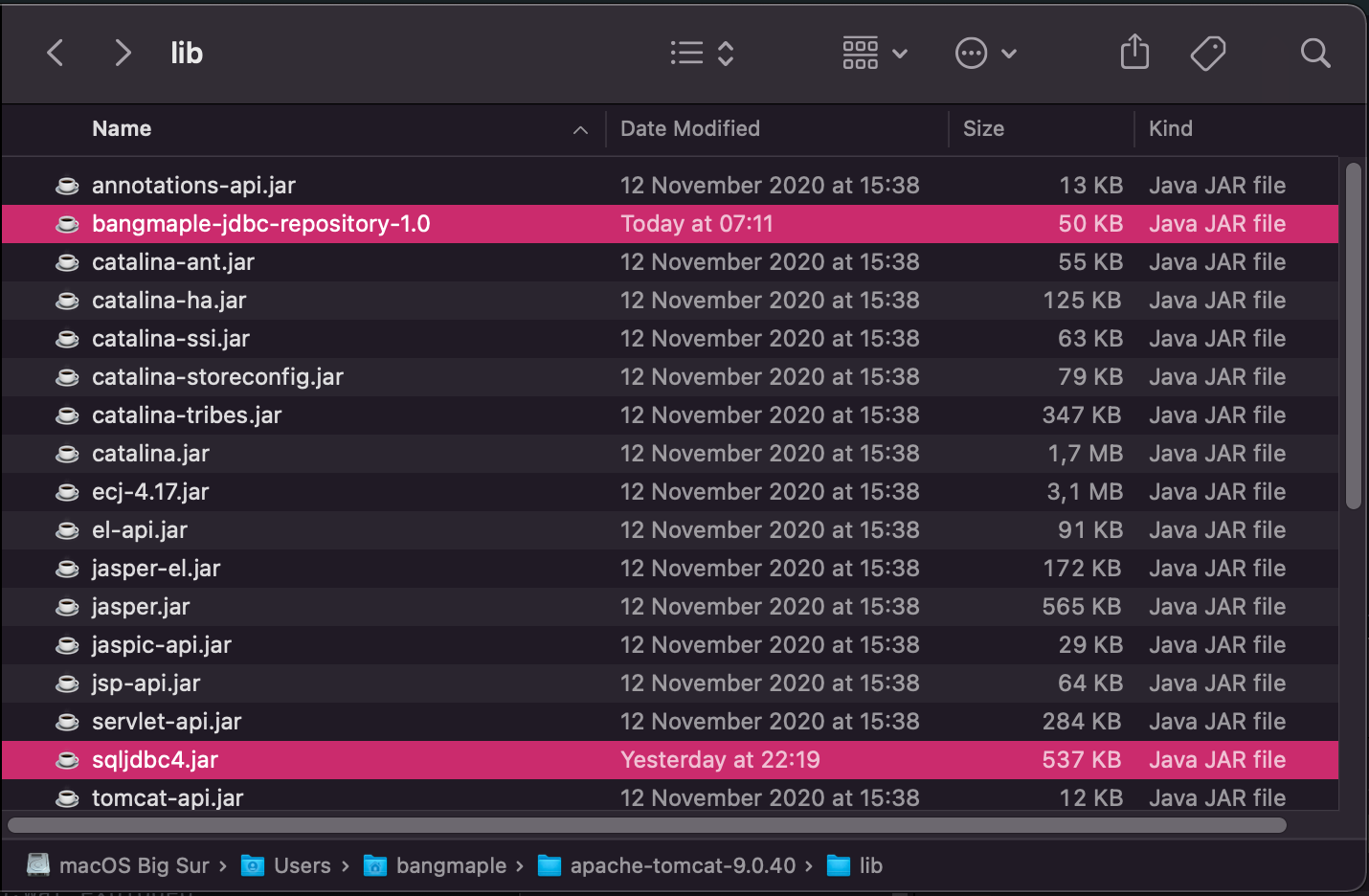 After that, confirm it is existed at this directory then restart your application server! Happy coding!
bangmaple/BangMapleJDBCRepository is a public repo on GitHub by bangmaple. Provides many useful CRUD, Pagination, Sorting operations with Thread-safe Singleton support through the native JDBC API.
It declares no license on GitHub. Public does not mean open source: without a license, nobody is granted the right to reuse it.
Its maker has not tagged a system, so it is unknown here. Its README says what it needs.
Open "Take it" on its page: Take My Repo writes an install plan for your machine and hands it to your AI agent (Claude Code, Codex or Cursor), which asks you before each step. Take My Repo has not tested it on any machine.
Its last change on GitHub was on 2023-09-19. Take My Repo does not judge from that whether it is maintained.
Reverse engineer anything with agents, from app behavior down to native binaries.
Nobody has reviewed it on Take My Repo yet, which says nothing about its quality.
The Postgres development platform. Supabase gives you a dedicated Postgres database to build your web, mobile, and AI applications.
Stop renting your intelligence. Own it with AnythingLLM. Everything you need for a powerful local-first agent experience
Cisco Certificate Network Professional - Routing Section for studying with hands-on labs running on EVE-NG emulated environment.
A repository for HP ZBook 15G1 Hackintosh based on OpenCore Bootloader. Will be continuously improved.
*BangMapleJDBCGenerator - A desktop helper tool for generating JDBC Connection, JDBC DAO, Entity (DTO) Java classes. Inheritance and implementing other Java classes are also supported!


