Mudlet
⚔️ A cross-platform, open source, and super fast MUD client with scripting in Lua
- 923
- C++
- GPL-3.0
- 16 h ago
AberMUSH is a text based role playing game with ANSI graphics, set in the AberMUD 5 universe.
Repo bashrc2/AberMUSH, read from GitHub 18 min ago. bashrc2 has not joined Take My Repo.
bashrc2/AberMUSH is a public repo on GitHub by bashrc2. AberMUSH is a text based role playing game with ANSI graphics, set in the AberMUD 5 universe. It declares the AGPL-3.0 license on GitHub. It is written mainly in Python, has 30 stars and last changed on 2026-10-06. Nobody has reviewed it on Take My Repo yet, which says nothing about its quality. Read from GitHub on 2026-11-25.

"Once a year the dragon emerged from its cave. The people of the valleys could hear its thundering roar as it awakened from its long slumber."
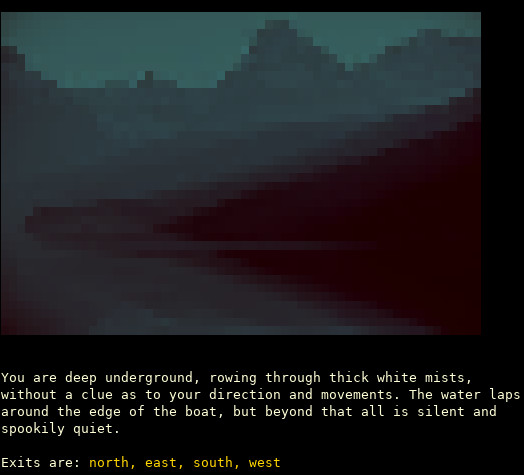
AberMUSH is a text based role playing game with UTF-8 ANSI graphics, set in the AberMUD 5 universe. Explore, battle and adventure in a fantasy version of medieval Wales. Experience DnD style combat, gambling disputes, excessive ale consumption and puzzling mysteries in the once magnificent but now fallen city of Tranoch, with dynamic scenery, tides, wildlife and weather effects.
This game includes 8 bit console graphics, but if you are a MUD purist or don't need graphics then you can turn them off.
Based on dumserver by Bartek Radwanski and Mark Frimston https://github.com/wowpin/dumserver
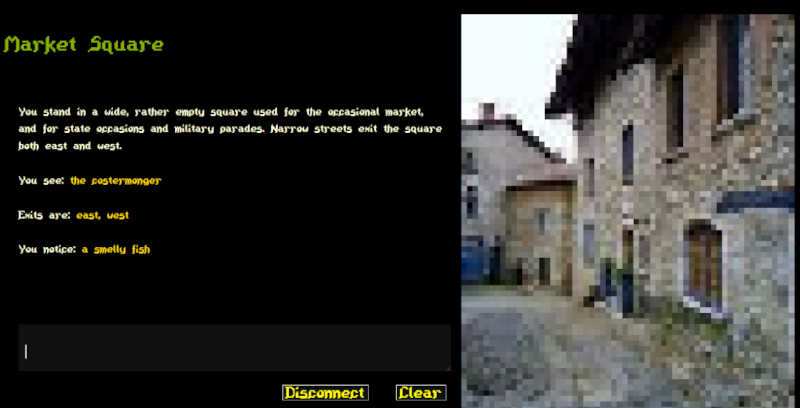
You can also use a mud client of your choice if you wish - use connection details below:
telnet [hostname] 35123
or via ssh:
ssh [username]@[hostname] -p 35124
Within /etc/ssh/sshd_config you may need to set:
PermitTTY yes
Then restart the ssh server.
If you havn't already created an account then when logging in via ssh your username and password can be anything and you can then use the new command to create an account. After that you can log into your account directly from ssh.
Use UTF-8 terminal encoding.
- IMPORTANT - Python >= 3.6.7 is required (Ubuntu >= 18.04 LTS)!
sudo apt update && sudo apt upgradegit clone https://gitlab.com/bashrc2/AberMUSHsudo ./installer.shIf you want to add a firewall which only allows logins via ssh or telnet:
sudo cp /opt/abermush/firewall.nft /etc/firewall.conf
sudo apt -y install nftables
sudo nft -f /etc/firewall.conf
sudo echo '#!/bin/sh' > /etc/network/if-up.d/firewall
sudo echo 'nft flush ruleset' >> /etc/network/if-up.d/firewall
sudo echo 'nft -f /etc/firewall.conf' >> /etc/network/if-up.d/firewall
sudo chmod +x /etc/network/if-up.d/firewall
You now should be able to connect to your server on <server IP/hostname>:35123
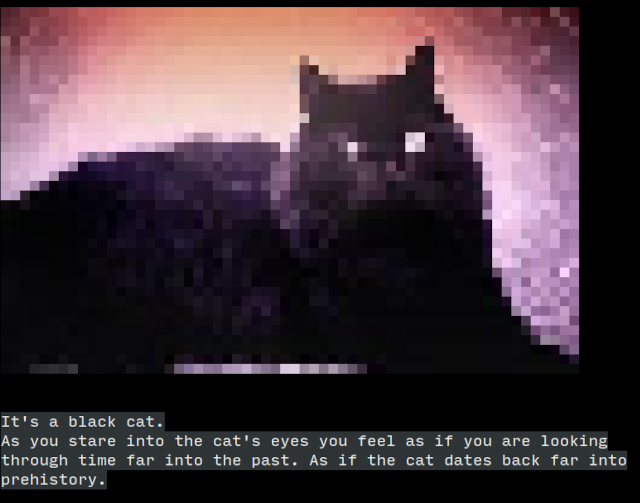
All players can use the following commands:
bio [description]                       - Set a description of yourself
graphics [on|off]                       - Turn graphical content on or off
change password [newpassword]           - Change your password
who                                     - List players and where they are
quit/exit                               - Leave the game
eat/drink [item]                        - Eat or drink a consumable
speak [language]                        - Switch to speaking a different language
say [message]                           - Says something out loud
look/examine                            - Examines the surroundings
go [exit]                               - Moves through the exit specified
climb though/onto [exit]                - Try to climb through or onto an exit
move/roll/heave [target]                - Try to move or roll a heavy object
jump to [exit]                          - Try to jump onto something
attack/punch/kick/headbutt [target]     - Attack another player or NPC
throw [weapon] at [target]              - Throw a weapon at another player or NPC
shove/trip                              - Try to knock down a target during an attack
prone                                   - Lie down
stand                                   - Stand up
check inventory                         - Check the contents of your inventory
take/get [item]                         - Pick up an item
put [item] in/on [item]                 - Put an item into or onto another one
drop [item]                             - Drop an item
whisper [target] [message]              - Whisper to a player in the same room
tell/ask [target] [message]             - Send a tell message to another player or NPC
use/hold/pick/wield [item] [left|right] - Transfer an item to your hands
stow                                    - Free your hands of items
wear [item]                             - Wear an item
remove/unwear [item]                    - Remove a worn item
open [item]                             - Open an item or door
close [item]                            - Close an item or door
push [item]                             - Pushes a lever
pull [item]                             - Pulls a lever
affinity [player name]                  - Shows your affinity level with another player
cut/escape                              - Attempt to escape from a trap
step over tripwire [exit]               - Step over a tripwire in the given direction
dodge                                   - Dodge an attacker on the next combat round
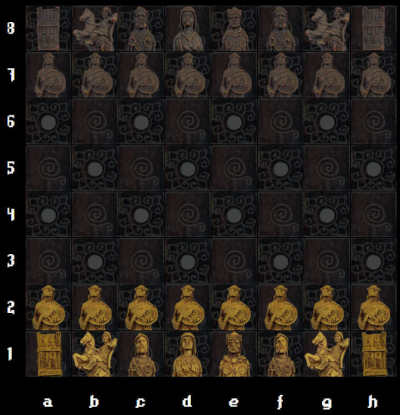
If you can find a chess board to play on:
chess                                   - Shows the board
chess reset                             - Rests the game
chess move [coords]                     - eg. chess move e2e3
chess undo                              - undoes the last move
If you can find a deck of cards:
shuffle                                 - Shuffles the deck
deal to [player names]                  - Deals cards
hand                                    - View your hand of cards
stick                                   - Stick with your current hand
swap [card description]                 - Swaps a card
call                                    - Players show their hands
If you can find a Morris board:
morris                                  - Show the board
morris put [coordinate]                 - Place a counter
morris move [from coord] [to coord]     - Move a counter
morris take [coordinate]                - Remove a counter after mill
morris reset                            - Resets the board
Some characters can use magic with the following commands:
prepare spells                          - List spells which can be prepared
prepare [spell name]                    - Prepares a spell
spells                                  - Lists your prepared spells
clear spells                            - Clears your prepared spells list
cast find familiar                      - Summons a familiar with random form
dismiss familiar                        - Dismisses a familiar
cast [spell name] on [target]           - Cast a spell on a player or NPC
Spells are defined within spells.json and the system for spellcasting is a simplified version of the one within conventional D&D games. You prepare a spell, it gets added to your list and then you can cast it and it disappears from the prepared list. Some spells require certain items to be in the player's inventory.
Witches are the admins of the system, and have additional supernatural powers. The first user to create an account gains witch status. Additional witches may be assigned by appending them to the witches file, which is located in the same directory as abermush.py is run from.
close registrations                - Closes registrations of new players
open registrations                 - Allows registrations of new players
mute/silence [target]              - Mutes a player and prevents them from attacking
unmute/unsilence [target]          - Unmutes a player
freeze [target]                    - Prevents a player from moving or attacking
unfreeze [target]                  - Allows a player to move or attack
teleport [room]                    - Teleport to a room
summon [target]                    - Summons a player to your location
kick out/remove [target]           - Remove a player from the game
blocklist                          - Show the current blocklist
block [word or phrase]             - Adds a word or phrase to the blocklist
unblock [word or phrase]           - Removes a word or phrase to the blocklist
describe "room" "room name"        - Changes the name of the current room
describe "room description"        - Changes the current room description
describe "tide" "room description" - Changes the room description when tide is out
describe "item" "item description" - Changes the description of an item in the room
describe "NPC" "NPC description"   - Changes the description of an NPC in the room
conjure room [direction]           - Creates a new room in the given direction
conjure npc [target]               - Creates a named NPC in the room
conjure [item]                     - Creates a new item in the room
destroy room [direction]           - Removes the room in the given direction
destroy npc [target]               - Removes a named NPC from the room
destroy [item]                     - Removes an item from the room
resetuniverse                      - Resets the universe, losing any changes from defaults
shutdown                           - Shuts down the game server
NPCs defined within def/npcs.json have a few different modes. The rooms which they can occupy are defined within the path list and the ways in which they move is defined by the moveType parameter. Movement types are:
If no moveType is specified then random movement is the default.
The speed at which NPCs move between rooms is defined by moveDelay and randomFactor parameters. RandomFactor just makes the delay between movements not completely predictable.
NPCs may be present at certain times of day or days of the year. To define this use the moveTimes list within npcs.json.
"moveTimes": [["hour",8,19],["day","saturday","sunday"],["inactive",1386]],
In the above example the NPC will be active between 8:00 (8am) and 19:00 (7pm) on the weekend and when inactive will be in room 1386. So for example a cleric might be present at a church only on Sunday between certain hours and then be at a monestary at other times. If the inactive list isn't specified then when inactive an NPC will go to a default purgatory room.
You can also use moveTimes within items.json to specify items which are only present at certain times. However, these must be items having a weight value of zero so that they can't be taken.
You can create simple kinds of conversations with NPCs by editing npcs.json and adding line entries within the conv parameter. For example:
"conv" : [
    [["serve","beer","?"], "Yes, of course"],
    [["serve","wine","?"], "We only serve the more disreputable wine"],
    [["have","order","like","beer","ale","drink","please"],"Here you go","give","114"],
    [["have","order","buy","purchase","trade","like","weapon","dagger","knife","please"],"This weapon may come in handy on your adventures","buy","624","1367"]
],
This uses a simple "bag of words" matching, so serve and wine could be in any order.
You can then tell the NPC something like:
ask inn-keeper Do you serve wine?
The system will then try to match words within your ask command and pick the most appropriate reply:
the old inn-keeper says: We only serve the more disreputable wine.
The NPC can also give an item if some words are matched, or exchange/buy/barter an item such as a gold coin for a small dagger. The numbers refer to item numbers within items.json.
Possible types of actions within NPC conversations are:
give [item ID]                       - Gives an item
teach [skill] [adjustment value]     - Adjusts a skill level
transport [room ID]                  - Moves the player to a different room
taxi [room ID] [itemID]              - Moves the player to a different room in exchange for an inventory item
date [dd/mm]                         - Conversation can only occur on a given day of the year
buy [obtain item ID] [give item ID]  - Obtains one item in exchange for another
experience [points]                  - Increase player experience
To show an image during a conversation:
"conv" : [
    [["have","order","like","beer","ale","drink","please"],"Here you go","image:givedrink","give","114"]
],
If an image then exists in images/events called givedrink then it will be shown when the conversation event happens.
If an NPC moves between rooms then you can make conversation lines dependent on being in a particular region.
"conv" : [
    [["what","you","doing","?","region=cave"],"I'm digging for gold"]
    [["what","you","doing","?","region=garden"],"I'm doing some gardening"]
],
Region names can be set within rooms.json, and could be for a single room or a group of rooms.
Players and NPCs have their own languages: common, dwarvish, elvish, draconic and druidic. Goblins and humans may not be able to understand each other.
The language spoken and understood by NPCs can be defined with two parameters within npcs.json. language is a list of languages which the NPC understands and speakLanguage is the language which they are currently using to communicate.
"speakLanguage": "common",
"language": ["common","dwarvish"],
bashrc2/AberMUSH is a public repo on GitHub by bashrc2. AberMUSH is a text based role playing game with ANSI graphics, set in the AberMUD 5 universe.
It declares the AGPL-3.0 license on GitHub.
Its maker has not tagged a system, so it is unknown here. Its README says what it needs.
Open "Take it" on its page: Take My Repo writes an install plan for your machine and hands it to your AI agent (Claude Code, Codex or Cursor), which asks you before each step. Take My Repo has not tested it on any machine.
Community-built comprehensive 2D content creation appplication for graphic design, digital art, and interactive real-time motion graphics powered by a node-based procedural graphics engine
A simple MUD server in Python, for teaching purposes, which could be run on a Raspberry Pi
Its last change on GitHub was on 2026-10-06. Take My Repo does not judge from that whether it is maintained.
Nobody has reviewed it on Take My Repo yet, which says nothing about its quality.
Take My Repo cannot say: it does not audit code and has not run AberMUSH. What is known comes from GitHub. It declares the AGPL-3.0 license on GitHub. Its last change was on 2026-10-06. It has 30 stars, which measure popularity, not safety. Nobody has reviewed it on Take My Repo yet, which says nothing about its quality. Read the source before you run it. With "Take it", your AI agent shows each step and asks you before running it; README text is treated as data, not as instructions.