
rea
Reverse engineer anything with agents, from app behavior down to native binaries.
- 477k
- TypeScript
- MIT
- 53 min ago
A Vulkan wrapper
Repo bean-mhm/beva, read from GitHub 3 h ago. bean-mhm has not joined Take My Repo.
bean-mhm/beva is a public repo on GitHub by bean-mhm. A Vulkan wrapper. It declares the AGPL-3.0 license on GitHub. It is written mainly in C++, has 4 stars and last changed on 2025-09-23. Nobody has reviewed it on Take My Repo yet, which says nothing about its quality. Read from GitHub on 2026-11-25.
Reverse engineer anything with agents, from app behavior down to native binaries.
Official electron build of draw.io

beva (lowercase) is a thin wrapper over the Vulkan API. It abstracts away very little functionality from the original API and keeps the low-level design.
The beva.hpp header (which is the only one) uses the bv namespace and
contains 4 different regions.
dynamic_bitset: This regions contains a copy of the dynamic_bitset library by pinam45. Dynamic bitsets are used for memory management in beva.
Data-only structs and enums: This region provides tiny wrappers for
Vulkan structs that use STL containers and types like std::vector,
std::array, std::string, and std::optional instead of raw pointers and
arrays. These structs also hide away useless fields like flags that are reserved
for the future and the usually redundant sType and pNext fields. This
region also contains Version, a wrapper around the VK_MAKE_API_VERSION and
VK_API_VERSION_XXXX macros used for encoding and decoding versions in
integers.
Error handling: beva throws exceptions of type Error for error
handling. Error can be constructed from a message and an optional VkResult
and provides a to_string() function with descriptions for every VkResult
based on the Vulkan specification.
Classes and object wrappers: Contains wrapper classes for Vulkan objects. This will be further explained below.
Helper functions: This is self explanatory.
Memory management: This region contains helper classes for managing device memory allocations and splitting them into several chunks for different images and buffers in a thread-safe manner. This will be further explained below.
In the header, you'll find comments containing links to the Khronos manual above wrapper structs, classes, and functions. I encourage you to read them to learn how to use them properly.
beva provides Context for instance management. A Device can then
be created with that context. Finally, normal objects like Image can be
created within that device. These classes include static and member functions
covering common usage of them, for example, Device::retrieve_queue() or
CommandBuffer::begin().
For convenience, some classes automatically fetch and store commonly used
information. For example, Swapchain::create() will fetch the associated images
and store them in a vector you can access by calling images(). Another example
is Image or Buffer fetching their memory requirements on creation.
Apart from these, there is also DebugMessenger which is a wrapper around
VkDebugUtilsMessengerEXT from the VK_EXT_debug_utils extension.
Finally, Allocator is an abstract class that lets you implement your own
memory allocator for the Vulkan driver to use. You can use
Context::set_allocator() to set an allocator for that context and every
Device based on it, and every object created and destroyed within that
Device.
Context provides fetch_physical_devices() which returns a vector of
PhysicalDevice objects already containing information such as device
properties, features, memory properties, and queue families. Additionally,
PhysicalDevice provides several member functions for fetching information
like swapchain support details for a surface (formats, present modes, etc.),
available device extensions, and image and buffer format properties, as well as
functions for finding queue families that meet the provided criteria.
beva uses RAII. Object wrappers have a static create() function that usually
takes in a config struct and returns a shared pointer of the associated type.
The destructor will try to delete the underlying Vulkan object if possible.
beva uses weak pointers in config structs and for member variables to avoid
circular or unwanted references preventing deletion of objects. This means, for
example, a Fence will only hold a weak pointer to its parent Device,
so you can delete the device before the fence. When the fence's destructor is
invoked, it will first check if the weak pointer to the device has expired and
do nothing if so. However, if you call a member function on the fence that needs
to use the device, an Error will be thrown complaining about the weak pointer
having expired.
| Term | Description |
|---|---|
| Block | A small portion of a device memory, by default 1024 bytes. |
| Region | A huge amount of allocated device memory which acts as a memory arena for virtually allocating chunks. A region also contains a bitset to represent which blocks are allocated. |
| Chunk | A virtually allocated range inside a memory region. |
| Bank | Manages a list of memory regions and provides logic for allocating new chunks. |
beva provides MemoryBank for device memory management. A MemoryBank manages
a list of MemoryRegions internally. A MemoryRegion simply contains a
DeviceMemory and a bitset to represent which blocks are allocated.
You can call MemoryBank::allocate() to get a MemoryChunk that you can bind
to your image or buffer using its bind() functions. MemoryBank::allocate()
will automatically handle finding a free range inside a compatible region, or
creating a new one if none were found. It will also take care of alignment
requirements. These operations are all thread safe and use a mutex under the
hood.
A MemoryChunk will mark its corresponding blocks as free upon destruction.
MemoryBank::allocate() will check for empty regions and delete them when
needed.
Additionally, you can call mapped() and flush() on a MemoryChunk if it was
allocated from a host visible region. Note that you can pass the required memory
properties (like host visible or device local) as an argument to
MemoryBank::allocate().
beva only implements a tiny section of the Vulkan API, mostly the parts needed
for traditional rasterized rendering and compute shaders. You can call
handle() on an object wrapper to get its raw handle and directly use the
Vulkan API to implement what beva doesn't cover.
beva will not try and catch invalid input. It's totally possible to get
undefined behavior and crashes with beva if used incorrectly. To avoid these
situations, read the Khronos manual pages linked above structs, classes, and
functions to see how to use them properly. For example, whether a
std::shared_ptr field can be nullptr or must have a value, or in what
conditions a std::optional field can actually be std::nullopt.
beva is not tested enough to be called stable or ready for production at all. It is just a fun side project at most.
I don't have time to write documentation but looking at the header, this page, the demos, and Khronos manual pages should give you enough information on how to use beva.
Make a new directory named beva somewhere in your include directories and copy
beva/src/lib/beva/beva.hpp and beva.cpp into it. Make sure your compiler is
recognizing and actually compiling beva.cpp. And of course, make sure to set
up and include the latest Vulkan SDK such that #include "vulkan/vulkan.h"
works. Here's a tutorial on that.
Note: beva requires C++20.
Check out beva/src/demos to see how to use beva. If you build and run the
project in Visual Studio, you'll get asked to choose a demo to run.
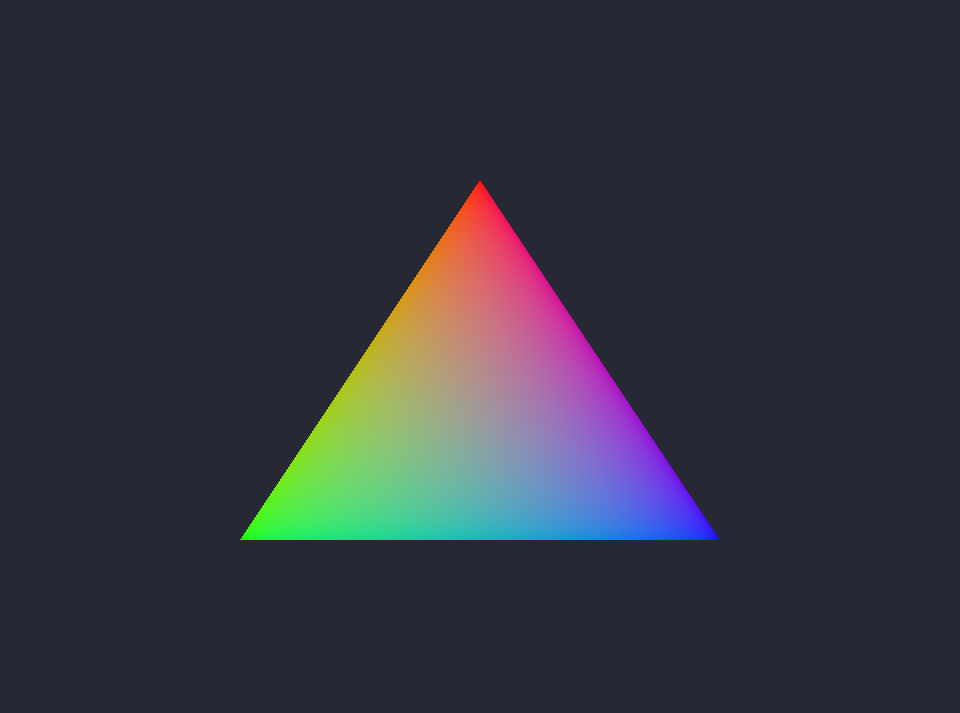
This demo implements the very basics needed to draw a triangle to the screen. Devices, swapchains, vertex buffers, that sort of stuff.
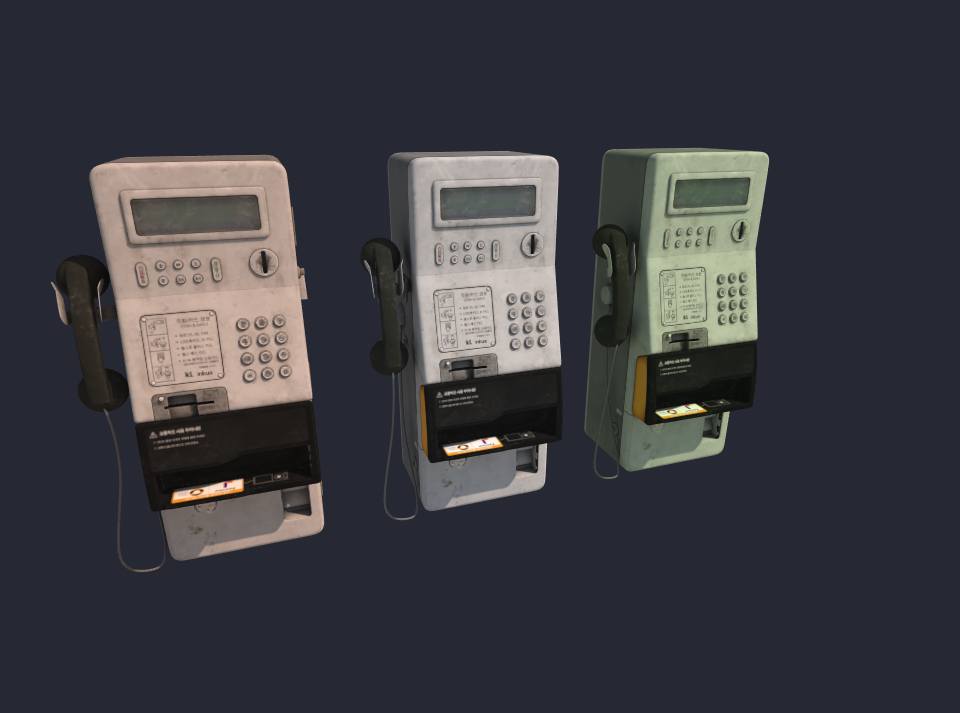
This demo builds on top of the first one and implements uniform buffers, textures, depth buffering, mipmaps, multisampling, instanced rendering, and push constants. It uses an external library to load an OBJ model. The model is from PolyHaven.com.
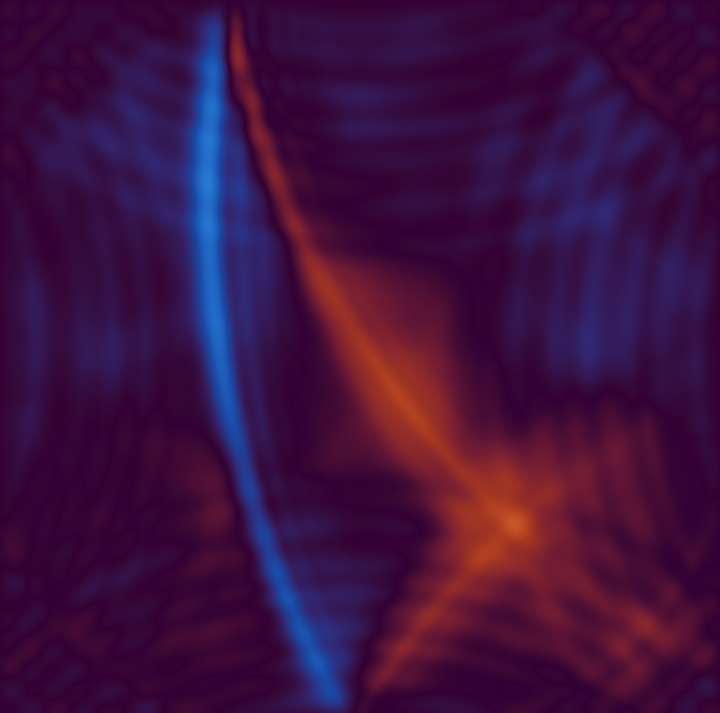
This demo uses a compute shader to drive a wave simulation. It uses shader storage images for the simulation and specialization constants to send local invocation sizes to the compute shader at runtime without recompiling it.
The wave simulation code is mostly based on this shadertoy.
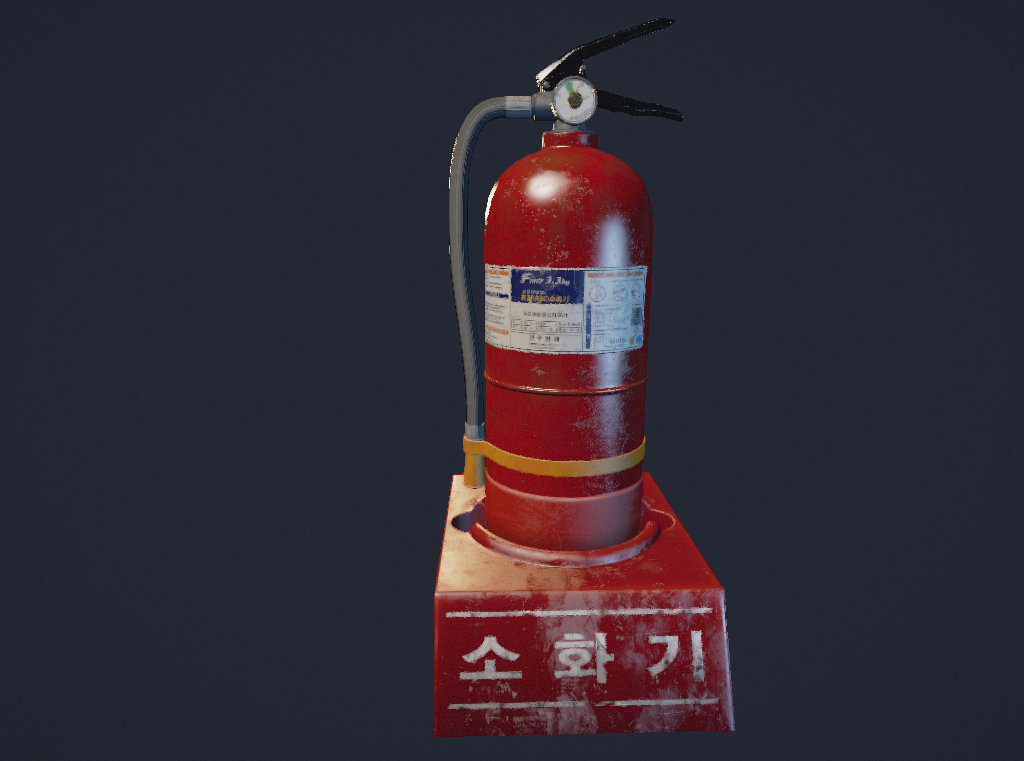
Being the most complex of them all, this one uses what's called a G-Buffer to only render what's essential for lighting. This is different for every application, but in this case the G-Buffer contains two images with the following data:
The geometry pass is what renders to the G-Buffer. A lighting pass then draws a full-screen quad and samples the the G-Buffer images to render a properly lit scene. It uses a shader storage buffer object (SSBO) to read and use an array of lights updated from the CPU. Finally, a post processing pass samples the output from the lighting pass to apply FXAA-like antialiasing, some post processing, and flim, my filmic color transform.
Deferred rendering is most useful when you have a lot of lights, or a lot of overdraw such that the lighting calculations for a pixel get completely discarded as another one is drawn on top of it. None of these are a problem is the extremely simple "scene" in this demo, though.
The 3D model in this demo is from PolyHaven.com.
These demos don't necessarily follow the best practices for making larger applications. There is minimal separation of concerns (everything is forced into a single class), no sampler sharing (every image has its own sampler), and other flaws. These demos are just there to show you how beva itself can be used.
bean-mhm/beva is a public repo on GitHub by bean-mhm. A Vulkan wrapper.
It declares the AGPL-3.0 license on GitHub.
Its maker has not tagged a system, so it is unknown here. Its README says what it needs.
Open "Take it" on its page: Take My Repo writes an install plan for your machine and hands it to your AI agent (Claude Code, Codex or Cursor), which asks you before each step. Take My Repo has not tested it on any machine.
Its last change on GitHub was on 2025-09-23. Take My Repo does not judge from that whether it is maintained.
🎮 A step-by-step guide to implementing SSAO, depth of field, lighting, normal mapping, and more for your 3D game.
📚 Modern C++ Tutorial: C++11 to C++26 On the Fly | https://changkun.de/modern-cpp/
Nobody has reviewed it on Take My Repo yet, which says nothing about its quality.
Take My Repo cannot say: it does not audit code and has not run beva. What is known comes from GitHub. It declares the AGPL-3.0 license on GitHub. Its last change was on 2025-09-23. It has 4 stars, which measure popularity, not safety. Nobody has reviewed it on Take My Repo yet, which says nothing about its quality. Read the source before you run it. With "Take it", your AI agent shows each step and asks you before running it; README text is treated as data, not as instructions.


