
visual-cpu
Visual RV32IM simulator with inspectable ALU circuits, cache transactions, and clock-by-clock replay
- 0
- MIT
- 8 wk ago
Repo beejmaxx/visual-cpu, read from GitHub 1 min ago. beejmaxx has not joined Take My Repo.
In short
beejmaxx/visual-cpu is a public repo on GitHub by beejmaxx. Visual RV32IM simulator with inspectable ALU circuits, cache transactions, and clock-by-clock replay. It declares the MIT license on GitHub. It is written mainly in Rust, has 0 stars and last changed on 2026-09-27. Nobody has reviewed it on Take My Repo yet, which says nothing about its quality. Read from GitHub on 2026-11-24.
RV32IM simulator
A visual RV32IM computer that executes compiled C and assembly. The CPU, caches, RAM, and terminal all belong to the same Rust simulation. The browser loads that engine as WebAssembly; no simulation server or guest operating system is needed.
This is a working prototype. Its CPU finishes one instruction at a time through fetch, decode, execute, memory, and writeback. An overlapping pipeline is a later milestone.
Screenshots
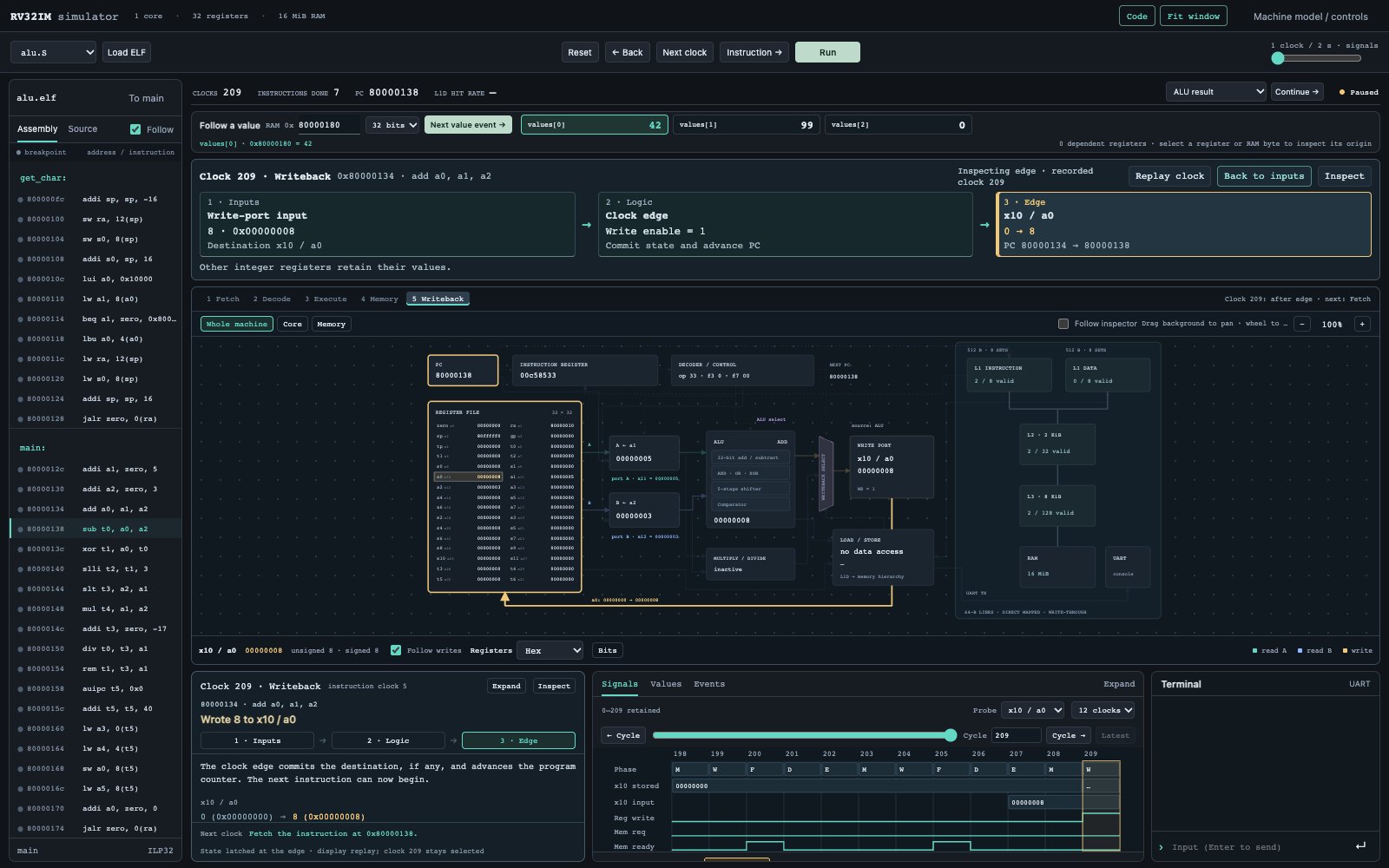
The machine paused after add a0, a1, a2: the clock view shows x10 changing
from 0 to 8, alongside the register file, memory hierarchy, and signal history.

Inside the ALU: full-adder gates and carry bits
The same addition, with bit 3 selected to inspect its XOR, AND, and OR gates.

Inside a cache: address decoding, tag comparison, and stored bytes
An L1 instruction-cache hit, with tag/index/offset decoding and the selected 64-byte line. The four bytes returned for the instruction are highlighted.

Run the interface
First follow the Build instructions below to generate the WebAssembly engine and example executables. Then, from this directory:
python3 -m http.server 8765 --bind 127.0.0.1 --directory web
Open http://127.0.0.1:8765. The default flow.c example multiplies four array
elements by three and prints 126. It starts with samples[2] = 42 selected.
Next value event stops at its address calculation, cache lookups/refills,
register load, multiply iterations, and dependent writes. Inspect opens the
active component beside the machine; enable Follow inspector to open it
automatically at event stops. Expand gives large circuits the full width.
Choose another array cell or enter a RAM address to follow it.
The window layout keeps the machine, current-clock explanation, compact signals, and terminal together. Code toggles the program column; Fit window switches between a fitted desktop workspace and a scrolling page. Signals, Values, and Events share a tabbed panel. Expand the signals when you need the full waveform.
The clock strip above the machine shows source/value → operation → destination. Next clock advances one real clock, then visually replays its Inputs → Logic → Edge. The diagram shows recorded pre-edge registers, the combinational result, then the latched registers and cache valid counts. Replay clock repeats this without executing again; Next signal and the three cards let you inspect each part manually. The default Run speed replays each clock's signals over two seconds. Faster speeds show completed clock states at the selected playback rate.
The lower detail panel lists changes, held values, and the next action. Inspect opens the actual gate or cache view, including the adder's carry reveal. Inspectors show the completed clock; Expand gives more space to the details. These are recorded logical steps, not measured propagation times. Memory highlighting uses the stage that ran, while the next queued stage is explicitly labeled separately.
The first instruction remains in Fetch for 88 clocks with empty caches: 1 in L1I, 6 in L2, 18 in L3, 60 waiting for RAM, and three one-clock cache refills. A simple integer instruction then needs four more clocks to finish. Waiting clocks show the outstanding request and a countdown; Finish wait runs to the end of that memory stage. RAM circuitry and per-gate electrical delays are not modeled.
The core, caches, RAM, and UART share one canvas. Drag the background to pan, use the wheel or +/− to zoom, and use Whole machine, Core, or Memory to frame a region. A focused canvas also accepts arrow keys to pan, +/− to zoom, and 0 to fit the machine.
The alu.S example has short integer operations followed by cold and warm
loads and a store. Choose To main, then
Instruction twice to load 5 and 3. With Stop at next: ALU result, click
Continue to inspect add a0, a1, a2 before writeback. The register file still
holds the old destination value until Instruction completes it.
Click an ALU unit to inspect its bits and gates, a register then Bits to see its 32 bits, or the decoder to see instruction fields and control selections. In the adder, select a bit column to inspect that full adder's XOR/AND/OR gates. Reveal carries reveals the computed signals without advancing the CPU clock.
For multiply/divide, choose Stop at next: Multiply/divide cycle and Continue, then Next multiply/divide cycle. The assembly example multiplies 5 × 3, then computes −17 / 5 and −17 % 5. Each cycle shows working registers before/after, the selected multiplier/dividend bit, and arithmetic circuits. Choose a bit to inspect partial-product AND gates or the divider's remainder MUX (NOT/AND/OR), followed by that bit's full adder. The circuit picker also exposes operand magnitude and final sign conversion. Instruction completes the remaining cycles and writeback; Back returns to the instruction boundary.
Click a cache and use Next cache stage to stop after each lookup, RAM return, refill, and write-through. Data accesses only skips instruction fetches. A cold load visits L1D → L2 → L3 → RAM, then refills L3 → L2 → L1D. The inspector shows tag/index/offset bits, the pre-lookup valid bit and tag, the comparison, and current cache contents. Select a set to inspect all 64 bytes; hover a byte for its address and offset. Other examples include an array summed twice, recursive Fibonacci, quicksort, and terminal input.
- Run / pause: Space. The speed slider changes playback, not modeled timing.
- Instruction: Right arrow. Complete the current instruction.
- Back: Left arrow. Restore the preceding instruction boundary, including RAM, caches, registers, input queue, and output, within the retained timeline.
- Signals: Scrub to a recorded cycle, type its number, click a waveform column, or use ← Cycle / Cycle →. Latest replays to the recorded frontier. Probe any register to compare pending input D, stored output Q, write enable, and the memory request/ready handshake. Expand also shows the clock and ALU-busy lanes. Samples show state after rising edges; they are not electrical timing measurements.
- Values: Click a register, RAM/cache byte, or terminal output byte to inspect its producer and consumers. Click a graph node to return to its cycle. Node details include exact write-version IDs and input roles. The RAM/cache cards always inspect the watched address; register links follow data writes.
- Reset: R. Reload the original executable with empty caches and terminal.
- Breakpoints: Click a circle in the assembly gutter; execution stops before fetching that address. Resume steps past the current breakpoint.
- Continue: Stop at the next ALU result, register write, cache miss, fill, cache stage, or multiply/divide cycle. Normal playback still uses the selected cycles/second.
- Events: Filter the last 128 events by register writes, cache misses, fills, or terminal output. Each event records its cycle and instruction PC.
- Terminal: Send a line to the guest UART. The echo example reads it using ordinary guest loads and writes output using guest stores.
- Load ELF: Open another compatible executable. Bundled examples also have a source tab; uploaded executables show assembly and optional ELF symbols.
During a partly completed instruction, Back returns to the start of that instruction. After an instruction completes, Back undoes it. Opening an inspector does not advance time; clicking a history node explicitly seeks to its cycle.
Cycle replay uses 128 instruction checkpoints, RAM undo records, and at most 4096 compact clock samples. The slider shows the actual retained interval. Seeking can stop inside a cache wait or multiply iteration. Recorded UART input is replayed once; new input entered at a historical cycle discards the recorded future and starts a new branch. Reset clears both execution and history.
Provenance records register-write versions and byte-level memory producers, including overlapping stores. It does not infer origins from equal numbers or track control dependencies. A load records its actual cache transaction; node details preserve the lookup/refill path. Storage is bounded to 8192 producer nodes and 16384 tracked RAM bytes. Missing/older sources are labeled; the diagram shows at most 24 nodes from a bounded dependency query. Earlier cycles may be outside replay history even when their producer node is still visible. Terminal byte buttons show the latest 128 bytes, independently of UTF-8 text decoding.
Build
Clone the repository first:
git clone https://github.com/beejmaxx/visual-cpu.git
cd visual-cpu
Requires recent stable Rust/Cargo, Python 3, LLVM Clang with the RISC-V backend,
and LLD. Apple system Clang may lack the required backend. The build script
checks Homebrew LLVM, then Clang on PATH; RISCV_CLANG and RISCV_LLD can select
other installations. The native and WASM engines use the same source.
rustup target add wasm32-unknown-unknown
cargo install wasm-bindgen-cli --version 0.2.127 --locked
python3 scripts/build.py
The wasm-bindgen CLI version must match Cargo.toml. The script builds six real
RV32IM ELF executables, copies their source into web/programs/, and generates
the browser engine in web/pkg/. To rebuild only the examples:
python3 scripts/build.py --guest-only
For a native terminal run:
cargo run --release --bin viscpu -- web/programs/sort.elf
The optional second argument limits modeled cycles (default 20 million). The native runner currently supports output only; use the browser for input.
Machine contract
| Component | Current model |
|---|---|
| ISA | RV32I integer operations plus M multiply/divide, little endian, ILP32 |
| CPU | One instruction in flight; five sequential phases; 32 integer registers |
| Register file | 32 × 32 bits, two latched read ports, one write port; x0 is hardwired zero |
| ALU | 32 full-adder slices, parallel AND/OR/XOR, five-stage barrel shifter, comparator; these computed outputs drive execution |
| Multiply/divide | 64-bit shift-and-add multiplier; 33-bit restoring divider; visible AND/NOT/OR/XOR and full-adder signals; 34 execute cycles |
| L1 instruction | 512 bytes, eight 64-byte lines, 1-cycle lookup |
| L1 data | 512 bytes, eight 64-byte lines, 1-cycle lookup |
| L2, unified | 2 KiB, 32 lines, 6-cycle lookup |
| L3, unified | 8 KiB, 128 lines, 18-cycle lookup |
| RAM | 16 MiB at 0x80000000–0x80ffffff, 60-cycle access |
| Terminal device | Uncached UART accesses, 1 cycle; input queue and output buffer |
| Disk | Not implemented; the loader copies ELF segments directly into RAM |
All caches are direct mapped, blocking, write-allocate, and write-through. They store actual bytes and use valid bits and address tags. Lookup latency accumulates through the levels visited, and each returning cache fill takes one cycle: a load from L1 costs 1 cycle, L2 8, L3 27, and a cold RAM load 88. Each lookup updates its hit/miss counter on completion. A RAM read returns one 64-byte line; each subsequent refill makes that line visible in the next upper cache. Probes retain the tag and valid bit observed before replacement, so a miss remains a miss in the inspector after its line arrives.
Stores add a 60-cycle RAM write and update every resident copy when that write completes. The inspector distinguishes the line's previous read value from the store payload. There is no dirty state, store buffer, bus contention, or individual bus-beat timing. Lower caches do not guarantee inclusion of upper-cache contents.
An arithmetic instruction with an L1 instruction hit takes five cycles. A memory stall extends its fetch or memory phase. Integer multiply/divide holds the CPU in Execute for 34 cycles: operand preparation, 32 bit iterations, then sign correction and word selection. With an L1 instruction hit, the complete instruction takes 38 cycles. Gate propagation delays are not modeled. These are teaching parameters, not timings for a commercial RISC-V chip. The display highlights the phase that ran on the selected clock; the caption identifies the phase that will advance next.
The multiplier masks a shifted multiplicand with each multiplier bit and adds it into a 64-bit product. The divider shifts the next dividend bit into a 33-bit remainder, subtracts the divisor, and uses the no-borrow carry signal to select the trial result or restore the shifted remainder. The same signal supplies the next quotient bit. Signed inputs use conditional two's complement before and after the iterations. The host's multiplication/division operators do not compute the simulated results.
Questions
What is visual-cpu?
beejmaxx/visual-cpu is a public repo on GitHub by beejmaxx. Visual RV32IM simulator with inspectable ALU circuits, cache transactions, and clock-by-clock replay.
Is visual-cpu open source?
It declares the MIT license on GitHub.
Does visual-cpu run on macOS, Windows or Linux?
Its maker tagged it for macOS. That is declared by the maker; Take My Repo has not tested it.
How do I install visual-cpu?
Open "Take it" on its page: Take My Repo writes an install plan for your machine and hands it to your AI agent (Claude Code, Codex or Cursor), which asks you before each step. Take My Repo has not tested it on any machine.