
TeleFileBot-CloudFlare
Store and Manage your file in Telegram — designed to run on Cloudflare Workers + D1 with zero cost.
- 0
- 11 d ago
Repo bonorca/TeleFileBot-CloudFlare, read from GitHub 11 h ago. bonorca has not joined Take My Repo.
In short
bonorca/TeleFileBot-CloudFlare is a public repo on GitHub by bonorca. Store and Manage your file in Telegram — designed to run on Cloudflare Workers + D1 with zero cost. It declares no license on GitHub. Public does not mean open source: without a license, nobody is granted the right to reuse it. It is written mainly in JavaScript, has 0 stars and last changed on 2026-11-14. Nobody has reviewed it on Take My Repo yet, which says nothing about its quality. Read from GitHub on 2026-11-24.
Similar repos
what-the-hack
Get to know the top comments of a Hacker News post in a glance! Built with Nextjs14 & Cloudflare Workers AI


TeleFileBot
English · 简体中文
A personal file storage bot for Telegram, powered by Cloudflare Workers + D1 + Workers AI. Every file is categorized and named for you. Zero cost. Zero servers.
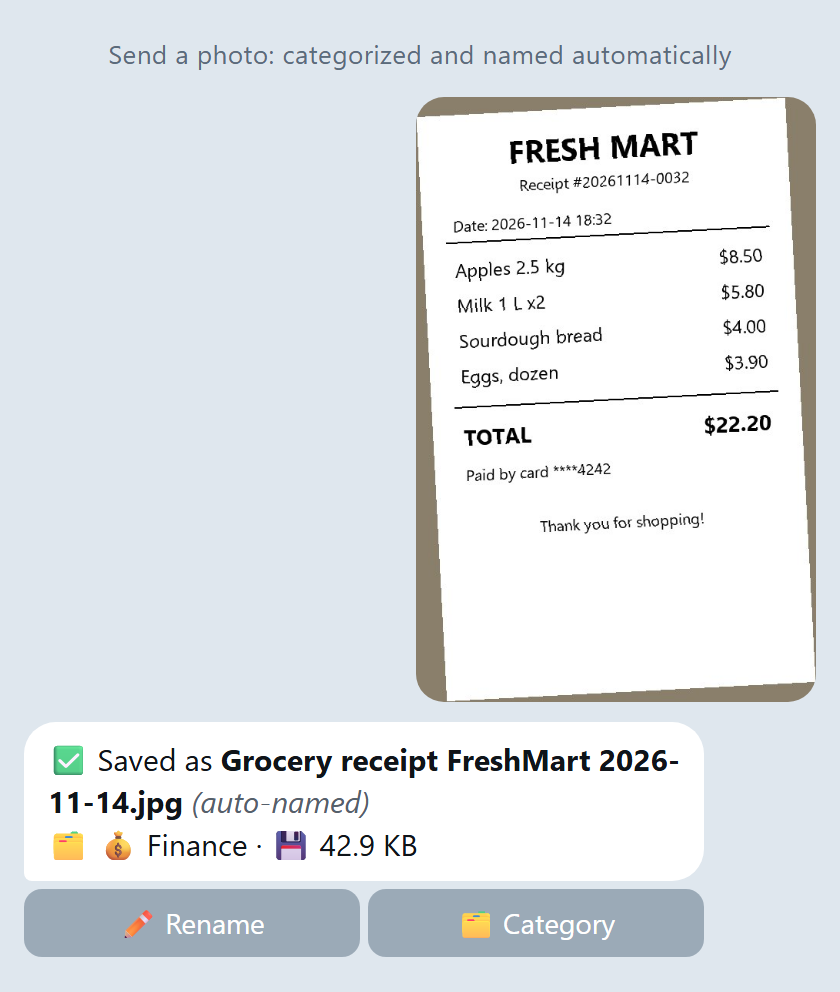 Auto-naming photo_123.jpg → a real name |
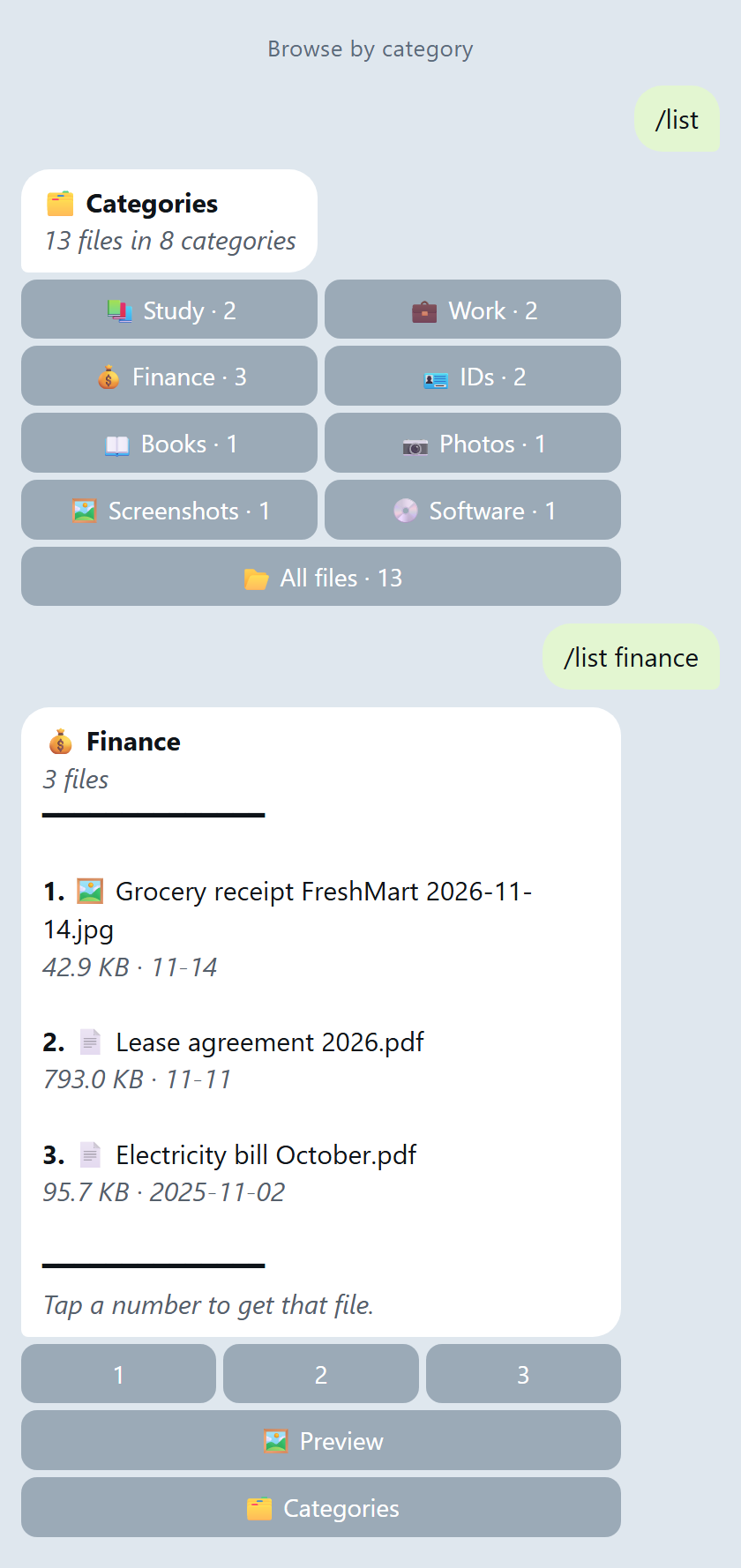 Browse by category /list, then any category |
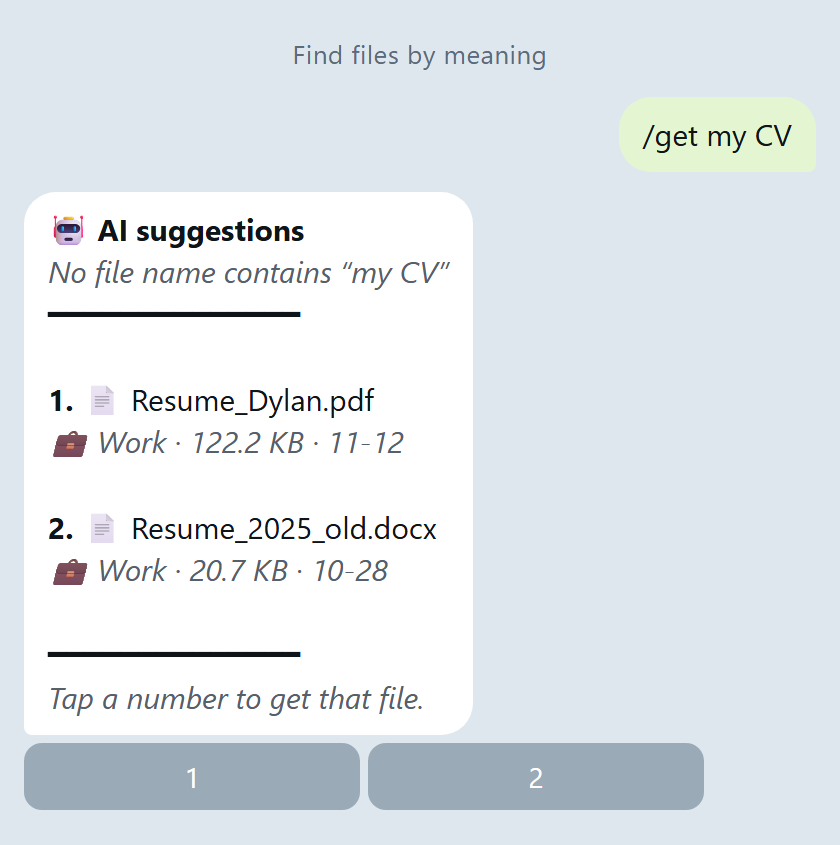 Search by meaning /get my CV → your resumes |
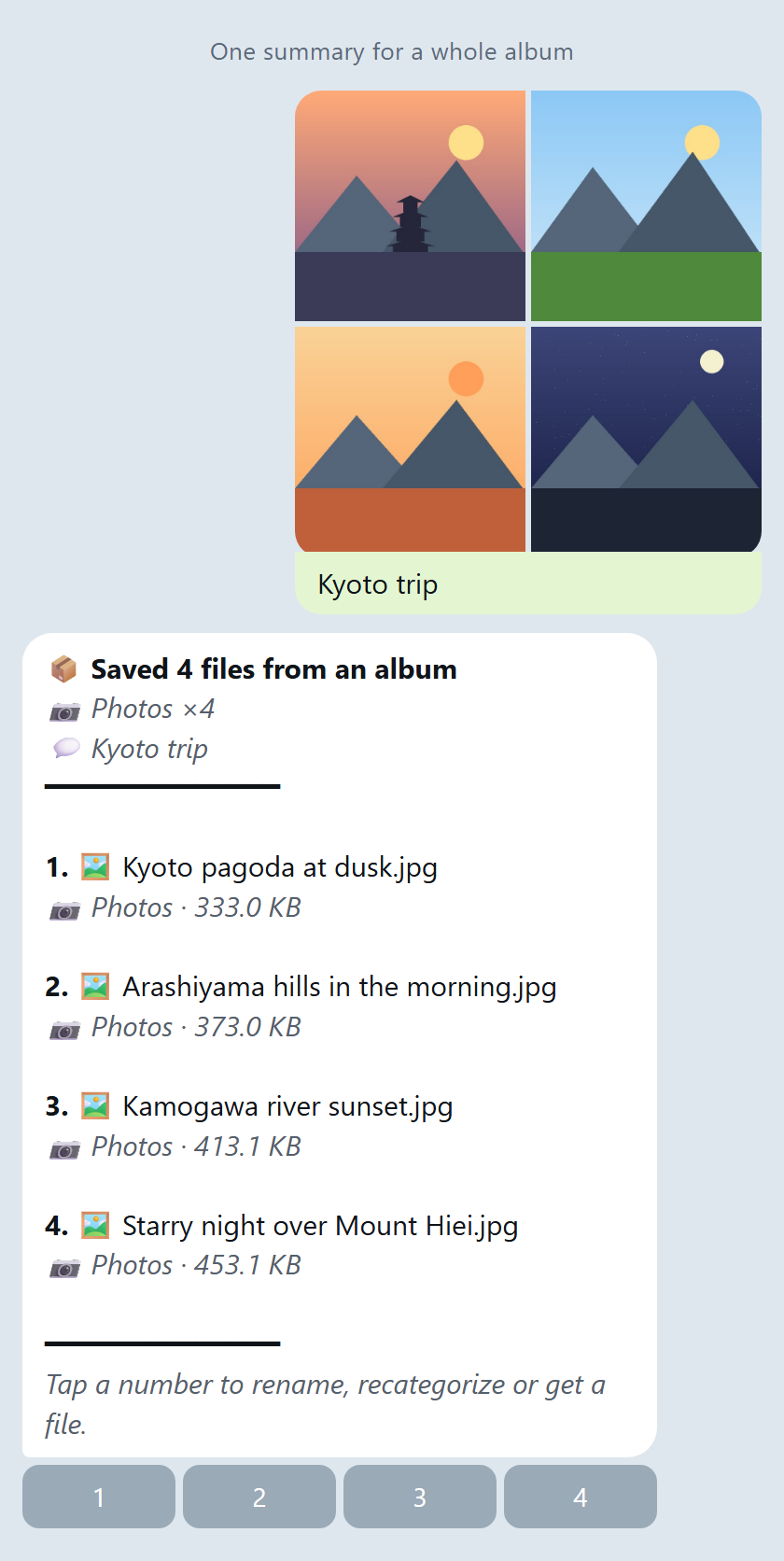 Albums one summary, not ten messages |
Screenshots are rendered from the bot's actual message output with sample files.
Features
- Instant backup — send any file to your bot and it's saved
- Auto-classification — every upload goes into one of 11 categories, decided by Workers AI from the file name, your caption and the image itself
- Auto-naming — meaningless names (
photo_123.jpg,IMG_4521.HEIC,Screenshot_…) are replaced with a name that describes the content, e.g.Grocery receipt FreshMart 2026-11-14.jpg - Search by meaning —
/getmatches names first, then lets AI find files from a description ("my CV", "visa documents") - Albums — send up to 10 photos at once and get one summary; the caption applies to every photo
- English and Chinese — switch with
/lang; category names and new auto-names follow the language, stored data never changes - Rename, recategorize, tag — one tap under any file
- Private — only you can use the bot; files live in your private channel
- Free — runs on Cloudflare's free tier, including the AI
Supported file types
| Type | Examples |
|---|---|
| Documents | PDF, DOCX, ZIP, and any other file type |
| Photos | JPG, PNG, WebP (saved at the highest quality) |
| Videos | MP4, MKV, and more |
| Audio | MP3, FLAC, OGG, and more |
| Voice messages | OGG (Telegram voice) |
| Video notes | MP4 (Telegram circles) |
| Stickers | WebP (static stickers) |
| Animations | GIF / MP4 |
Architecture
You --> Telegram Bot --> Cloudflare Worker --> D1 (metadata)
               |                 |
               |                 +---> Workers AI (category, name, search)
               +---> Private Channel (file storage)
Files are stored on Telegram's servers through a private channel. D1 only stores metadata (names, categories, tags, IDs). This means:
- No storage limits beyond Telegram's 2 GB per-file cap
- No egress costs — files are served directly by Telegram
- Durable — as long as the channel exists, your files persist
Quick start
One-step setup
git clone https://github.com/yourname/telefilebot-cloudflare.git
cd telefilebot-cloudflare
chmod +x setup.sh
./setup.sh
The setup script walks you through everything interactively.
Manual setup
Click to expand manual instructions
Prerequisites
- Node.js >= 18
- Wrangler CLI (
npm install -g wrangler) - A Cloudflare account (free tier works)
- A Telegram bot token from @BotFather
Step 1: Clone and install
git clone https://github.com/yourname/telefilebot-cloudflare.git
cd telefilebot-cloudflare
npm install
Step 2: Create the D1 database
wrangler d1 create telefilebot-cloudflare-db
Copy the database_id from the output into wrangler.jsonc.
Step 3: Apply the schema
wrangler d1 execute telefilebot-cloudflare-db --file=schema.sql --remote
Upgrading an existing install? Instead of Step 3, run the migrations your database is missing, in order:
npm run db:migrate     # 0001: categories
npm run db:migrate:2   # 0002: albums
npm run db:migrate:3   # 0003: settings (language)
Step 4: Configure secrets
wrangler secret put BOT_TOKEN      # From @BotFather
wrangler secret put BOT_SECRET     # Any random string (secures the webhook URL)
wrangler secret put CHANNEL_ID     # Your private channel ID (e.g. -100xxxxxxxxxx)
wrangler secret put ADMIN_ID       # Your Telegram user ID
Channel ID: add @RawDataBot to your channel; it posts a message containing the ID. Remove it afterwards.
User ID: message @userinfobot on Telegram.
Step 5: Deploy
wrangler deploy
Step 6: Register the webhook
Call it with your BOT_SECRET in a header (keeps the secret out of URLs, logs and browser history):
curl -H "Authorization: Bearer YOUR_BOT_SECRET" https://your-worker.workers.dev/registerWebhook
Opening https://your-worker.workers.dev/registerWebhook?secret=YOUR_BOT_SECRET in a browser also works. Without the secret the URL answers 403, so nobody else can re-point or remove your webhook. /unregisterWebhook works the same way.
Tip: in @BotFather,
/setjoingroups→ Disable stops anyone adding your bot to groups.
Commands
Notation: <arg> required · [arg] optional · ... repeatable
BROWSE
| Synopsis | Description |
|---|---|
/list [<category>] |
List categories, or the files in <category>. /list #tag lists a tag. |
/all |
List all files, newest first. |
/get <name> |
Send a file. Partial names work; AI searches when no name matches. |
MANAGE
| Synopsis | Description |
|---|---|
/cat <name> |
Change a file's category. |
/rename <name> [<new>] |
Rename a file; without <new> the bot asks for it. |
/tag <name> <tag>... |
Add one or more tags. |
/delete <name> |
Delete a file, after confirmation. |
MAINTENANCE
| Synopsis | Description |
|---|---|
/classify |
Categorize and name older files, 8 at a time. |
/stats |
Show storage statistics. |
/lang [en|zh] |
Show or switch the bot's language. |
/help |
Show help (also syncs Telegram's / menu). |
Uploading: send any file, photo, video or audio message — it's saved, categorized and, if needed, renamed. A caption (e.g. "for the expense report") helps. Tap ✏️ Rename or 🗂 Category under the confirmation if the guess is wrong.
How it works
Categories
| Category | What goes there |
|---|---|
| 📚 Study | Course material, lecture notes, papers, homework |
| 💼 Work | Contracts, reports, resumes, meeting notes |
| 💰 Finance | Invoices, receipts, bills, taxes, bank statements |
| 🪪 IDs | ID cards, passports, visas, certificates, transcripts |
| 📖 Books | E-books, novels, comics |
| 📷 Photos | Camera photos and ordinary pictures |
| 🖼 Screenshots | Screenshots, chat logs, web pages |
| 🎬 Media | Movies, music, podcasts, voice messages |
| 💿 Software | Installers, source code, config files |
| 😀 Stickers | Stickers, memes, GIFs |
| 📦 Other | Anything else |
/list accepts a category name in either language (/list finance and the Chinese name both work).
- Rules first, no AI call — stickers and GIFs → Stickers, voice and video notes → Media,
.epub/.mobi/…→ Books,.apk/.exe/.dmg/…→ Software. - Otherwise Workers AI (
@cf/google/gemma-4-26b-a4b-it) reads the file name, MIME type, caption, forward source and a small preview image (the photo itself, an image file, or the thumbnail Telegram provides for videos and some documents). - If the AI call fails, a MIME-based guess is used, so uploads never fail because of classification.
Auto-naming
The same AI call that picks the category also suggests a name, so naming costs nothing extra. It is only used when the original name says nothing: names generated by Telegram or this bot (photo_…, video_…, document_…), camera names (IMG_, DSC_, PXL_, …), Screenshot_2026…, pure numbers or hashes. Meaningful names like Resume_Dylan.pdf are never touched. If the model gives nothing usable, the file becomes <category>_<date>; clashes get a numeric suffix. /classify also renames older files that still have generic names.
Search
- Exact name (case-insensitive) → 2. name contains the text → 3. name contains every word, in any order. A single match is sent immediately.
- Only if nothing matches by name, Workers AI reads the list of names, categories and tags and suggests up to 5 files — so
/get my CVor/get visa documentswork. AI suggestions are shown as a pick list, never sent automatically.
Albums
Telegram delivers each photo of an album separately. The bot waits until the album has been quiet for 2.5 seconds, then sends one summary with a per-category count, the caption and a numbered list. Tap a number for that file's ⬇️ Get / ✏️ Rename / 🗂 Category buttons. Late items update the same summary, and files you had already saved are counted as skipped.
Language
The bot speaks English or Chinese: messages, buttons, category names, the / command menu, and the language the AI uses for new names.
- Set the default with the
BOT_LANGvariable inwrangler.jsonc("en"or"zh"), or switch any time with/lang. The choice is saved in thesettingstable and overridesBOT_LANG. - The database stores a fixed key for each category, so the English and Chinese names map to the same category. Switching languages never changes stored data, and existing file names stay as they are — only files named from then on use the new language.
Security
- Only you. Updates from anyone other than
ADMIN_IDare dropped before any work is done: no reply, no database access, no AI call. The sender is checked, not just the chat. - Webhook authentication.
/registerWebhookregisters…/webhookwith Telegram'ssecret_token, so the secret is sent in a header and never appears in URLs or request logs. Once the header has been seen, requests without it are refused, even on the old/webhook/<secret>path. If you registered before this existed, open/registerWebhook?secret=…once to switch over. - Admin URLs (
/registerWebhook,/unregisterWebhook) need the secret, asAuthorization: Bearer <BOT_SECRET>or?secret=; without it they answer 403. Prefer the header: query strings end up in logs. - Missing secrets make the worker refuse webhook traffic (503) instead of running half-configured.
- Untrusted file names, captions and forwarded-chat titles have control and format characters removed (bidi overrides, zero-width and invisible tag characters, …), so
invoice\u202Efdp.execan't pose as a PDF. - Prompt injection: text from files reaches the AI fenced off as data. The worst a crafted file can do is pick its own name (sanitized, at most 40 characters) and category, or nudge AI search suggestions, which you still have to tap. It can't run commands or delete anything.
- What reaches Workers AI: file names, captions, categories and tags, plus a small preview image of photos and image files. Nothing is sent for files the rules classify (stickers, voice notes, e-books, installers).
Cost
Questions
What is TeleFileBot-CloudFlare?
bonorca/TeleFileBot-CloudFlare is a public repo on GitHub by bonorca. Store and Manage your file in Telegram — designed to run on Cloudflare Workers + D1 with zero cost.
Is TeleFileBot-CloudFlare open source?
It declares no license on GitHub. Public does not mean open source: without a license, nobody is granted the right to reuse it.
Does TeleFileBot-CloudFlare run on macOS, Windows or Linux?
Its maker has not tagged a system, so it is unknown here. Its README says what it needs.


