ripgrep
ripgrep recursively searches directories for a regex pattern while respecting your gitignore
- 70k
- Rust
- Unlicense
- 10 h ago
codespelunker - CLI code search tool that understands code structure and ranks results by relevance. No indexing required with CLI, TUI, MCP and HTTP support.
Repo boyter/cs, read from GitHub 22 h ago. boyter has not joined Take My Repo.
boyter/cs is a public repo on GitHub by boyter. codespelunker - CLI code search tool that understands code structure and ranks results by relevance. No indexing required with CLI, TUI, MCP and HTTP support. It declares the MIT license on GitHub. It is written mainly in Go, has 1,078 stars and last changed on 2026-10-27. Nobody has reviewed it on Take My Repo yet, which says nothing about its quality. Read from GitHub on 2026-11-24.
cs powers searchcode.com — structured code intelligence over any repo, built for AI agents.
Ever searched for authenticate and gotten 200 results from config files, comments, and test stubs before finding the actual implementation? cs fixes that.
It combines the speed of CLI tools with the relevance ranking usually reserved for heavy indexed search engines like Sourcegraph or Zoekt, but without needing to maintain an index.
cs "authenticate" --gravity=brain           # Find the complex implementation, not the interface
cs "FIXME OR TODO OR HACK" --only-comments  # Search only in comments, not code or strings
cs "error" --only-strings                   # Find where error messages are defined
cs "handleRequest" --only-declarations      # Jump straight to where it's defined
cs "handleRequest" --only-usages            # Find every call site, skip the definition
cs "error" --dedup                          # Collapse duplicated matches into one result
Licensed under MIT.
cs TUI demo
Most search tools treat code as plain text. cs doesn't.
It parses every file on the fly to understand what is a comment, what is a string, and what is code then uses that structure to rank by relevance, not just list them by occurrence.
cs "authenticate"                    # BM25-ranked variant results, best match first
cs "authenticate" --gravity=brain    # Boost complex implementations over interfaces
cs "TODO" --only-comments            # Only matches inside comments
cs "error" --only-strings            # Only matches inside string literals
cs "config OR setup" lang:go         # Boolean queries with language filters
cs "handleRequest" --only-declarations  # Jump to definitions (func, class, def, etc.)
cs "config" --dedup                     # Collapse byte-identical matches
It comes with a TUI and HTTP mode for Interactive Exploration.
cs      # enter TUI mode from this location
cs -d   # enter HTTP mode on port 8080 by default
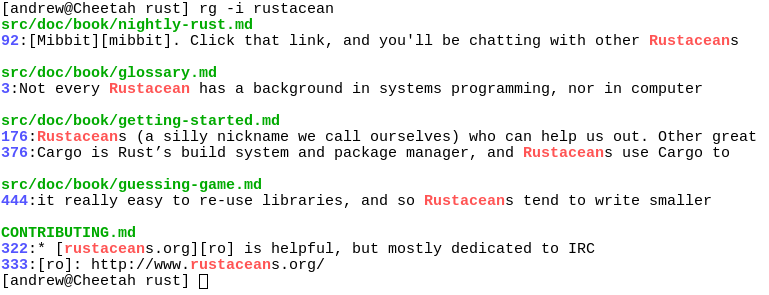
ripgrep is a fast text matcher. It finds lines and prints them. It's the best at what it does.
cs is a search engine. It finds files, ranks by relevance, extracts the best snippet,
and shows the most relevant results. Think Sourcegraph-quality ranked search as a CLI tool, no index required.
They solve different problems. You'll probably want both.
--only-code, --only-comments, --only-strings.Authenticate? The complex implementation file ranks above the interface definition. (--gravity=brain)Stop grepping through false positives.
cs "database" --only-code        # Ignore matches in comments/docs
cs "FIXME" --only-comments       # Ignore matches in code/strings
cs "error" --only-strings        # Find where error messages are defined
cs "handleRequest" --only-declarations  # Jump to where it's defined (func, class, def, etc.)
cs "handleRequest" --only-usages        # Every call site, skipping the definition
These are mutually exclusive with --only-code, --only-comments, and --only-strings.
The structural ranker also uses declaration detection to boost matches that appear on declaration lines
(e.g. func, class, def) over plain usages. This currently works for the following languages:
Go, Python, JavaScript, TypeScript, TSX, Rust, Java, C, C++, C#, Ruby, PHP, Kotlin, Swift, Shell, Lua, Scala, Elixir, Haskell, Perl, Zig, Dart, Julia, Clojure, Erlang, Groovy, OCaml, MATLAB, Powershell, Nim, Crystal, V
For unsupported languages, all matches are treated as usages and ranked by text relevance only.
Structural filtering (--only-code, --only-comments, --only-strings) still works for any language recognised
by scc.
Find where the work happens.
cs "login" --gravity=brain       # Boosts complex files (the implementation)
cs "login" --gravity=low         # Boosts simple files (configs/interfaces)
Preset ranking strategies that tune multiple parameters at once.
cs "authenticate" --profile=precise   # Short, focused source files
cs "authenticate" --profile=broad     # Cast a wide net, include tests
cs "authenticate"                     # Balanced (default, same as always)
| Profile | Best for | What it does |
|---|---|---|
balanced |
General use (default) | Standard BM25 tuning, moderate complexity boost, test files dampened |
precise |
"Find the one file that matters" | Saturates quickly on term frequency, penalises long files, aggressively filters noise and test files |
broad |
"Show me everything relevant" | Rewards repeated matches, boosts long files slightly, includes test files at full weight |
When --profile is set it overrides --gravity, --noise, and --test-penalty.
Keep your search targets up to date automatically. When running in a long-lived mode (TUI, HTTP, or MCP),
--git-sync periodically runs git pull on repositories found in the search directory.
# Single repo — pulls the repo at /path/to/repo on a schedule
cs -d --git-sync --dir /path/to/repo

# Directory of repos — pulls every repo under /path/to/projects
cs -d --git-sync --dir /path/to/projects

# Custom interval and concurrency
cs -d --git-sync --git-sync-interval 2m --git-sync-workers 4 --dir /path/to/projects

# TUI mode
cs --git-sync --dir /path/to/projects

# MCP mode
cs --mcp --git-sync --dir /path/to/codebase
Discovery rules:
.git, that single repo is synced..git are synced (one level deep only).| Flag | Default | Description |
|---|---|---|
--git-sync |
off | Enable periodic git pull |
--git-sync-interval |
5m |
Time between pulls (e.g. 30s, 2m, 1h) |
--git-sync-workers |
1 |
Number of concurrent git pull workers |
Sync runs immediately on startup, then repeats at the configured interval. Errors are logged to stderr but do not stop the process. Each pull has a 2-minute timeout and runs non-interactively (will not prompt for credentials). Ignored in console mode since it exits immediately.
In MCP mode, only the --dir directory is discovered and synced. An agent that searches somewhere
else via the search tool's path parameter gets that directory exactly as it is on disk, and the
response carries a git_sync_note saying so. Use --mcp-lock-dir if you want searches confined to
the synced tree.
Similar to Sourcegraph: Clone your team's repos into a single directory, point cs at it with
--git-sync, and you have a self-updating, relevance-ranked code search across all of them — no
indexing server, no infrastructure, no configuration beyond a single command:
mkdir -p ~/code-search && cd ~/code-search
git clone https://github.com/your-org/repo-a.git
git clone https://github.com/your-org/repo-b.git
git clone https://github.com/your-org/repo-c.git

# Start HTTP search across all repos, auto-updating every 5 minutes
cs -d --git-sync --dir ~/code-search
This gives you ranked, structural code search across your entire codebase — similar to what Sourcegraph or Hound provide — with zero setup beyond cloning the repos.
Collapse byte-identical matches into a single result.
cs "Copyright" --dedup                  # One result per unique copyright notice
cs "error" --dedup                      # Skip vendored/copied duplicates
Smart Ranking Results are sorted by BM25 (relevance), dampened by file length, and boosted by code structure. Some effort to dampen test files (when you are not looking for them) is taken into account as well.
Non-Smart Ranking You can switch the ranking algorithm to pure BM25, TFIDF, or simple most match ranking on the fly.
If you want to create a package to install, please make it. Let me know, and I will ensure I add it here.
If you have Go >= 1.25.2 installed
go install github.com/boyter/cs/v3@latest
nix-shell -p codespelunker
Binaries for Windows, GNU/Linux, and macOS are available from the releases page.
No.
The answer is probably no. It's not directly comparable. No other tool I know of works like this outside of full indexing tools such as hound, searchcode, sourcegraph etc... None work on the fly like this does.
As far as I know what cs does is unique for a command line tool.
cs runs a full lexical analysis and complexity calculation from scc on every matching file.
This is expensive compared to the raw byte-scanning of ripgrep, but probably not as slow as you may think.
On a modern machine (such as Apple Silicon M1), it can search and rank the entire Linux kernel source in ~3 seconds. Using a 9950x3D it can search the kernel in ~400 milliseconds.
So long as they are text. I wrote it to search code, but it works just as well on full-text documents. The snippet extraction, for example, was tested on Pride and Prejudice, a text I know more about than I probably should considering I'm male.
UTF-8, with or without a byte order mark, and UTF-16 that starts with a byte order mark (FF FE little endian, FE FF
big endian). SQL Server Management Studio and Visual Studio save files as UTF-16 with a mark by default.
UTF-16 is decoded to UTF-8 before binary detection, matching, snippets and line counts. Line numbers and match positions
refer to the decoded text, not the bytes on disk, and JSON results for such files carry an encoding field such as
"utf-16le". --max-read-size-bytes limits the raw bytes read from disk, before decoding.
UTF-16 without a byte order mark, and UTF-32, cannot be told apart from binary cheaply and are skipped as binary, as
ripgrep does. Run with --verbose to see which files were skipped.
cs skips files that look binary (a NUL byte in the first 10,000 bytes), minified files (see --min and
--min-line-length) and files it cannot read. --binary and --min turn the first two checks off.
boyter/cs is a public repo on GitHub by boyter. codespelunker - CLI code search tool that understands code structure and ranks results by relevance. No indexing required with CLI, TUI, MCP and HTTP support.
It declares the MIT license on GitHub.
Its maker tagged it for macOS, Windows and Linux, or as Docker or cross-platform. That is declared by the maker; Take My Repo has not tested it.
Open "Take it" on its page: Take My Repo writes an install plan for your machine and hands it to your AI agent (Claude Code, Codex or Cursor), which asks you before each step. Take My Repo has not tested it on any machine.
CLI proxy that reduces LLM token consumption by 60-90% on common dev commands. Single Rust binary, zero dependencies
Reverse engineer anything with agents, from app behavior down to native binaries.
The agent harness performance optimization system. Skills, instincts, memory, security, and research-first development for Claude Code, Codex, Opencode, Cursor and beyond.
Its last change on GitHub was on 2026-10-27. GitHub counts 2 open issues and pull requests. Take My Repo does not judge from that whether it is maintained.
Nobody has reviewed it on Take My Repo yet, which says nothing about its quality.
Take My Repo cannot say: it does not audit code and has not run cs. What is known comes from GitHub. It declares the MIT license on GitHub. Its last change was on 2026-10-27. It has 1,078 stars, which measure popularity, not safety. Nobody has reviewed it on Take My Repo yet, which says nothing about its quality. Read the source before you run it. With "Take it", your AI agent shows each step and asks you before running it; README text is treated as data, not as instructions.