

AutoGPT
AutoGPT is the vision of accessible AI for everyone, to use and to build on. Our mission is to provide the tools, so that you can focus on what matters.
- 188k
- Python
- 11 h ago
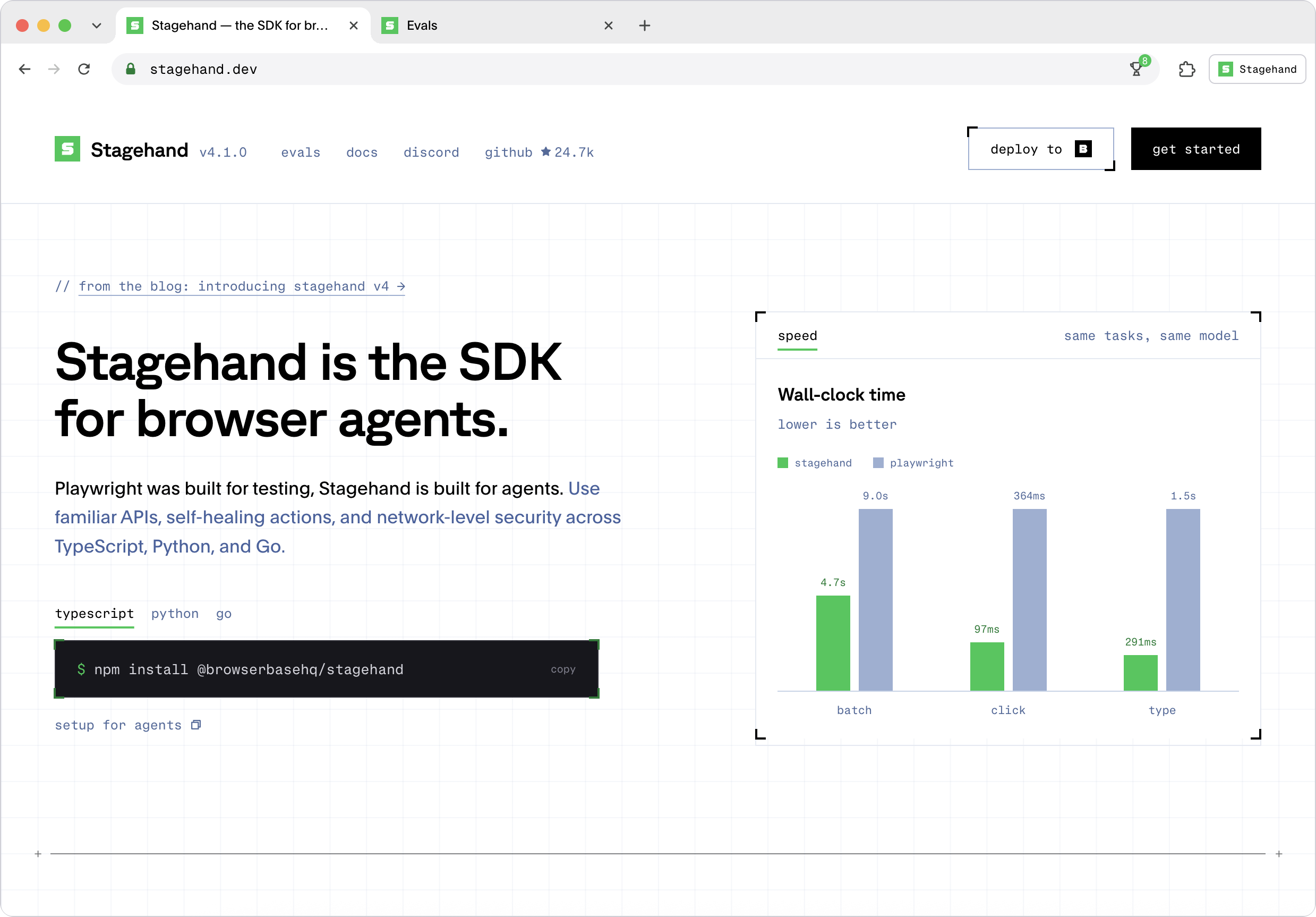
The SDK to extract data and interact with any site on the web. Get started with Claude Code, Codex, Eve, Mastra, and more.
Repo browserbase/stagehand, read from GitHub 11 h ago. browserbase has not joined Take My Repo.
browserbase/stagehand is a public repo on GitHub by browserbase. The SDK to extract data and interact with any site on the web. Get started with Claude Code, Codex, Eve, Mastra, and more. It declares the MIT license on GitHub. It is written mainly in TypeScript, has 26,125 stars and last changed on 2026-11-24. Nobody has reviewed it on Take My Repo yet, which says nothing about its quality. Read from GitHub on 2026-11-24.
AutoGPT is the vision of accessible AI for everyone, to use and to build on. Our mission is to provide the tools, so that you can focus on what matters.

Stagehand is the SDK for browser agents
Docs · Quickstart · ⭐ Star this repo



Sign in once, keep the session, and pull structured data out the other side.
import { localBrowser, Stagehand } from "@browserbasehq/stagehand";
import { z } from "zod/v4";

// Cookies persist in ./browser-data, so the next run starts already signed in
const browser = await localBrowser.launch({ userDataDir: "./browser-data" });
const stagehand = await Stagehand.create({
  browser,
  model: { modelName: "openai/gpt-5.4-mini", apiKey: process.env.OPENAI_API_KEY },
});

const [page] = await browser.context.pages();
await page.goto("https://app.example.com/login");

// observe() returns real selectors, so credentials never reach the model
const { data: email } = await stagehand.observe("find the email input");
const { data: password } = await stagehand.observe("find the password input");
await page.locator(email[0].selector).fill(process.env.APP_EMAIL!);
await page.locator(password[0].selector).fill(process.env.APP_PASSWORD!);

// act() self-heals when the site redesigns its form
await stagehand.act("click the sign in button");
await stagehand.act("open the billing page");

// extract() returns schema-validated data
const { data } = await stagehand.extract(
  "extract every invoice in the table",
  z.object({
    invoices: z.array(z.object({ number: z.string(), amount: z.number(), paid: z.boolean() })),
  }),
);

console.log(data.invoices);

await stagehand.close();
await browser.close();
import asyncio
import os

from pydantic import BaseModel
from stagehand import Stagehand, local_browser


class Invoice(BaseModel):
    number: str
    amount: float
    paid: bool


class Invoices(BaseModel):
    invoices: list[Invoice]


async def main() -> None:
    # Cookies persist in ./browser-data, so the next run starts already signed in
    browser = await local_browser.launch(user_data_dir="./browser-data")
    try:
        stagehand = await Stagehand.create(
            browser=browser,
            model="openai/gpt-5.4-mini",
            model_api_key=os.environ["OPENAI_API_KEY"],
        )
        try:
            page = (await browser.context.pages())[0]
            await page.goto("https://app.example.com/login")

            # observe() returns real selectors, so credentials never reach the model
            email = await stagehand.observe("find the email input")
            password = await stagehand.observe("find the password input")
            await page.locator(email.data[0].selector).fill(os.environ["APP_EMAIL"])
            await page.locator(password.data[0].selector).fill(os.environ["APP_PASSWORD"])

            # act() self-heals when the site redesigns its form
            await stagehand.act("click the sign in button")
            await stagehand.act("open the billing page")

            # extract() returns schema-validated data
            result = await stagehand.extract(
                "extract every invoice in the table",
                Invoices,
            )
            print(result.data.invoices)
        finally:
            await stagehand.close()
    finally:
        await browser.close()


asyncio.run(main())
package main

import (
	"context"
	"errors"
	"fmt"
	"log"
	"os"

	stagehand "github.com/browserbase/stagehand/packages/sdk-go/v4"
)

type invoice struct {
	Number string  `json:"number"`
	Amount float64 `json:"amount"`
	Paid   bool    `json:"paid"`
}

type invoices struct {
	Invoices []invoice `json:"invoices"`
}

func main() {
	if err := run(context.Background()); err != nil {
		log.Fatal(err)
	}
}

func run(ctx context.Context) (err error) {
	// Cookies persist in ./browser-data, so the next run starts already signed in
	browser, err := stagehand.LaunchLocalBrowser(ctx, &stagehand.LocalBrowserLaunchOptions{
		UserDataDir: "./browser-data",
	})
	if err != nil {
		return err
	}
	defer func() { err = errors.Join(err, browser.Close(ctx)) }()

	modelAPIKey := os.Getenv("OPENAI_API_KEY")
	client, err := stagehand.Create(ctx, stagehand.CreateOptions{
		Browser: browser,
		Model: &stagehand.ModelConfig{
			ModelName: "openai/gpt-5.4-mini",
			APIKey:    &modelAPIKey,
		},
	})
	if err != nil {
		return err
	}
	defer func() { err = errors.Join(err, client.Close(ctx)) }()

	browserContext, err := browser.Context()
	if err != nil {
		return err
	}
	pages, err := browserContext.Pages(ctx)
	if err != nil {
		return err
	}
	page := pages[0]
	if _, err := page.Goto(ctx, "https://app.example.com/login", nil); err != nil {
		return err
	}

	// Observe returns real selectors, so credentials never reach the model
	emailInstruction := "find the email input"
	email, err := client.Observe(ctx, &emailInstruction, nil)
	if err != nil {
		return err
	}
	if err := page.Locator(email.Data[0].Selector).Fill(ctx, os.Getenv("APP_EMAIL")); err != nil {
		return err
	}

	passwordInstruction := "find the password input"
	password, err := client.Observe(ctx, &passwordInstruction, nil)
	if err != nil {
		return err
	}
	if err := page.Locator(password.Data[0].Selector).Fill(ctx, os.Getenv("APP_PASSWORD")); err != nil {
		return err
	}

	// Act self-heals when the site redesigns its form
	if _, err := client.Act(ctx, stagehand.ActInstruction("click the sign in button"), nil); err != nil {
		return err
	}
	if _, err := client.Act(ctx, stagehand.ActInstruction("open the billing page"), nil); err != nil {
		return err
	}

	// Extract returns data decoded into a Go type
	extracted, err := stagehand.Extract[invoices](
		ctx,
		client,
		"extract every invoice in the table",
		nil,
	)
	if err != nil {
		return err
	}
	fmt.Println(extracted.Data.Invoices)

	return nil
}
pnpm add @browserbasehq/stagehand 'zod@~4.4.3'
pip install stagehand
go get github.com/browserbase/stagehand/packages/sdk-go/v4@v4.0.0
Local runs need Chrome installed. Full setup: Quickstart.
Install the browse CLI and skill instead of using the SDK directly:
npm install -g browse
npx skills add browserbase/stagehand --skill browse
browse open https://example.com --local
browse snapshot
browse get title
No LLM key or Browserbase account needed for local use. See CLI vs SDK vs hosted MCP for when to use each.
| Familiar APIs | The Playwright-style methods you and your agents already know: goto, click, locator, screenshot. |
| Token efficiency | Hybrid accessibility-tree trimming gives agents exactly the page context they need and nothing more. |
| Faster in production | Stagehand runs as an extension next to the browser, cutting round-trip latency on every action. |
| Self-healing | act, observe, and extract refresh how an action happens when the site changes underneath it. |
| Built for agents | WebMCP, clipboard support, batch commands, deep locators for nested iframes and closed Shadow DOMs, OTel traces. |
| Three languages | One complete browser driver across TypeScript, Python, and Go. |
Point the same script at Browserbase and get 2x faster execution than Playwright cloud equivalent browsers. Configure the Model Gateway so you never wire up a provider, and enable server-side caching to cache repeated actions.
import { browserbase, Stagehand } from "@browserbasehq/stagehand";

const browser = await browserbase.launch({ apiKey: process.env.BROWSERBASE_API_KEY! });

// No model configuration: the Model Gateway picks the cheapest model for each action
// cache: true: identical calls come back from Browserbase, no tokens spent
const stagehand = await Stagehand.create({ browser, cache: true });
import os

from stagehand import Stagehand, browserbase

browser = await browserbase.launch(api_key=os.environ["BROWSERBASE_API_KEY"])

# No model configuration: the Model Gateway picks the cheapest model for each action
# cache=True: identical calls come back from Browserbase, no tokens spent
stagehand = await Stagehand.create(browser=browser, cache=True)
browser, err := stagehand.LaunchBrowserbase(ctx, stagehand.BrowserbaseLaunchOptions{
	APIKey: os.Getenv("BROWSERBASE_API_KEY"),
})
if err != nil {
	return err
}

// No model configuration: the Model Gateway picks the cheapest model for each action
// CacheEnabled(true): identical calls come back from Browserbase, no tokens spent
cache := stagehand.CacheEnabled(true)
client, err := stagehand.Create(ctx, stagehand.CreateOptions{
	Browser: browser,
	Cache:   &cache,
})
if err != nil {
	return err
}
Verified mode, residential proxies, persistent contexts, and session recordings come with it. Get an API key and learn how to configure your browser here.
The hosted Browserbase MCP server puts navigate, act, observe, and extract in any MCP client — no install, no local browser. Requires a Browserbase API key.
claude mcp add --transport http browserbase https://mcp.browserbase.com/mcp \
  --header "Authorization: Bearer $BROWSERBASE_API_KEY"
{
  "mcpServers": {
    "browserbase": {
      "url": "https://mcp.browserbase.com/mcp",
      "headers": { "Authorization": "Bearer YOUR_BROWSERBASE_API_KEY" }
    }
  }
}
For local browsing without an API key, use the browse CLI instead.
Fetch lets you grab the content of any URL as markdown. Search provides fast, token-efficient web search results. Both as a lightweight complement to browser sessions.
import { browserbase } from "@browserbasehq/stagehand";

const { results } = await browserbase.search({
  apiKey: process.env.BROWSERBASE_API_KEY!,
  query: "browser agent frameworks",
  numResults: 5,
});

const fetched = await browserbase.fetch({
  apiKey: process.env.BROWSERBASE_API_KEY!,
  url: results[0].url,
  format: "markdown",
});

console.log(fetched.content);
| Quickstart | Empty directory to working automation in three steps |
browserbase/stagehand is a public repo on GitHub by browserbase. The SDK to extract data and interact with any site on the web. Get started with Claude Code, Codex, Eve, Mastra, and more.
It declares the MIT license on GitHub.
Its maker has not tagged a system, so it is unknown here. Its README says what it needs.
Open "Take it" on its page: Take My Repo writes an install plan for your machine and hands it to your AI agent (Claude Code, Codex or Cursor), which asks you before each step. Take My Repo has not tested it on any machine.
Open-source Python library for AI browser agents, plus Browser Use Cloud: stealth browsers and a hosted agent API.
The agent harness performance optimization system. Skills, instincts, memory, security, and research-first development for Claude Code, Codex, Opencode, Cursor and beyond.
Reverse engineer anything with agents, from app behavior down to native binaries.
Langflow is a powerful tool for building and deploying AI-powered agents and workflows.
🕷️ The BEST Web Scraping framework that handles everything from a single request to a full-scale crawl! Don't be shy, join here: https://discord.gg/EMgGbDceNQ and follow here for daily tips and tricks: https://x.com/Scrapling_dev
Its last change on GitHub was on 2026-11-24. GitHub counts 445 open issues and pull requests. Take My Repo does not judge from that whether it is maintained.
Nobody has reviewed it on Take My Repo yet, which says nothing about its quality.
Take My Repo cannot say: it does not audit code and has not run stagehand. What is known comes from GitHub. It declares the MIT license on GitHub. Its last change was on 2026-11-24. It has 26,125 stars, which measure popularity, not safety. Nobody has reviewed it on Take My Repo yet, which says nothing about its quality. Read the source before you run it. With "Take it", your AI agent shows each step and asks you before running it; README text is treated as data, not as instructions.





