
github_wrapped
Beautiful "Wrapped" style reports for your GitHub organization's activity
- 2
- 11 mo ago
Repo bsramin/github_wrapped, read from GitHub 1 min ago. bsramin has not joined Take My Repo.
In short
bsramin/github_wrapped is a public repo on GitHub by bsramin. Beautiful "Wrapped" style reports for your GitHub organization's activity. It declares no license on GitHub. Public does not mean open source: without a license, nobody is granted the right to reuse it. It is written mainly in Shell, has 2 stars and last changed on 2026-01-01. Nobody has reviewed it on Take My Repo yet, which says nothing about its quality. Read from GitHub on 2026-11-25.
🔄 GitHub Wrapped
Generate beautiful "Wrapped" style reports for your GitHub organization's activity. Analyze commits, lines of code, top contributors, and activity patterns across all repositories.
Features
- Multi-repository analysis across an entire GitHub organization
- Author deduplication (same person with different name/email combinations)
- Beautiful static HTML report with dark theme
- Notion-compatible Markdown export
- CSV and JSON data exports
- Time analytics (most active hours, days, weekdays)
- POSIX compatible (works on bash, zsh, sh, dash - Linux & macOS)
Requirements
gh- GitHub CLI (authenticated)gitjqawk,sort,uniq,wc,sed(standard Unix tools)
Install dependencies
macOS:
brew install gh jq
gh auth login
Linux (Debian/Ubuntu):
sudo apt install gh jq
gh auth login
Quick Start
1. Create a configuration file
Create a file named wrapped.conf (or any name you prefer):
# wrapped.conf

# Required: GitHub organization name
ORG_NAME="your-org-name"

# Required: Date range
SINCE="2024-01-01"
UNTIL="2024-12-31"

# Optional: Only analyze default branch (recommended)
DEFAULT_BRANCH_ONLY=true

# Optional: Auto-clone missing repos
AUTO_CLONE=true

# Optional: Output file names
OUT_HTML="2024_wrapped.html"
OUT_NOTION_MD="2024_NOTION.md"

# Optional: Author aliases file (for deduplication)
# AUTHOR_ALIASES_FILE="author_aliases.txt"
2. Run the scripts
The project is split into 3 scripts that should be run in sequence:
# Step 1: Clone/update all repositories
CONFIG_FILE=./wrapped.conf ./sync-repos.sh

# Step 2: Generate author mapping (for deduplication)
CONFIG_FILE=./wrapped.conf ./generate-author-map.sh

# Step 3: Generate the wrapped report
CONFIG_FILE=./wrapped.conf ./wrapped.sh
Scripts
sync-repos.sh
Clones new repositories and updates existing ones from your GitHub organization.
CONFIG_FILE=./wrapped.conf ./sync-repos.sh
What it does:
- Fetches the list of non-archived repos from the organization
- Clones repos that don't exist locally
- Runs
git fetch --all --pruneon existing repos
generate-author-map.sh
Analyzes all commits to identify potential duplicate authors (same person with different name/email combinations).
CONFIG_FILE=./wrapped.conf ./generate-author-map.sh
What it does:
- Scans all commits in the specified date range
- Identifies authors with similar names but different emails
- Generates
author_aliases.txtwith suggested merges
Output: github-wrapped/author_aliases.txt
After running, edit the file to uncomment the lines for authors you want to merge, then add to your config:
AUTHOR_ALIASES_FILE="author_aliases.txt"wrapped.sh
Generates the final wrapped report with all statistics.
CONFIG_FILE=./wrapped.conf ./wrapped.sh
What it does:
- Analyzes commits, lines added/removed per repository
- Calculates top authors by commits and by churn
- Analyzes time patterns (hours, days, weekdays)
- Generates all output files
Output files:
wrapped.html- Beautiful static HTML reportNOTION.md- Notion-compatible Markdownwrapped.json- Full data in JSON formatwrapped_by_repo.csv- Per-repository datawrapped_summary.txt- Plain text summary
Configuration Options
| Option | Required | Default | Description |
|---|---|---|---|
ORG_NAME |
Yes* | - | GitHub organization name |
REPOS |
Yes* | - | Or provide explicit list of repos |
SINCE |
Yes | - | Start date (YYYY-MM-DD) |
UNTIL |
Yes | - | End date (YYYY-MM-DD) |
WORKDIR |
No | ./github-wrapped |
Working directory |
AUTO_CLONE |
No | true |
Auto-clone missing repos |
DEFAULT_BRANCH_ONLY |
No | true |
Only analyze default branch |
TOP_N |
No | 10 |
Number of top entries to show |
AUTHOR_ALIASES_FILE |
No | - | Path to author aliases file |
ACCENT_COLOR |
No | violet |
Theme color: violet, indigo, blue, cyan, teal, green, orange, red, pink |
GENERATE_HTML |
No | true |
Generate HTML output |
GENERATE_NOTION_MD |
No | true |
Generate Notion Markdown |
OUT_HTML |
No | wrapped.html |
HTML output filename |
OUT_NOTION_MD |
No | NOTION.md |
Markdown output filename |
OUT_JSON |
No | wrapped.json |
JSON output filename |
OUT_CSV |
No | wrapped_by_repo.csv |
CSV output filename |
*Either ORG_NAME or REPOS must be provided.
Author Deduplication
Git commits can have different author name/email combinations for the same person. The generate-author-map.sh script helps identify these duplicates.
Alias File Format
# Format: CanonicalName|alias1,alias2,email1,email2
John Doe|john@company.com,johnd@gmail.com,John D.,JD
Example
If your commits show:
- "Claudio" claudio@company.com (500 commits)
- "Claudio Rossi" claudio.r@gmail.com (50 commits)
Add this line to author_aliases.txt:
Claudio Rossi|claudio@company.com,claudio.r@gmail.com,Claudio
All commits will be attributed to "Claudio Rossi".
Example Output
HTML Report
The HTML report features:
- Dark theme with gradient accents
- Animated cards with hover effects
- Responsive design (mobile-friendly)
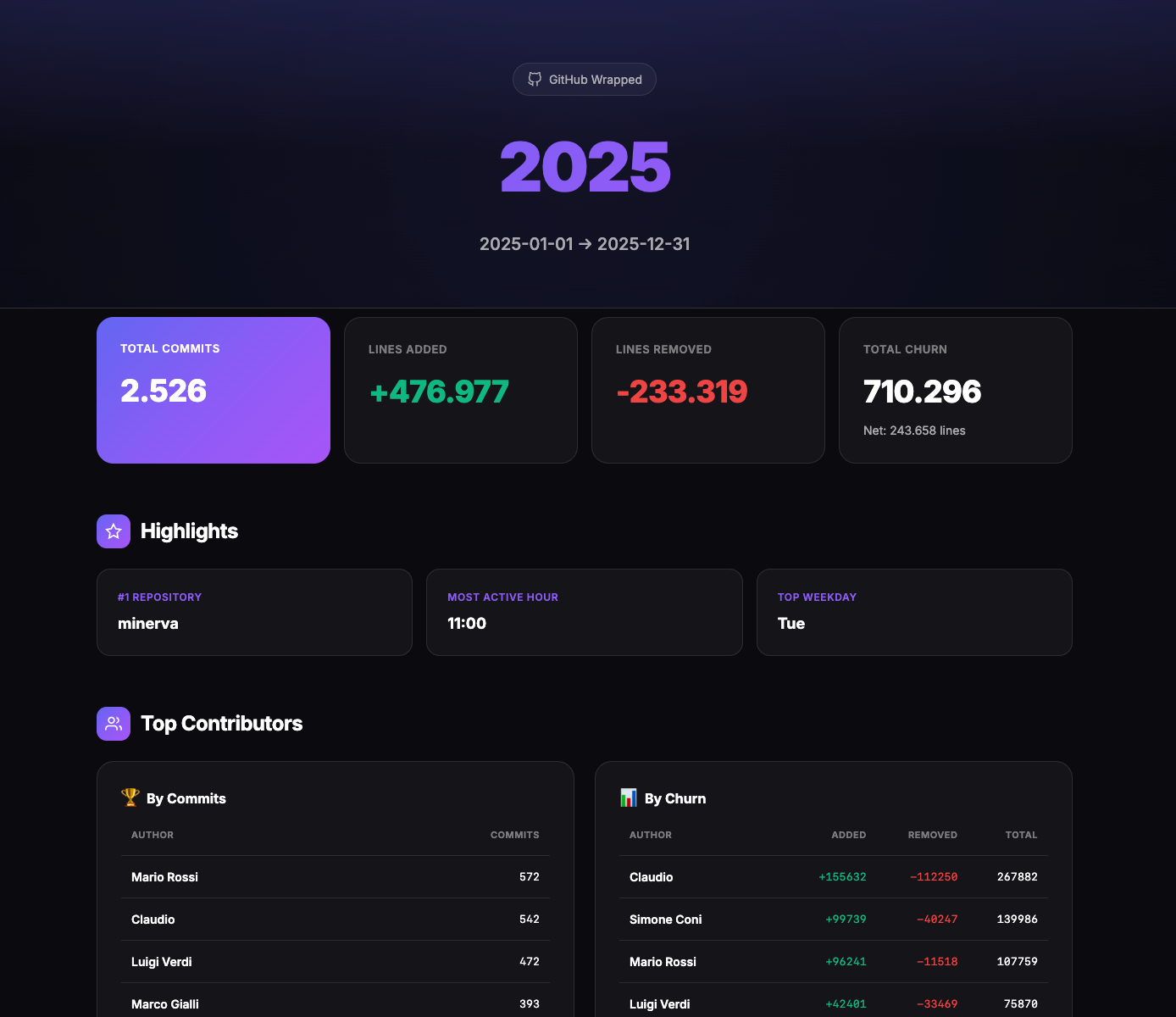
- Top statistics (commits, lines added/removed, churn)
- Highlights (top repo, most active hour, top weekday)
- Top contributors tables (by commits and by churn)
- Time analytics (top hours, weekday distribution)
- Repository leaderboard with activity bars
Screenshots
Hero section with KPIs and highlights:

The report opens with an eye-catching hero section showing the analysis period, followed by key metrics (total commits, lines added/removed, churn) and highlights cards displaying the top repository, most active hour, and busiest weekday.
Contributors and time analytics:

Detailed tables showing top contributors ranked by commits and by code churn, plus time-based analytics including most active hours and weekday distribution.
Notion Markdown
The Markdown output is optimized for Notion import:
- Proper table formatting
- All KPIs and highlights
- Compatible with Notion's table rendering
Multiple Years
To generate reports for different years, create separate config files:
# wrapped-2023.conf
SINCE="2023-01-01"
UNTIL="2023-12-31"
OUT_HTML="2023_wrapped.html"
OUT_NOTION_MD="2023_NOTION.md"

# wrapped-2024.conf
SINCE="2024-01-01"
UNTIL="2024-12-31"
OUT_HTML="2024_wrapped.html"
OUT_NOTION_MD="2024_NOTION.md"
Then run:
CONFIG_FILE=./wrapped-2023.conf ./wrapped.sh
CONFIG_FILE=./wrapped-2024.conf ./wrapped.sh
Troubleshooting
"gh not authenticated"
Run gh auth login and follow the prompts.
"ORG_NAME not defined"
Make sure your config file includes ORG_NAME="your-org" or provide REPOS directly.
Duplicate authors in report
Run generate-author-map.sh, edit the generated author_aliases.txt, then set AUTHOR_ALIASES_FILE in your config.
Script not working on macOS
All scripts are POSIX compatible and should work with the default /bin/sh on macOS. If you encounter issues, try running with bash or zsh explicitly:
bash ./wrapped.sh
License
MIT
Questions
What is github_wrapped?
bsramin/github_wrapped is a public repo on GitHub by bsramin. Beautiful "Wrapped" style reports for your GitHub organization's activity.
Is github_wrapped open source?
It declares no license on GitHub. Public does not mean open source: without a license, nobody is granted the right to reuse it.
Does github_wrapped run on macOS, Windows or Linux?
Its maker tagged it for macOS and Linux. That is declared by the maker; Take My Repo has not tested it.