
github-data-challenge-2014
Entry for the Third Annual GitHub Data Challenge
- 35
- 12 y ago
Repo c-w/github-data-challenge-2014, read from GitHub 1 min ago. c-w has not joined Take My Repo.
In short
c-w/github-data-challenge-2014 is a public repo on GitHub by c-w. Entry for the Third Annual GitHub Data Challenge. It declares no license on GitHub. Public does not mean open source: without a license, nobody is granted the right to reuse it. It is written mainly in Shell, has 35 stars and last changed on 2014-11-24. It is archived: its maker no longer maintains it. Nobody has reviewed it on Take My Repo yet, which says nothing about its quality. Read from GitHub on 2026-11-24.
Humans of GitHub (HoG)
Introduction
This repository is an entry to the Third Annual GitHub Data Challenge.
We use the GitHub Users API in order to acquire a large collection of user avatars. User avatars! A pointed expression of individualism; A mirror into the users' soul. We then use dimensionality reduction techniques in order to explore if there are any similarities or re-occurring patterns in the user avatars, thus answering the eternal question of Who really uses GitHub? Who are the Humans of GitHub? Cats with eight tentacles? Unicorns? Ninjas? This visualization finally brings answers!
Visualization
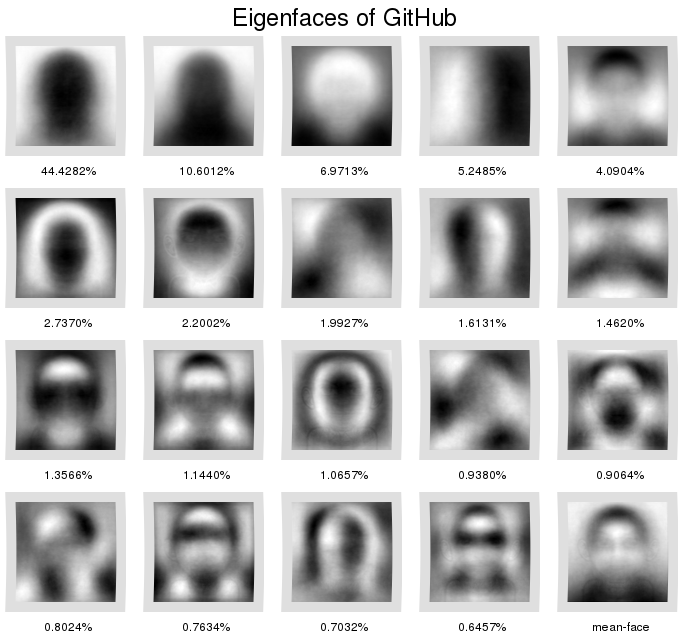
Eigenfaces are a straight-forward and highly interpretable way to find structure and patterns in large collections of images. So that's the technique we are going to use to explore the "Humans of GitHub." The following figure shows the results of using Principal Component Analysis to find 20 eigenfaces in our data-set of GitHub user-avatars. Every eigenface is tagged with the percentage of variance it explains.

We can learn a number of things from this visualization:
-
GitHub is used by humans! The mean-face and the eigenfaces that account for the largest amounts of variance in the data-set all have a distinctly humanoid complexion so we can rest assured in the knowledge that GitHub is indeed for humans.
-
GitHub users have funky hair! The sixth-strongest eigenface captures the variance in things that are around the heads of GitHub users (i.e. their hair) and we can interpret the patterned noise in the eighteenth-strongest eigenface as an expression of the variety of GitHub users hair-dos. Similarly, the fifteenth strongest eigenface can be interpreted as capturing those GitHub users who have a beard.
-
GitHub users like geometry! The fourth, eigth and fourteenth most important eigenfaces exhibit very regular patterns that don't look humanoid at all. These eigenfaces can be interpreted as capturing those GitHub users who use a logo or some sort of gemoetric shape for their avatar. Examples: 1, 2.
-
GitHub users like cartoons! The seventh, twelfth and thirteenth eigenfaces show clearly defined stylized ear-, eye- and nose-regions. This points towards a population of cartoon avatars in the GitHub user-base. Examples: 1, 2.
The data-set we used to create this visualization violates a number of key assumptions of the usual eigenface inference process: the images in the data-set are not controlled for lighting conditions and the images are not centered on a common position of mouth, eyes and nose. It is interesting how we can nevertheless still find somewhat interpretable and most certainly entertaining results. This speaks to the robustness of eigenfaces and principal component analysis.
You can find full detail on how we went about creating the eigenfaces for our visualization in the sections below.
Technical detail
We need to do four simple things to get GitHub user eigenfaces (detailed in the four sections below).
Data acquisition
Before we get started, we first need to do some admin work. You'll want to create an OAuth Token and copy it into a file named oauth.txt in the top-level directory of this repository. Then, have a peek around the scripts in the hog/ directory (no, nothing to do with pigs - that's short for "Humans of GitHub," you silly). There are some configuration options at the top of each script that you'll want to review and adapt if you deem it necessary.
Now we're ready to rock and create some eigenfaces!
We crawl the /users API and grab some meta-data about people on GitHub. Amongst others, this meta-data contains a link to every user's avatar that we'll use to get some image data in a minute. The following snippet downloads 5000 batches of JSON user information (starting from the first) from the API and stores them gzipped on disk at data/users. Every batch contains information about 100 users, so this will give us a sizeable data-set to work with.
./hog/crawl_users.sh 0 5000
We then use the previously acquired meta-information to collect a large number of avatars of GitHub users. The following snippet retrieves the avatar of ever user we queried from the API and stores it at data/avatars.
./hog/crawl_avatars.py data/users/*.json.gz
Data pre-processing and cleanup
Next up, we apply some preprocessing to make sure that all avatars are roughly comparable. The following snippet converts all avatars to PNG, rescales them to 100x100 pixels and converts them to gray-scale. The first operation really just is convenience to not have to deal with multiple image formats later. The later two operations make the rest of the eigenface inference problem more tractable by reducing the dimensionality of our data-set. The script also filters out any GitHub auto-generated avatars (like this one). Note: the avatars are edited in-place i.e. the original full-size and full-color avatars are removed in favor of their new low-pixel gray-scale versions.
./hog/preprocess_avatars.sh data/avatars/*
Principal component analysis
Finally, we can use Principal Component Analysis to perform eigenface decomposition! The following snippet loads every 100x100 image in our data-set as a 10000x1-dimensional vector, bunches them together into a matrix and applies PCA. The top-50 principal components are then unrolled into images and output to data/eigenfaces. The eigenfaces adhere to the following naming convention: eigenface#0.[0-9]+#.png where the numbers indicate the percentage of variance explained by the principal component corresponding to the eigenface.
./hog/eigenfaces.py data/avatars/*.png
A note on "big data"
We downloaded 54936 avatars in total for our experiments. 28255 (51%) of these avatars were auto-generated and thus filtered out, leaving 26681 avatars left over.
Dependencies
- Python 2.7: sklearn, matplotlib, numpy, requests
- cURL
- ImageMagick
- GNUplot
Questions
What is github-data-challenge-2014?
c-w/github-data-challenge-2014 is a public repo on GitHub by c-w. Entry for the Third Annual GitHub Data Challenge.
Is github-data-challenge-2014 open source?
It declares no license on GitHub. Public does not mean open source: without a license, nobody is granted the right to reuse it.
Does github-data-challenge-2014 run on macOS, Windows or Linux?
Its maker has not tagged a system, so it is unknown here. Its README says what it needs.