Nino
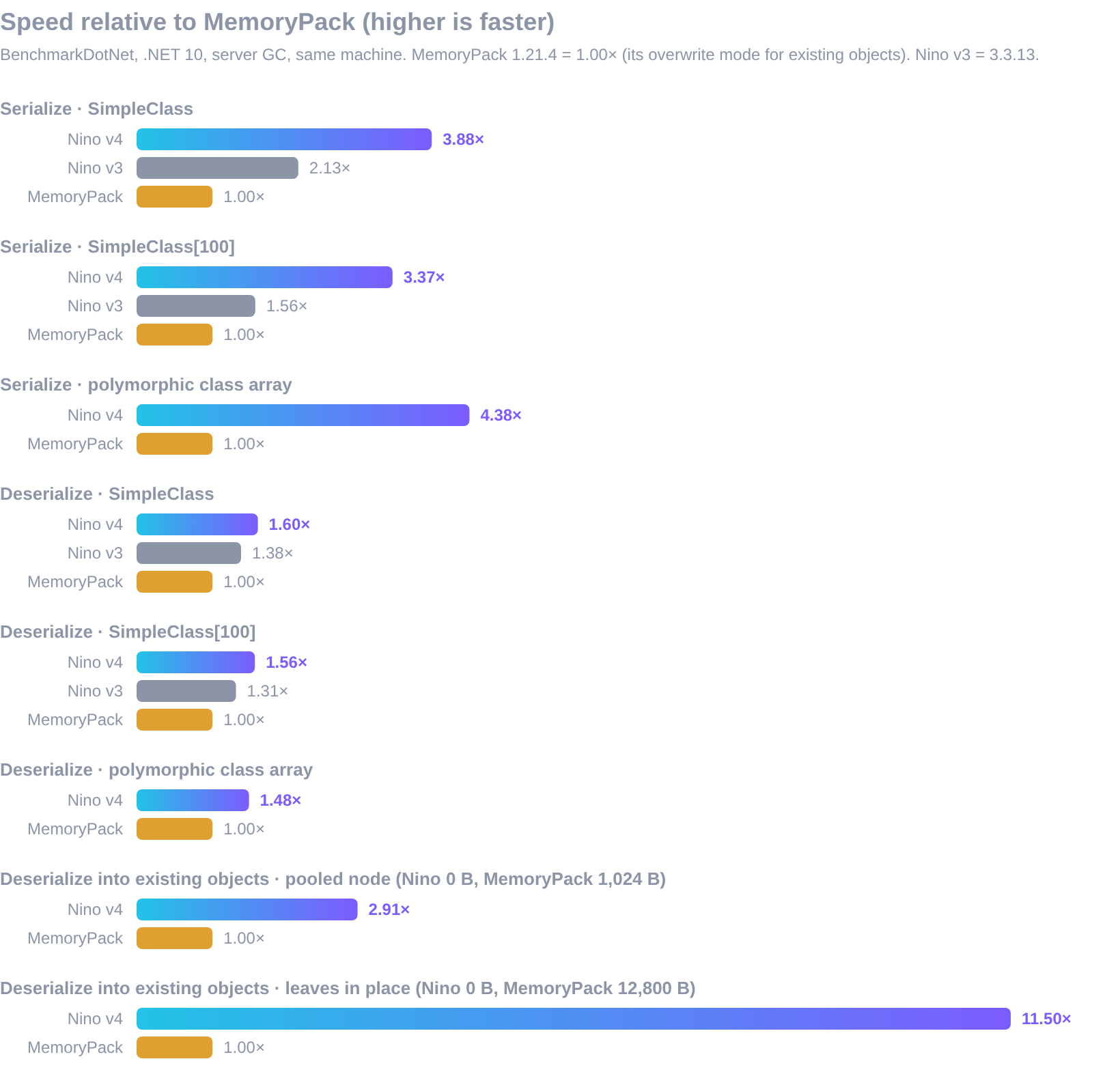
The fastest binary serializer for C#. Source-generated, zero-allocation, thread-safe and safe on untrusted input: .NET, Native AOT, Unity, Godot and HybridCLR, with Go, Rust and TypeScript writing and reading the same bytes.
- 664
- C#
- MIT
- 2 d ago
Powerful INotifyPropertyChanged / INotifyPropertyChanging Source Generator, which generates INPC boilerplate for you as part of your build. Supports features such as automatic and manual dependencies between properties, notifications when specific properties change, and more.
Repo canton7/PropertyChanged.SourceGenerator, read from GitHub 20 h ago. canton7 has not joined Take My Repo.
canton7/PropertyChanged.SourceGenerator is a public repo on GitHub by canton7. Powerful INotifyPropertyChanged / INotifyPropertyChanging Source Generator, which generates INPC boilerplate for you as part of your build. Supports features such as automatic and manual dependencies between properties, notifications when specific properties change, and more. It declares the MIT license on GitHub. It is written mainly in C#, has 170 stars and last changed on 2025-11-02. Nobody has reviewed it on Take My Repo yet, which says nothing about its quality. Read from GitHub on 2026-11-24.
The fastest binary serializer for C#. Source-generated, zero-allocation, thread-safe and safe on untrusted input: .NET, Native AOT, Unity, Godot and HybridCLR, with Go, Rust and TypeScript writing and reading the same bytes.
 PropertyChanged.SourceGenerator
Implementing INotifyPropertyChanged / INotifyPropertyChanging is annoying. PropertyChanged.SourceGenerator hooks into your compilation process to generate the boilerplate for you, automatically.
PropertyChanged.SourceGenerator works well if you're using an MVVM framework or going without, and supports various time-saving features such as:
[IsChanged]PropertyChanged.SourceGenerator is available on NuGet. You'll need to be running Visual Studio 2019 16.9 or higher, or by building using the .NET SDK 5.0.200 or higher (your project doesn't have to target .NET 5, you just need to be building using a newish version of the .NET SDK).
These dependencies may change in future minor versions, see Versioning.
If you're using Visual Studio 17.2.6 with WPF and you get lots of "... already contains a definition for ..." error messages, see this bug and workaround.
using PropertyChanged.SourceGenerator;
public partial class MyViewModel
{
    [Notify] private string _lastName;
    public string FullName => $"Dr. {LastName}";
}
Make sure your ViewModel is partial, and define the backing fields for your properties, decorated with [Notify]. When you build your project, PropertyChanged.SourceGenerator will create a partial class which looks something like:
partial class MyViewModel : INotifyPropertyChanged
{
    public event PropertyChangedEventHandler PropertyChanged;

    public string LastName
    {
        get => _lastName;
        set
        {
            if (!EqualityComparer<string>.Default.Equals(_lastName, value))
            {
                _lastName = value;
                OnPropertyChanged(EventArgsCache.LastName);
                OnPropertyChanged(EventArgsCache.FullName);
            }
        }
    }

    protected virtual void OnPropertyChanged(PropertyChangedEventArgs args)
    {
        PropertyChanged?.Invoke(args);
    }
}
What happened there?
[Notify], so it got involved and generated another part to the partial class.INotifyPropertyChanged, so it implemented it for you (it's also fine if you implement it yourself).[Notify], it generated property with the same name (but with the leading _ removed and the first letter capitalised) which used that field as its backing field. That property implemented INotifyPropertyChanged.FullName depended on LastName, so raised the PropertyChanged event for FullName whenever LastName changed.Note: It's really important that you don't refer to the backing fields after you've defined them: let PropertyChanged.SourceGenerator generate the corresponding properties, and then always use those propertues.
Source Generators are a relatively new technology, and they're being improved all the time. Unfortunately, in order for source generators to take advantage of improvements, they must target a newer version of Visual Studio / the .NET SDK.
If/when PropertyChanged.SourceGenerator is updated to depend on a new version Visual Studio / the .NET SDK, this will be signified by a minor version bump: the minor version number will be incremented. Changes which mean you have to change existing code to keep PropertyChanged.SourceGenerator working will be signified by a major version bump.
| Version Number | Min Visual Studio Version | Min .NET SDK Version |
|---|---|---|
| 1.0.x | 2019 16.9 | 5.0.200 |
| 1.1.x | 2022 17.3 | 6.0.304 |
INotifyPropertyChangedWhen you define a ViewModel which makes use of PropertyChanged.SourceGenerator, that ViewModel must be partial. If it isn't, you'll get a warning.
Your ViewModel can implement INotifyPropertyChanged, or not, or it can implement parts of it (such as implementing the interface but not defining the PropertyChanged event), or it can extend from a base class which implements INotifyPropertyChanged: PropertyChanged.SourceGenerator will figure it out and fill in the gaps.
If you've got a ViewModel base class which implements INotifyPropertyChanged (perhaps as part of an MVVM framework), PropertyChanged.SourceGenerator will try and find a suitable method to call in order to raise the PropertyChanged event. It will look for a method called OnPropertyChanged, RaisePropertyChanged, NotifyOfPropertyChange, or NotifyPropertyChanged, which covers all of the major MVVM frameworks (although this is configurable, see Configuration), with one of the following signatures:
void OnPropertyChanged(PropertyChangedEventArgs args)void OnPropertyChanged(string propertyName)void OnPropertyChanged(PropertyChangedEventArgs args, object oldValue, object newValue)void OnPropertyChanged(string propertyName, object oldValue, object newValue)If it can't find a suitable method, you'll get a warning and it won't run on that particular ViewModel.
INotifyPropertyChangingWorking with INotifyPropertyChanging is similar, with the caveat that your class or one of its base classes must implement INotifyPropertyChanging (not everone wants to implement this interface, so it's opt-in). You don't need to implement all of the interface members: PropertyChanged.SourceGenerator will step in and fill in the gaps.
As with INotifyPropertyChanged, PropertyChanged.SourceGenerator will try and find a suitable method to call in order to raise the PropertyChanging event. It will look for a method called OnPropertyChanging, RaisePropertyChanging, NotifyOfPropertyChanging, or NotifyPropertyChanging (again this is configurable, see Configuration), with one of the following signatures:
void OnPropertyChanging(PropertyChangingEventArgs args)void OnPropertyChanging(string propertyName)void OnPropertyChanging(PropertyChangingEventArgs args, object oldValue)void OnPropertyChanging(string propertyName, object oldValue)To get PropertyChanged.SourceGenerator to generate a property which implements INotifyPropertyChanged, you must define the backing field for that property, and decorate it with [Notify].
(This is an annoying effect of how Source Generators work. If you'd like a better way, please vote for this issue on partial properties).
If you write:
using PropertyChanged.SourceGenerator;
public partial class MyViewModel : INotifyPropertyChanged
{
    [Notify] private int _foo;
}
PropertyChanged.SourceGenerator will generate something like:
partial class MyViewModel
{
    public int Foo
    {
        get => _foo,
        set
        {
            if (!EqualityComparer<int>.Default.Equals(_foo, value))
            {
                _foo = value;
                OnPropertyChanged(EventArgsCache.Foo);
            }
        }
    }

    // PropertyChanged event, OnPropertyChanged method, etc.
}
The name of the generated property is derived from the name of the backing field, by:
_ prefix, if one existsThis can be customised, see Configuration.
If you want to manually specify the name of a particular property, you can pass a string to [Notify]:
using PropertyChanged.SourceGenerator;
public partial class MyViewModel : INotifyPropertyChanged
{
    [Notify("FOO")] private int _foo;
}
PropertyChanged.SourceGenerator will generate a property called FOO.
By default, all generated properties have public getters and public setters.
This isn't always what you want, so it's possible to override this by passing Getter.XXX and Setter.XXX to [Notify].
using PropertyChanged.SourceGenerator;
public partial class MyViewModel : INotifyPropertyChanged
{
    [Notify(Setter.Private)]
    private int _foo;

    [Notify(Getter.PrivateProtected, Setter.Protected)]
    private string _bar;
}
This generates:
partial class MyViewModel
{
    public int Foo
    {
        get => _foo
        private set { /* ... */ }
    }

    protected string Bar
    {
        private protected get => _bar,
        set { /* ... */ }
    }
}
Any XML doc comments applied to your field will be copied to the generated property. Note that any such comments must appear before the [Notify] attribute.
using PropertyChanged.SourceGenerator;
public partial class MyViewModel
{
    /// <summary>
    /// The Foo property
    /// </summary>
    [Notify] private int _foo;
}
Generates:
partial class MyViewModel
{
    /// <summary>
    /// The Foo property
    /// </summary>
    public int Foo
    {
        // ...
    }
}
Sometimes you need the to place attributes onto the generated property, e.g. to control validation or serialization. You can do this by passing a string containing this attribute to the [PropertyAttribute] attribute, e.g.:
using PropertyChanged.SourceGenerator;
public partial class MyViewModel
{
    [PropertyAttribute("[System.Xml.Serialization.XmlIgnore]")]
    [Notify] private int _foo;
}
The string that you pass to [PropertAttribute] will be pasted into the generated file verbatim. It's important to note that the generated file doesn't have any using statements, so you need to fully-qualify all types. For example:
[PropertyAttribute("[System.ComponentModel.EditorBrowsable(System.ComponentModel.EditorBrowsableState.Never)]")]
rather than just:
[PropertyAttribute("[EditorBrowsable(EditorBrowsabeState.Never)]")]
If you want the generated property to be virtual, use:
using PropertyChanged.SourceGenerator;
public partial class MyViewModel : INotifyPropertyChanged
{
    [Notify(IsVirtual = true]
    private int _foo;
}
Generates:
partial class MyViewModel
{
    public virtual int Foo
    {
        // ...
    }
}
Sometimes, you have properties which depend on other properties, for example:
using PropertyChanged.SourceGenerator;
public partial class MyViewModel
{
    [Notify] private string _firstName;
    [Notify] private string _lastName;
    public string FullName => $"{FirstName} {LastName}";
}
Whenever FirstName or LastName is updated, you want to raise a PropertyChanged event for FullName, so that the UI also updates the value of FullName which is displayed.
If a property has a getter which accesses a generated property on the same type, then PropertyChanged.SourceGenerator will automatically raise a PropertyChanged event every time the property it depends on changes.
For example, if you write:
using PropertyChanged.SourceGenerator;
public partial class MyViewModel
{
    [Notify] private string _lastName;
    public string FullName => $"Dr. {LastName}";
}
PropertyChanged.SourceGenerator will notice that the getter for FullName accesses the generated LastName
canton7/PropertyChanged.SourceGenerator is a public repo on GitHub by canton7. Powerful INotifyPropertyChanged / INotifyPropertyChanging Source Generator, which generates INPC boilerplate for you as part of your build. Supports features such as automatic and manual dependencies between properties, notifications when specific properties change, and more.
It declares the MIT license on GitHub.
A .NET source generator for generating object mappings. No runtime reflection.
The fastest deep cloning library for .NET – zero-config, works out of the box.
Cross-platform .NET library for computations whose arguments and results are objects that implement INotifyPropertyChanged and INotifyCollectionChanged (ObservableCollection) interfaces.
A high performance implementation of Mediator pattern in .NET using source generators.
Source generator that helps register attribute marked services in the dependency injection ServiceCollection
Its maker has not tagged a system, so it is unknown here. Its README says what it needs.
Open "Take it" on its page: Take My Repo writes an install plan for your machine and hands it to your AI agent (Claude Code, Codex or Cursor), which asks you before each step. Take My Repo has not tested it on any machine.
Its last change on GitHub was on 2025-11-02. Take My Repo does not judge from that whether it is maintained.
Nobody has reviewed it on Take My Repo yet, which says nothing about its quality.
Take My Repo cannot say: it does not audit code and has not run PropertyChanged.SourceGenerator. What is known comes from GitHub. It declares the MIT license on GitHub. Its last change was on 2025-11-02. It has 170 stars, which measure popularity, not safety. Nobody has reviewed it on Take My Repo yet, which says nothing about its quality. Read the source before you run it. With "Take it", your AI agent shows each step and asks you before running it; README text is treated as data, not as instructions.