
rea
Reverse engineer anything with agents, from app behavior down to native binaries.
- 471k
- TypeScript
- MIT
- 6 h ago
Encrypt your .env. Sync it across your team. Ship it anywhere.
Repo capysc/capy-cli, read from GitHub 1 min ago. capysc has not joined Take My Repo.
capysc/capy-cli is a public repo on GitHub by capysc. Encrypt your .env. Sync it across your team. Ship it anywhere. It declares no license on GitHub. Public does not mean open source: without a license, nobody is granted the right to reuse it. It is written mainly in TypeScript, has 28 stars and last changed on 2026-11-21. Nobody has reviewed it on Take My Repo yet, which says nothing about its quality. Read from GitHub on 2026-11-21.

Like git, built for secrets.
Install
·
Quickstart
·
Documentation
·
Changelog
·
Issues
Capy is a secrets toolchain with git-style primitives — branch, sync, deploy, revoke — end-to-end encrypted on your machine and fully revocable for humans and agents. Your .env becomes versioned state your team can commit, roll back, and offboard without rotating a single key.
→ Compare Capy to Doppler, Infisical, AWS Secrets Manager, and SOPS.
Capy in its most basic form is just a CLI: no lengthy signup, account setup, or SDK to import.
npm install -g @capysc/cli
Or with Bun:
bun add -g @capysc/cli
No Node or npm needed.
curl -fsSL https://capy.sc/install.sh | shThe installer downloads the binary for your system from GitHub Releases and checks its SHA-256 before installing. If Capy is already installed as a standalone file, it is replaced in place. If Capy came from Homebrew or npm, the installer stops and nothing is changed: update with brew upgrade capy or npm install -g @capysc/cli.
For a new install it uses /usr/local/bin when that folder is on your PATH and writable, otherwise ~/.local/bin. CAPY_INSTALL_DIR sets the folder.
CAPY_PREFIX is the older name and still works: the binary goes to $CAPY_PREFIX/bin. If both are set, CAPY_INSTALL_DIR wins.
CAPY_NO_NPM_FALLBACK is accepted and ignored, because there is no npm fallback. CAPY_FORCE_NPM=1 stops and prints the npm command.
Use the native PowerShell installer, not install.sh:
irm https://capy.sc/install.ps1 | iex
capy --version
Or download and run it using Windows' curl.exe:
$installer = curl.exe -fsSL https://capy.sc/install.ps1 | Out-String
if ($LASTEXITCODE -ne 0) { throw 'Installer download failed' }
Invoke-Expression $installer
capy --version
Each release publishes its own install.sh and install.ps1 with that version's checksums. To pin a version, run the installer with CAPY_VERSION:
curl -fsSL https://raw.githubusercontent.com/capysc/capy-cli/main/install.sh | CAPY_VERSION=<version> sh
Or use the versioned release URL directly:
curl -fsSL https://github.com/capysc/capy-cli/releases/download/v<version>/install.sh | sh
Delete the capy file from the folder the installer printed. The ~/.capy folder holds your keys: do not delete it to reinstall.
capy                              # sync secrets
capy edit                         # inspect & edit secrets in a TUI
capy invite rachael@tyrell.com    # add a teammate
capy kick roy@tyrell.com          # remove a teammate
capy run -- npm run dev           # run with decrypted secrets
capy deploy                       # ship to prod
That's the whole loop. Edit a secret, run capy and it all just works.
capy kick makes the kicked user's local key.enc cryptographically inert. Remaining users keep using the same keys; no rotation cascade.process.env. No SDK to import, no daemon to run, no dashboard to maintain. capy run injects decrypted values into Node, Python, Go, Ruby, or any process that reads env vars.keep.lock manifest. Each git branch pins to a Capy branch, so secrets travel with your code.Capy is a zero-trust secrets manager: we start by encrypting your .env on your machine. The encrypted secrets then sync to our service, and your team decrypts them on their own machines. We never see plaintext at any point.
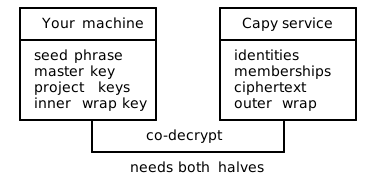
Decryption is a two-party operation: our service strips the outer wrap of your key.enc, your machine strips the inner. Neither side has both keys.
For the full threat model, see docs.capy.sc/internals/zero-trust. For the cryptographic constructions, see docs.capy.sc/internals/cryptography.
Most secrets managers encrypt at rest on their servers. Capy is one of the few that encrypts at source. Every value in your .env is ciphertext on your machine before any of it crosses the wire, making Capy a uniquely zero-trust, end-to-end secrets control system built for humans and agents alike.

Each value is a capy:{resourceId}:{ciphertext} snippet only your team can decrypt, but with just enough characters surrounding the ciphertext for you to identify the items. Plaintext only exists in process memory while capy run has your app spawned.
Two ways to change a value. Both end up encrypted and synced — pick whichever fits the moment.
.env in placeOpen .env in your editor and overwrite a capy:... snippet with the new plaintext value. The next capy sync re-encrypts whatever changed and updates keep.lock.

Good when you're already in your editor, pasting a new key from a dashboard, or scripting a bulk change.
capy edit)capy edit opens an interactive table of every variable on the current branch with sync status, drift, and conflicts visible at a glance. Reveal a value with r, edit with e, navigate with ↑↓, quit with q.

Good when you want to see drift across the whole branch, edit one variable without touching the file, or check what's in sync before a deploy.
| Command | Description |
|---|---|
capy |
Sync secrets. Initializes on first run. |
capy run -- <cmd> |
Run a command with decrypted secrets injected. |
capy edit |
Inspect and edit secrets in an interactive TUI. |
capy status |
Show drift between local, pinned, and remote. |
capy push |
Push local changes. Runs the same sync as capy, so any difference is settled first. |
capy lock |
Lock the local key so the passphrase is required next time. |
capy deploy |
Generate a deploy token and walk through platform setup. |
capy connect <provider> |
Pull a credential from a provider into .env. |
capy rotate [var] |
Rotate a managed credential. |
capy invite <email> |
Invite a teammate. |
capy redeem <code> |
Redeem an invite code. |
capy transport |
Move your account to another machine. |
capy kick <email> |
Remove a teammate. |
capy users |
Interactive user management. |
capy projects |
List projects in the org and their branches. |
capy project create|delete|restore |
Create, delete or restore a project in the org. |
capy secrets |
List every secret name in the org, grouped by value (never shows a value). |
capy org |
List or switch organizations. |
capy branch |
List or switch branches. |
capy checkout <branch> |
Switch branches. -b to create. |
capy grant-branch |
Grant access to a protected branch. |
capy revoke-branch |
Revoke branch access. |
capy recover |
Restore access from your recovery phrase. |
capy end-recover |
End a recovery session. |
capy decrypt |
Decrypt secrets offline (owner only). |
capy use <profile> |
Switch between configured profiles. |
capy profile |
Manage CLI profiles. |
capy byoc [url] |
Connect to a self-hosted Capy instance. |
capy info |
Show current session info. |
capy agents |
Tell AI coding agents in this repo how to use Capy (writes AGENTS.md / CLAUDE.md). |
capy logout |
Clear local session. |
capy cleanup |
Remove git hooks and local state. |
Run capy pair --json in an interactive terminal so the returned account can
be confirmed after browser approval. Before polling, Capy emits a versioned
pairing_required JSON event on stderr. It includes a PNG file and data URI,
the complete approval URL, exact pairing code, expiry in UTC, purpose, requesting
runtime, and display.markdown with the response the agent must show.
Always render that QR image inline with the link and metadata. If the CLI runs
inside another runtime, copy the PNG to the display environment or decode its
data URI there. Never use an external QR service. A client that cannot display
images must say so explicitly and still show the link and complete metadata.
Keep the command running; show the returned email and obtain the human's explicit
approval before confirming the account. The temporary PNG is removed when polling
ends, including expiry or denial. Final success/refusal remains a single JSON
object on stdout. capy help --json publishes the same presentation contract.
Terminal account-confirmation prompts can follow the initial event on stderr;
the event itself is one complete JSON line emitted before polling begins.
capy is a three-way diff between your local .env, the last pinned snapshot in keep.lock, and the latest on the service. Conflicts open an interactive resolver. See docs.capy.sc/using/syncing-secrets.
No command overwrites a value someone else changed since you last saw it. Every command that writes from a folder (capy edit, add, remove, connect, rotate, push, deploy, org, and checkout of an existing branch) runs a plain capy first. It repeats until your folder and Capy agree on every variable. If you cancel, nothing is written. Only then does the command apply its own change on top of Capy's latest. Every difference blocks the write, including ones unrelated to the variable you are changing. Exceptions: capy checkout -b, capy decrypt (and checkout while recovering from a seed phrase), new projects, and the org system store.
For each difference you choose one of four: pinned (the folder's keep.lock), local (your .env), remote (Capy's latest), or delete.
Off a terminal (--non-tty, --json, an agent, CI) nobody can be asked. The command writes nothing, exits 3, and prints JSON on stdout with "code": "SECRETS_CONFLICT", a conflict_id, and one row per difference (name, project, branch, and fingerprints of the pinned, local and remote values, never the values). Ask the person, then rerun the same command once with --resolve NAME=pinned|local|remote|delete for every row and --conflict <conflict_id>. A Dokploy platform value is answered as NAME@TARGET=local|remote. If anything moved in between, the command exits 3 again with SECRETS_CONFLICT_STALE and the fresh rows. There is no resolve-all, and an answer naming a source that has no value for that row is refused (only delete deletes).
capy push --non-tty                                        # exit 3: SECRETS_CONFLICT, conflict_id c_...
capy push --non-tty --resolve API_KEY=local --conflict c_9f2e41a07b3d
The capy secrets edit screens and capy secrets set do the same check against the value you were shown. Uploads also carry the version they started from, and the server refuses a stale one. The CLI syncs again and retries once.
capy run -- <cmd> decrypts .env in memory and spawns your command with the values set as environment variables. Works in any runtime that reads env vars. See docs.capy.sc/using/running-your-app.
Docker Compose: capy run -- docker compose up works with an unchanged env_file: .env. Capy passes compose an extra override listing only the decrypted variable names for the services that read .env, so compose forwards the real values into those containers. Nothing is written to disk.
capy deploy walks through Vercel, Cloudflare, Docker, Fly, Railway, Render, Heroku, GitHub Actions, and AWS Lambda. See docs.capy.sc/using/deploying.
capy deploy runs a plain capy first, so it only ships values your folder and Capy agree on. For Dokploy, if a service's live value was changed outside Capy since the last delivery, you choose local (deliver Capy's value) or remote (keep the platform's value and skip it). Batch deploy from capy secrets delivers only the variables you picked.
capy invite <email> to add a teammate; capy kick <email> to remove one. Invite codes travel out-of-band; kicks are O(1) with no key rotation. See docs.capy.sc/using/team/inviting.
Capy is a version control system for secrets that runs alongside git. You commit code, you sync secrets. Both have branches, both have a committed manifest (.git/, keep.lock), both pull and push to a remote. The difference: git's remote sees your code, Capy's remote only sees ciphertext.
A Capy branch is to your secrets what a git branch is to your code: a parallel state with its own values and its own access list. Switching branches changes which values capy run injects. As an example setup, you might keep a development branch open to every user while gating a production branch to only admins.
Because Capy branches are independent of git branches, each git branch pins to a Capy branch via the committed keep.lock file. Branch names are yours to choose, just like in git: a common pattern is sharing one shared dev branch across feature work and pinning release-* git branches to a separate staging or production branch.
For the full state model and protected-branch role enforcement, see docs.capy.sc/using/branches/overview.
Zero-trust is a cryptographic property: an attacker who fully compromises our service still can't decrypt your secrets, because every decryption requires a key share that lives only on your machine. Capy isn't asking you to trust us; the architecture ensures that compromising our service alone yields only ciphertext.
If you're the org owner and you lose the seed phrase with no other device holding key.enc, you lose access to that org. Capy can't help; it's zero-trust by design, so recovery would require us to hold something we intentionally don't. Back the seed phrase up when it's shown (password manager, physical note in a safe).
Run capy in a project that already has a .env. On first run, Capy treats your .env as authoritative, encrypts every value, uploads the ciphertext, and rewrites .env in place with capy:... snippets. A backup of your original .env is written to .env.pre-capy.old (gitignored).
The first sync needs network for authentication and key co-decrypt, but after that, capy run works offline against the local cache at ~/.capy/. You can develop on a plane; you just can't pick up changes other teammates pushed.
Immediately. On the kicked user's next request, the service refuses to strip the outer wrap; their key.enc becomes cryptographically inert on disk. The master key never rotates because remaining users can keep using it.
SOC 2 audit is in progress. GDPR-compliant. Trust posture and ongoing reports at trust.capy.sc.
Free for individuals and small teams. Paid plans for orgs that need higher quotas, more projects, or more users.
Yes. Configure your identity provider (Okta, Azure AD, Google Workspace, etc.) when creating your organization and your team authenticates via the same provider as the rest of your stack.
Not currently. The service component is closed. If self-hosting matters for your compliance posture, get in touch.
capy run keeps working from the local cache, so your running apps don't break. New syncs pause until the service comes back.
Yes. capy deploy generates SECRETS_BLOB and PROJECT_KEY to set as CI env vars; capy run in your build/test step does the rest. capy deploy --yes in CI exits 3 instead of proceeding if the folder and Capy differ on any variable; see Conflicts and agents. See the GitHub Actions guide at docs.capy.sc/using/deploying/github-actions.
Capy ships with five runtime dependencies. Each is a load-bearing piece of the CLI; nothing is included for convenience or to save a few lines of code. A small dependency footprint keeps the supply-chain attack surface tight.
| Dependency | Purpose | Status |
|---|---|---|
commander |
CLI argument parsing | ✓ no known vulnerabilities |
dotenv |
.env file parsing |
✓ no known vulnerabilities |
inquirer |
Interactive prompts | ✓ no known vulnerabilities |
open |
OAuth browser launch | ✓ no known vulnerabilities |
proper-lockfile |
Atomic file locking | ✓ no known vulnerabilities |
Live audit status and the full transitive dep tree: github.com/capysc/capy-cli/network/dependencies.
Dependabot keeps dependencies current — see .github/dependabot.yml. It opens weekly PRs for npm and github-actions, with dev dependencies grouped into a single PR per ecosystem.
Don't file public GitHub issues or discussions for security vulnerabilities. Those channels are public.
Capy takes security issues seriously. If you've found a vulnerability, email security@capy.sc with a description and ideally a way to reproduce it. We'll respond as soon as possible.
This address is for undisclosed vulnerabilities only. Please report security problems to us before disclosing them publicly.
You can fork this repo and create pull requests:
github.com/capysc/capy-cli - bugs and discussions
Publish npm releases only from a verified commit on origin/main, after the
release PR has been merged and full CI for that exact commit has passed. Build
and pack from that commit; a detached worktree keeps main unchanged. Confirm
the product changes against the previous release before tagging or publishing.
Never publish a tarball built from a feature or release branch.
Maintainers can approve npm authentication on another device without a callback to the publishing machine. Use npm 11.9 or newer with a supported Node version:
npm run release:login
npm run release:publish -- /absolute/path/to/reviewed-package.tgz
The login command prints npm's browser link and waits for npm's registry to
confirm approval. Publishing accepts a previously built and reviewed npm pack
artifact. If npm asks for another security-key approval, the helper prints its
link, polls the registry, and retries that same artifact once. It does not launch
a local browser or require an inbound callback. Complete approval within five
minutes; expired approvals require a fresh command.
Add --json to either command for newline-delimited status and approval events.
Only the browser approval link is emitted; registry polling URLs and one-time
tokens stay within the publishing process. Login credentials are saved by npm
in its normal user configuration.
AGPL-3.0-only. Copyright © Incentv Technologies Inc.
See LICENSE for the full text. For what AGPL means for your team in practice — when it imposes obligations and when it doesn't — see docs.capy.sc/using/license.
The prebuilt binaries embed their dependencies; those packages' licenses and copyright notices are reproduced in THIRD-PARTY-NOTICES.md.
capysc/capy-cli is a public repo on GitHub by capysc. Encrypt your .env. Sync it across your team. Ship it anywhere.
It declares no license on GitHub. Public does not mean open source: without a license, nobody is granted the right to reuse it.
Its maker has not tagged a system, so it is unknown here. Its README says what it needs.
Open "Take it" on its page: Take My Repo writes an install plan for your machine and hands it to your AI agent (Claude Code, Codex or Cursor), which asks you before each step. Take My Repo has not tested it on any machine.
Its last change on GitHub was on 2026-11-21. Take My Repo does not judge from that whether it is maintained.
Nobody has reviewed it on Take My Repo yet, which says nothing about its quality.
Reverse engineer anything with agents, from app behavior down to native binaries.
The agent harness performance optimization system. Skills, instincts, memory, security, and research-first development for Claude Code, Codex, Opencode, Cursor and beyond.
A collection of inspiring lists, manuals, cheatsheets, blogs, hacks, one-liners, cli/web tools and more.
Fair-code workflow automation platform with native AI capabilities. Combine visual building with custom code, self-host or cloud, 400+ integrations.
Makes your AI agent think like the laziest senior dev in the room. The best code is the code you never wrote.
Standalone passkey PRF encryption compatibility test across browsers, devices, and password managers.




