cider
The Clojure Interactive Development Environment that Rocks for Emacs
- 3.7k
- Emacs Lisp
- GPL-3.0
- 11 d ago

The next generation Clojure major mode for Emacs, powered by TreeSitter
Repo clojure-emacs/clojure-ts-mode, read from GitHub 1 min ago. clojure-emacs has not joined Take My Repo.
clojure-emacs/clojure-ts-mode is a public repo on GitHub by clojure-emacs. The next generation Clojure major mode for Emacs, powered by TreeSitter. It declares the GPL-3.0 license on GitHub. It is written mainly in Emacs Lisp, has 192 stars and last changed on 2026-11-07. Nobody has reviewed it on Take My Repo yet, which says nothing about its quality. Read from GitHub on 2026-11-22.
clojure-ts-mode is an Emacs major mode that provides font-lock (syntax
highlighting), indentation, and navigation support for the
Clojure(Script) programming language, powered by the
tree-sitter-clojure
Tree-sitter grammar.
clojure-mode has served us well
for a very long time, but it suffers from a few long-standing
problems, related to
Emacs limitations baked into its design. The introduction of built-in support
for Tree-sitter in Emacs 29 presents a natural opportunity to address many of
them. Enter clojure-ts-mode, which makes use of Tree-sitter to provide:
imenu (an outline of
a source buffer), current form inference (used internally by various Emacs
modes and utilities), etcWorking with Tree-sitter is significantly easier than the legacy Emacs APIs for font-locking and
indentation, which makes it easier to contribute to clojure-ts-mode, and to improve it in general.
Keep in mind that the transition to clojure-ts-mode won't happen overnight for several reasons:
clojure-mode will take some timeclojure-mode will need to be updated to work with clojure-ts-modeThat's why clojure-ts-mode is being developed independently of clojure-mode
and will one day replace it when the time is right. (e.g. 3 major Emacs version
down the road, so circa Emacs 32)
You can read more about the vision for clojure-ts-mode here.
Warning
This library is still under active development. Breaking changes should be expected.
The currently provided functionality should cover the needs of most Clojure programmers, but you can expect to encounter some bugs and missing functionality here and there.
Those will be addressed over time, as more and more people use clojure-ts-mode.
For clojure-ts-mode to work, you need Emacs 30+ built with Tree-sitter support.
To check if your Emacs supports Tree-sitter run the following (e.g. by using M-:):
(treesit-available-p)
Additionally, you'll need to have Git and some C compiler (cc) installed and available
in your $PATH (or Emacs's exec-path), for clojure-ts-mode to be able to install the required
Tree-sitter grammars automatically.
Tip
As the Tree-sitter support in Emacs is still fairly new and under active development itself, for optimal results you should use the latest stable Emacs release or even the development version of Emacs. See the "Caveats" section for more on the subject.
Note
That's the recommended way to install clojure-ts-mode.
clojure-ts-mode is available on MELPA and NonGNU ELPA. It can be installed with:
(package-install 'clojure-ts-mode)
Emacs also includes package-vc-install, so you can run:
(package-vc-install "https://github.com/clojure-emacs/clojure-ts-mode")to install this package from source.
You can install it by cloning the repository and adding it to your load path.
git clone https://github.com/clojure-emacs/clojure-ts-mode.git
(add-to-list 'load-path "~/path/to/clojure-ts-mode/")
Once installed, evaluate clojure-ts-mode.el and you should be ready to go.
Note
clojure-ts-mode installs the required grammars automatically, so for most
people no manual actions will be required.
clojure-ts-mode makes use of the following Tree-sitter grammars:
clojure-ts-mode.clojure-ts-use-markdown-inline is enabled.clojure-ts-use-regex-parser is not nil.clojure-ts-clojurescript-mode can optionally use tree-sitter-javascript grammar
to highlight JS syntax in js* forms. This is enabled by default and can be
turned off by setting clojure-ts-clojurescript-use-js-parser to nil.
clojure-ts-jank-mode can optionally use tree-sitter-cpp grammar to highlight C++
syntax in cpp/raw forms. This is enabled by default and can be turned off by
setting clojure-ts-jank-use-cpp-parser to nil.
If you have git and a C compiler (cc) available on your system's PATH,
clojure-ts-mode will install the
grammars when you first open a Clojure file and clojure-ts-ensure-grammars is
set to t (the default). macOS users can install the required tools like this:
xcode-select --install
Similarly, Debian/Ubuntu users can do something like:
sudo apt install build-essential
This installs GCC, G++, make, and other essential development tools.
If clojure-ts-mode fails to automatically install the grammar, you have the
option to install it manually. Please, refer to the installation instructions of
each required grammar and make sure you're installing the versions expected (see
clojure-ts-grammar-recipes for details).
If clojure-ts-ensure-grammars is enabled, clojure-ts-mode will try to upgrade
the Clojure grammar if it's outdated. This might happen when you activate
clojure-ts-mode for the first time after a package update. If the grammar was
previously installed, you might need to restart Emacs, because it has to reload
the grammar binary.
To reinstall or upgrade Tree-sitter grammars, you can execute:
M-x clojure-ts-reinstall-grammars
This will install the latest compatible grammars, even if they are already installed.
clojure-ts-mode provides major modes for several Clojure dialects:
| Mode | File Extension | Description |
|---|---|---|
clojure-ts-mode |
.clj |
Clojure |
clojure-ts-clojurescript-mode |
.cljs |
ClojureScript |
clojure-ts-clojurec-mode |
.cljc |
ClojureC (portable Clojure) |
clojure-ts-clojuredart-mode |
.cljd |
ClojureDart |
clojure-ts-jank-mode |
.jank |
Jank |
clojure-ts-joker-mode |
.joke |
Joker |
All derived modes inherit the full feature set of clojure-ts-mode.
To see a list of available configuration options do M-x customize-group <RET> clojure-ts.
Most configuration changes will require reverting any active clojure-ts-mode buffers.
clojure-mode buffersBy default, clojure-ts-mode assumes command over all buffers and file
extensions previously associated with clojure-mode (and derived major modes
like clojurescript-mode). To disable this remapping, set
(setopt clojure-ts-auto-remap nil)You can also use the commands clojure-ts-activate-mode-remappings /
clojure-ts-deactivate-mode-remappings to interactively change this behavior.
clojure-ts-mode currently supports 2 different indentation strategies:
semantic, the default, which tries to match the indentation of clojure-mode and cljfmtfixed, a simple indentation strategy outlined by Tonsky in a blog postSet the var clojure-ts-indent-style to change it.
(setopt clojure-ts-indent-style 'fixed)Tip
You can find this article comparing semantic and fixed indentation useful.
The indentation of special forms and macros with bodies is controlled via
clojure-ts-semantic-indent-rules. Nearly all special forms and built-in macros
with bodies have special indentation settings in clojure-ts-mode, which are
aligned with cljfmt indent rules. You can add/alter the indentation settings in
your personal config. Let's assume you want to indent ->> and -> like this:
(->> something
  ala
  bala
  portokala)
You can do so by putting the following in your config:
(setopt clojure-ts-semantic-indent-rules '(("->" . ((:block 1)))
                                           ("->>" . ((:block 1)))))
This means that the body of the ->/->> is after the first argument.
The default set of rules is defined as
clojure-ts--semantic-indent-rules-defaults, any rule can be overridden using
customization option.
Two types of rules are supported: :block and :inner, mirroring those in
cljfmt. When a rule is defined as :block n, n represents the number of
arguments preceding the body. If the body doesn't start on a line of its own,
the form is indented like a function call instead. When a rule is
defined as :inner n, each form within the expression's body, nested n
levels deep, is indented by two spaces. These rule definitions fully reflect the cljfmt rules.
For example:
do has a rule ((:block 0)).when has a rule ((:block 1)).defn and fn have a rule ((:inner 0)).letfn has a rule ((:block 1) (:inner 2 0)).Custom indentation rules can be set for individual projects. To achieve this,
you need to create a .dir-locals.el file in the project root. The content
should look like:
((clojure-ts-mode . ((clojure-ts-semantic-indent-rules . (("with-transaction" . ((:block 1)))
                                                          ("with-retry" . ((:block 1))))))))
In order to apply directory-local variables to existing buffers, they must be "reverted" (reloaded).
You can vertically align sexps with C-c SPC. For instance, typing this combo
on the following form:
(def my-map
  {:a-key 1
   :other-key 2})
Leads to the following:
(def my-map
  {:a-key     1
   :other-key 2})
This can also be done automatically (as part of indentation) by turning on
clojure-ts-align-forms-automatically. This way it will happen whenever you
select some code and hit TAB.
Forms that can be aligned vertically are configured via the following variables:
clojure-ts-align-reader-conditionals - align reader conditionals as if they
were maps.clojure-ts-align-binding-forms - a customizable list of forms with let-like
bindings that can be aligned vertically.clojure-ts-align-cond-forms - a customizable list of forms whose body
elements can be aligned vertically. These forms respect the block semantic
indentation rule (if configured) and align only the body forms, skipping N
special arguments.clojure-ts-align-separator - determines whether blank lines prevent vertical
alignment.clojure-ts-mode provides 4 levels of font-locking, as is the standard for
Tree-sitter modes. The default level in Emacs is 3, and you can change it like
this:
;; this font-locks everything clojure-ts-mode supports
(setq treesit-font-lock-level 4)
The font-lock features available at each level are:
Level 1 (minimal -- comments, definitions, and variables):
comment -- comments and #_ discard expressionsdefinition -- defn, defmacro, defmethod, defmulti, defonce, defrecord, deftype, defprotocol, reify, letfn, anonymous functions (#(...))variable -- def and defonce bindingsLevel 2 (add keywords, strings, types, symbols):
keyword -- Clojure keywords and their namespaces: :foo, :bar/bazstring -- string literals: "hello"char -- character literals: \a, \newlinesymbol -- symbol namespaces: clojure.string in clojure.string/joinbuiltin -- clojure.core built-in forms and dynamic vars: let, when, map, *out*type -- type declarations (defrecord, deftype, defprotocol), type hints (^String), namespace namesLevel 3 (default -- full-blown fontification):
constant -- boolean and nil literals: true, false, nilnumber -- numeric literals: 42, 3.14, 0xFFquote -- quoting markers: ', `, ~, ~@, #'metadata -- metadata markers and keyword values: ^:dynamic, #^{}doc -- docstrings in defn, def, defmacro, etc.regex -- the # marker on regex literals: #"pattern"Level 4 (maximum detail):
bracket -- brackets: (), [], {}, #{}deref -- the @ deref marker: @atomfunction -- function calls: f in (f x), map in (map inc coll)tagged-literals -- tagged literals: #inst, #uuid, #my/tagYou don't have to use the level system. If you want fine-grained control over
what gets highlighted, you can cherry-pick individual features using
treesit-font-lock-recompute-features:
(defun my-clojure-ts-font-lock-setup ()
  (treesit-font-lock-recompute-features
   ;; enable these features
   '(comment definition variable keyword string char symbol builtin type
     constant number quote metadata doc regex
     deref function tagged-literals)
   ;; disable these features
   '(bracket)))

(add-hook 'clojure-ts-mode-hook #'my-clojure-ts-font-lock-setup)
You can also call M-x treesit-font-lock-recompute-features interactively to
toggle features in the current buffer.
The faces used are standard font-lock-*-face faces (plus clojure-ts-keyword-face
and clojure-ts-character-face), so any theme applies automatically. If you want
to tweak how specific syntactic elements look, you have two options:
Buffer-local remapping (recommended) -- changes apply only to
clojure-ts-mode buffers, leaving other modes unaffected:
;; Use a custom color for keywords in Clojure buffers only
(add-hook 'clojure-ts-mode-hook
  (lambda ()
    (face-remap-add-relative 'clojure-ts-keyword-face
                             :foreground "DarkCyan")))
You can remap multiple faces in the same hook. Each
face-remap-add-relative call stacks on top of the face's current
definition, so theme settings are preserved as a base. See
Face Remapping
in the Emacs Lisp manual for details.
Global customization -- changes apply everywhere the face is used:
;; Change keyword face globally
(custom-set-faces
 '(clojure-ts-keyword-face ((t (:foreground "DarkCyan")))))
This is simpler but less precise -- since tree-sitter modes share the same
font-lock-*-face faces, a global change will affect every tree-sitter mode
(and traditional modes) that uses that face.
To highlight entire rich comment expression with the comment font face, set
(setopt clojure-ts-comment-macro-font-lock-body t)By default this is nil, so that anything within a comment expression is
highlighted like regular Clojure code.
In clojure-ts-mode it is possible to specify additional defn-like forms that
should be fontified. For example to highlight the following form from Hiccup
library as a function definition:
(defelem file-upload
  "Creates a file upload input."
  [name]
  (input-field "file" name nil))
You can add defelem to clojure-ts-extra-def-forms list like this:
(add-to-list 'clojure-ts-extra-def-forms "defelem")
or set this variable using setopt:
(setopt clojure-ts-extra-def-forms '("defelem"))This setting will highlight defelem symbol, function name and the docstring,
including the Markdown in it.
Important
Setting clojure-ts-extra-def-forms won't change the indentation rule for
these forms. For indentation rules you should use
clojure-ts-semantic-indent-rules variable (see semantic
indentation section).
By default Markdown syntax is highlighted in the docstrings using
markdown-inline grammar. To disable this feature use:
(setopt clojure-ts-use-markdown-inline nil)Example of Markdown syntax highlighting:

By default syntax inside regex literals is highlighted using regex grammar. To disable this feature use:
(setopt clojure-ts-use-regex-parser nil)Example of regex syntax highlighting:

To make forms inside of (comment ...) forms appear as top-level forms for evaluation and navigation, set
(setopt clojure-ts-toplevel-inside-comment-form t)To change the maximal line length used by M-x prog-fill-reindent-defun (also
bound to M-q by default) to reformat docstrings and comments it's possible to
customize clojure-ts-docstring-fill-column variable (by default set to the value of
Emacs' fill-column value).
Every new line in the docstrings is indented by
clojure-ts-docstring-fill-prefix-width number of spaces (set to 2 by default
which matches the clojure-mode settings).
clojure-ts-mode supports various types of definition that can be navigated
using imenu, such as:
defprotocol, definterface and defmulti)deftype, defrecord and defstruct)clojure-ts-mode can detect Clojure project roots by looking for common build
tool files (e.g. project.clj, deps.edn, shadow-cljs.edn, etc.). The list
of files used for detection is configured via clojure-ts-build-tool-files.
The function used to locate the project root can be customized via
clojure-ts-project-root-function (defaults to clojure-ts-project-root-path).
For performance, the project directory and namespace lookups can be cached via
clojure-ts-cache-project-dir (enabled by default) and clojure-ts-cache-ns
(disabled by default).
outline-minor-modeclojure-ts-mode supports two integration variants with
outline-minor-mode. The default variant uses special top-level comments (level
1 heading starts with three semicolons, level 2 heading starts with four,
etc.). The other variant treats def-like forms (the same forms produced by the
imenu command) as outline headings. To use the second option, use the
following customization:
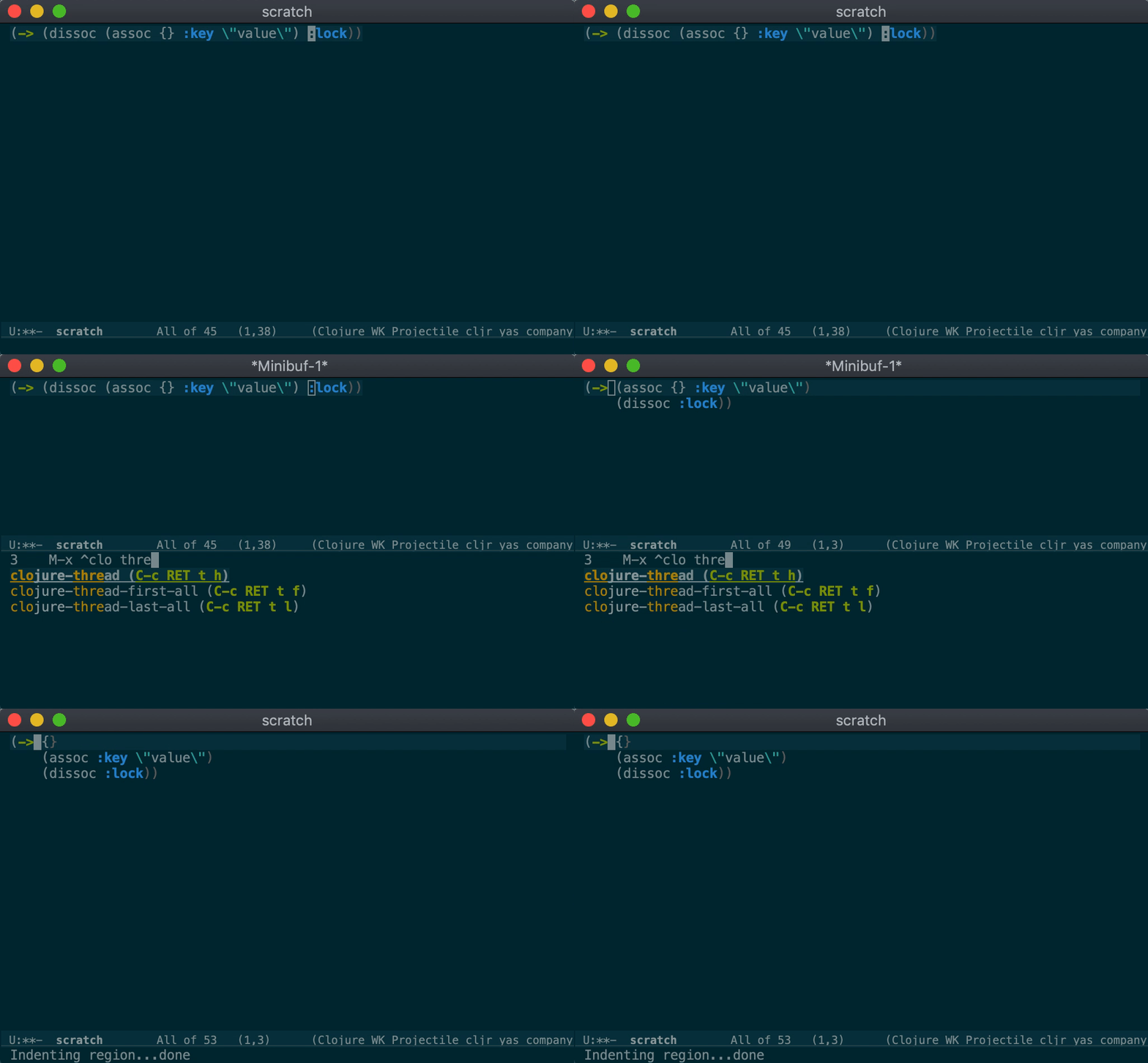
(setopt clojure-ts-outline-variant 'imenu)There are a bunch of commands for threading and unwinding threaded Clojure forms:
clojure-ts-thread: Thread another form into the surrounding thread. Both
->>/some->> and ->/some-> variants are supported.clojure-ts-unwind: Unwind a threaded expression. Supports both ->>/some->>
and ->/some->.clojure-ts-thread-first-all: Introduce the thread first macro (->) and
rewrite the entire form. With a prefix argument do not thread the last form.clojure-ts-thread-last-all: Introduce the thread last macro and rewrite the
entire form. With a prefix argument do not thread the last form.clojure-ts-unwind-all: Fully unwind a threaded expression removing the
threading macro.By default clojure-ts-thread-first-all and clojure-ts-thread-last-all will
thread all nested expressions. For example this expression:
(->map (assoc {} :key "value") :lock)
After executing clojure-ts-thread-last-all will be converted to:
(-> {}
    (assoc :key "value")
    (->map :lock))
This behavior can be changed by setting:
(setopt clojure-ts-thread-all-but-last t)Then the last expression will not be threaded and the result will be:
(-> (assoc {} :key "value")
    (->map :lock))
clojure-ts-cycle-keyword-string: Convert the string at point to a keyword and
vice versa.clojure-ts-cycle-privacy: Cycle privacy of defs or defns. Use metadata
explicitly with setting clojure-ts-use-metadata-for-defn-privacy to t for
defns too.clojure-ts-cycle-conditional: Change a surrounding conditional form to its
negated counterpart, or vice versa (supports if/if-not and
when/when-not). For if/if-not also transposes the else and then
branches, keeping the semantics the same as before.clojure-ts-cycle-not: Add or remove a not form around the current form.Convert any given collection at point to list, quoted list, map, vector or set. The following commands are available:
clojure-ts-convert-collection-to-listclojure-ts-convert-collection-to-quoted-listclojure-ts-convert-collection-to-mapclojure-ts-convert-collection-to-vectorclojure-ts-convert-collection-to-setclojure-ts-add-arity: Add a new arity to an existing single-arity or
multi-arity function or macro. Function can be defined using defn, fn or
defmethod form. This command also supports functions defined inside forms like
letfn, defprotocol, reify, extend-protocol or proxy.
clojure-ts-remove-unused-keys: Remove what the top-level form at point
destructures from maps but doesn't use: names in :keys, :strs and :syms,
:as names and names bound to keys, along with their :or defaults. That
covers arglists (defn, fn, defmethod, letfn, reify and the like) and
the bindings of let, loop, for, doseq and the like. A map with nothing
left becomes _.
(defn handle [{:keys [id user] :or {user "anon"} :as req}]
  (process id))

;; becomes

(defn handle [{:keys [id]}]
  (process id))
A name stays when a symbol with that name appears anywhere in its scope, even
if it's a local that shadows it, and so does one starting with _, which marks
it unused on purpose. Positional args and vector destructuring are left alone,
as removing one would change what the others bind.
| Keybinding | Command |
|---|---|
C-: |
clojure-ts-cycle-keyword-string |
C-c SPC |
clojure-ts-align |
C-c C-r t / C-c C-r C-t |
clojure-ts-thread |
C-c C-r u / C-c C-r C-u |
clojure-ts-unwind |
C-c C-r f / C-c C-r C-f |
clojure-ts-thread-first-all |
C-c C-r l / C-c C-r C-l |
clojure-ts-thread-last-all |
C-c C-r p / C-c C-r C-p |
clojure-ts-cycle-privacy |
C-c C-r ( / C-c C-r C-( |
clojure-ts-convert-collection-to-list |
C-c C-r ' / C-c C-r C-' |
clojure-ts-convert-collection-to-quoted-list |
C-c C-r { / C-c C-r C-{ |
clojure-ts-convert-collection-to-map |
C-c C-r [ / C-c C-r C-[ |
clojure-ts-convert-collection-to-vector |
C-c C-r # / C-c C-r C-# |
clojure-ts-convert-collection-to-set |
C-c C-r c / C-c C-r C-c |
clojure-ts-cycle-conditional |
C-c C-r o / C-c C-r C-o |
clojure-ts-cycle-not |
C-c C-r a / C-c C-r C-a |
clojure-ts-add-arity |
C-c C-r k / C-c C-r C-k |
clojure-ts-remove-unused-keys |
By default prefix for all refactoring commands is C-c C-r. It can be changed
by customizing clojure-ts-refactor-map-prefix variable.
clojure-ts-mode provides basic code completion functionality. Completion only
works for the current source buffer and includes completion of top-level
definitions and local bindings. This feature can be turned off by setting:
(setopt clojure-ts-completion-enabled nil)Here's the short video illustrating the feature with Emacs's built-in completion UI (it
should also work well with more advanced packages like company and corfu):
If you are migrating to clojure-ts-mode note that clojure-mode is still
required for CIDER and clj-refactor packages to work properly.
After installing the package do the following:
clojure-mode-hook and copy all relevant hooks to clojure-ts-mode-hook.(add-hook 'clojure-ts-mode-hook #'cider-mode) (add-hook 'clojure-ts-mode-hook #'enable-paredit-mode) (add-hook 'clojure-ts-mode-hook #'rainbow-delimiters-mode) (add-hook 'clojure-ts-mode-hook #'clj-refactor-mode)
.dir-locals.el in all of your Clojure projects to activate directory
local variables in clojure-ts-mode.((clojure-mode (cider-clojure-cli-aliases . ":test:repl")) (clojure-ts-mode (cider-clojure-cli-aliases . ":test:repl")))
As the Tree-sitter Emacs APIs are new and keep evolving there are some
differences in the behavior of clojure-ts-mode on different Emacs versions.
Here are some notable examples:
prog-mode, but on Emacs 30+ it's both prog-mode
and clojure-mode (this is very helpful when dealing with derived-mode-p checks)clojure-mode features are currently missing?As of version 0.5.x, clojure-ts-mode provides almost all clojure-mode features.
Currently only a few refactoring commands are missing.
clojure-ts-mode work with CIDER?Yes! Preliminary support for clojure-ts-mode was released in CIDER
1.14. Note that
clojure-mode is still needed for some APIs that haven't yet been ported to
clojure-ts-mode.
For now, when you take care of the keybindings for the CIDER commands you use
and ensure cider-mode is enabled for clojure-ts-mode buffers in your config,
most functionality should already work:
(add-hook 'clojure-ts-mode-hook #'cider-mode)
Check out this article for more details.
Note
The dynamic indentation feature in CIDER requires clojure-ts-mode 0.3+.
clojure-ts-mode work with inf-clojure?Yes, it does. inf-clojure 3.3+ supports clojure-ts-mode.
clojure-ts-mode require Emacs 30?You might be wondering why does clojure-ts-mode require Emacs 30 instead of
Emacs 29, which introduced the built-in Tree-sitter support. The answer is
simple - the initial Tree-sitter support in Emacs 29 had quite a few issues and
we felt it's better to nudge most people interested in using it to Emacs 30,
which fixed a lot of the problems.
We welcome contributions of any kind!
If you're not familiar with Tree-sitter, a good place to start is our design documentation, which explains how Tree-sitter works in Emacs in broad strokes and covers some of the design decisions we've made along the way.
We're using Eldev as our build tool, so you'll have to install it. We also provide a simple Makefile with targets invoking Eldev. You only need to know a couple of them:
make lint

make test
The process of releasing a new version of clojure-ts-mode is documented here.
Copyright © 2022-2026 Danny Freeman, Bozhidar Batsov and contributors.
Distributed under the GNU General Public License; type C-h C-c to view it.
clojure-emacs/clojure-ts-mode is a public repo on GitHub by clojure-emacs. The next generation Clojure major mode for Emacs, powered by TreeSitter.
It declares the GPL-3.0 license on GitHub.
Its maker tagged it for macOS and Linux. That is declared by the maker; Take My Repo has not tested it.
Open "Take it" on its page: Take My Repo writes an install plan for your machine and hands it to your AI agent (Claude Code, Codex or Cursor), which asks you before each step. Take My Repo has not tested it on any machine.
Its last change on GitHub was on 2026-11-07. GitHub counts 8 open issues and pull requests. Take My Repo does not judge from that whether it is maintained.
Nobody has reviewed it on Take My Repo yet, which says nothing about its quality.
The Clojure Interactive Development Environment that Rocks for Emacs
Emacs support for the Clojure(Script) programming language
A CIDER extension that provides powerful commands for refactoring Clojure code.
A collection of nREPL middleware to enhance Clojure editors with common functionality like definition lookup, code completion, etc.