ECC
The agent harness performance optimization system. Skills, instincts, memory, security, and research-first development for Claude Code, Codex, Opencode, Cursor and beyond.
- 309k
- JavaScript
- MIT
- 3 d ago
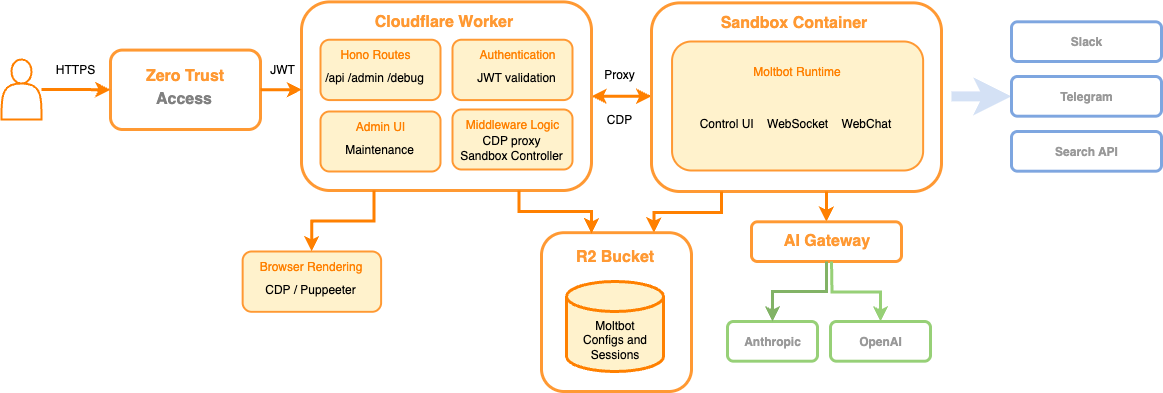
Run OpenClaw, (formerly Moltbot, formerly Clawdbot) on Cloudflare Workers
Repo cloudflare/moltworker, read from GitHub 1 min ago. cloudflare has not joined Take My Repo.
cloudflare/moltworker is a public repo on GitHub by cloudflare. Run OpenClaw, (formerly Moltbot, formerly Clawdbot) on Cloudflare Workers. It declares the Apache-2.0 license on GitHub. It is written mainly in TypeScript, has 9,946 stars and last changed on 2026-05-09. Nobody has reviewed it on Take My Repo yet, which says nothing about its quality. Read from GitHub on 2026-11-23.
Run OpenClaw (formerly Moltbot, formerly Clawdbot) personal AI assistant in a Cloudflare Sandbox.

Experimental: This is a proof of concept demonstrating that OpenClaw can run in Cloudflare Sandbox. It is not officially supported and may break without notice. Use at your own risk.
The following Cloudflare features used by this project have free tiers:
This project uses a standard-1 Cloudflare Container instance (1/2 vCPU, 4 GiB memory, 8 GB disk). Below are approximate monthly costs assuming the container runs 24/7, based on Cloudflare Containers pricing:
| Resource | Provisioned | Monthly Usage | Included Free | Overage | Approx. Cost |
|---|---|---|---|---|---|
| Memory | 4 GiB | 2,920 GiB-hrs | 25 GiB-hrs | 2,895 GiB-hrs | ~$26/mo |
| CPU (at ~10% utilization) | 1/2 vCPU | ~2,190 vCPU-min | 375 vCPU-min | ~1,815 vCPU-min | ~$2/mo |
| Disk | 8 GB | 5,840 GB-hrs | 200 GB-hrs | 5,640 GB-hrs | ~$1.50/mo |
| Workers Paid plan | $5/mo | ||||
| Total | ~$34.50/mo |
Notes:
SANDBOX_SLEEP_AFTER (e.g., 10m) so the container sleeps when idle. A container that only runs 4 hours/day would cost roughly ~$5-6/mo in compute on top of the $5 plan fee.lite at 256 MiB/$0.50/mo memory or standard-4 at 12 GiB for heavier workloads).OpenClaw (formerly Moltbot, formerly Clawdbot) is a personal AI assistant with a gateway architecture that connects to multiple chat platforms. Key features:
This project packages OpenClaw to run in a Cloudflare Sandbox container, providing a fully managed, always-on deployment without needing to self-host. Optional R2 storage enables persistence across container restarts.

Cloudflare Sandboxes are available on the Workers Paid plan.
# Install dependencies
npm install

# Set your API key (direct Anthropic access)
npx wrangler secret put ANTHROPIC_API_KEY

# Or use Cloudflare AI Gateway instead (see "Optional: Cloudflare AI Gateway" below)
# npx wrangler secret put CLOUDFLARE_AI_GATEWAY_API_KEY
# npx wrangler secret put CF_AI_GATEWAY_ACCOUNT_ID
# npx wrangler secret put CF_AI_GATEWAY_GATEWAY_ID

# Generate and set a gateway token (required for remote access)
# Save this token - you'll need it to access the Control UI
export MOLTBOT_GATEWAY_TOKEN=$(openssl rand -hex 32)
echo "Your gateway token: $MOLTBOT_GATEWAY_TOKEN"
echo "$MOLTBOT_GATEWAY_TOKEN" | npx wrangler secret put MOLTBOT_GATEWAY_TOKEN

# Deploy
npm run deploy
After deploying, open the Control UI with your token:
https://your-worker.workers.dev/?token=YOUR_GATEWAY_TOKEN
Replace your-worker with your actual worker subdomain and YOUR_GATEWAY_TOKEN with the token you generated above.
Note: The first request may take 1-2 minutes while the container starts.
Important: You will not be able to use the Control UI until you complete the following steps. You MUST:
- Set up Cloudflare Access to protect the admin UI
- Pair your device via the admin UI at
/_admin/
You'll also likely want to enable R2 storage so your paired devices and conversation history persist across container restarts (optional but recommended).
To use the admin UI at /_admin/ for device management, you need to:
The easiest way to protect your worker is using the built-in Cloudflare Access integration for workers.dev:
moltbot-sandbox)workers.dev row, click the meatballs menu (...)CF_ACCESS_AUD in Step 2 belowAfter enabling Cloudflare Access, set the secrets so the worker can validate JWTs:
# Your Cloudflare Access team domain (e.g., "myteam.cloudflareaccess.com")
npx wrangler secret put CF_ACCESS_TEAM_DOMAIN

# The Application Audience (AUD) tag from your Access application that you copied in the step above
npx wrangler secret put CF_ACCESS_AUD
You can find your team domain in the Zero Trust Dashboard under Settings > Custom Pages (it's the subdomain before .cloudflareaccess.com).
npm run deploy
Now visit /_admin/ and you'll be prompted to authenticate via Cloudflare Access before accessing the admin UI.
If you prefer more control, you can manually create an Access application:
moltbot-sandbox.your-subdomain.workers.dev)/_admin/*, /api/*, /debug/*For local development, create a .dev.vars file with:
DEV_MODE=true               # Skip Cloudflare Access auth + bypass device pairing
DEBUG_ROUTES=true           # Enable /debug/* routes (optional)
By default, moltbot uses device pairing for authentication. When a new device (browser, CLI, etc.) connects, it must be approved via the admin UI at /_admin/.
/_admin/This is the most secure option as it requires explicit approval for each device.
A gateway token is required to access the Control UI when hosted remotely. Pass it as a query parameter:
https://your-worker.workers.dev/?token=YOUR_TOKEN
wss://your-worker.workers.dev/ws?token=YOUR_TOKEN
Note: Even with a valid token, new devices still require approval via the admin UI at /_admin/ (see Device Pairing above).
For local development only, set DEV_MODE=true in .dev.vars to skip Cloudflare Access authentication and enable allowInsecureAuth (bypasses device pairing entirely).
By default, moltbot data (configs, paired devices, conversation history) is lost when the container restarts. To enable persistent storage across sessions, configure R2:
moltbot-data bucket (created automatically on first deploy)# R2 Access Key ID npx wrangler secret put R2_ACCESS_KEY_ID # R2 Secret Access Key npx wrangler secret put R2_SECRET_ACCESS_KEY # Your Cloudflare Account ID npx wrangler secret put CF_ACCOUNT_ID
To find your Account ID: Go to the Cloudflare Dashboard, click the three dots menu next to your account name, and select "Copy Account ID".
R2 storage uses a backup/restore approach for simplicity:
On container startup:
During operation:
/_admin/In the admin UI:
Without R2 credentials, moltbot still works but uses ephemeral storage (data lost on container restart).
By default, the sandbox container stays alive indefinitely (SANDBOX_SLEEP_AFTER=never). This is recommended because cold starts take 1-2 minutes.
To reduce costs for infrequently used deployments, you can configure the container to sleep after a period of inactivity:
npx wrangler secret put SANDBOX_SLEEP_AFTER
# Enter: 10m (or 1h, 30m, etc.)
When the container sleeps, the next request will trigger a cold start. If you have R2 storage configured, your paired devices and data will persist across restarts.

Access the admin UI at /_admin/ to:
The admin UI requires Cloudflare Access authentication (or DEV_MODE=true for local development).
Debug endpoints are available at /debug/* when enabled (requires DEBUG_ROUTES=true and Cloudflare Access):
GET /debug/processes - List all container processesGET /debug/logs?id=<process_id> - Get logs for a specific processGET /debug/version - Get container and moltbot version infonpx wrangler secret put TELEGRAM_BOT_TOKEN npm run deploy
npx wrangler secret put DISCORD_BOT_TOKEN
npm run deploy
npx wrangler secret put SLACK_BOT_TOKEN
npx wrangler secret put SLACK_APP_TOKEN
npm run deploy
This worker includes a Chrome DevTools Protocol (CDP) shim that enables browser automation capabilities. This allows OpenClaw to control a headless browser for tasks like web scraping, screenshots, and automated testing.
npx wrangler secret put CDP_SECRET
# Enter a secure random stringnpx wrangler secret put WORKER_URL
# Enter: https://your-worker.workers.devnpm run deploy
| Endpoint | Description |
|---|---|
GET /cdp/json/version |
Browser version information |
GET /cdp/json/list |
List available browser targets |
GET /cdp/json/new |
Create a new browser target |
WS /cdp/devtools/browser/{id} |
WebSocket connection for CDP commands |
All endpoints require authentication via the ?secret=<CDP_SECRET> query parameter.
The container includes pre-installed skills in /root/clawd/skills/:
Browser automation via the CDP shim. Requires CDP_SECRET and WORKER_URL to be set (see Browser Automation above).
Scripts:
screenshot.js - Capture a screenshot of a URLvideo.js - Create a video from multiple URLscdp-client.js - Reusable CDP client libraryUsage:
# Screenshot
node /root/clawd/skills/cloudflare-browser/scripts/screenshot.js https://example.com output.png

# Video from multiple URLs
node /root/clawd/skills/cloudflare-browser/scripts/video.js "https://site1.com,https://site2.com" output.mp4 --scroll
See skills/cloudflare-browser/SKILL.md for full documentation.
You can route API requests through Cloudflare AI Gateway for caching, rate limiting, analytics, and cost tracking. OpenClaw has native support for Cloudflare AI Gateway as a first-class provider.
AI Gateway acts as a proxy between OpenClaw and your AI provider (e.g., Anthropic). Requests are sent to https://gateway.ai.cloudflare.com/v1/{account_id}/{gateway_id}/anthropic instead of directly to api.anthropic.com, giving you Cloudflare's analytics, caching, and rate limiting. You still need a provider API key (e.g., your Anthropic API key) — the gateway forwards it to the upstream provider.
# Your AI provider's API key (e.g., your Anthropic API key).
# This is passed through the gateway to the upstream provider.
npx wrangler secret put CLOUDFLARE_AI_GATEWAY_API_KEY

# Your Cloudflare account ID
npx wrangler secret put CF_AI_GATEWAY_ACCOUNT_ID

# Your AI Gateway ID (from the gateway overview page)
npx wrangler secret put CF_AI_GATEWAY_GATEWAY_ID
All three are required. OpenClaw constructs the gateway URL from the account ID and gateway ID, and passes the API key to the upstream provider through the gateway.
npm run deploy
When Cloudflare AI Gateway is configured, it takes precedence over direct ANTHROPIC_API_KEY or OPENAI_API_KEY.
By default, AI Gateway uses Anthropic's Claude Sonnet 4.5. To use a different model or provider, set CF_AI_GATEWAY_MODEL with the format provider/model-id:
npx wrangler secret put CF_AI_GATEWAY_MODEL
# Enter: workers-ai/@cf/meta/llama-3.3-70b-instruct-fp8-fast
This works with any AI Gateway provider:
| Provider | Example CF_AI_GATEWAY_MODEL value |
API key is... |
|---|---|---|
| Workers AI | workers-ai/@cf/meta/llama-3.3-70b-instruct-fp8-fast |
Cloudflare API token |
| OpenAI | openai/gpt-4o |
OpenAI API key |
| Anthropic | anthropic/claude-sonnet-4-5 |
Anthropic API key |
| Groq | groq/llama-3.3-70b |
Groq API key |
Note: CLOUDFLARE_AI_GATEWAY_API_KEY must match the provider you're using — it's your provider's API key, forwarded through the gateway. You can only use one provider at a time through the gateway. For multiple providers, use direct keys (ANTHROPIC_API_KEY, OPENAI_API_KEY) alongside the gateway config.
With Unified Billing, you can use Workers AI models without a separate provider API key — Cloudflare bills you directly. Set CLOUDFLARE_AI_GATEWAY_API_KEY to your AI Gateway authentication token (the cf-aig-authorization token).
The previous AI_GATEWAY_API_KEY + AI_GATEWAY_BASE_URL approach is still supported for backward compatibility but is deprecated in favor of the native configuration above.
| Secret | Required | Description |
|---|---|---|
CLOUDFLARE_AI_GATEWAY_API_KEY |
Yes* | Your AI provider's API key, passed through the gateway (e.g., your Anthropic API key). Requires CF_AI_GATEWAY_ACCOUNT_ID and CF_AI_GATEWAY_GATEWAY_ID |
CF_AI_GATEWAY_ACCOUNT_ID |
Yes* | Your Cloudflare account ID (used to construct the gateway URL) |
CF_AI_GATEWAY_GATEWAY_ID |
Yes* | Your AI Gateway ID (used to construct the gateway URL) |
CF_AI_GATEWAY_MODEL |
No | Override default model: provider/model-id (e.g. workers-ai/@cf/meta/llama-3.3-70b-instruct-fp8-fast). See Choosing a Model |
ANTHROPIC_API_KEY |
Yes* | Direct Anthropic API key (alternative to AI Gateway) |
ANTHROPIC_BASE_URL |
No | Direct Anthropic API base URL |
OPENAI_API_KEY |
No | OpenAI API key (alternative provider) |
AI_GATEWAY_API_KEY |
No | Legacy AI Gateway API key (deprecated, use CLOUDFLARE_AI_GATEWAY_API_KEY instead) |
AI_GATEWAY_BASE_URL |
No | Legacy AI Gateway endpoint URL (deprecated) |
CF_ACCESS_TEAM_DOMAIN |
Yes* | Cloudflare Access team domain (required for admin UI) |
CF_ACCESS_AUD |
Yes* | Cloudflare Access application audience (required for admin UI) |
MOLTBOT_GATEWAY_TOKEN |
Yes | Gateway token for authentication (pass via ?token= query param) |
DEV_MODE |
No | Set to true to skip CF Access auth + device pairing (local dev only) |
DEBUG_ROUTES |
No | Set to true to enable /debug/* routes |
SANDBOX_SLEEP_AFTER |
No | Container sleep timeout: never (default) or duration like 10m, 1h |
R2_ACCESS_KEY_ID |
No | R2 access key for persistent storage |
R2_SECRET_ACCESS_KEY |
No | R2 secret key for persistent storage |
CF_ACCOUNT_ID |
No | Cloudflare account ID (required for R2 storage) |
TELEGRAM_BOT_TOKEN |
No | Telegram bot token |
TELEGRAM_DM_POLICY |
No | Telegram DM policy: pairing (default) or open |
DISCORD_BOT_TOKEN |
No | Discord bot token |
DISCORD_DM_POLICY |
No | Discord DM policy: pairing (default) or open |
SLACK_BOT_TOKEN |
No | Slack bot token |
SLACK_APP_TOKEN |
No | Slack app token |
CDP_SECRET |
No | Shared secret for CDP endpoint authentication (see Browser Automation) |
WORKER_URL |
No | Public URL of the worker (required for CDP) |
OpenClaw in Cloudflare Sandbox uses multiple authentication layers:
Cloudflare Access - Protects admin routes (/_admin/, /api/*, /debug/*). Only authenticated users can manage devices.
Gateway Token - Required to access the Control UI. Pass via ?token= query parameter. Keep this secret.
Device Pairing - Each device (browser, CLI, chat platform DM) must be explicitly approved via the admin UI before it can interact with the assistant. This is the default "pairing" DM policy.
npm run dev fails with an Unauthorized error: You need to enable Cloudflare Containers in the Containers dashboard
Gateway fails to start: Check npx wrangler secret list and npx wrangler tail
Config changes not working: Edit the # Build cache bust: comment in Dockerfile and redeploy
Slow first request: Cold starts take 1-2 minutes. Subsequent requests are faster.
R2 not mounting: Check that all three R2 secrets are set (R2_ACCESS_KEY_ID, R2_SECRET_ACCESS_KEY, CF_ACCOUNT_ID). Note: R2 mounting only works in production, not with wrangler dev.
Access denied on admin routes: Ensure CF_ACCESS_TEAM_DOMAIN and CF_ACCESS_AUD are set, and that your Cloudflare Access application is configured correctly.
Devices not appearing in admin UI: Device list commands take 10-15 seconds due to WebSocket connection overhead. Wait and refresh.
WebSocket issues in local development: wrangler dev has known limitations with WebSocket proxying through the sandbox. HTTP requests work but WebSocket connections may fail. Deploy to Cloudflare for full functionality.
On Windows, Git may check out shell scripts with CRLF line endings instead of LF. This causes start-openclaw.sh to fail with exit code 126 inside the Linux container. Ensure your repository uses LF line endings — configure Git with git config --global core.autocrlf input or add a .gitattributes file with * text=auto eol=lf. See #64 for details.
cloudflare/moltworker is a public repo on GitHub by cloudflare. Run OpenClaw, (formerly Moltbot, formerly Clawdbot) on Cloudflare Workers.
It declares the Apache-2.0 license on GitHub.
Its maker tagged it for Windows and Linux. That is declared by the maker; Take My Repo has not tested it.
Open "Take it" on its page: Take My Repo writes an install plan for your machine and hands it to your AI agent (Claude Code, Codex or Cursor), which asks you before each step. Take My Repo has not tested it on any machine.
Its last change on GitHub was on 2026-05-09. GitHub counts 95 open issues and pull requests. Take My Repo does not judge from that whether it is maintained.
Nobody has reviewed it on Take My Repo yet, which says nothing about its quality.
The agent harness performance optimization system. Skills, instincts, memory, security, and research-first development for Claude Code, Codex, Opencode, Cursor and beyond.
Web framework built on Web Standards
Reverse engineer anything with agents, from app behavior down to native binaries.
Memory and context engine + app that is extremely fast, scalable, and can be run fully locally. The Memory API for the AI era.
A coding-agent skill for multi-phase security audits with independently verified, machine-readable findings
A library for building fast, reliable and evolvable network services.
Agent workspace built on Cloudflare Workers for creating documents, building apps, and running agents with your company’s context and systems.