ECMAScript-features
ECMAScript Features Cheat Sheet: A Quick Guide for JavaScript Developers
- 14
- 3 mo ago
Repo codeaashu/ECMAScript-features, read from GitHub 1 min ago. codeaashu has not joined Take My Repo.
In short
codeaashu/ECMAScript-features is a public repo on GitHub by codeaashu. ECMAScript Features Cheat Sheet: A Quick Guide for JavaScript Developers. It declares no license on GitHub. Public does not mean open source: without a license, nobody is granted the right to reuse it. It is written mainly in JavaScript, has 14 stars and last changed on 2026-08-29. Nobody has reviewed it on Take My Repo yet, which says nothing about its quality. Read from GitHub on 2026-11-18.
ECMAScript Features or Cheatsheet
Click ⭐if you like the project. Pull Request are highly appreciated. Connect with us on aashuu for technical updates.
How to run examples
npm install
npx babel-node es2020\bigint.js  # Try other examples too
What is ECMAScript?
ECMAScript is the scripting language which acts as the basis of JavaScript. ECMAScript is standardized by the ECMA International standards organization in the ECMA-262 and ECMA-402 specifications. Each proposal for an ECMAScript feature goes through the following maturity stages:
- Stage 0: Strawman;
- Stage 1: Proposal;
- Stage 2: Draft;
- Stage 3: Candidate;
- Stage 4: Finished.
Version History
| Edition | Date |
|---|---|
| ES2015 Or ES6 | June 2015 |
| ES2016 Or ES7 | June 2016 |
| ES2017 Or ES8 | June 2017 |
| ES2018 Or ES9 | June 2018 |
| ES2019 Or ES10 | June 2019 |
| ES2020 Or ES11 | June 2020 |
| ES2021 Or ES12 | June 2021 |
| ES2022 Or ES13 | June 2022 |
| ES2023 Or ES14 | June 2023 |
| ES2024 Or ES15 | June 2024 |
| ES2025 Or ES16 | June 2025 |
Table of Contents
ES2015 Or ES6
-
Variable Scoping
The variable scoping determines the visibility or accessibility of a variable within the certain part of the program or region.
In ES6, both
constandletkeywords allow developers to declare variables in the block scope.The
letstatement declares a block-scoped local variable which can be reassigned. i.e,letdeclaration creates a mutable variable.let a = 1; if (a === 1) { let a = 2; console.log(a); //2 } console.log(a); //1
const variables are similar to let variables but they can't be changed through reassignment. i.e, The const declaration creates a read-only reference to a value.
const x = 1;

if (x === 1) {
    const y = 2; // You cannot re-assign the value similar to let variable

    console.log(y); //2
}

console.log(x); //1
-
Arrow functions
The arrow functions provides a more concise syntax for writing function expressions by opting out the function and return keywords using fat arrow(=>) notation. Let's see how this arrow function looks like,
// Function Expression
var multiplyFunc = function(a, b) {
  return a * b;
}
console.log(multiplyFunc(2, 5)); // 10

// Arrow function
var multiplyArrowFunc = (a, b) => a * b;
console.log(multiplyArrowFunc(2, 5)); // 10
You can also skip parenthesis(()) if the function has exactly one parameter(either zero or more than one parameter). Apart from this, you can wrap braces({}) if the function has more than one expression in the body.
Let's list down all the variations of arrow functions,
//1. Single parameter and single statement
const message = name => console.log("Hello, " + name + "!");
message("aashuu"); // Hello, aashuu!

//2. Multiple parameters and single statement
const multiply = (x, y) => x * y;
console.log(multiply(2, 5)); // 10

//3. Single parameter and multiple statements
const even = number => {
  if(number%2) {
    console.log("Even");
  } else {
    console.log("Odd");
  }
}
even(5); // odd

//4. Multiple parameters and multiple statements
const divide = (x, y) => {
  if(y != 0) {
    return x / y;
  }
}
console.log(divide(100, 5)); // 20

//5. No parameter and single statement
const greet = () => console.log('Hello World!');
greet(); // Hello World!
-
Classes
The classes are introduced as syntactic sugar over existing prototype based inheritance and constructor functions. So this feature doesn't bring new object-oriented inheritance model to JavaScript.
There are two ways to define classes,
- Class declarations:
class Square {
  constructor(length) {
    this.length = length;
  }

  get area() {
    return this.length * this.length;
  }

  set length(value) {
    this.length = value;
  }
}
- Class expressions:
const square = class Square {
  constructor(length) {
    this.length = length;
  }

  get area() {
    return this.length * this.length;
  }

  set length(value) {
    this.length = value;
  }
}
You can use extend keyword to use inheritance. This enables the subclass to get all features of a parent class.
class Vehicle {
  constructor(name) {
    this.name = name;
  }

  start() {
    console.log(`${this.name} vehicle started`);
  }
}

class Car extends Vehicle {
  start() {
    console.log(`${this.name} car started`);
  }
}

const car = new Car('BMW');
console.log(car.start()); // BMW car started
Note: Even though ES6 classes looks similar to classes in other object oriented languages, such as Java, PHP, etc but they do not work exactly the same way.
-
Enhanced object literals
Object literals are extended to support setting the prototype at construction, shorthand for foo: foo assignments, defining methods, making super calls, and computing property names with expressions.
The important enhancements of object literals are,
- Property Shorthand:
Object's properties are often created from variables with the same name.
Let's see the ES5 representation
var a = 1, b = 2, c = 3,
  obj = {
    a: a,
    b: b,
    c: c
  };
  console.log(obj);
and it can be represented in a shorter syntax as below,
const a = 1, b = 2, c = 3;
const obj = {
  a,
  b,
  c
};
console.log(obj);
- Method Shorthand: In ES5, Object methods require the function statement as below,
var calculation = {
  sum: function(a, b) { return a + b; },
  multiply: function(a, b) { return a * b; }
};

console.log(calculation.sum(5, 3));  // 8
console.log(calculation.multiply(5, 3)); // 15
This can be avoided in ES6,
const calculation = {
  sum(a, b) { return a + b; },
  multiply(a, b) { return a * b; }
};

console.log(calculation.sum(5, 3));  // 8
console.log(calculation.multiply(5, 3)); // 15
- Computed Property Names: In ES5, it wasn’t possible to use a variable for a key name during object creation stage.
var
  key = 'three',
  obj = {
    one: 1,
    two: 2
  };

obj[key] = 3;
Object keys can be dynamically assigned in ES6 by placing an expression in square brackets([])
const
  key = 'three',
  computedObj = {
    one: 1,
    two: 2,
    [key]: 3
  };
-
Template literals
Prior to ES6, JavaScript developers would need to do ugly string concatenation to creat dynamic strings.
Template literals allows you to work with strings in a new way compared to ES5. These are just string literals allowing embedded expressions denoted by the dollar sign and curly braces (
${expression}). Also, these literals are enclosed by the backtick (`) character instead of double or single quotes.ES6 has two new kinds of literals:
- Template literals: string literals which exists across multiple lines and include interpolated expressions(i.e, ${expression})
const firstName = 'John';
console.log(`Hello ${firstName}!
Good morning!`);
- Tagged template literals: Function calls which are created by mentioning a function before a template literal.
The real world use case is creating components in CSS-In-JS styled components to use across the application
const Button = styled.a`
  display: inline-block;
  border-radius: 3px;
`
-
Destructuring
Destructuring is a javascript expression for extracting multiple values from data stored in objects(properties of an object) and Arrays.
Object destructuring:
This feature is used to extract values from an object.
const user = { firstName: 'John', lastName: 'Kary' };
const {firstName, lastName} = user;
console.log(firstName, lastName); // John, Kary
Array destructuring:
This feature is used to extract values from an array.
const [one, two, three] = ['one', 'two', 'three'];
console.log(one, two, three); // one, two, three
You can use destructing in below places,
- Variable declarations
- Assignments
- Parameter definitions
- for-of loop
-
Default parameters
Default parameters allow named parameters of a function to be initialized with default values if no value or undefined is passed.
Prior to ES6, you need check for undefined values and provide the default value for undefined values using if/else or ternary operator
function add(a, b) {
  a = (typeof a !== 'undefined') ? a : 10;
  b = (typeof b !== 'undefined') ? b : 20;
  return a + b;
}
add(20); // 40
add(); // 30
In ES6, these checks can be avoided using default parameters
function add(a = 10, b = 20) {
  return a + b;
}
add(20); // 40
add(); // 30
-
Rest parameter
The rest parameter is used to represent an indefinite number of arguments as an array. The important point here is only the function's last parameter can be a "rest parameter". This feature has been introduced to reduce the boilerplate code that was induced by the arguments.
function sum(...args) {
  return args.reduce((previous, current) => {
    return previous + current;
  });
}

console.log(sum(1, 2, 3)); // 6
console.log(sum(1, 2, 3, 4)); // 10
console.log(sum(1, 2, 3, 4, 5)); // 15
-
Spread Operator
Spread Operator allows iterables( arrays / objects / strings ) to be expanded into single arguments/elements.
- In function and constructor calls, the spread operator turns iterable values into arguments
console.log(Math.max(...[-10, 30, 10, 20])); //30
console.log(Math.max(-10, ...[-50, 10], 30)); //30
- In Array literals and strings, the spread operator turns iterable values into Array elements
console.log([1, ...[2,3], 4, ...[5, 6, 7]]); // 1, 2, 3, 4, 5, 6, 7
Note: The spread syntax is opposite of rest parameter.
-
Iterators & For..of
String, Array, TypedArray, Map, and Set are all built-in iterables but objects are not iterables by default. Iterators are a new way to loop over any collection in JavaScript. These are objects which defines a sequence and potentially a return value upon its termination. An iterator implements the Iterator protocol by having a next() method that returns an object with two properties:
- value: The next value in the iteration sequence.
- done: returns true if the last value in the sequence has already been consumed.
You can make the object iterable by defining a
Symbol.iteratorproperty on it.const collection = { one: 1, two: 2, three: 3, [Symbol.iterator]() { const values = Object.keys(this); let i = 0; return { next: () => { return { value: this[values[i++]], done: i > values.length } } }; } }; const iterator = collection[Symbol.iterator](); console.log(iterator.next()); // → {value: 1, done: false} console.log(iterator.next()); // → {value: 2, done: false} console.log(iterator.next()); // → {value: 3, done: false} console.log(iterator.next()); // → {value: undefined, done: true} for (const value of collection) { console.log(value); }
The for...of statement creates a loop iterating over user defined collection object. But this loop can be used for built-in objects too.
Note: The abrupt iteration termination can be caused by break, throw or return.
-
Generators
A generator is a function that can stop or suspend midway and then continue from where it stopped while maintaining the context(saved across re-entrances). It can be defined using a function keyword followed by an asterisk(i.e, function* ()).
This function returns an iterator object and this iterator's next() method returns an object with a value property containing the yielded value and a done property which indicates whether the generator has yielded its last value.
function* myGenerator(i) {
  yield i + 10;
  yield i + 20;
  return i + 30;
}

const myGenObj = myGenerator(10);

console.log(myGenObj.next().value); // 20
console.log(myGenObj.next().value); // 30
console.log(myGenObj.next().value); // 40
Note: We can use
yield*to delegate to another generator function -
Modules
Modules are small units of independent, reusable code to be used as the building blocks in a Javascript application.
Prior to ES6, there was no native modules support in JavaScript. There were 3 major module standards used,
- Asynchronous Module Definition (AMD)
- RequireJS Modules
- CommonJS Modules (module.exports and require syntax used in Node.js)
ES6 has provided the built-in support for modules. Everything inside a module is private by default, and runs in strict mode. Public variables, functions and classes are exposed using
exportstatement and import the same usingimportstatement.Export Statement:
There are two types of exports:
- Named Exports (Zero or more exports per module)
You can export each element or a single export statement to export all the elements at once
// module "my-module.js"

const PI = Math.PI;

function add(...args) {
  return args.reduce((num, tot) => tot + num);
}

function multiply(...args) {
  return args.reduce((num, tot) => tot * num);
}

// private function
function print(msg) {
  console.log(msg);
}

export { PI, add, multiply };
- Default Exports (One per module)
If we want to export a single value, you could use a default export
// module "my-module.js"

export default function add(...args) {
  return args.reduce((num, tot) => tot + num);
}
Import Statement:
The static import statement is used to import read only live bindings which are exported by another module.
There are many variations of import scenarios as below,
// 1. Import an entire module's contents
import * as name from "my-module";

//2.Import a single export from a module
import { export1 } from "my-module";

//3.Import multiple exports from a module
import { export1 , export2 } from "my-module";

//4.Import default export from a module
import defaultExport from "my-module";

//5.Import an export with an alias
import { export1 as alias1 } from "my-module";
-
Set
Set is a built-in object to store collections of unique values of any type.
let mySet = new Set()

mySet.add(1);
mySet.add(2);
mySet.add(2);
mySet.add('some text here');
mySet.add({one: 1, two: 2 , three: 3});
console.log(mySet); // Set [ 1, 2, 'some text here', {one: 1, two: 2 , three: 3} ]
console.log(mySet.size) // 4
console.log(mySet.has(2)); // true
-
Weakset
The Set is used to store any type of data such as primitives and object types. Whereas WeakSet is an object to store weakly held objects in a collection. (i.e, WeakSet is the collections of objects only). Here weak means, If no other references to an object stored in the WeakSet exist, those objects can be garbage collected.
let myUserSet = new WeakSet();

let john = { name: "John" };
let rocky = { name: "Rocky" };
let alex = { name: "Alex" };
let nick = { name: "Nick" };

myUserSet.add(john);
myUserSet.add(rocky);
myUserSet.add(john);
myUserSet.add(nick);

console.log(myUserSet.has(john)); // true
console.log(myUserSet.has(alex)); // false
console.log(myUserSet.delete(nick));
console.log(myUserSet.has(nick)); // false

john = null;
-
Map
Map is a collection of elements where each element is stored as a Key, value pair. It can hold both objects and primitive values as either key or value and iterates its elements in insertion order.
Let's take a map with different types of primitives and objects as key-value pairs and various methods on it,
let typeMap = new Map();

var keyObj = {'one': 1}

typeMap.set('10', 'string');   // a string key
typeMap.set(10, 'number');     // a numeric key
typeMap.set(true, 'boolean');  // a boolean key
typeMap.set(keyObj, 'object'); // an object key


console.log(typeMap.get(10));         // number
console.log(typeMap.get('10'));       // string
console.log(typeMap.get(keyObj));     // object
console.log(typeMap.get({'one': 1})); // undefined

console.log(typeMap.size ); // 4

for(let item of typeMap) {
  console.log(item);
}


for(let item in typeMap) {
  console.log(item);
}
-
Weakmap
WeakMap object is a collection of key/value pairs in which the keys are weakly referenced. For this object, the keys must be objects and the values can be arbitrary values.
Let's see various methods of weakmap with below example,
var weakMap = new WeakMap();

var obj1 = {}
var obj2 = {}


weakMap.set(obj1, 1);
weakMap.set(obj2, 2);
weakMap.set({}, {"four": 4});

console.log(weakMap.get(obj2)); // 2
console.log(weakMap.has({})); // return false even though empty object exists as key. Because the keys have different references

delete obj2;
console.log(weakMap.get(obj2)); // 2
weakMap.delete(obj1)
console.log(weakMap.get(obj1)); //undefined
-
Unicode
Prior to ES6, JavaScript strings are represented by 16-bit character encoding (UTF-16). Each character is represented by 16-bit sequence known as code unit. Since the character set is been expanded by Unicode, you will get unexpected results from UTF-16 encoded strings containing surrogate pairs(i.e, Since it is not sufficient to represent certain characters in just 16-bits, you need two 16-bit code units).
let str = '𠮷';

console.log(str.length);            // 2
console.log(text.charAt(0));        // ""
console.log(text.charAt(1));        // ""
console.log(text.charCodeAt(0));    // 55362(1st code unit)
console.log(text.charCodeAt(1));    // 57271(2nd code unit)

console.log(/^.$/.test(str)); // false, because length is 2
console.log('\u20BB7'); // 7!(wrong value)
console.log(str === '\uD842\uDFB7'); // true
ECMAScript 6 added full support for UTF-16 within strings and regular expressions. It introduces new Unicode literal form in strings and new RegExp u mode to handle code points, as well as new APIs(codePointAt, fromCodePoint) to process strings.
let str = '𠮷';

// new string form
console.log('\u{20BB7}'); // "𠮷"

// new RegExp u mode
console.log(new RegExp('\u{20BB7}', 'u'));
console.log(/^.$/u.test(str)); // true

//API methods
console.log(str.codePointAt(0)); // 134071
console.log(str.codePointAt(1)); // 57271

console.log(String.fromCodePoint(134071)); // "𠮷"
-
Symbols
Symbol is a new peculiar primitive data type of JavaScript, along with other primitive types such as string, number, boolean, null and undefined. The new symbol is created just by calling the Symbol function. i.e, Every time you call the Symbol function, you’ll get a new and completely unique value. You can also pass a parameter to Symbol(), which is useful for debugging purpose only.
Even though equality checks on two symbols is always false, it will be true while comparing symbols with
.formethod due to global registry (i.e, Symbols.for('key') === Symbols.for('key'))These symbols are useful to uniquely identify properties or unique constants,
//1. Object properties
let id = Symbol("id");
let user = {
  name: "John",
  age: 40,
  [id]: 111
};

for (let key in user) {
console.log(key); // name, age without symbols
}

console.log(JSON.stringify(user)); // {"name":"John", "age": 40}
console.log(Object.keys(user)); // ["name", "age"]

console.log( "User Id: " + user[id] ); // Direct access by the symbol works

//2. Unique constants
const logLevels = {
  DEBUG: Symbol('debug'),
  INFO: Symbol('info'),
  WARN: Symbol('warn'),
  ERROR: Symbol('error'),
};
console.log(logLevels.DEBUG, 'debug message');
console.log(logLevels.INFO, 'info message');

//3. Equality Checks

console.log(Symbol('foo') === Symbol('foo')); // false
console.log(Symbol.for('foo') === Symbol.for('foo')); // true
-
Proxies
The Proxy object is used to create a proxy for another object, which can intercept and redefine fundamental operations for that object such as property lookup, assignment, enumeration, function invocation etc. These are used in many libraries and some browser frameworks.
The proxy object is created with two parameters with below syntax,
let proxy = new Proxy(target, handler)
- target: Object on which you want to proxy
- handler: An object that defines which operations will be intercepted and how to redefine them.
The property Lookup Behavior of a user proxied object will be as below,
const target = {
  name: "John",
  age: 3
};

const handler = {
  get: function(target, prop) {
    return prop in target ?
        target[prop] :
        `${prop} does not exist`;
  }
};

const user = new Proxy(target, handler);
console.log(user.name); // John
console.log(user.age); // 3
console.log(user.gender); // gender does not exist
These proxies also enforce value validations. Let's take an example with set handler,
let ageValidator = {
  set: function(obj, prop, value) {
    if (prop === 'age') {
      if (!Number.isInteger(value)) {
        throw new TypeError('The age is not an integer');
      }
      if (value > 200) {
        throw new RangeError('Invalid age');
      }
    }

    obj[prop] = value; // The default behavior to store the value

    return true; // Indicate success
  }
};

const person = new Proxy({}, ageValidator);

person.age = 30;
console.log(person.age); // 30
person.age = 'old';      // Throws an exception
person.age = 200;        // Throws an exception
-
Promises
A promise is an object which represent the eventual completion or failure of an asynchronous operation.
It is in one of these states:
pending: Represents initial state, neither fulfilled nor rejected. fulfilled: Indicates that the operation is completed successfully. rejected: Indicates that the operation is failed.
A promise is said to be settled if it is either fulfilled or rejected, but not pending. The instance methods
promise.then(),promise.catch(), andpromise.finally()are used to associate further action with a promise that becomes settled. And these methods also return a newly generated promise object, which can optionally be used for chaining.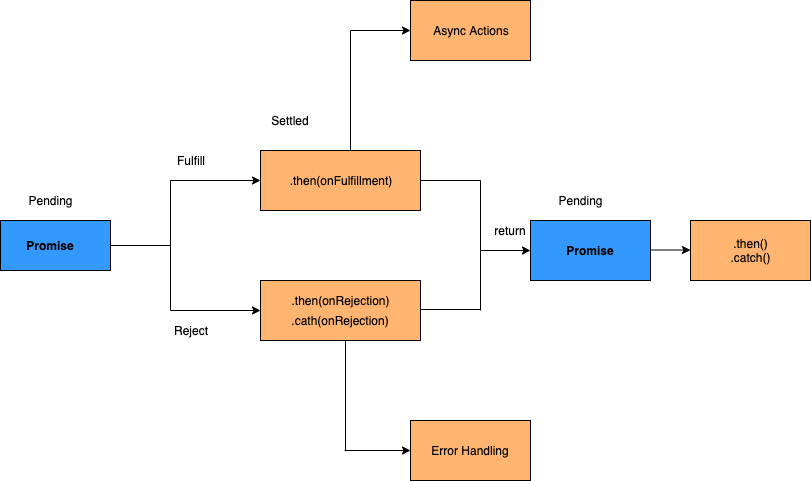
The promise chaining structure would be as below,
const promise = new Promise(function(resolve, reject) {
  setTimeout(() => resolve(1), 1000);
});

promise.then(function(result) {
    console.log(result); // 1

    return result * 2;
  }).then(function(result) {
    console.log(result); // 2

    return result * 3;
  }).then(function(result) {
    console.log(result); // 6

    return result * 4;
  }).catch(function(error){
    console.log(error);
  });
-
Reflect
Reflection is the ability of a code to inspect and manipulate variables, properties, and methods of objects at runtime. JavaScript already provides
Object.keys(), Object.getOwnPropertyDescriptor(), and Array.isArray()methods as classic refection features. In ES6, it has been officially provided through Reflect object. Reflect is a new global object which is used to call methods, construct objects, get and set properties, manipulate and extend properties.Unlike most global objects, Reflect is not a constructor. i.e, You cannot use Reflect with the new operator or invoke the Reflect as a function. It is similar to Math and JSON objects in which all the methods of this object are static.
Let's see the usage of Reflect API with below examples,
- Creating objects using Reflect.construct();
The
construct()method behaves like the regular new operator, but as a function. It is equivalent to calling new target(...args) with an option to specify a different prototype. The syntax looks like as below,Reflect.construct(target, args [, newTarget]);
The method has below parameters,
- target: The target function to call.
- argumentsList: An array-like object specifying the arguments with which target should be called.
- newTarget: The constructor whose prototype should be used. This is an optional parameter. i.e, If newTarget is not present, its value defaults to target.
Example:
class User {
  constructor(firstName, lastName) {
    this.firstName = firstName;
    this.lastName = lastName;
  }
  get fullName() {
    return `${this.firstName} ${this.lastName}`;
  }
};

let args = ['John', 'Emma'];

let john = Reflect.construct(
  User,
  args
);

console.log(john instanceof User);
console.log(john.fullName); // John Doe
- Calling a function using Reflect.apply():
Prior to ES6, you can invoke a function with a specified
thisvalue and arguments by using theFunction.prototype.apply()method.
For example, you can call
max()static method of Math object,const max = Function.prototype.apply.call(Math.max, Math, [100, 200, 300]); console.log(max);
In ES6, Reflect.apply() provides the same features as Function.prototype.apply() but in a less verbose syntax.
const max = Reflect.apply(Math.max, Math, [100, 200, 300]);
console.log(max);
- Defining a property using Reflect.defineProperty():
The
Reflect.defineProperty()method is similar toObject.defineProperty()but it returns a Boolean value indicating whether or not the property was defined successfully instead of throwing an exception.
The syntax of this method looks like below,
Reflect.defineProperty(target, propertyName, propertyDescriptor)
Let's define the age property on user object,
class User {
  constructor(firstName, lastName) {
    this.firstName = firstName;
    this.lastName = lastName;
  }
  get fullName() {
    return `${this.firstName} ${this.lastName}`;
  }
};

let john = new User('John', 'Resig');

if (Reflect.defineProperty(john, 'age', {
    writable: true,
    configurable: true,
    enumerable: false,
    value: 33,
  })) {
  console.log(john.age);
} else {
  console.log('Cannot define the age property on the user object.');
}
- Delete property using Reflect.deleteProperty():
The
Reflect.deleteProperty()method is used to delete properties like the delete operator but as a function. It returns Boolean value indicating whether or not the property was successfully deleted.const user = { name: 'John', age: 33 }; console.log(Reflect.deleteProperty(user, 'age')); // true console.log(user.age); // undefined
- Get property of an object using Reflect.get():
The
Reflect.getmethod is used to get a property on an object like the property accessor syntax but as a function.
const user = {
  name: 'John',
  age: 33
};

console.log(Reflect.get(user, 'age')); // 33
- :
-
Binary and Octal
ES5 provided numeric literals in octal (prefix 0), decimal (no prefix), and hexadecimal ( 0x) representation. ES6 added support for binary literals and improvements on octal literals.
1. Binary literals:
Prior to ES5, JavaScript didn’t provide any literal form of binary numbers. So you need to use a binary string with the help of
parseInt()const num = parseInt('110',2); console.log(num); // 6
Whereas ES6 added support for binary literals using the 0b prefix followed by a sequence of binary numbers (i.e, 0 and 1).
const num = 0b110;
console.log(num); // 6
2. Octal literals:
In ES5, to represent an octal literal, you use the zero prefix (0) followed by a sequence of octal digits (from 0 to 7).
const num = 055;
console.log(num); // 45

let invalidNum = 058;
console.log(invalidNum); // treated as decimal 58
Whereas ES6 represents the octal literal by using the prefix 0o followed by a sequence of octal digits from 0 through 7.
const num = 055;
console.log(num); // 45

const invalidNum = 028;
console.log(invalidNum); // treated as decimal 28
Remember If you use an invalid number in the octal literal, JavaScript will throw a SyntaxError as below,
const invalidNum = 028;
console.log(invalidNum); // SyntaxError
-
Proper Tail Calls

Proper tail call(PTC) is a technique where the program or code will not create additional stack frames for a recursion when the function call is a tail call.
For example, the below classic or head recursion of factorial function relies on stack for each step. Each step need to be processed upto n * factorial(n - 1)
 function factorial(n) {
   if (n === 0) {
     return 1
   }
   return n * factorial(n - 1)
 }
 console.log(factorial(5)); //120
But if you use Tail recursion functions, they keep passing all the necessary data it needs down the recursion without relying on the stack.
 function factorial(n, acc = 1) {
   if (n === 0) {
     return acc
   }
   return factorial(n - 1, n * acc)
 }
 console.log(factorial(5)); //120
The above pattern returns the same output as first one. But the accumulator keeps track of total as an argument without using stack memory on recursive calls.
The browsers which supports PTC do not generate stack overflow instead shows Infinity with below inputs,
 console.log(factorial(10));
 console.log(factorial(100));
 console.log(factorial(1000));
 console.log(factorial(10000));
-
ES6 introduced few array methods and two of them are
Array find methods
Array.find()andArray.findIndex().
Array.find()
This method returns the value of the first element in an array that satisfies the given test. Let's take an example of array with all even elements except one element and use find method to find the odd element.
```js
let arr = [2, 4, 5, 6, 8, 10];

function isOdd(i) {
  return i % 2 !== 0;
}

console.log(arr.find(isOdd)); // 5
```
Array.findIndex()
This method returns the index of the first element in the array that satisfies the given test. Let's take an example of array with all even elements except one element and use findIndex method to find the index of odd element.
```js
let arr = [2, 4, 5, 6, 8, 10];

function isOdd(i) {
  return i % 2 !== 0;
}

console.log(arr.findIndex(isOdd)); //2
```
ES2016 Or ES7
ES2015/ES6 introduced a huge set of new features. But ECMAScript 2016 Or ES7 introduced only two new features:
-
Array.prototype.includes()
-
Exponentiation operator
-
Array Includes
Prior to ES7, you have to use
indexOfmethod and compare the result with '-1' to check whether an array element contains particular element or not.const array = [1,2,3,4,5,6]; if(array.indexOf(5) > -1 ){ console.log("Found an element"); }
Whereas in ES7,
array.prototype.includes()method is introduced as a direct approach to determine whether an array includes a certain value among its entries or not.const array = [1,2,3,4,5,6]; if(array.includes(5)){ console.log("Found an element"); }
In addition to this, Array.prototype.includes() handles NaN and Undefined values better than Array.prototype.indexOf() methods. i.e, If the array contains NaN and Undefined values then indexOf() does not return correct index while searching for NaN and Undefined.
let numbers = [1, 2, 3, 4, NaN, ,];
console.log(numbers.indexOf(NaN)); // -1
console.log(numbers.indexOf(undefined)); // -1
On the otherhand, includes method is able to find these elements
let numbers = [1, 2, 3, 4, NaN, ,];
console.log(numbers.includes(NaN)); // true
console.log(numbers.includes(undefined)); // true
-
Exponentiation Operator
The older versions of javascript uses
Math.powfunction to find the exponentiation of given numbers. ECMAScript 2016 introduced the exponentiation operator, **(similar to other languages such as Python or F#) to calculate the power computation in a clear representation using infix notation.//Prior ES7 const cube = x => Math.pow(x, 3); console.log(cube(3)); // 27 //Using ES7 const cube1 = x => x ** 3; console.log(cube1(3)); // 27
ES2017 Or ES8
-
Async functions
In ES6, Promises were introduced to solve the famous callback hell problem. When a series of nested asynchronous functions need to be executed in order, it leads to a callback hell
function task() {
  task1((response1) => {
    task2(response1, (response2) => {
      task3(response2, (response3) => {
        // etc...
      };
    });
  });
}
But the Chained Promises creates complex flow for asynchronous code.
Async functions were introduced as a combination of promises and generators to give us the possibility of writing asynchronous in a synchronous manner. i.e, This function is going to be declared with the async keyword which enable asynchronous, promise-based behavior to be written in a cleaner style by avoiding promise chains. These functions can contain zero or more await expressions.
Let's take a below async function example,
async function logger() {
  let data = await fetch('http://someapi.com/users'); // pause until fetch returns
    console.log(data)
}
logger();
-
Object values
Similar to Object.keys which iterate over JavaScript object’s keys, Object.values will do the same thing on values. i.e, The Object.values() method is introduced to returns an array of a given object's own enumerable property values in the same order as
for...inloop.const countries = { IN: 'India', SG: 'Singapore', } Object.values(countries) // ['India', 'Singapore']
By the way, non-object argument will be coerced to an object
console.log(Object.values(['India', 'Singapore'])); // ['India', 'Singapore']
console.log(Object.values('India')); // ['I', 'n', 'd', 'i', 'a']
-
Object entries
The
Object.entries()method is introduced to returns an array of a given object's own enumerable string-keyed property [key, value] pairs in the same order asfor...inloop.const countries = { IN: 'India', SG: 'Singapore', } Object.entries(countries) // [["IN", "India"], ["SG", "Singapore"]]
By the way, non-object argument will be coerced to an object
   const countriesArr = ['India', 'Singapore'];
   console.log(Object.entries(countriesArr)); // [ ['0', 'India'], ['1', 'Singapore']]

   const country = 'India';
   console.log(Object.entries(country)); // [["0", "I"], ["1", "n"], ["2", "d"], ["3", "i"], ["4", "a"]]

   console.log(Object.entries(100)); // [], an empty array for any primitive type because it won't have any own properties
-
Object property descriptors
Property descriptors describe the attributes of a property. The
Object.getOwnPropertyDescriptors()method returns all own property descriptors of a given object.It provides the below attributes,
- value: The value associated with the property (data descriptors only).
- writable: true if and only if the value associated with the property may be changed
- get: A function which serves as a getter for the property.
- set: A function which serves as a setter for the property.
- configurable: true if and only if the type of this property descriptor may be changed or deleted.
- enumerable: true if and only if this property shows up during enumeration of the property.
The usage of finding property descriptors for any property seems to be as below,
 const profile = {
   age: 42
 };

 const descriptors = Object.getOwnPropertyDescriptors(profile);
 console.log(descriptors); //  {age: {configurable: true, enumerable: true, writable: true }}
-
String padding
Some strings and numbers(money, date, timers etc) need to be represented in a particular format. Both
padStart() & padEnd()methods introduced to pad a string with another string until the resulting string reaches the supplied length.- padStart(): Using this method, padding is applied to the left or beginning side of the string.
For example, you may want to show only the last four digits of credit card number for security reasons,
const cardNumber = '01234567891234';
const lastFourDigits = cardNumber.slice(-4);
const maskedCardNumber = lastFourDigits.padStart(cardNumber.length, '*');
console.log(maskedCardNumber); // expected output: "**********1234"
- padEnd(): Using this method, padding is applied to the right or ending side of the string.
For example, the profile information padded for label and values as below
const label1 = "Name";
const label2 = "Phone Number";
const value1 = "John"
const value2 = "(222)-333-3456";

console.log((label1 + ': ').padEnd(20, ' ') + value1); // Name:                     John
console.log(label2 + ": " + value2); // Phone Number: (222)-333-3456
-
Shared memory and atomics
The Atomics is a global object which provides atomic operations to be performed as static methods. They are used with SharedArrayBuffer(fixed-length binary data buffer) objects. The main use cases of these methods are,
-
atomic operations: When memory is shared, multiple threads can read and write the same data in memory. So there would be a chance of loss of data. But atomic operations make sure that predictable values are written and read, that operations are finished before the next operation starts and that operations are not interrupted.
It provides static methods such as add, or, and, xor, load, store, isLockFree etc as demonstrated below.
const sharedMemory = new SharedArrayBuffer(1024);
const sharedArray = new Uint8Array(sharedMemory);
sharedArray[0] = 10;

Atomics.add(sharedArray, 0, 20);
console.log(Atomics.load(sharedArray, 0)); // 30

Atomics.sub(sharedArray, 0, 10);
console.log(Atomics.load(sharedArray, 0)); // 20

Atomics.and(sharedArray, 0, 5);
console.log(Atomics.load(sharedArray, 0));  // 4

Atomics.or(sharedArray, 0, 1);
console.log(Atomics.load(sharedArray, 0));  // 5

Atomics.xor(sharedArray, 0, 1);
console.log(Atomics.load(sharedArray, 0)); // 4

Atomics.store(sharedArray, 0, 10); // 10

Atomics.compareExchange(sharedArray, 0, 5, 10);
console.log(Atomics.load(sharedArray, 0)); // 10

Atomics.exchange(sharedArray, 0, 10);
console.log(Atomics.load(sharedArray, 0)); //10

Atomics.isLockFree(1); // true
-
waiting to be notified: Both
wait()andnotify()methods provides ways for waiting until a certain condition becomes true and are typically used as blocking constructs.Let's demonstrate this functionality with reading and writing threads.
First define a shared memory and array
const sharedMemory = new SharedArrayBuffer(1024);
const sharedArray = new Int32Array(sharedMemory);
A reading thread is sleeping and waiting on location 0 which is expected to be 10. You can observe a different value after the value overwritten by a writing thread.
Atomics.wait(
-
Questions
What is ECMAScript-features?
codeaashu/ECMAScript-features is a public repo on GitHub by codeaashu. ECMAScript Features Cheat Sheet: A Quick Guide for JavaScript Developers.
Is ECMAScript-features open source?
It declares no license on GitHub. Public does not mean open source: without a license, nobody is granted the right to reuse it.
Does ECMAScript-features run on macOS, Windows or Linux?
Its maker has not tagged a system, so it is unknown here. Its README says what it needs.
How do I install ECMAScript-features?
Open "Take it" on its page: Take My Repo writes an install plan for your machine and hands it to your AI agent (Claude Code, Codex or Cursor), which asks you before each step. Take My Repo has not tested it on any machine.
Is ECMAScript-features still maintained?
Its last change on GitHub was on 2026-08-29. Take My Repo does not judge from that whether it is maintained.