tauri
Build smaller, faster, and more secure desktop and mobile applications with a web frontend.
- 113k
- Rust
- Apache-2.0
- 2 d ago
Structured GUI framework for Love2D written in pure Lua.
Repo codecat/ngui, read from GitHub 16 h ago. codecat has not joined Take My Repo.
codecat/ngui is a public repo on GitHub by codecat. Structured GUI framework for Love2D written in pure Lua. It declares the MIT license on GitHub. It is written mainly in Lua, has 11 stars and last changed on 2024-01-27. Nobody has reviewed it on Take My Repo yet, which says nothing about its quality. Read from GitHub on 2026-11-21.
GUI framework for Love2D written in pure Lua. Some features:
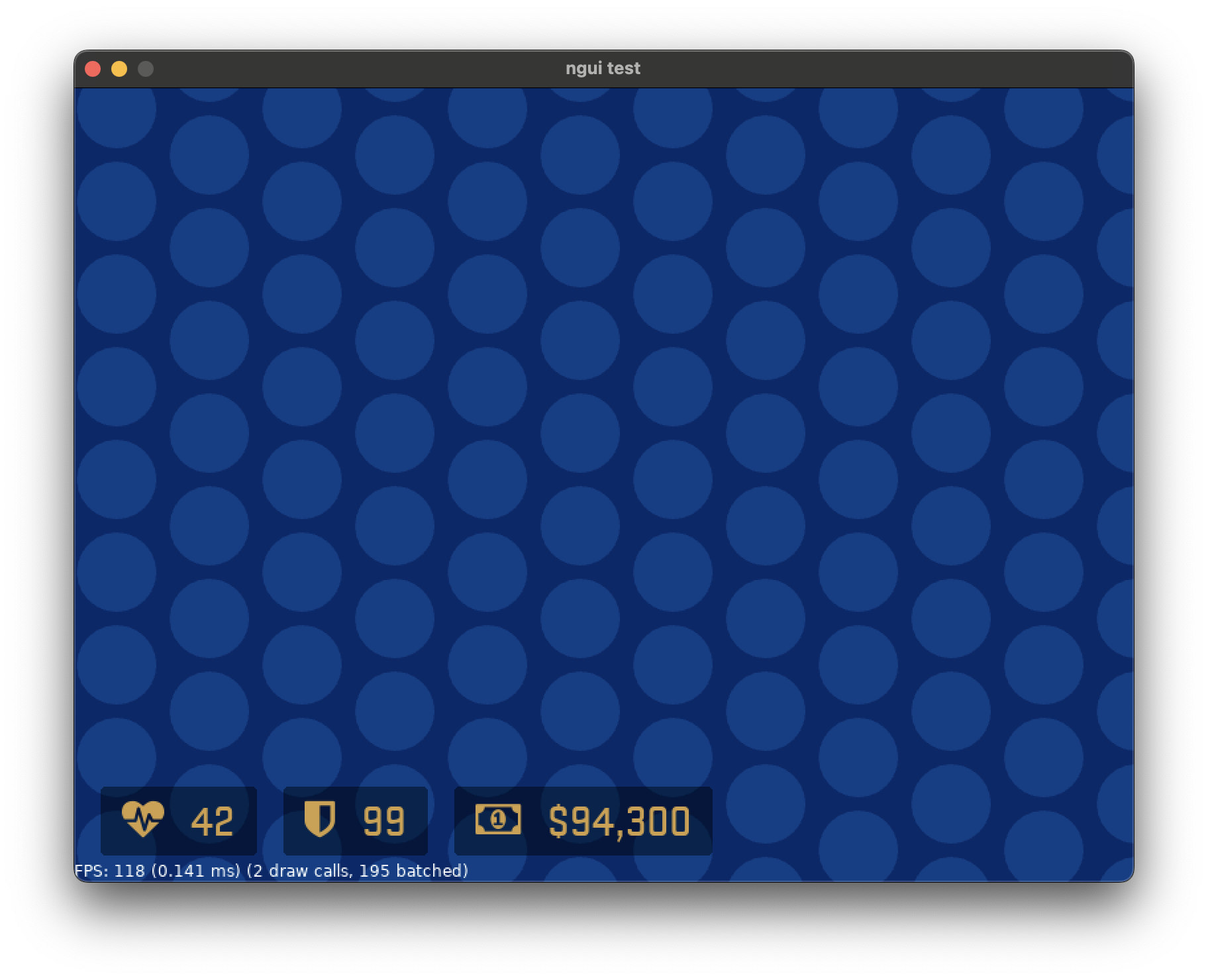
hbox#stats
	hbox#hp.element
		icon "heartbeat"
		label "42"
	hbox#armor.element
		icon "shield"
		label "99"
	hbox#money.element
		icon "money"
		label "$94,300"
To run a demo of the framework, simply run this repository as a Love2D project itself. To actually
use the framework, copy the ngui folder to your own project and include it using require:
local ngui = require('ngui')
This framework is not actively maintained, but if you are interested, I'm open to reviewing and accepting any and all contributions.
To start off, you need to call ngui.init in love.load.
local ngui = require('ngui')

function love.load()
	ngui.init()
end
After initializing the framework, call ngui.load to load an .ngui file.
ngui.load('assets/test.ngui')
In love.update, call ngui.update, and in love.draw, call ngui.draw.
function love.update(dt)
	ngui.update(dt)
end

function love.draw()
	ngui.draw()
end
Now your UI should render!
If you also want to handle events, you need to pass a "sink" parameter to the ngui.load function
as well, for example:
ngui.load('assets/test.ngui', {
	foobar = function()
		print('Foobar!')
	end,
})
The ngui.load function also returns the "host" object of the loaded UI. This lets you do several
things, such as selecting and updating widgets at runtime:
ui = ngui.load('assets/test.ngui')
ui:select('#foo'):setText('Foo from code!')
The current list of available built-in widgets are:
box, vbox, hbox: boxes that contain and layout child widgetslabel: static textbutton: things you can clickcheckbox: things you can checkimage: renders an imageicon: renders a ForkAwesome icon.ngui filesUI's are defined using an indent-based structured format. Tabs must be used for this. Internally the structure is tree-like similar to an XML node structure, where each node can have properties, a name, child nodes, and content.
A simple example of the basic features that can be in a document:
first
	item
		item
		item
			item
	item
	item

second
	foo
		bar

	foo
	foo "content"

	foo 12345
	foo 3.14159
	foo 0x12345678

	foo#my_id "content"
	foo.class_name
	foo:modifier_type

	foo "content" attr="123" @event="callback" $styleattr="123"
The content for a node can be a string or a number. Strings are always within quotation marks.
Numbers can be in any format that tonumber accepts (see also the definition of numeric constant
in Lua's lexical conventions).
Node ID's are typed as part of the node name. For example, while foo is just a regular node, using
foo#my_id is a node with an ID of my_id. ID's are useful where you want to get a specific widget
in your UI, which can be done using Widget:findById. Only 1 ID may be set per widget.
Similar to CSS in HTML, you can add a class name to widgets. Currently you may only specify a single
class per widget. Specify the class name prefix with a period, for example: foo.class_name. This
class name will then correspond to a style node structure if it was specified (see below), and may
also be used as a way to search for nodes using Widget:findByClassName.
You may also use !include instead of a node name to include another .ngui file at that location
in the node tree.
codecat/ngui is a public repo on GitHub by codecat. Structured GUI framework for Love2D written in pure Lua.
It declares the MIT license on GitHub.
Its maker has not tagged a system, so it is unknown here. Its README says what it needs.
Open "Take it" on its page: Take My Repo writes an install plan for your machine and hands it to your AI agent (Claude Code, Codex or Cursor), which asks you before each step. Take My Repo has not tested it on any machine.
Its last change on GitHub was on 2024-01-27. Take My Repo does not judge from that whether it is maintained.
Nobody has reviewed it on Take My Repo yet, which says nothing about its quality.
Build smaller, faster, and more secure desktop and mobile applications with a web frontend.
LÖVE is an awesome 2D game framework for Lua.
Dear ImGui: Bloat-free Graphical User interface for C++ with minimal dependencies
A curated list of amazingly awesome LÖVE libraries, resources and shiny things.
Unofficial mirror for Angelscript's SVN repository, updated hourly.