
education-agent-skills
165 evidence-grounded AI skills for teachers, school leaders and EdTech builders—pedagogy, learning science, curriculum, assessment and regeneration. Claude, Codex and Hermes.
- 1k
- TypeScript
- 3 wk ago
A flexible, adaptive classification system for dynamic text classification
Repo codelion/adaptive-classifier, read from GitHub 1 d ago. codelion has not joined Take My Repo.
codelion/adaptive-classifier is a public repo on GitHub by codelion. A flexible, adaptive classification system for dynamic text classification. It declares the Apache-2.0 license on GitHub. It is written mainly in Python, has 577 stars and last changed on 2026-11-02. Nobody has reviewed it on Take My Repo yet, which says nothing about its quality. Read from GitHub on 2026-11-22.
165 evidence-grounded AI skills for teachers, school leaders and EdTech builders—pedagogy, learning science, curriculum, assessment and regeneration. Claude, Codex and Hermes.

🚀 Dynamic text classification with continuous learning, strategic defense, and zero-downtime adaptation

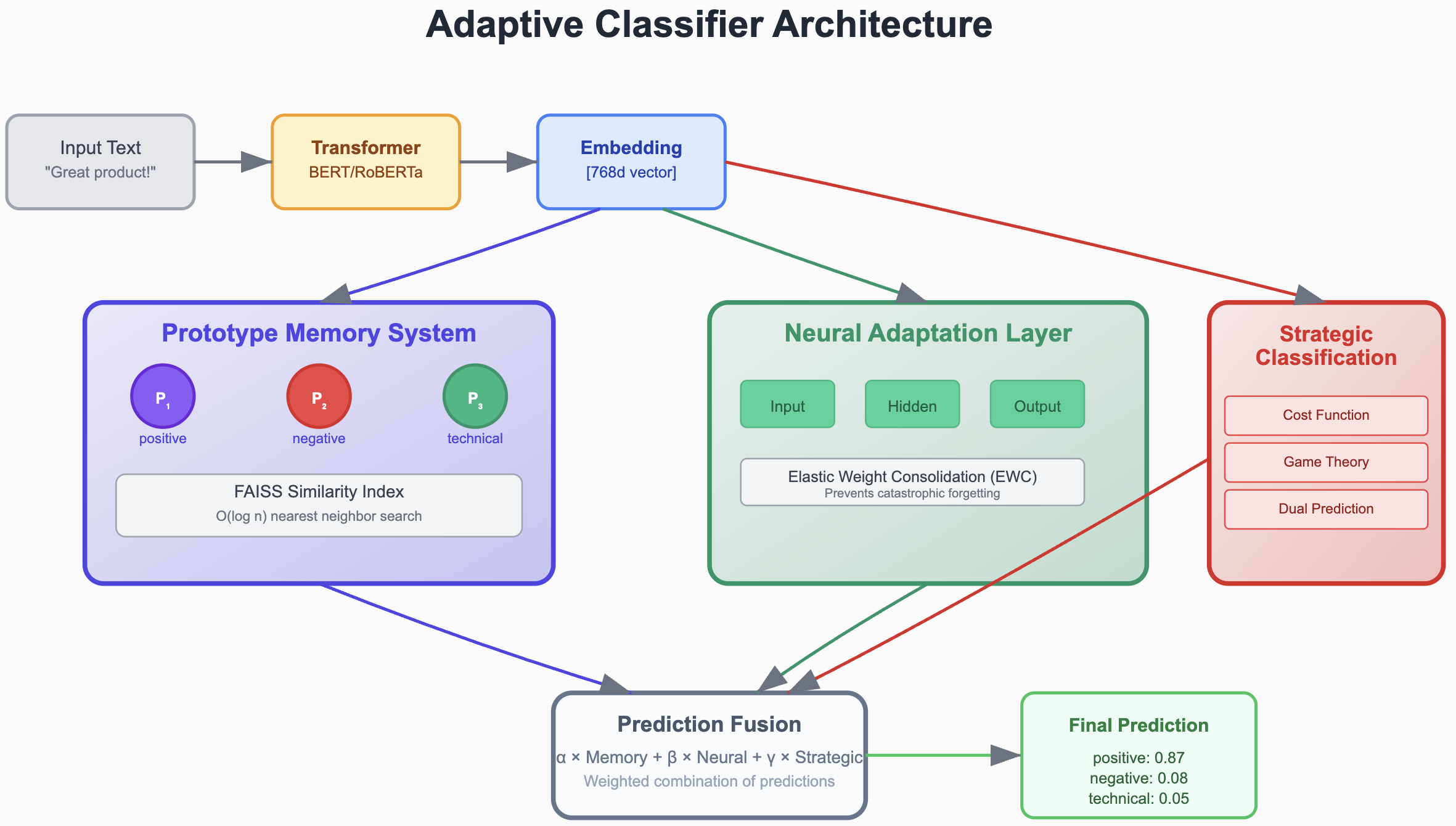
Adaptive Classifier is a PyTorch-based machine learning library that revolutionizes text classification with continuous learning, dynamic class addition, and strategic defense against adversarial inputs. Built on HuggingFace transformers, it enables zero-downtime model updates and enterprise-grade robustness.
Tested on adversarial examples from AI-Secure/adv_glue dataset:
| Metric | Regular Classifier | Strategic Classifier | Improvement |
|---|---|---|---|
| Clean Data Accuracy | 80.00% | 82.22% | +2.22% |
| Adversarial Data Accuracy | 60.00% | 82.22% | +22.22% |
| Robustness (vs attack) | -20.00% drop | 0.00% drop | Perfect |
Evaluated on RAGTruth benchmark across multiple task types:
| Task Type | Precision | Recall | F1 Score |
|---|---|---|---|
| QA | 35.50% | 45.11% | 39.74% |
| Summarization | 22.18% | 96.91% | 36.09% |
| Data-to-Text | 65.00% | 100.0% | 78.79% |
| Overall | 40.89% | 80.68% | 51.54% |
Tested on arena-hard-auto-v0.1 dataset (500 queries):
| Metric | Without Adaptation | With Adaptation | Improvement |
|---|---|---|---|
| Cost Savings | 25.60% | 32.40% | +6.80% |
| Efficiency Ratio | 1.00x | 1.27x | +27% |
| Resource Utilization | Standard | Optimized | Better |
Key Insight: Adaptive classification maintains quality while significantly improving cost efficiency and robustness across all tested scenarios.
| Use Case | Demonstrates | Link |
|---|---|---|
| Basic Example (Cat or Dog) | Continuous learning | |
| Support Ticket Classification | Realistic examples | |
| Query Classification | Different configurations | |
| Multilingual Sentiment Analysis | Ensemble of classifiers | |
| Product Category Classification | Batch processing | |
| Multi-label Classification | Extensibility |
pip install adaptive-classifier
Includes: ONNX Runtime for 2-4x faster CPU inference out-of-the-box
# Clone the repository
git clone https://github.com/codelion/adaptive-classifier.git
cd adaptive-classifier

# Install in development mode with test dependencies
pip install -e ".[test]"
AdaptiveClassifier reduces a model's token embeddings to one vector per text.
How it does that matters, because prototype memory is cosine nearest-neighbour
search over those vectors.
Before 0.2.0 the CLS token was always used. That is wrong for most encoders.
all-MiniLM-L6-v2 publishes pooling_mode_mean_tokens, so it is a mean-pooling
model, and a masked language model never trains its CLS token as a sentence
representation at all. On a semantic-similarity check with all-MiniLM-L6-v2,
CLS scored unrelated sentence pairs at 0.53 cosine similarity while mean pooling
scored them at -0.03: a 2.4x difference in separation between related and
unrelated text.
From 0.2.0 the default is auto. The model's own sentence-transformers pooling
config is used when it publishes one, otherwise mean pooling.
# use what the model was trained with (default)
classifier = AdaptiveClassifier("sentence-transformers/all-MiniLM-L6-v2")

# or choose explicitly
classifier = AdaptiveClassifier("bert-base-uncased", config={"pooling": "mean"})
classifier = AdaptiveClassifier("bert-base-uncased", config={"pooling": "cls"})
Classifiers saved before 0.2.0 keep CLS pooling when reloaded, so upgrading does
not change their predictions. Retrain, or pass pooling explicitly, to pick up
the new behaviour.
A prediction mixes two signals: the prototype score (how close the text is to each class's mean embedding) and the neural head (a small trained network on the same embeddings). prototype_weight and neural_weight (default 0.7 / 0.3) control the mix.
classifier = AdaptiveClassifier(
    "sentence-transformers/all-MiniLM-L6-v2",
    config={"prototype_weight": 0.3, "neural_weight": 0.7},
)
The best split depends on how well your encoder separates your classes: an encoder that bunches everything together produces weak prototypes and is better off leaning on the head.
Classes with few examples. Until a class has new_class_example_threshold examples (default 10), the head's weight ramps up linearly from zero to neural_weight and the prototype takes the rest, so a brand-new class is judged almost entirely by its prototype. (Before 0.3.0 such classes used a fixed 0.3 / 0.7 split in favour of the head, and a head fitted to a handful of points could confidently outvote a correct prototype. To get a fixed split back, set both new_class_prototype_weight and new_class_neural_weight.)
Recognising a new class sooner. The ramp is the dial between "protect the classes you already have" and "pick up a new class quickly". Lowering new_class_example_threshold gives the head a say earlier. Measured with MiniLM, adding classes one at a time with 4 examples each (3 seeds, 600 test texts; averages over the added classes):
new_class_example_threshold |
ag_news: final accuracy / new-class recall / old-class loss | emotion: final accuracy / new-class recall / old-class loss |
|---|---|---|
| 10 (default) | 0.76 / 0.77 / 0.06 | 0.35 / 0.43 / 0.09 |
| 5 | 0.74 / 0.85 / 0.12 | 0.35 / 0.59 / 0.14 |
| 3 | 0.72 / 0.87 / 0.15 | 0.34 / 0.59 / 0.15 |
| fixed 0.3 / 0.7 (pre-0.3.0 split) | 0.66 / 0.91 / 0.22 | 0.32 / 0.68 / 0.18 |
Each step buys new-class recall with old-class accuracy. If a new class that is missed matters more to you than one that disturbs the others, try 5; the default favours stability. Two datasets and one encoder, so check it on your own data.
Prototype sharpness. Prototype scores are softmax(-distance² / prototype_temperature) with a default temperature of 0.25. Lower values make the nearest class stand out more. Set prototype_temperature to None for the scoring used before 0.3.0, which barely separated the nearest class from the rest.
Head training. The head is trained for at least head_steps optimiser steps (default 300) with a cosine-decayed head_learning_rate (default 0.003). That takes roughly 1-2 seconds on a small memory; lower head_steps (for example to 100) if you add examples very frequently. Before 0.3.0 the head got about ten steps, too few to learn even a simple XOR pattern, which prototypes alone cannot separate.
Classifiers saved before 0.3.0 keep their old scoring when reloaded, so upgrading does not change their predictions. Retrain, or set the keys above, to adopt the new behaviour.
Get started with adaptive classification in under 30 seconds:
from adaptive_classifier import AdaptiveClassifier

# 🎯 Step 1: Initialize with any HuggingFace model
classifier = AdaptiveClassifier("bert-base-uncased")

# 📝 Step 2: Add training examples
texts = ["The product works great!", "Terrible experience", "Neutral about this purchase"]
labels = ["positive", "negative", "neutral"]
classifier.add_examples(texts, labels)

# 🔮 Step 3: Make predictions
predictions = classifier.predict("This is amazing!")
print(predictions)
# Output: [('positive', 0.85), ('neutral', 0.12), ('negative', 0.03)]
Classify texts into multiple categories simultaneously with automatic threshold adaptation:
from adaptive_classifier import MultiLabelAdaptiveClassifier

# Initialize multi-label classifier
classifier = MultiLabelAdaptiveClassifier(
    "bert-base-uncased",
    min_predictions=1,    # Ensure at least 1 prediction
    max_predictions=5     # Limit to top 5 predictions
)

# Multi-label training data (each text can have multiple labels)
texts = [
    "AI researchers study climate change using machine learning",
    "Tech startup develops healthcare solutions"
]
labels = [
    ["technology", "science", "climate", "ai"],
    ["technology", "business", "healthcare"]
]

classifier.add_examples(texts, labels)

# Make multi-label predictions
predictions = classifier.predict_multilabel("Medical AI breakthrough announced")
# Output: [('healthcare', 0.72), ('technology', 0.68), ('ai', 0.45)]
# Save locally
classifier.save("./my_classifier")
loaded_classifier = AdaptiveClassifier.load("./my_classifier")

# 🤗 HuggingFace Hub Integration
classifier.push_to_hub("adaptive-classifier/my-model")
hub_classifier = AdaptiveClassifier.from_pretrained("adaptive-classifier/my-model")
# Enable strategic classification for adversarial robustness
config = {'enable_strategic_mode': True}
strategic_classifier = AdaptiveClassifier("bert-base-uncased", config=config)

# Robust predictions against manipulation
predictions = strategic_classifier.predict("This product has amazing quality features!")
# Returns predictions that consider potential gaming attempts
Adaptive Classifier includes built-in ONNX Runtime support for 2-4x faster CPU inference with zero code changes required.
ONNX Runtime is automatically used on CPU for optimal performance:
# Automatically uses ONNX on CPU, PyTorch on GPU
classifier = AdaptiveClassifier("bert-base-uncased")

# That's it! Predictions are 2-4x faster on CPU
predictions = classifier.predict("Fast inference!")
| Configuration | Speed | Use Case |
|---|---|---|
| PyTorch (GPU) | Fastest | GPU servers |
| ONNX (CPU) | 2-4x faster | Production CPU deployments |
| PyTorch (CPU) | Baseline | Development, training |
codelion/adaptive-classifier is a public repo on GitHub by codelion. A flexible, adaptive classification system for dynamic text classification.
It declares the Apache-2.0 license on GitHub.
Its maker tagged it for macOS, Windows and Linux, or as Docker or cross-platform. That is declared by the maker; Take My Repo has not tested it.
《李宏毅深度学习教程》(李宏毅老师推荐👍,苹果书🍎),PDF下载地址:https://github.com/datawhalechina/leedl-tutorial/releases
An NLP library for building bots, with entity extraction, sentiment analysis, automatic language identify, and so more
The Postgres development platform. Supabase gives you a dedicated Postgres database to build your web, mobile, and AI applications.
Stop renting your intelligence. Own it with AnythingLLM. Everything you need for a powerful local-first agent experience
Natural Language Processing Tutorial for Deep Learning Researchers
Open "Take it" on its page: Take My Repo writes an install plan for your machine and hands it to your AI agent (Claude Code, Codex or Cursor), which asks you before each step. Take My Repo has not tested it on any machine.
Its last change on GitHub was on 2026-11-02. GitHub counts 2 open issues and pull requests. Take My Repo does not judge from that whether it is maintained.
Nobody has reviewed it on Take My Repo yet, which says nothing about its quality.
Take My Repo cannot say: it does not audit code and has not run adaptive-classifier. What is known comes from GitHub. It declares the Apache-2.0 license on GitHub. Its last change was on 2026-11-02. It has 577 stars, which measure popularity, not safety. Nobody has reviewed it on Take My Repo yet, which says nothing about its quality. Read the source before you run it. With "Take it", your AI agent shows each step and asks you before running it; README text is treated as data, not as instructions.