
safeos
Free deep-learning monitoring PWA for pets, babies, and elderly care. Real-time computer vision (TensorFlow.js COCO-SSD + Transformers.js ViT) runs entirely on-device, fully offline. Privacy-first.
- 58
- TypeScript
- MIT
- 20 h ago
Transform your IP camera into an intelligent baby monitoring system with real-time AI detection, sleep tracking, and safety alerts.
Repo codeperfectplus/AI-Baby-Monitor, read from GitHub 1 min ago. codeperfectplus has not joined Take My Repo.
codeperfectplus/AI-Baby-Monitor is a public repo on GitHub by codeperfectplus. Transform your IP camera into an intelligent baby monitoring system with real-time AI detection, sleep tracking, and safety alerts. It declares the MIT license on GitHub. It is written mainly in HTML, has 45 stars and last changed on 2025-08-17. Nobody has reviewed it on Take My Repo yet, which says nothing about its quality. Read from GitHub on 2026-11-22.
Transform your IP camera into an intelligent baby monitoring system with real-time AI detection, sleep tracking, and safety alerts.

Clone the Repository
git clone https://github.com/codeperfectplus/AI-Baby-Monitor.git
cd AI-Baby-Monitor
Configure environment:
cp .env.example .env
# Edit .env with your RTSP camera credentials
Deploy the application:
./deploy.sh
Access the Web Interface Open your web browser and go to:
http://localhost:8847
Default Login Credentials
Clone the Repository
git clone https://github.com/codeperfectplus/AI-Baby-Monitor.git
cd AI-Baby-Monitor
Install Dependencies
pip install -r requirements.txt
Configure Camera Settings
Copy and edit the environment file:
cp .env.example .env
Edit .env with your camera credentials:
# RTSP Camera Configuration
RTSP_USERNAME=your_camera_username
RTSP_PASSWORD=your_camera_password
RTSP_IP=192.168.1.100
RTSP_PORT=554
RTSP_STREAM=stream1
Run the Web Application
python app.py
Access the Interface Open your browser and navigate to:
http://localhost:8847
Enable RTSP in the Tapo app:
RTSP URL Format:
rtsp://username:password@camera_ip:554/stream1
Common RTSP URL patterns:
rtsp://username:password@ip:554/Streaming/Channels/101rtsp://username:password@ip:554/cam/realmonitor?channel=1&subtype=0rtsp://username:password@ip:554/axis-media/media.amprtsp://username:password@ip:554/videoMainFind Camera IP Address:
# Scan your network for connected devices
nmap -sn 192.168.1.0/24

# Or check your router's admin panel
Test RTSP Connection:
# Using VLC Media Player
vlc rtsp://username:password@camera_ip:554/stream1

# Using FFmpeg
ffprobe rtsp://username:password@camera_ip:554/stream1
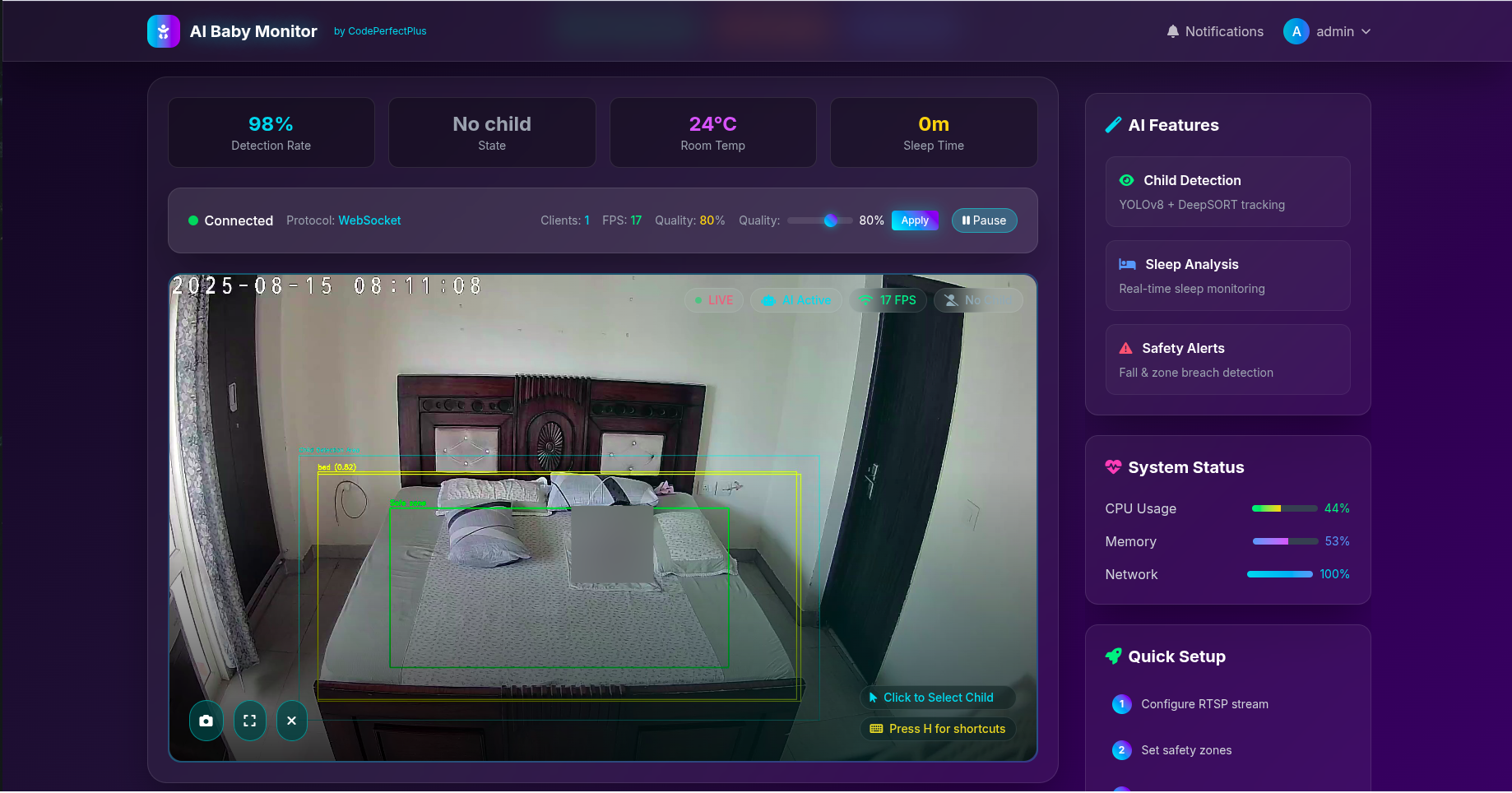
The application provides a comprehensive web-based interface with secure user management:
/)/auth/user-management)/auth/login) - Secure access with remember me option/auth/signup) - New user registration with relationship selection/auth/change-password) - Secure password updates| Key | Action | Description |
|---|---|---|
Q |
Quit | Exit the application |
P |
Pause/Resume | Toggle recording pause |
S |
Snapshot | Capture instant photo |
R |
Raw/Annotated | Switch between raw and AI-annotated recording |
C |
Clear Selection | Reset child selection and sleep detection |
Z |
Sleep Detection | Toggle sleep/wake monitoring |
The system sends desktop notifications for:
~/baby-monitor-recordings/
├── 2025-08-13/           # Date folder
│   ├── 00-06/            # Time block (midnight to 6 AM)
│   │   ├── tapo_023015.avi
│   │   └── tapo_053015.avi
│   ├── 06-12/            # Morning block (6 AM to noon)
│   └── 12-18/            # Afternoon block (noon to 6 PM)
└── 2025-08-14/
    └── ...

~/logs/
└── detections.log        # All alerts and events log
Located in config/settings.py:
CONFIDENCE_THRESHOLD = 0.4    # AI detection confidence (0.0-1.0)
TARGET_FPS = 15.0            # Video frame rate (lower = less CPU usage)
MOVEMENT_THRESHOLD = 30       # Pixels of movement to detect activity
SLEEP_TIME_SEC = 150         # Seconds of stillness = sleep (2.5 minutes)
WAKE_NOTIFICATION_COOLDOWN = 60  # Seconds between wake notifications
SAFE_MARGIN_RATIO = 0.15     # Safety zone margin (15% inside bed)
RISK_FRAMES_THRESHOLD = 10    # Frames outside safe zone before alert
ALERT_COOLDOWN_SEC = 20      # Seconds between repeated alerts
SEGMENT_MINUTES = 30         # Minutes per video file
TIME_BLOCK_HOURS = 6         # Hours per folder block
SAVE_ANNOTATED = True        # Save AI-annotated videos
SHOW_PREVIEW = True          # Show live preview window
Problem: "Cannot open RTSP stream" Solutions:
ping your_camera_ip.env filevlc rtsp://user:pass@ip:554/stream1Problem: "Connection lost frequently" Solutions:
Problem: High CPU usage Solutions:
TARGET_FPS in config (try 10 or 5)SHOW_PREVIEW = False for headless modeProblem: Video files corrupted Solutions:
Problem: Child not detected Solutions:
CONFIDENCE_THRESHOLD in config (try 0.3)Problem: Import errors in modular version Solutions:
python dev.py testpython dev.py statusThe application displays a rich, real-time interface showing:
We welcome contributions! Please feel free to:
# Fork the repository
git clone https://github.com/your-fork/AI-Baby-Monitor.git
cd AI-Baby-Monitor

# Create virtual environment
python -m venv venv
source venv/bin/activate  # Linux/Mac
# or
venv\Scripts\activate     # Windows

# Install development dependencies
pip install -r requirements.txt

# Set up environment variables
cp .env.example .env
# Edit .env with your RTSP camera details

# Initialize database and run
python app.py
For testing user management features without a camera:
export AUTH_ONLY_MODE=true
python app.pyThe application has evolved into a full-stack web-based monitoring system with Flask backend and real-time capabilities:
AI-Baby-Monitor/
├── app.py                  # 🚀 Flask web application entry point
├── config/                 # ⚙️ Configuration management
│   └── settings.py        # Application settings and RTSP config
├── models/                 # �️ Database models
│   ├── auth.py            # User authentication and login logs
│   └── notification.py    # Notification system
├── api/                    # 🌐 REST API endpoints
│   ├── auth_route.py      # Authentication routes
│   ├── monitor_route.py   # Monitoring endpoints
│   ├── active_users_route.py # Real-time user tracking
│   └── websocket_handlers.py # WebSocket for live streaming
├── services/               # 🔧 Core business logic
│   ├── detection/         # 🤖 YOLO object detection
│   ├── tracking/          # 📍 DeepSORT tracking
│   ├── streaming/         # 📡 RTSP streaming & web sockets
│   ├── monitoring/        # 👶 Sleep & safety monitoring
│   └── recording/         # 🎥 Video recording
├── templates/              # 🎨 HTML templates
│   ├── index.html         # Main dashboard
│   └── auth/              # Authentication pages
├── forms/                  # 📝 WTForms for user input
└── utils/                  # 🛠️ Utility functions
Browser ←→ Flask App ←→ WebSocket ←→ RTSP Stream
    ↓         ↓                        ↓
 Auth DB ← User Mgmt              AI Detection
    ↓         ↓                        ↓
Login Logs  Activity Track        Recording
This project is licensed under the MIT License - see the LICENSE file for details.
Made with ❤️ by CodePerfectPlus
codeperfectplus/AI-Baby-Monitor is a public repo on GitHub by codeperfectplus. Transform your IP camera into an intelligent baby monitoring system with real-time AI detection, sleep tracking, and safety alerts.
It declares the MIT license on GitHub.
Its maker tagged it for macOS, Windows and Linux, or as Docker or cross-platform. That is declared by the maker; Take My Repo has not tested it.
Open "Take it" on its page: Take My Repo writes an install plan for your machine and hands it to your AI agent (Claude Code, Codex or Cursor), which asks you before each step. Take My Repo has not tested it on any machine.
Its last change on GitHub was on 2025-08-17. GitHub counts 2 open issues and pull requests. Take My Repo does not judge from that whether it is maintained.
Free deep-learning monitoring PWA for pets, babies, and elderly care. Real-time computer vision (TensorFlow.js COCO-SSD + Transformers.js ViT) runs entirely on-device, fully offline. Privacy-first.
Nobody has reviewed it on Take My Repo yet, which says nothing about its quality.
π RuView turns commodity WiFi signals into real-time spatial intelligence, vital sign monitoring, and presence detection — all without a single pixel of video.
Computer Vision Essentials in Python Programming Language :tada:
Data science web project implemented in Django framework.
American Sign Language Detection Android App using SSD_Mobilenet | Google Colab