
git-worktree-runner
Bash-based Git worktree manager with editor and AI tool integration. Automates per-branch worktree creation, configuration copying, dependency installation, and workspace setup for efficient parallel development.
- 1.8k
- Apache-2.0
- 6 d ago
Repo coderabbitai/git-worktree-runner, read from GitHub 1 h ago. coderabbitai has not joined Take My Repo.
In short
coderabbitai/git-worktree-runner is a public repo on GitHub by coderabbitai. Bash-based Git worktree manager with editor and AI tool integration. Automates per-branch worktree creation, configuration copying, dependency installation, and workspace setup for efficient parallel development. It declares the Apache-2.0 license on GitHub. It is written mainly in Shell, has 1,817 stars and last changed on 2026-11-18. It is archived: its maker no longer maintains it. Nobody has reviewed it on Take My Repo yet, which says nothing about its quality. Read from GitHub on 2026-11-24.

gtr - Git Worktree Runner
A portable Git worktree CLI for PR reviews, coding agents, and repeatable per-branch setup
Table of Contents
- What are git worktrees?
- Quick Start
- AI Agent Usage
- Why gtr?
- Features
- Requirements
- Commands
- Configuration
- Shell Completions
- Platform Support
- Contributing
- Maintainers
- License
What are git worktrees?
ELI5: Normally, you can only work on one git branch at a time in a folder. Want to fix a bug while working on a feature? You have to stash changes, switch branches, then switch back. Git worktrees let you have multiple branches checked out at once in different folders - like having multiple copies of your project, each on a different branch.
The Problem: Everyone's using git worktrees wrong (or not at all):
- Constantly stashing/switching branches disrupts flow
- Running tests on main while working on features requires manual copying
- Reviewing PRs means stopping current work
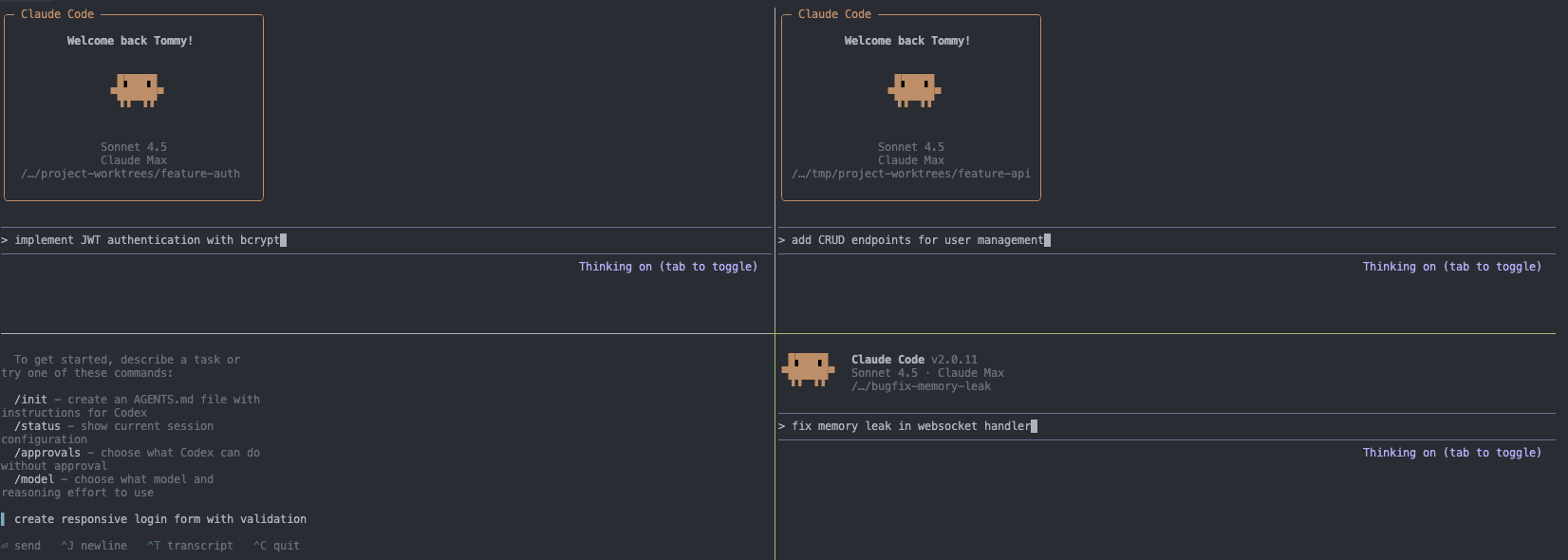
- Parallel AI agents on different branches? Nearly impossible without worktrees
Why people sleep on worktrees: The DX is terrible. git worktree add ../my-project-feature feature is verbose, manual, and error-prone.
Enter gtr: Simple commands, AI tool integration, automatic setup, and built for modern parallel development workflows.
Quick Start
Homebrew (macOS):
brew tap coderabbitai/tap
brew install git-gtr
Install from source (macOS / Linux / Windows Git Bash):
git clone https://github.com/coderabbitai/git-worktree-runner.git
cd git-worktree-runner
./install.sh
On Windows Git Bash, the installer prints a command to add the checkout's bin
directory to PATH. Add it to ~/.bashrc or ~/.bash_profile, reload that file,
and verify with git gtr version. Keep the full checkout at the same location;
copying only bin/git-gtr omits the libraries it needs to start.
Other installation options
macOS (Intel) / Linux:
sudo mkdir -p /usr/local/bin
sudo ln -s "$(pwd)/bin/git-gtr" /usr/local/bin/git-gtr
User-local (no sudo required):
mkdir -p ~/.local/bin
ln -s "$(pwd)/bin/git-gtr" ~/.local/bin/git-gtr
# Add to ~/.zshrc or ~/.bashrc if ~/.local/bin is not in PATH:
# export PATH="$HOME/.local/bin:$PATH"
Usage:
# Navigate to your git repo
cd ~/GitHub/my-project

# One-time setup (per repository)
git gtr config set gtr.editor.default cursor
git gtr config set gtr.ai.default claude

# Daily workflow
git gtr new my-feature          # Create worktree folder: my-feature
git gtr new my-feature --editor # Create and open in editor
git gtr new my-feature --ai     # Create and start AI tool
git gtr new my-feature -e -a    # Create, open editor, then start AI
git gtr pr 123                  # Create worktree for pull request #123
git gtr editor my-feature       # Open in cursor
git gtr ai my-feature           # Start claude

# Run commands in worktree
git gtr run my-feature npm test # Run tests

# Navigate to worktree
gtr new my-feature --cd         # Create and cd (requires shell integration)
gtr pr 123 --cd                 # Create a PR worktree and cd
gtr cd                          # Interactive picker (requires fzf + shell integration)
gtr cd my-feature               # Requires shell integration (see below)
cd "$(git gtr go my-feature)"   # Alternative without shell integration

# List all worktrees
git gtr list

# Remove when done
git gtr rm my-feature

# Or remove all worktrees with merged or closed PRs/MRs (requires gh or glab CLI)
git gtr clean --merged --closed
AI Agent Usage
Shell-capable coding agents can use git gtr directly; a separate MCP server is
not required. Use git gtr new <branch> --porcelain to create a worktree and
reliably capture its path, then run the agent inside that directory. Built-in
adapters cover popular tools, while the safe PATH fallback works with other
agent CLIs without requiring a dedicated adapter.
See docs/agent-usage.md for a copy-paste AGENTS.md
policy, output contract, and safe lifecycle examples.
Why gtr?
While git worktree is powerful, it's verbose and manual. git gtr adds quality-of-life features for modern development:
| Task | With git worktree |
With git gtr |
|---|---|---|
| Create worktree | git worktree add ../repo-feature feature |
git gtr new feature |
| Create + open | git worktree add ... && cursor . |
git gtr new feature --editor |
| Checkout PR | gh pr checkout 123 |
git gtr pr 123 |
| Open in editor | cd ../repo-feature && cursor . |
git gtr editor feature |
| Start AI tool | cd ../repo-feature && claude |
git gtr ai feature |
| Copy config files | Manual copy/paste | Auto-copy via gtr.copy.include |
| Run build steps | Manual npm install && npm run build |
Auto-run via gtr.hook.postCreate |
| List worktrees | git worktree list (shows paths) |
git gtr list (shows branches + status) |
| Clean up | git worktree remove ../repo-feature |
git gtr rm feature |
TL;DR: git gtr wraps git worktree with quality-of-life features for modern development workflows (AI tools, editors, automation).
Features
- Simple commands - Create and manage worktrees with intuitive CLI
- Repository-scoped - Each repo has independent worktrees
- Configuration over flags - Set defaults once, use simple commands
- Editor integration - Open worktrees in Antigravity, Cursor, VS Code, Zed, and more
- AI tool support - Launch Claude Code, Codex, Gemini CLI, or any safe command in
PATH - Smart file copying - Selectively copy configs/env files to new worktrees
- Hooks system - Run custom commands after create/remove
- Cross-platform - Works on macOS, Linux, and Windows (Git Bash)
- Shell completions - Tab completion for Bash, Zsh, and Fish
Requirements
- Git 2.17+ (for
git worktree move/removesupport) - Bash 3.2+ (macOS ships 3.2; 4.0+ recommended for advanced features)
Commands
Commands accept branch names to identify worktrees. Use 1 to reference the main repo.
Run git gtr help for full documentation.
git gtr new <branch> [options]
Create a new git worktree. Folder is named after the branch.
git gtr new my-feature                                                                   # Creates folder: my-feature
git gtr new hotfix --from v1.2.3                                                         # Create from specific ref
git gtr new variant-1 --from-current                                                     # Create from current branch
git gtr new feature/auth                                                                 # Creates folder: feature-auth
git gtr new feature/implement-user-authentication-with-oauth2-integration --folder auth  # Custom folder name
git gtr new feature-auth --name backend --force                                          # Same branch, custom name
git gtr new my-feature --name descriptive-variant                                        # Optional: custom name without --force
git gtr new agent-task --porcelain                                                       # Stable output for automation
Options:
--from <ref>: Create from specific ref--from-current: Create from current branch (useful for parallel variant work)--remote <name>: Remote used for default base refs--track <mode>: Tracking mode (auto|remote|local|none)--no-copy: Skip file copying--no-fetch: Skip git fetch--no-hooks: Skip post-create hooks--sparse: Inherit sparse-checkout from the base worktree (Git 2.36+; overridesgtr.sparse.inherit = false)--no-sparse: Force a full checkout even whengtr.sparse.inheritis on--force: Allow same branch in multiple worktrees (requires --name or --folder)--name <suffix>: Custom folder name suffix (optional, required with --force)--folder <name>: Custom folder name (replaces default, useful for long branch names)--editor,-e: Open in editor after creation--ai,-a: Start AI tool after creation--yes: Non-interactive mode--porcelain: Emit stablekey<TAB>valuerecords (implies--yes; incompatible with--editorand--ai)
--track remote checks out the selected remote branch and sets it as the upstream.
An existing local branch must have the same tip; its upstream is set to the selected
remote even if it was missing or different. Ahead, behind, or diverged local branches
are rejected without moving them, including with --force. Use --track local to
check out the existing local tip instead.
On success, --porcelain writes exactly three records to stdout: path,
branch, and hook_status. Progress messages and hook output are written to
stderr. If a post-create hook fails, the command exits non-zero and emits no
success records. See AI agent usage for the format and
recommended safety boundaries.
git gtr pr <number|url|branch> [options]
Create a worktree from a GitHub pull request. Requires GitHub CLI (gh) for PR lookup.
When supported, GTR delegates checkout to gh pr checkout --worktree; otherwise it
uses a compatibility path that preserves configured Git remotes and protocols.
The default local branch is the PR head branch so GitHub CLI can infer the PR from inside the worktree.
git gtr pr 123                         # Branch/folder from PR head branch
git gtr pr 123 --branch review/fix     # Custom local branch
git gtr pr 123 --folder review         # Custom folder name
gtr pr 123 --cd                        # Create and cd with shell integration
Options:
--branch <name>,-b: Local branch name to use (default: PR head branch)--repo <repo>,-R: Repository forgh pr view--remote <name>: Override remote/repository used to fetchrefs/pull/<number>/head--no-copy: Skip file copying--no-hooks: Skip post-create hooks--force: Allow same branch in multiple worktrees (requires --name or --folder)--name <suffix>: Custom folder name suffix--folder <name>: Custom folder name--editor,-e: Open in editor after creation--ai,-a: Start AI tool after creation--yes: Non-interactive mode
git gtr editor <branch> [--editor <name>]
Open worktree in editor (uses gtr.editor.default or --editor flag).
git gtr editor my-feature                    # Uses configured editor
git gtr editor my-feature --editor vscode    # Override with vscode
git gtr ai <branch> [--ai <name>] [-- args...]
Start AI coding tool (uses gtr.ai.default or --ai flag).
git gtr ai my-feature                      # Uses configured AI tool
git gtr ai my-feature --ai codex          # Override with different tool
git gtr ai my-feature -- --verbose        # Pass arguments to tool
git gtr ai 1                              # Use AI in main repo
git gtr go <branch>
Print worktree path for shell navigation.
cd "$(git gtr go my-feature)"    # Navigate by branch name
cd "$(git gtr go 1)"             # Navigate to main repo
Tip: For easier navigation, use git gtr init to enable gtr cd:
# Bash (add to ~/.bashrc)
eval "$(git gtr init bash)"

# Zsh (add to ~/.zshrc)
eval "$(git gtr init zsh)"

# Fish (add to ~/.config/fish/config.fish)
git gtr init fish | source

# Then navigate with:
gtr new my-feature --cd  # Create and land in the new worktree
gtr pr 123 --cd          # Create PR worktree and land in it
gtr cd                # Interactive worktree picker (requires fzf)
gtr cd my-feature
gtr cd 1
git gtr init <shell> reuses cached output only when both the installed version and shell integration schema match. Keep the invocation in your shell configuration so upgrades refresh the helpers automatically. If your existing setup sources a cache file directly or checks a hard-coded init= value, replace it with the setup above, then restart your shell or run the matching setup command in the current shell. Upgrades to the v4 trust format require reviewing commands again with git gtr trust.
The cache lives under ${XDG_CACHE_HOME:-$HOME/.cache}/gtr/
Questions
What is git-worktree-runner?
coderabbitai/git-worktree-runner is a public repo on GitHub by coderabbitai. Bash-based Git worktree manager with editor and AI tool integration. Automates per-branch worktree creation, configuration copying, dependency installation, and workspace setup for efficient parallel development.
Is git-worktree-runner open source?
It declares the Apache-2.0 license on GitHub.
Does git-worktree-runner run on macOS, Windows or Linux?
Its maker has not tagged a system, so it is unknown here. Its README says what it needs.




