Docker-OSX
Run macOS VM in a Docker! Run near native OSX-KVM in Docker! X11 Forwarding! CI/CD for OS X Security Research! Docker mac Containers.
- 53k
- Shell
- GPL-3.0
- 13 mo ago
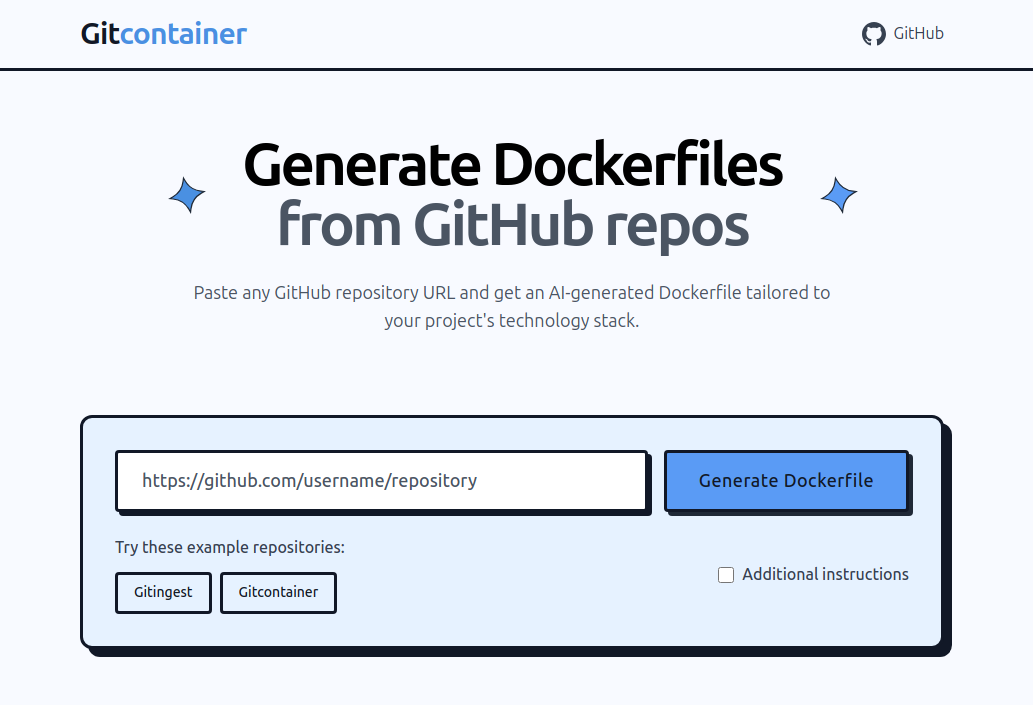
Replace "github" with "gitcontainer" in URLs to generate a dockerfile.
Repo coderamp-labs/gitcontainer, read from GitHub 8 min ago. coderamp-labs has not joined Take My Repo.
coderamp-labs/gitcontainer is a public repo on GitHub by coderamp-labs. Replace "github" with "gitcontainer" in URLs to generate a dockerfile. It declares the MIT license on GitHub. It is written mainly in Jinja, has 134 stars and last changed on 2025-08-06. Nobody has reviewed it on Take My Repo yet, which says nothing about its quality. Read from GitHub on 2026-11-22.
Turn any GitHub repository into a production-ready Docker container with AI-powered Dockerfile generation.
Gitcontainer is an AI-powered web application that automatically generates production-ready Dockerfiles by analyzing GitHub repositories. Simply paste a GitHub URL and get a tailored Dockerfile with intelligent base image selection, dependency management, and Docker best practices.
Simply replace github.com with gitcontainer.com in any GitHub repository URL to instantly access the Dockerfile generation page for that repository.
For example:
https://github.com/username/repo → https://gitcontainer.com/username/repo
Clone the repository:
git clone https://github.com/cyclotruc/gitcontainer.git
cd gitcontainer
Install dependencies:
pip install -r requirements.txt
Set up environment variables:
# Create .env file
echo "OPENAI_API_KEY=your_openai_api_key_here" > .env
Run the application:
python app.py
Open your browser:
Navigate to http://localhost:8000
cyclotruc-gitcontainer/
├── app.py                 # Main FastAPI application
├── requirements.txt       # Python dependencies
├── .env                  # Environment variables (create this)
├── static/               # Static assets (icons, CSS)
├── templates/
│   └── index.jinja       # Main HTML template
└── tools/                # Core functionality modules
    ├── __init__.py
    ├── create_container.py  # AI Dockerfile generation
    ├── git_operations.py    # GitHub repository cloning
    └── gitingest.py        # Repository analysis
| Variable | Description | Required |
|---|---|---|
OPENAI_API_KEY |
Your OpenAI API key | Yes |
PORT |
Server port (default: 8000) | No |
HOST |
Server host (default: 0.0.0.0) | No |
You can use the tools programmatically:
from tools import clone_repo_tool, gitingest_tool, create_container_tool
import asyncio

async def generate_dockerfile(github_url):
    # Clone repository
    clone_result = await clone_repo_tool(github_url)

    # Analyze with gitingest
    analysis = await gitingest_tool(clone_result['local_path'])

    # Generate Dockerfile
    dockerfile = await create_container_tool(
        gitingest_summary=analysis['summary'],
        gitingest_tree=analysis['tree'],
        gitingest_content=analysis['content']
    )

    return dockerfile

# Usage
result = asyncio.run(generate_dockerfile("https://github.com/user/repo"))
print(result['dockerfile'])
Use the "Additional instructions" feature to customize generation:
"Use Alpine Linux for smaller image size""Include Redis and PostgreSQL""Optimize for production deployment""Add development tools for debugging"This project is licensed under the MIT License - see the LICENSE file for details.
Made with ❤️ by Romain Courtois
Turn any repository into a container in seconds!
coderamp-labs/gitcontainer is a public repo on GitHub by coderamp-labs. Replace "github" with "gitcontainer" in URLs to generate a dockerfile.
It declares the MIT license on GitHub.
Its maker tagged it for macOS, Windows and Linux, or as Docker or cross-platform. That is declared by the maker; Take My Repo has not tested it.
Open "Take it" on its page: Take My Repo writes an install plan for your machine and hands it to your AI agent (Claude Code, Codex or Cursor), which asks you before each step. Take My Repo has not tested it on any machine.
Its last change on GitHub was on 2025-08-06. GitHub counts 6 open issues and pull requests. Take My Repo does not judge from that whether it is maintained.
Nobody has reviewed it on Take My Repo yet, which says nothing about its quality.
Run macOS VM in a Docker! Run near native OSX-KVM in Docker! X11 Forwarding! CI/CD for OS X Security Research! Docker mac Containers.

A list of Free Software network services and web applications which can be hosted on your own servers
Fair-code workflow automation platform with native AI capabilities. Combine visual building with custom code, self-host or cloud, 400+ integrations.
Replace 'hub' with 'ingest' in any GitHub URL to get a prompt-friendly extract of a codebase
✨ A extension can help you open git ingest to turn any git repository into a prompt-friendly text ingest for LLMs.