Usage
Surf to script.google.com, create a script, and copy/paste this into Code.gs:
var app   = new Gexpress.App()
var cache = CacheService.getScriptCache()

cache.put("/hello", JSON.stringify({date: new Date()}) )

app.use(function(req,res,next){
  req.user = {email:Session.getActiveUser().getEmail()}
  next()
})

app.get('/hello',function(req,res,next){
  res.set('content-type','application/json')
  res.send( cache.get('/hello') )
  res.end()
},true)

app.get('/client.js', app.client() )

app.get(/.*/, function(req,res,next){
  res.set('content-type','text/html')
  res.send("<html><body><h1>Hello</h1></body></html>") // see docs for template-usage & banner-removal
  res.end()
})

// this hooks Gexpress into appscript
function doGet(e) { return app.doGet(e)  }
function doPost(e){ return app.doPost(e) }
.put() .post() .delete() and .options() are also supported (see virtual endpoints)
This creates these urls:
click the urls to see live demo output
Include the library
Add 1Lm_jNmD2FWYF-Kgj7AdHVvLEVXZ4c5AXwzd1KJSb48scn0HLBq64um7S to your libraries (Resources > Libraries).
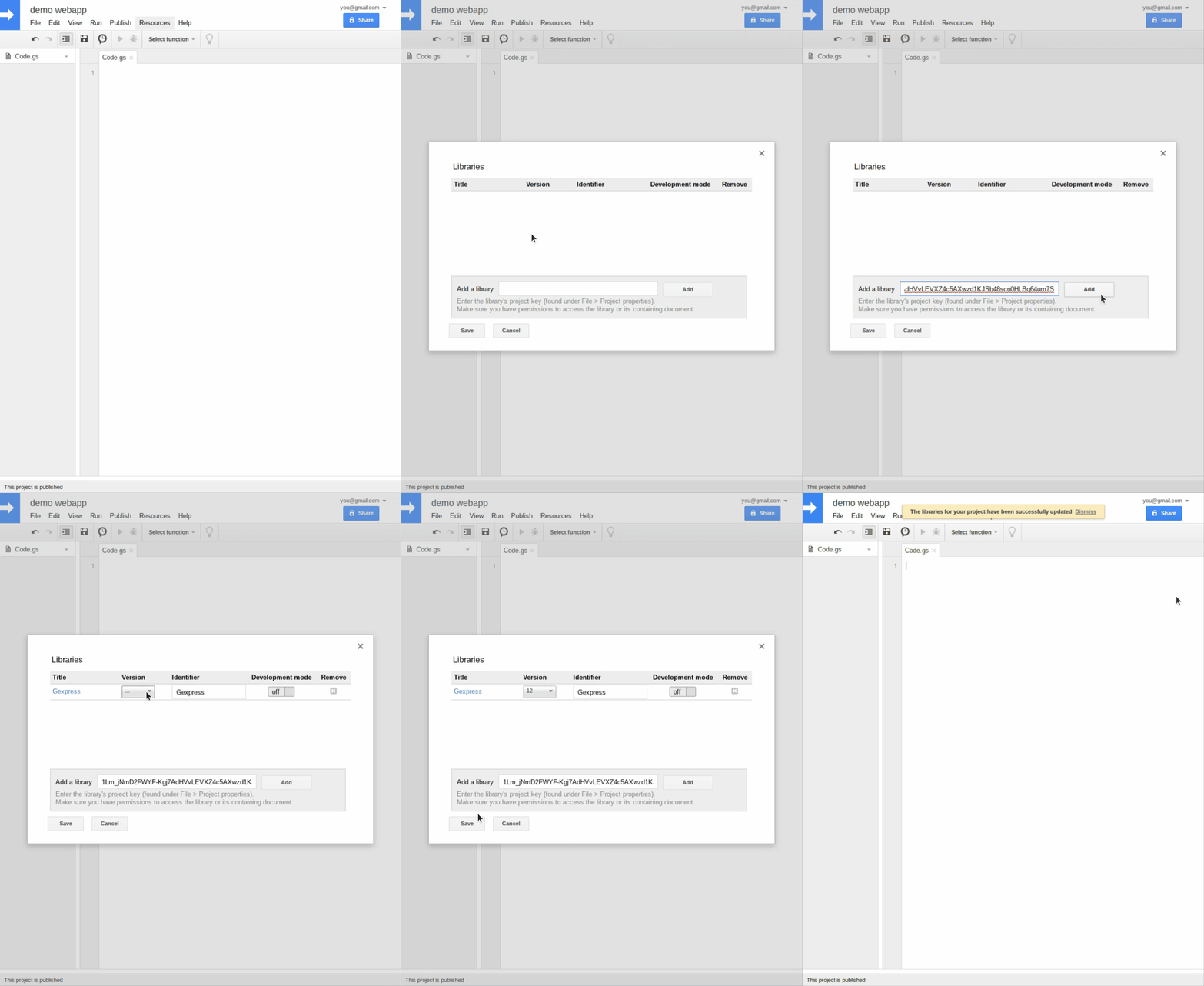
NOTE: please make sure you select the latest version of the library
Debugging
Use BetterLog to easily log into a spreadsheet (because Logger.log does not always work inside doGet() and doPost())
Logger = BetterLog.useSpreadsheet('1gUQI4SUyQbIoNYwUHORgl') // spreadsheet id
Logger.log("hello world")
Permissions and users
Make sure you deploy with these settings:
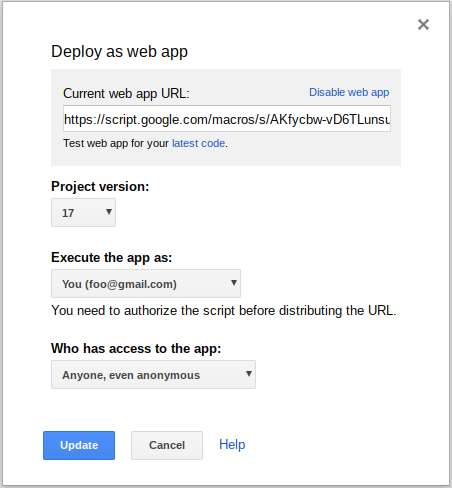
You can add google users to the appscript (share-button), re-deploy, and you're done.
Rules of thumb:
- use the rooturl (
/exec) for anonymous access
- use other urls (
/exec/myadmin e.g.) urls for authenticated access
The latter will automatically trigger login for anonymous users.
See an overview of (non)authenticated urls below.
RESTFUL-ish
Webtraffic to Google Appscript Webapps is limited/secured in many ways.
This is not that bad, given that every appscript gives us:
- free security + free https! =)
Virtual CORS anonymous endpoints
By default, Gexpress exposes endpoints in a slightly different way (compared to express):
| Gexpress method |
Listens to webrequest(s) |
Anonymous webrequest |
CORS |
application/json |
application/javascript |
text/xml |
text/plain |
text/html |
| app.get('/foo',..) |
GET /exec?path=/foo |
✓ |
✓ |
✓ |
✓ |
✓ |
✓ |
⚠ |
|
POST /exec?path=/foo&method=GET |
✓ |
✓ |
✓ |
✓ |
✓ |
✓ |
⚠ |
| app.post('/foo',..) |
POST /exec?path=/foo&method=POSTt |
✓ |
✓ |
✓ |
✓ |
✓ |
✓ |
⚠ |
| app.put('/foo',..) |
POST /exec?path=/foo&method=PUT |
✓ |
✓ |
✓ |
✓ |
✓ |
✓ |
⚠ |
| app.delete('/foo',..) |
POST /exec?path=/foo&method=DELETE |
✓ |
✓ |
✓ |
✓ |
✓ |
✓ |
⚠ |
| app.options('/foo',..) |
POST /exec?path=/foo&method=OPTIONS |
✓ |
✓ |
✓ |
✓ |
✓ |
✓ |
⚠ |
⚠ = will trigger this application was created by another user-banner if not logged in as appscript-owner. See chapter 'Banner 101'
If you really want 100% restful endpoints, see the following section.
Authenticated endpoints
If you only want authenticated (gsuite) users to access your webapp (see settings in Publish > Deploy as webapp), then these are the exposed endpoints:
| Gexpress method |
Listens to webrequest(s) |
Anonymous webrequest |
CORS |
application/json |
application/javascript |
text/xml |
text/plain |
text/html |
| app.get(/.*/,..) |
GET /exec |
✓ |
✓ |
✓ |
✓ |
✓ |
✓ |
⚠ |
| app.get('/foo',..) |
GET /exec/foo |
triggers auth |
|
✓ |
✓ |
✓ |
✓ |
⚠ |
| app.post('/foo',..) |
POST /exec/foo |
triggers auth |
|
✓ |
✓ |
✓ |
✓ |
⚠ |
| app.put('/foo',..) |
POST /exec/foo&method=PUT |
triggers auth |
|
✓ |
✓ |
✓ |
✓ |
⚠ |
| app.delete('/foo',..) |
POST /exec/foo&method=DELETE |
triggers auth |
|
✓ |
✓ |
✓ |
✓ |
⚠ |
| app.options('/foo',..) |
POST /exec/foo&method=OPTIONS |
triggers auth |
|
✓ |
✓ |
✓ |
✓ |
⚠ |
NOTE: disable the virtual endpoints by initializing Gexpress with new Gexpress.App({pathToQuery:false})
Accessing data from requests
| example |
retrieval |
| GET /exec?path=/foo/12 |
req.query.path, req.params.id |
| GET /exec?path=/foo&bar=1 |
req.query.path, req.query.bar |
| POST /exec?path=/foo&bar=1 {...} |
req.query.path, req.query.bar, req.body |
| PUT /exec?path=/foo&method=PUT&bar=1 {...} |
req.query.path, req.query.bar, req.body |
| DELETE /exec?path=/foo&method=DELETE&bar=1 {...} |
req.query.path, req.query.bar, req.body |
use this middleware to log requests (View > Logs)
app.use(function(req,res,next){
  Logger.log( req.method+" "+req.url+" "+(req.route ? "("+req.route+")":"")+" "+JSON.stringify(req.params) )
  next()
})
Regex / Serving files / templating
Appscript has builtin support for templating, here's a simple example.
Serve this index.html-file:
<!DOCTYPE html>
<html>
  <head>
    <base target="_top">
	<title><?= title ?></title>
  </head>
  <body>
    <?!= foo() ?>
  </body>
</html>
With this endpoint:
function foo(id){
  return "Hello world "+id
}

app.get( /.*/, function(req,res,next){ // default to homepage
  Logger.log("defaulting to homepage")
  var html = HtmlService.createTemplateFromFile('index') // this will get the index.html-file from your appscript project
  html.title = 'Hello'
  res.set('content-type','text/html')
  res.send( html.evaluate().setXFrameOptionsMode(HtmlService.XFrameOptionsMode.ALLOWALL).getContent() )
  res.end()
})
Retrieving url arguments
| route |
url request |
req.url value |
req.route value |
retrieve data |
note |
| app.get('/foo') |
GET /foo?bar=1 |
/foo |
/foo |
req.query.bar |
|
| app.get('/foo') |
GET /foo/123 |
/foo |
/foo/:id |
req.params.id |
:id is automatically detected |
| app.get('/foo/:foo') |
GET /foo/123 |
/foo |
/foo/:foo |
req.params.foo |
|
Generate Browser JS client
Gexpress can automatically generate a client (see app.client() above), which you can decorate further:
app.put('/foo', function(req,res,next){   .... }, true)      // note: true includes endpoint into client.js

app.get('/client.js', app.client( function(code){
  return ' ' + code + ' '
})
Now insert <script src="https://script.google.com/{SCRIPTID}/exec?path=/client.js"></script> in your html`
The generated client will allow you to do this:
  gclient.get('/foo'}).then( alert ).catch( alert)
  gclient.get('/foo/123'}).then( alert ).catch( alert)
  gclient.post('/foo',{bar:1}).then( alert ).catch( alert)
  gclient.put('/foo/123',{bar:2}).then( alert ).catch( alert)
  gclient.delete('/foo/123').then( alert ).catch( alert)
Just look at the client-source and you'll see some examples.
NOTE: Always make sure you create a new deployment before testing changes. Development-urls (ending with /dev) do not allow POST requests (post(),put(),delete() in our case). This is an appscript limitation.
Hence the client will always use the /exec-url production url.
Generate Node.js client
Install node-tech, and download the client.js-contents of above locally (the script-tag src-url), and save it into file client.js.
$ npm install node-fetch --save
$ curl -L 'https://script.google.com/{SCRIPTID}/exec?path=/client.js' > client.js
Then create a file called mynodescript.js:
    var gclient = require('./client.js')(require('node-fetch'))
    gclient.get('/foo')
    .then(  console.dir )
    .catch( console.dir )

    /* outputs:
     *
     * { limit: '3',
     *   offset: '0',
     *   order: 'date_modify DESC',
     *   nitems: 3,
     *   items:
     *    [ { '#': '1',
     *        name_first: '...',
     *        name_last: '...',
     *      },
     *      { '#': '45',
     *      ....
     */
Voila!
Middleware
Banner 101
In order to get rid of the (not made by google) banner, you can do 2 things:
- create a google site and include the script
- include the script as an iframe on another domain (host on gitlab/github/bitbucket page e.g.)